
Webflow in 2025 What Changed for Designers and Teams
Why do some websites built in 2025 outperform others, even when using the same tools like WordPress or Webflow? The difference often lies in how teams leverage modern platforms to optimize performance, ensure SEO readiness, and deliver a seamless user experience. For designers and teams, Webflow in 2025 is no longer just a visual builder it’s a full-fledged environment that combines no-code flexibility with production-ready capabilities. Real-time collaboration, built-in animations, clean code, and a responsive layout framework allow you to maintain creative control while scaling efficiently.
In 2025, Webflow transformed for designers and teams by combining no-code flexibility with production-ready features. Real-time collaboration, built-in animations, responsive layouts, and clean code streamline workflows, while AI assistants, Figma integration, and scalable Webflow CMS enable faster, SEO-optimized websites with full creative control.
Professional development and thoughtful maintenance have become crucial. A well-planned Webflow CMS structure or optimized landing pages can mean the difference between a slow, clunky site and a high-converting digital asset. Even basic support packages now often start around a few hundred dollars monthly, reflecting the true value of design, optimization, and ongoing updates.
This blog will explore what changed in Webflow for designers and teams in 2025, including workflow improvements, AI assistant integration, advanced SEO strategies, Figma-to-Webflow design translation, and tips to maximize creative control while keeping your projects production-ready.
Next-Gen CMS and Built-In Analytics Optimize Webflow
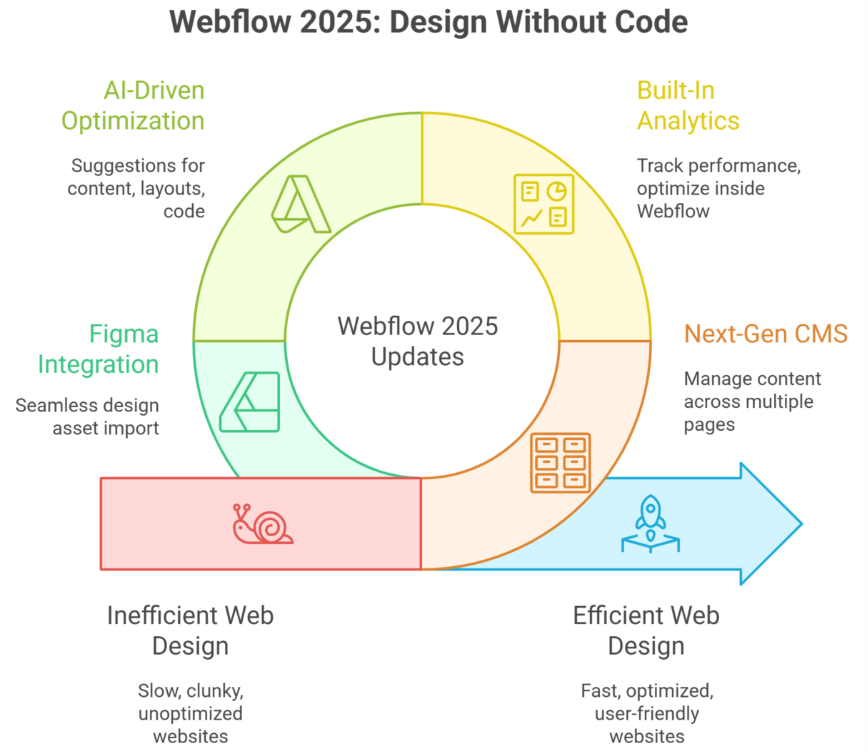
Webflow’s 2025 updates have redefined how designers and developers manage dynamic content and analyze performance. By combining a next-gen CMS with built-in analytics, teams can now build, optimize, and personalize websites without coding, while maintaining full design freedom and efficiency.
Streamlined CMS for Scalable Webflow Sites
Webflow’s CMS now allows marketing teams and developers to manage multiple CMS items effortlessly. From blogs to product pages, each CMS content block can be structured with a consistent design system, ensuring responsive websites that maintain visual consistency. Integrations like Figma to Webflow translation make importing design assets seamless, enabling designers to move from prototype to live site without losing fidelity.
Managing Multiple CMS Items Efficiently
Managing multiple CMS items is simplified with Webflow Canvas, where designers can see real-time previews of each item in context. This approach reduces errors, improves content workflows, and ensures every piece of content aligns with the site’s overall layout and brand standards.
Built-In Analytics for Data-Driven Decisions
With Webflow Analyze, teams can track core metrics like Core Web Vitals, user behavior, and SEO performance directly within the site builder. This enables marketing teams to make informed decisions, personalize content, and continuously optimize Webflow sites for higher conversions. Unlike relying on external analytics tools, built-in reporting saves time and ensures data accuracy.
Leveraging AI Tools for Performance
Webflow’s AI tools can now suggest optimizations for CMS content, responsive layouts, and even custom code snippets. These enhancements help teams reduce manual work while maintaining design freedom and keeping sites production-ready.
What’s New in Webflow 2025
The Webflow Conf 2025 highlighted several new features, including:
- Advanced features for personalization and user segmentation
- Enhanced design freedom for designers and developers
- Seamless integration of webflow university tutorials for rapid learning
- New tools for optimizing multi-page responsive websites
Pros and Cons of Webflow CMS
Pros:
- Complete design freedom
- Scalable CMS with personalization options
- Real-time analytics through Webflow Analyze
- Efficient Figma to Webflow workflows
Cons of Webflow:
- Some advanced features may require familiarity with custom code
- Managing multiple webflow accounts can be complex for larger teams
- Slight learning curve for non-technical marketing teams
Webflow in 2025: Key Features for Designers’ Success
- Next-Gen CMS enables seamless management of content and design across multiple pages.
- Built-in CMS supports dynamic content like blogs, portfolios, and e-commerce items.
- Built-in analytics allows designers to track performance and optimize websites inside Webflow without third-party tools.
- Reduced back-and-forth between designers and developers for faster project delivery.
- Websites without writing code can be created using the visual website builder and visual web development platform.
- CSS Grid and enhanced layout options enable precise, responsive, and scalable designs.
- Custom Webflow components allow tailored solutions for enterprise and client-specific projects.
- Additional features like animations, interactive elements, and AI-driven suggestions improve engagement and workflow efficiency.
- Efficient handling of multiple projects simultaneously for agency and enterprise teams.
- Content and design remain fully integrated, ensuring design consistency across next-gen CMS structures.
- 2025 updates bring enhanced key features for creative freedom, scalability, and production-ready websites.
Conclusion
Webflow in 2025 has evolved from a simple visual website builder into a robust visual web development platform that empowers designers and teams to create responsive websites efficiently. With next-gen CMS, built-in analytics, AI-driven optimization, and seamless Figma to Webflow workflows, teams can manage multiple projects, maintain creative control, and ensure high-performing, SEO-optimized websites without writing code. Features like CSS Grid, interactive components, and real-time previews streamline collaboration, reduce the back-and-forth between designers and developers, and enable scalable, production-ready solutions. Whether for enterprise teams or marketing-driven projects, Webflow’s 2025 updates provide the tools needed to deliver exceptional web experiences.
Now, here’s a practical question for users to explore:
How would you structure a multi-page Webflow site using next-gen CMS and built-in analytics to optimize both user experience and SEO performance across multiple projects?
Frequently Asked Questions (Webflow in 2025 What Changed for Designers and Teams )
Should I learn Webflow in 2025?
Yes, learning Webflow in 2025 is a smart move for designers and agencies. It enables faster development, clean production-ready code, strong SEO control, and real-time collaboration. Webflow is especially valuable for building high-performance marketing websites without heavy reliance on developers.
What is the web design trend in 2025?
In 2025, web design trends include immersive 3D and AR elements, micro-interactions and motion UI, AI-assisted design and personalization, minimalist yet dynamic layouts, dark mode options, voice-activated interfaces, and accessibility-first, performance-focused sites that load fast and engage users deeply.
What is the future of Webflow?
The future of Webflow in 2025 is strong, as it evolves into a full no-code production platform. With AI-assisted design, enhanced CMS capabilities, faster performance, real-time collaboration, and seamless integration with marketing and eCommerce tools, Webflow empowers designers and teams to build scalable, high-quality websites efficiently.
Is web design still in demand in 2025?
Yes, web design is still in high demand in 2025. Businesses, eCommerce, and digital platforms need engaging, fast, and accessible websites. Demand is driven by AI-enhanced experiences, mobile-first design, SEO optimization, and interactive interfaces, making skilled web designers essential for modern digital growth.
Leave a Reply