What needs To Change In Your wordpress Website Before 2026
Why do some WordPress websites struggle with performance while others drive traffic and conversions effortlessly? The answer often lies in a combination of technical structure, design choices, and ongoing maintenance practices. As 2026 approaches, factors influencing website performance such as page speed, responsive design, plugin management, and SEO optimization are more critical than ever for your brand’s digital presence.
Before 2026, your WordPress website must prioritize SEO optimization, responsive design, fast WordPress performance, and updated plugins. Focus on user experience, maintain core web vitals, manage cache effectively, and follow best practices in WordPress development to ensure your site stays competitive, secure, and future-ready.
Investing in professional WordPress development ensures your site is not only visually appealing but also functionally robust. A well-maintained WordPress site improves user experience strengthens SEO and supports scalable growth. Regular updates thoughtful plugin selection and performance-focused cache strategies protect your investment while reducing long-term technical debt. In practice businesses often allocate $1,500–$4,000 for professional development and ongoing maintenance to avoid costly fixes later.
This blog will explore key areas that require change in your WordPress website before 2026 including optimization for SEO improving user experience ensuring responsive design, managing plugins effectively and maintaining core web vitals. By addressing these areas you can future-proof your WordPress website maximize performance and stay ahead of evolving web standards.
Optimize WordPress website performance and SEO before 2026
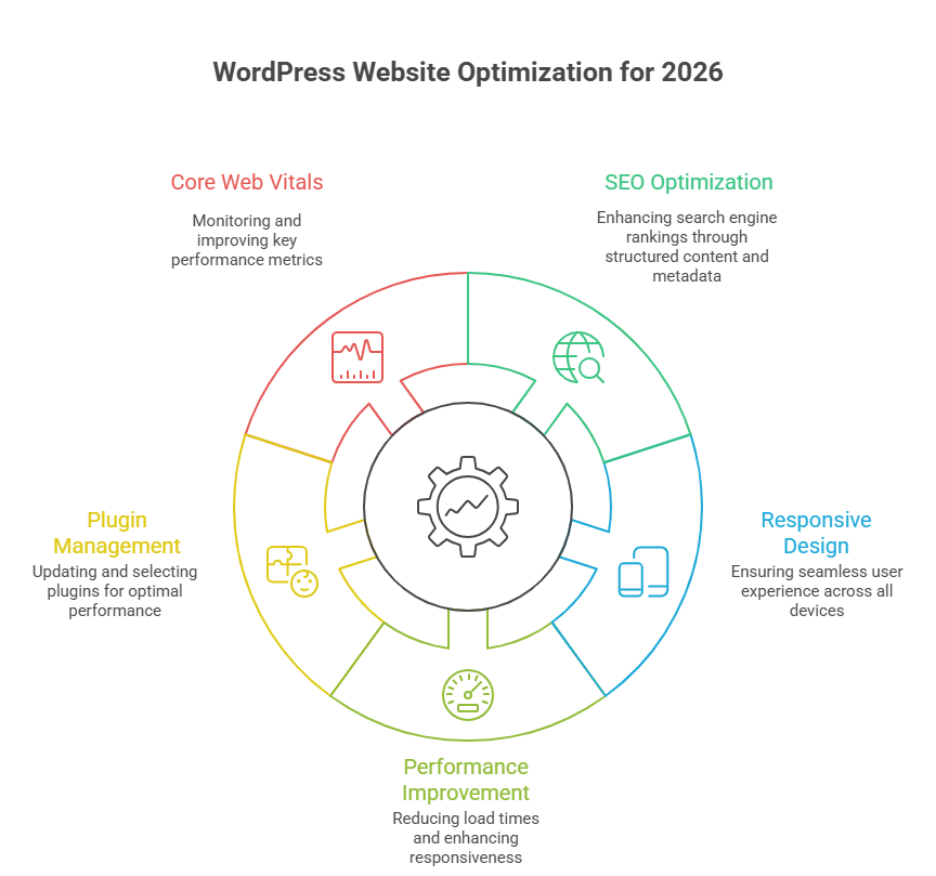
Ensuring your WordPress website is fast, secure, and SEO-friendly is essential for businesses in 2026. Performance directly impacts user experience search engine rankings, and conversion rates. Proper optimization combines technical improvements, design considerations, and ongoing website maintenance.
Speed and Performance Optimization
Improve Load Times and Responsiveness
Load times and responsiveness are critical for both desktop and mobile devices. Adopting mobile-first design optimizing images, leveraging Cloudflare and enabling browser caching can dramatically improve website performance. Choosing managed WordPress hosting or reliable WordPress hosting ensures server-side speed and uptime.
Optimize PHP, Themes, and Plugins
Using lightweight WordPress themes and limiting unnecessary WordPress plugins reduces server load. Regularly updating PHP the latest WordPress, and plugin versions prevents security risks while improving site performance. Implementing performance optimization best practices enhances both search engine optimization and user satisfaction.
SEO and Search Engine Optimization
Structure Content and Metadata
Organizing your site with clear categories and tags, proper headings and structured metadata improves search engine rankings. Optimized content and a well-maintained block editor workflow ensure that every WordPress site can compete for organic traffic in 2026.
Monitor Core Web Vitals
Metrics like Largest Contentful Paint (LCP) interactivity, and stability affect both SEO and user experience. Regularly auditing your WordPress development and following best practices ensures your site meets Google’s performance standards and ranks higher.
Ongoing Maintenance and Security
Consistent website maintenance updates to plugins for WordPress and implementing free SSL certificates protect your site from hackers and maintain optimal performance. Partnering with a professional development agency or experienced WordPress development team ensures your custom WordPress site remains competitive and secure.
Improve user experience with responsive WordPress development
A responsive WordPress development approach ensures your site adapts seamlessly to all devices, improves engagement and strengthens SEO. A site that performs well for users and search engines builds trust increases conversions, and supports long-term growth. Below is a structured value-driven guide to improving user experience on your WordPress site.
Core Strategies for Responsive Design
- Mobile-first approach: Design layouts starting with mobile devices to ensure accessibility and readability on smaller screens.
- Flexible grids and media: Use flexible grids fluid images, and scalable typography for consistency across devices.
- CSS and JavaScript optimization: Minify and defer scripts to reduce page load times and improve performance.
- Use lightweight themes: Choosing a well-coded WordPress theme reduces server load and improves overall responsiveness.
Performance and Optimization Tools
- Caching solutions: Tools like WP Rocket enhance speed and reduce server strain.
- Staging site testing: Test changes on a staging site before going live to avoid user experience disruptions.
- Free SSL certificates: Ensure secure browsing with free SSL improving trust and search rankings.
- Regular audits: Continuously identify and fix broken links slow-loading pages or plugin conflicts.
Best Practices for Users and SEO
- Accessible navigation: Ensure menus and buttons are easily tappable on mobile devices.
- Readable content structure: Use headings bullet points and whitespace to make content digestible.
- Frequently updated content: Answer frequently asked questions and provide useful resources.
- Monitor performance metrics: Track Core Web Vitals and page speed to maintain optimal user experience.
Conclusion
Preparing your WordPress website for 2026 is about more than aesthetics it’s about performance, SEO and a seamless user experience across all devices. By optimizing load times, maintaining core web vitals, updating plugins, and following best practices in WordPress development, you ensure your site remains competitive, secure, and future-ready. Implementing responsive design, leveraging WP Rocket or other caching solutions, and conducting regular audits on a staging site strengthens both search engine rankings and customer trust. A well-maintained site with free SSL and optimized CSS and JavaScript reduces server load while enhancing engagement and conversion rates.
Adapting these strategies transforms your WordPress site into a scalable, efficient, and user-friendly platform, ready to meet the demands of businesses in 2026.
So here’s a tricky question for you are you ready to stay ahead of competitors and boost your WordPress performance? Maybe it’s time to contact Integriti Studio and see how expert guidance can future-proof your website.
Frequently Asked Questions (What needs To Change In Your wordpress Website Before 2026)
How do you make changes to your WordPress website?
You make changes to a WordPress website by logging into the admin dashboard, editing pages or posts with the block editor, updating themes or plugins, and adjusting settings. For design or functionality updates, you can use themes, plugins, or custom code safely via a staging environment.
How to build a WordPress website in 2026?
In 2026, build a WordPress website by choosing fast managed hosting, installing WordPress, using a lightweight block-based theme, and creating pages with the Gutenberg editor. Focus on performance, SEO, accessibility, and security by using essential plugins, clean design, and regular updates.
Do people still use WordPress in 2026?
Yes people still use WordPress in 2026. It powers around 43% of all websites worldwide and dominates the CMS market with over 60% share, so it remains very popular for blogs, business sites, and e-commerce.
What to do before updating WordPress?
Before updating WordPress, back up your website files and database, check plugin and theme compatibility, and review the update details. Test updates on a staging site if possible, disable caching temporarily, and ensure you can roll back easily in case of errors or conflicts.
Leave a Reply