
Evaluating Your Wordpress Website’s Readiness For The Next Phase
Why do some businesses outgrow their WordPress site while others struggle to scale despite steady traffic and content? The difference often lies in how prepared your wordpress site truly is for its next phase of growth. Factors such as architecture, plugins, code quality, hosting provider, and long-term maintenance directly influence speed and performance, stability, and user trust.
Evaluating your WordPress website’s readiness means assessing performance, structure, scalability, and maintenance quality. It helps identify limitations that affect growth, user experience, and conversions, ensuring your site can support future business goals through better development, optimization, and long-term technical planning.
When professional development is overlooked, even a well-designed wordpress website can face slow page load, inconsistent behavior on mobile and desktop, and declining user experience. Agencies frequently see cases where a business spends a few hundred dollars on a wordpress theme, then thousands later trying to fix deeper issues that could have been avoided with proper planning, testing, and optimization from the start.
How to test your WordPress site speed effectively today
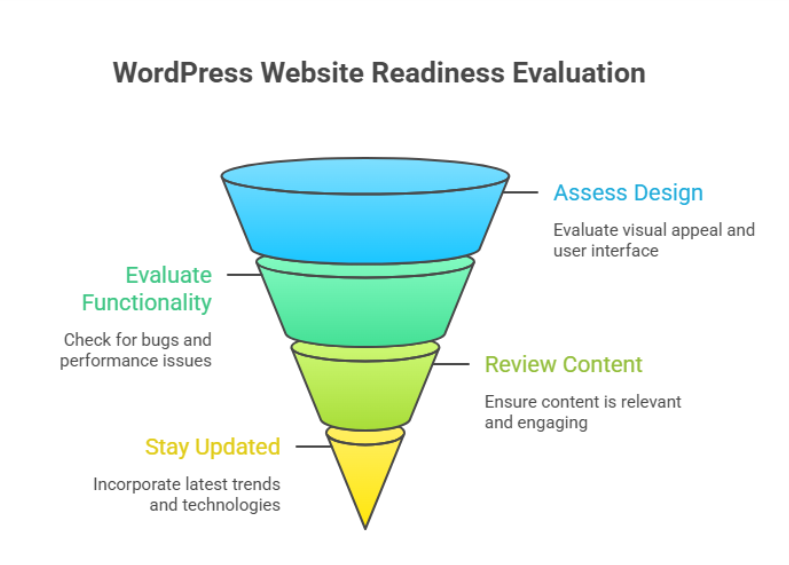
Testing site speed is not a one-time task. It is a structured process that helps you understand how your website performs under real-world conditions and what actions are required to fix speed and performance issues before they impact growth.
Step 1: Prepare your website for accurate testing
Before testing your wordpress, make sure no major changes or updates are running in the background. Pause heavy imports, complete updating WordPress if pending, and confirm your wordpress hosting environment is stable. This ensures your results reflect the real performance of your site speed, not temporary activity.
Step 2: Choose the right performance testing tools
Use reliable tools designed forWordPress environments to test your wordpress site. These tools simulate real visitors and measure page speed, load behavior, and interaction delays. A proper website speed test provides a clear performance score and highlights how quickly key elements respond on different devices.
What these tools measure
- Page speed and visual stability
- Interaction to next paint for responsiveness
- Core web vital indicators that affect rankings and usability
Step 3: Analyze results with a strategic mindset
Do not focus only on raw numbers. Look at how site speed affects user journeys, conversion paths, and engagement. Understanding the performance score helps agencies identify whether issues stem from the website builder, theme structure, or development decisions made during wordpress development.
Step 4: Retest after improvements
After applying changes, always re-run tests. Testing your site repeatedly ensures improvements are measurable and sustainable. This step confirms that your actions genuinely enhance page speed and support long-term optimizing your website rather than creating short-term gains.
Fix speed and performance issues for long term success
Long-term performance improvements require a strategic mindset rather than reactive fixes. Slow websites often emerge when growth outpaces structure, leaving the speed of your website affected by hidden technical debt. For any online business, consistent load speed and reliability are essential to maintain trust, engagement, and conversions.
Protecting stability before optimization
Before making changes, backing up your site is a critical safeguard. Using a trusted backup plugin ensures you retain full control of your website while implementing improvements. This safety net allows updates, adjustments, or even a wordpress update to be rolled out without risking data or functionality for the wordpress user.
Understanding what truly impacts performance
Performance issues are rarely caused by a single factor. The elements on your website, including media files, scripts, and third-party features, directly influence wordpress speed. Poor image optimization, excessive parts of your site loading at once, or a poorly chosen new plugin can make a site significantly slow. Testing the performance with a free tool or professional tools to test helps assess total blocking time, load responsiveness, and how fast your site loads under real conditions.
Building sustainable performance improvements
Fixes should focus on reducing complexity and improving efficiency, not shortcuts. Smart optimization ensures the site is performing well even as content grows. WordPress offers flexibility, and the wordpress community provides guidance and tools, but success depends on applying them thoughtfully creating a website without unnecessary overhead that scales smoothly over time.
Conclusion
Evaluating your WordPress website’s readiness for the next phase is not just a technical exercise it is a business decision. Performance, structure, scalability, and maintenance all play a direct role in how well your site supports growth, user trust, and long-term conversions. From testing site speed correctly to addressing deeper performance bottlenecks, every improvement contributes to a more stable and future-ready foundation.
Businesses that take a proactive approach avoid the costly cycle of temporary fixes and reactive troubleshooting. Instead, they build a site that evolves with their goals, handles increasing demands, and delivers consistent experiences across devices. When performance is treated as an ongoing strategy rather than a one-time task, your WordPress site becomes an asset not a limitation.
Is your current setup strong enough to support what comes next, or is it time to talk to Integriti Studio?
Frequently Asked Questions (Evaluating Your Wordpress Website’s Readiness For The Next Phase )
How to check the performance of a WordPress website?
To check a WordPress website’s performance, use tools like Google PageSpeed Insights, GTmetrix, or Lighthouse. Analyze loading speed, Core Web Vitals, mobile usability, and server response time. Regular testing helps identify issues and improve user experience and SEO.
How to set a WordPress website to coming soon?
To set a WordPress website to “Coming Soon,” install a plugin like SeedProd or Coming Soon Page. Activate the mode, customize the message and design, and publish it. This hides the live site from visitors while allowing admins to work in the background.
How to build a WordPress website in 2026?
To build a WordPress website in 2026, choose fast hosting, install WordPress, and use a lightweight theme. Customize with block editor or page builders, add essential plugins for SEO, security, and performance, and optimize for mobile, accessibility, and Core Web Vitals before launch.
What steps would you take to update or maintain a WordPress website?
To update and maintain a WordPress website, regularly update WordPress core, themes, and plugins. Backup the site, check for broken links, optimize database and images, monitor security, and test performance. Ensure content stays current, review SEO, and fix any issues to keep the site fast and secure.
Leave a Reply