Choosing between Webflow and WordPress depends on your business needs, technical skill level, and customization requirements. Both platforms are powerful, but they serve different types of users and project scopes. This comparison outlines key differences to help you choose the best platform for your website, whether you want a Webflow site, WordPress site, or even plan to migrate from WordPress to Webflow.
Design & customization
Webflow
Visual, drag-and-drop builder and visual web design platform—ideal for designers
Pixel-perfect layouts with advanced animations and CSS control No need for third-party themes, plugins, or coding
Webflow provides a platform that allows designers to build a website with precision
WordPress
Template and theme-based system, WordPress is a good choice for content-heavy sites
Requires plugins like Elementor or custom code for advanced design
Great flexibility, but WordPress could require a developer WordPress plugins, WordPress themes, and coding give more functionality for complex workflows
Ease of use & scalability
Webflow
Best suited for marketing websites, landing pages, Webflow CMS, and visual-heavy sites
Learning curve for non-designers, but intuitive once familiar
Limited plugin ecosystem—what you build is what you use
Webflow also offers a seamless web development experience and built-in SEO settings
WordPress
Strong for content-heavy sites, blogs, and ecommerce
More flexible in scaling via plugins, integrations, and WordPress CMS capabilities
Can become complex with plugin bloat, maintenance, and updates
WordPress is an open-source platform with a self-hosted option for more control
Maintenance & hosting
Webflow
Hosting provider, security, and updates are all handled in-platform
No plugin updates or security patches required
Webflow streamlines hosting and workflow, and Webflow automatically manages backend tasks
WordPress
Requires manual updates for plugins, WordPress software, and themes
Hosting and security depend on your provider More freedom, but more responsibility
WordPress integrates with multiple plugins and requires management through the WordPress dashboard
Final outcome
If you want full design control with minimal maintenance, Webflow is ideal. If you need deep customization, rich content management, or complex integrations, WordPress may be the better fit. Webflow also offers a visual web design platform, while WordPress provides extensive functionality through plugins and coding.
Still undecided? Integriti Studio helps businesses choose and build on the right platform—whether that’s the design flexibility of Webflow or the power of WordPress. Compare Webflow and WordPress carefully to match your business workflow, website builder needs, and long-term strategy.
Shopify Payments is the Shopify platform’s built-in payment gateway and integrated payment solution, allowing every Shopify merchant to accept payments directly through their online store. It supports credit cards, major credit cards, credit and debit cards, Apple Pay, Google Pay, Shop Pay, and other alternative payment methods without relying on third-party payment providers. Setting up Shopify Payments is simple and crucial for simplifying the payment process, reducing transaction fees, and creating an efficient payment experience.
Why use Shopify Payments
No third-party fees or need for third-party payment processors like PayPal or Stripe
Simplified and efficient payment process within Shopify
Supports accelerated and multiple payment options
Integrated reporting, payout tracking, and manage payments dashboard in Shopify admin
Setup instructions
Go to the Payments section in Shopify Admin Log in to your Shopify account, open the Shopify admin dashboard, and navigate to Settings > Payments. From this payments section of your Shopify admin, click on Activate Shopify Payments if it isn’t already enabled to begin the payment setup process.
Enter your business details Provide your legal business name, business address, and tax information in the payment settings. Individual sellers and Shopify Plus merchants may also need to submit personal details and bank account information as required by Shopify Payments supports guidelines.
Choose your bank account for payouts Add and verify the bank account where you want to receive payout transfers. Make sure the bank account supports your selling currency to ensure an efficient payment process and timely payouts.
Set up payment methods Shopify Payments offers various payment methods by default, including Visa, Mastercard, American Express, and other cards and other payment methods. You can also enable Apple Pay, Google Pay, Shop Pay, and choose which payment methods you want to accept payments directly through your store.
Configure payout schedule Select a daily, weekly, or monthly payout schedule based on your cash flow needs. This step helps Shopify merchants better manage payments and track payouts within Shopify.
Enable fraud protection (optional) Shopify provides built-in fraud prevention tools such as CVV and AVS checks. Enabling these features enhances your payment processing strategy by reducing chargebacks and suspicious activity.
Final outcome
Once you finish setting up payments on Shopify, Shopify Payments integrates seamlessly with your Shopify store, eliminating the need for third-party payment gateways. It simplifies the payment process, reduces transaction fees, and provides a built-in payment processing solution designed to grow with your business.
Need help launching your store’s payment system? Let Integriti Studio guide you through the process of setting up Shopify Payments effectively and configuring your payment settings for long-term success.
Optimizing product pages for search engines is essential for driving organic traffic and increasing conversion rate in ecommerce. On Shopify, SEO and search engine optimization best practices can be applied without extensive coding—making it easy for every store owner to optimize product pages, improve ranking, and fine-tune each product page for better visibility on Google search and other search engines.
Why product page SEO matters
A well-optimized product page SEO strategy helps your Shopify store and online store:
Appear in relevant Google searches and search engine results pages
Attract high-intent traffic, potential customers, and visitors ready to buy
Improve click-through rates with compelling meta titles, meta description, and titles and descriptions
Gain visibility, higher ranking, and stronger search engine rankings over competitors with similar ecommerce product pages
Key SEO elements to focus on
Product titles and URLs Use clear, keyword-rich product title, product name, and SEO-friendly page URLs. Avoid auto-generated links like /product-123; instead, use clean URLs like /leather-tote-bag to help search engines understand your product pages for SEO and optimize a product page effectively.
Meta titles and descriptions In the Shopify admin under “Search engine listing preview,” write optimized meta titles and meta descriptions that naturally include your target keyword and search term. This on-page SEO practice helps improve organic search visibility, click-through rate, and overall store’s SEO.
Image optimization Use high-quality product images, name image files descriptively, and add alt text that describes the product features and product benefits. This helps search engines, improves accessibility, supports page speed, and strengthens product page optimization.
Structured product data Shopify automatically adds product schema and structured data, helping search engines display rich results such as price, availability, product variants, and product reviews. This technical SEO element helps optimized product pages rank better and drive traffic to your website.
Final outcome
With SEO-optimized product pages, every Shopify product page becomes more searchable, user-friendly, and conversion-ready. Consistent optimization across every product page, product descriptions, and ecommerce site pages compounds over time, improving overall SEO, traffic to your store, and long-term sales growth.
Need help fine-tuning your product SEO? Let Integriti Studio help optimize your Shopify store with a proven SEO strategy for ecommerce SEO and on-page SEO success.
Webflow’s CMS (Content Management System) lets you design dynamic content and dynamic pages powered by structured CMS data. Whether you’re building a blog post layout, portfolio, team member pages, or product catalog, the key to scalability lies in how you structure a CMS collection in Webflow and organize your CMS collections visually.
Why CMS structure matters
Keeps your CMS content scalable, easy to update, edit, delete, and manageable in one collection
Enables dynamic page generation through collection pages, collection page templates, and template pages with consistent layout and design
Makes filtering, sorting, SEO, URL structure, schema, and collection list setup easier
Define the purpose of the collection Before you create a collection or add a collection in Webflow, ask what type of content it will hold. Examples include blog posts, individual blog entries, team member profiles, services, case studies, or other content called a collection in Webflow’s CMS. One collection should serve one clear purpose.
Plan your fields carefully Each collection item and CMS entry should include only essential and reusable collection fields. Webflow allows you to add field types such as custom fields, required fields, and optional fields, including:
Plain Text / Rich Text fields (for content, description, and body text)
Images / Videos (for visuals, icons, and media reflected on the site)
Switch field (for toggles like Featured, Static, or Show on homepage)
Reference field (to connect one collection to another, link related articles, categories, authors, or grouping logic)
Use naming conventions Keep the collection name plural and field names clear. For example, name a collection “Blog Posts,” and include fields like Post Title, Summary, Author, Category, Main Image, URL slug, SEO title, and meta description. This best practice helps developers, designers, and content editors manage CMS collection pages efficiently.
Optimize for SEO and dynamic design Include fields for SEO, URLs, meta descriptions, Open Graph images, and structured data so content is automatically mapped on the collection template and template page. Webflow automatically generates a collection page template that updates dynamically when you publish changes.
Final outcome
A well-structured CMS collection in Webflow gives you design freedom while automating dynamic content, layout logic, and CMS collection pages. It becomes the backbone of a scalable, developer-friendly, and client-friendly Webflow site that supports future customization, filtering, and updates.
Need help organizing your Webflow CMS for growth? Let Integriti Studio help you create one clean structure, customize collections, and connect dynamic content the Webflow way—so future edits stay easy and layouts stay flawless.
In 2025, Shopify store owners and Shopify merchants have access to an ever-growing Shopify app store filled with many apps designed to improve performance marketing, drive conversion rates, and streamline automation. Choosing the right apps to grow your online store can elevate customer experience, increase sales in 2025, automate key processes, and scale a successful Shopify store with ease.
What performance really means in Shopify
Boosting performance isn’t just about site speed or SEO—it’s about improving efficiency, customer journey, shopping experience, and backend workflows. The right apps like Klaviyo and Reconvert can help you:
Increase customer engagement, customer retention, repeat purchases, abandoned cart recovery, and loyalty program participation
Simplify checkout, order fulfillment, dropshipping, shipping, live chat support, and streamline operations
Maximize average order value (AOV), boost conversion, boost sales, and boosting average order value
Top-performing apps to consider, top apps, best apps
Klaviyo – Advanced Email & SMS Marketing Klaviyo remains a powerful Shopify app in 2025 for email marketing, SMS, and email and SMS marketing automation. From marketing emails and cart reminders to personalized marketing, product recommendations, and personalized product offers, it helps Shopify brands increase revenue, boost conversion rates, and retention marketing. Free trial options make it easy for Shopify Plus and growing brands.
Reconvert – Post-Purchase Upsells Turn your thank-you page and post-purchase checkout into a high-converting sales driver. Reconvert helps increase sales by letting customers buy more products through upsell offers, discount strategies, and boosting average order value (AOV).
Judge.me – Review Collection Collect product reviews, including photo and video reviews, user-generated content, and customer satisfaction feedback. Display reviews across your Shopify store to build trust, improve conversion, and support a better customer experience.
PageFly – Custom Landing Pages Design high-converting, mobile-optimized landing pages, store design layouts, and product pages without touching code. Perfect for affiliate marketing campaigns, sponsored apps promotions, and apps offer flexibility tailored to your brand.
ShipStation – Smarter Shipping Management Automate shipping, label printing, fulfillment, and backend workflows with this powerful Shopify app. Track packages, compare carrier rates, and streamline operations for a smoother shopping experience and successful Shopify growth.
Final outcome
By integrating a few strategic app choices from the Shopify app store, your Shopify store with apps can run faster, boost sales, improve conversion rates, and deliver a stronger customer journey. These best Shopify apps in 2025 provide a solid foundation for scalable growth, customer retention, and long-term success beyond 2025.
Looking to future-proof your Shopify tech stack and boost your Shopify store? Let Integriti Studio help you choose the right apps to grow, automate workflows, improve online visibility, and help you boost performance—tailored to your brand.
The checkout is the final (and most critical) step of your customer journey in ecommerce. By optimizing and customizing the Shopify checkout experience, you can reduce cart abandonment, improve user experience, and drive increased conversions. From layout tweaks to personalized incentives, smart checkout customization helps turn shoppers who are ready to buy into customers, boosting conversion rate and customer satisfaction.
Common issues with standard Shopify checkouts
While Shopify’s default checkout process is functional, it often lacks the advanced customization and tailored checkout experience today’s shoppers expect from a Shopify store:
Generic branding: Many checkout pages feel disconnected from the brand identity, visual style, and overall shopping experience.
Too many steps: Extra form fields, forced account creation, or unclear checkout flow can increase abandonment and frustrate shoppers.
Lack of urgency: No visual badges, trust badges, social proof, or cues for free shipping, limited stock, or time-sensitive discount code offers.
No upsells: Missed upsell, cross-sell, and upselling opportunities that could increase average order value (AOV) and higher order values.
Customization strategies that work
Match your brand identity Use Shopify Plus, Shopify Plus checkout, the checkout editor, or checkout extensibility features to customize your Shopify checkout page with your brand colors, logo, fonts, and trust badges and customer reviews. Consistent branding helps build trust, improve customer experience, and boost conversion rates.
Simplify the flow Optimize the checkout flow by removing unnecessary form fields, enabling guest checkout and guest checkout option, pre-filling known data, and displaying a clear order summary and order status. A seamless, one-page or express checkout with Shop Pay and one-click payment options can reduce cart abandonment and improve conversions.
Use smart upselling Add related products, bundles, accessories, or widgets for cross-selling and upselling directly in the checkout process. These checkout customization options help increase average order value without interrupting the main checkout experience.
Add urgency and incentives Leverage free shipping thresholds, countdown timers, loyalty programs, social proof, testimonials, and limited-time offers. These actionable incentives align with customer expectations and are an effective way to enhance checkout optimization and boost conversion.
Final outcome
Customizing the Shopify checkout isn’t just about looks—it’s about performance marketing and analytics-driven decisions. By improving checkout pages, payment options, and post-purchase touchpoints, you can reduce abandoned cart issues, improve conversions, and increase customer retention. Even small checkout customization changes can lead to higher conversion rates and increased customer satisfaction.
Need help optimizing your Shopify checkout? Partner with Integriti Studio—we help ambitious Shopify brands audit, customize, and leverage advanced checkout customization to design seamless checkout experiences that convert.
The New WordPress Skill Set Developers Needed By the End of 2025
Why do some WordPress websites perform flawlessly while others face constant issues despite using the same platform? The difference often comes down to the skill set of the WordPress developer and their ability to implement effective WordPress development practices. Performance, scalability, and maintainability are shaped by coding quality, proper use of plugins, theme customization, and adherence to best practices.
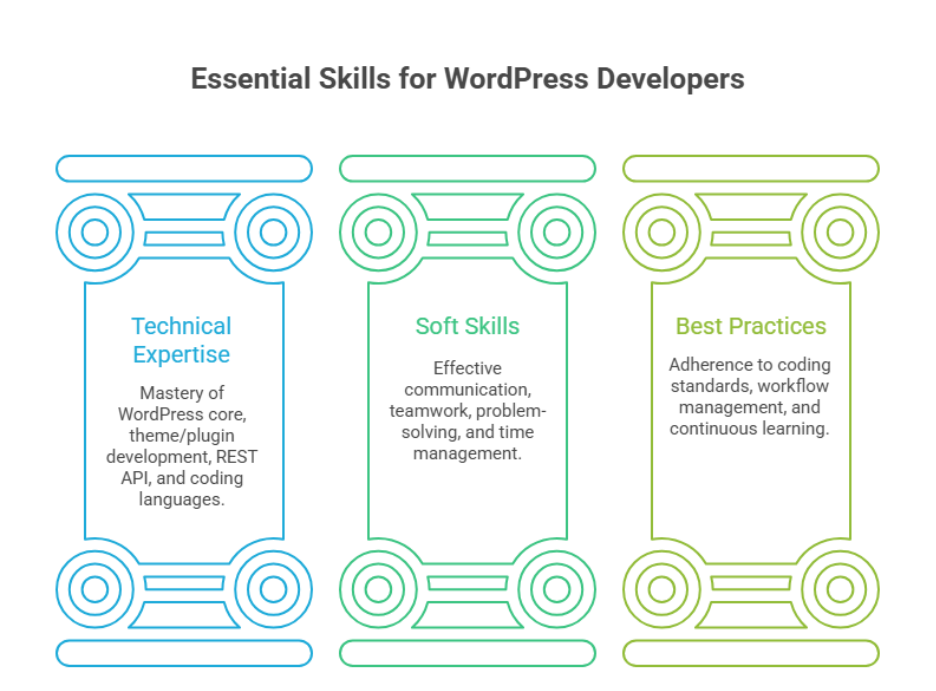
By the end of 2025, successful WordPress developers need a combination of technical and soft skills, including expertise in WordPress development, plugin and theme customization, REST API integration, SEO best practices, and headless WordPress. Mastery of these areas ensures scalable, high-performing, and maintainable WordPress websites.
As a WordPress developer, professional development is critical. Understanding how to optimize a WordPress site for speed, security, and SEO ensures long-term reliability. Good design, structured workflows, and ongoing WordPress maintenance not only improve user experience but also protect your investment. For example, while a basic setup may cost a few hundred dollars, hiring a skilled developer to create a robust, scalable site ensures sustainable performance and future-proofing.
This blog explores the new WordPress skill set developers need by the end of 2025, highlighting technical competencies, soft skills, and emerging trends like headless WordPress and API integrations. You’ll learn which abilities set top developers apart, how to demonstrate your skills, and why mastering these areas is essential for a successful career as a WordPress developer.
Essential WordPress development skills every developer needs 2025
Step 1: Master WordPress Core
Understand how the WordPress core works, including its architecture and database structure. This knowledge is essential for building custom WordPress solutions and maintaining WordPress websites efficiently.
Step 2: Learn Theme and Plugin Development
Develop skills to create and customize themes and plugins. This allows you to add unique functionalities and design elements, making your projects more versatile and client-ready.
Step 3: Understand WordPress REST API
Learn to integrate external applications and services using the WordPress REST API. This is crucial for building advanced features, headless WordPress setups, and modern workflows.
Step 4: Strengthen Coding Skills
Master PHP, HTML, CSS, and JavaScript. Writing clean, efficient code ensures scalability, performance, and easier debugging across WordPress development projects.
Step 5: Follow Modern Development Practices
Implement proper development workflow, use version control, and follow best practices. This improves collaboration, reduces errors, and maintains site security and performance.
Step 6: Develop Soft Skills
Enhance soft skills such as communication, teamwork, problem-solving, and time management. These skills are vital for working with clients, collaborating with other developers, and delivering projects successfully.
Soft skills and best practices for WordPress developers
Essential Soft Skills for WordPress Developers
Soft skills are just as important as technical expertise. Effective communication, collaboration, problem-solving, and time management allow developers to work efficiently with clients, designers, and other team members. These skills help ensure that projects stay on track and meet expectations in a fast-paced modern WordPress development environment.
Coding Standards and WordPress Architecture
A deep understanding of WordPress architecture and adherence to coding standards is essential. Developers should write clean, modular, and maintainable code for theme and plugin development. Following best practices ensures that WordPress websites are secure, scalable, and easy to maintain over time.
Workflow Management and Project Best Practices
Maintaining a structured development workflow improves efficiency and reduces errors. Using version control, staging environments, and thorough testing allows developers to deliver reliable projects while keeping WordPress installations optimized and up to date.
Continuous Learning and Adaptability
The WordPress ecosystem evolves constantly, so developers must stay updated with new tools, technologies, and WordPress software updates. Continuous learning ensures they can implement modern solutions and remain competitive in the world of web development.
Importance of Soft Skills and Best Practices in Career Growth
Combining technical expertise with soft skills positions developers for a successful career as a WordPress developer. Skilled developers can deliver high-quality WordPress solutions, meet client expectations, and adapt to industry changes, making them valuable assets in any WordPress project.
Conclusion
By the end of 2025, WordPress developers need both technical expertise like theme and plugin development, REST API integration, and headless WordPress and soft skills such as communication and problem-solving. Mastering these ensures scalable, high-performing, and maintainable websites while supporting a successful WordPress career.
Want to future-proof your site? Contact Integriti Studio.
Frequently Asked Questions (The New WordPress Skill Set Developers Needed By the End of 2025)
Which skills will be most required by 2025?
By 2025, the most required skills include AI literacy, data analysis, cybersecurity, cloud computing, digital marketing, UX/UI design, automation, and problem-solving. Soft skills like adaptability, communication, and critical thinking will be equally important as technology continues to evolve rapidly across industries.
What is the scope of WordPress in 2025?
WordPress continues to be highly relevant in 2025, powering about 43 % of all websites and over 60 % of sites using a CMS, meaning huge demand for site creation, customization, e-commerce (WooCommerce) and content jobs. It’s a strong platform for freelancers, agencies and businesses globally.
What skills should a WordPress developer have?
A WordPress developer in 2025 should have PHP, JavaScript, HTML, CSS, and MySQL proficiency, plus experience with Gutenberg/block editor, theme and plugin development, REST API, WooCommerce, security, performance optimization, and basic SEO. Problem-solving, adaptability, and version control (Git) are also essential.
Is WordPress still relevant in 2025?
Yes WordPress remains highly relevant in 2025, powering around 43% of all websites and dominating the CMS market. With continuous updates, AI integration, full-site editing, and strong e-commerce support via WooCommerce, it stays a top choice for businesses, creators, and developers worldwide.
Why High-Revenue Shopify Stores Look Very Different After 2025
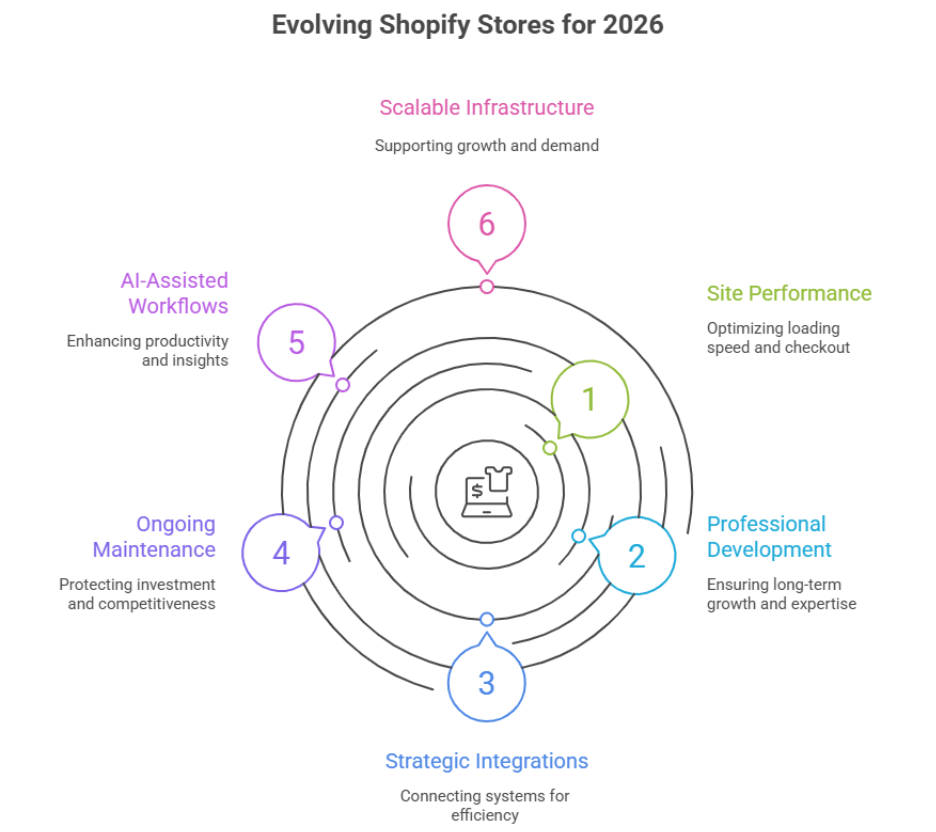
Why do some Shopify stores generate exceptional revenue while others stall despite using the same platform? The answer lies in multiple factors, including site performance, professional development, strategic integrations, and ongoing maintenance. As a shopify store owner, you may already rely on the Shopify platform, but without expert execution, even high-potential stores can underperform.
High-revenue Shopify storeslook very different after 2025 due to strategic adoption of advanced integrations, performance-focused updates, and professional development practices. Store owners leveraging optimized shopify store design, AI-assisted workflows, and scalable infrastructure achieve higher profitability, better ecommerce performance, and long-term growth heading into 2026.
Performance is influenced by site architecture, loading speed, checkout optimization, and scalability. Professional development ensures your store is built for long-term growth, while good design, UX-focused layouts, and reliable support increase ecommerce conversions and customer trust. Maintenance and updates protect your investment, keeping your store competitive as Shopify evolves. For instance, while a basic setup may cost a few hundred dollars, a fully optimized, scalable store often requires higher upfront investment but delivers measurable returns over time.
This blog explores why high-revenue Shopify stores look very different after 2025, highlighting key changes that affect profitability, the impact of 2026 trends, and how strategic choices in design, integration, and development help store owners achieve sustainable growth in the evolving global ecommerce landscape.
How Shopify stores evolve for profitability in 2026
High-performing Shopify store owners know that profitability in 2026 depends on strategic evolution, not just platform adoption. The Shopify platform continues to expand, offering advanced integration options, scalable infrastructure, and tools that support global ecommerce growth. Businesses that adapt their workflows, design, and technology stack now are better positioned to achieve sustained revenue growth.
Leveraging Integrations for Enhanced Performance
Modern online stores thrive by connecting multiple systems through integration. From payment gateways and inventory management to loyalty programs and marketing automation, Shopify store owners can streamline operations and reduce manual effort. Efficient backend management improves order processing, while integrations with third-party apps from the app store enable faster implementation of features that directly impact profitability.
Optimizing Product Pages and Checkout
A focus on optimized product pages and streamlined checkout experiences drives higher conversions. Clear product descriptions, intuitive navigation, and responsive design ensure shoppers complete purchases efficiently. Shopify merchants who continually refine these elements see measurable revenue growth, particularly when leveraging analytics and Shopify in 2025 insights to anticipate trends in 2026.
Expanding Through Global Ecommerce
Expanding into global ecommerce markets allows Shopify store owners to increase gross merchandise volume (GMV) and overall sales. Multi-currency support, localized content, and region-specific payment processing help businesses tap into international audiences while maintaining profitability. Strategic integrations with shipping and tax tools further simplify cross-border operations.
Strategic Use of Shopify Plus and Advanced Features
For larger businesses, Shopify Plus provides advanced features such as custom APIs, automation, and high-volume processing capabilities. By leveraging these tools alongside a well-planned Shopify setup, store owners can scale efficiently while controlling costs. Integrating AI-powered analytics and marketing workflows ensures stores remain competitive and continue delivering profitability in 2026.
Continuous Monitoring and Adaptation
Sustaining profitability requires ongoing attention. Regular audits, performance checks, and updates to integrations or Shopify ecosystem tools keep the store optimized. Shopify store owners who invest in continual improvement are better prepared for shifting market demands, evolving consumer behavior, and the expanding opportunities within global ecommerce.
Key Shopify 2025 changes shaping global ecommerce growth
The landscape of global ecommerce shifted significantly in 2025, with changes that continue to influence how Shopify stores perform today. Understanding these updates is critical for store owners who want to remain competitive, optimize traffic and sales, and ensure their margins are tighter don’t compromise long-term growth.
Platform Enhancements Driving Efficiency
Several core updates to Shopify in 2025 improved operational efficiency and store management:
Enterprise-grade tools: Larger Shopify websites gained better scalability and headless commerce options, allowing seamless integration with third-party systems.
Seamless backend improvements: The Shopify dashboard was updated for streamlined workflows, reducing administrative burden for stores using Shopify.
Transaction fees and shipping costs: Adjustments in transaction fees and optimized shipping costs encouraged more efficient operations and improved profit margins.
Marketing and Customer Engagement Updates
Shopify expanded its marketing capabilities, helping e-commerce store owners increase visibility and engagement:
Social media integration: Tools for linking social media accounts including TikTok Shop boosted discoverability and sales volume.
AI-driven insights: Integration of chatGPT and other AI-powered tools allowed store owners to refine product recommendations, improve brand presence, and optimize traffic and sales.
Email and automation: Enhanced Klaviyo integrations provided better targeting for email campaigns and customer segmentation.
Design, Customization, and Store Appearance
Store aesthetics and flexibility became a major differentiator in 2025:
Go custom and headless commerce: High-growth Shopify stores could implement unique designs, improving user experience and brand presence.
Template and theme updates: Both standard Shopify stores and enterprise-grade solutions benefited from modern templates that make the store look professional and optimized for conversions.
Top categories optimization: Adjustments in layout and navigation helped increase sales by emphasizing top categories for better shopper engagement.
Long-Term Impact on Profitability
Tighter margins: Many Shopify store owners recognized that while profitability was achievable, margins are tighter, necessitating strategic updates and investment in professional shopify website management.
Sustaining growth: Stores that adopted AI-driven analytics, streamlined shipping costs, and leveraged enterprise-grade tools continue to run a still a profitable business heading into Shopify in 2026.
Conclusion
High-revenue Shopify stores look very different after 2025 because success is no longer just about choosing a platform—it’s about strategic execution, professional development, and smart integration. Store owners who optimize design, streamline checkout processes, and leverage AI-driven insights achieve higher profitability, improved traffic and sales, and sustainable growth heading into Shopify in 2026.
The updates introduced in 2025 from enhanced backend efficiency and enterprise-grade tools to social media integration and headless commerce capabilities have reshaped the way shopify store owners operate. By adopting these changes, monitoring performance, and continuously refining workflows, high-growth stores maintain competitive advantage and maximize gross merchandise volume (GMV) while keeping margins tighter under control.
Ultimately, the stores that thrive are those that combine professional shopify website management with forward-thinking strategies, ensuring their e-commerce store remains scalable, adaptable, and still a profitable business well beyond 2025. Embracing these practices today positions your store to capture new opportunities, enhance brand presence, and sustain long-term success in the evolving global ecommerce landscape.
Frequently Asked Questions (Why High-Revenue Shopify Stores Look Very Different After 2025)
Are Shopify stores still profitable in 2025?
Yes Shopify stores are still profitable in 2025 if you execute well with strong products, marketing, and customer retention. Many merchants report average net profits around 15–30%, and some niche or branded stores earn much more, though results vary by strategy and effort.
Where will Shopify be in 5 years?
In 5 years (2030) Shopify is likely to evolve from a basic online store builder into a broader global commerce platform, powering payments, logistics, checkout APIs, and enterprise solutions, expanding internationally and across channels with strong AI integration and deeper ecosystem services.
What is the outlook for Shopify in 2025?
In 2025, Shopify’s outlook remains strong with robust revenue and growth, expecting mid-to-high-20% revenue increases and continued profitability through the year. It’s expanding AI tools, global reach, and merchant adoption, though growth may face competition and marketing cost challenges.
What is the highest earning Shopify store?
The highest-earning Shopify-powered store today is Herman Miller, with an estimated $821.7 million in revenue, followed by big brands like Peloton and waterdrop® also earning hundreds of millions annually. These are among the top-grossing Shopify stores in 2025.
WordPress in 2026 which 2025 Changes Will Matter long-term
Why do some WordPress websites scale smoothly while others struggle to keep up with business goals? The difference rarely lies in the platform itself. Website performance is shaped by multiple factors, including development quality, architectural decisions, long-term maintenance, and how well evolving technologies are adopted. As a site owner, you may already rely on WordPress for flexibility, but without professional execution, even powerful tools can underperform.
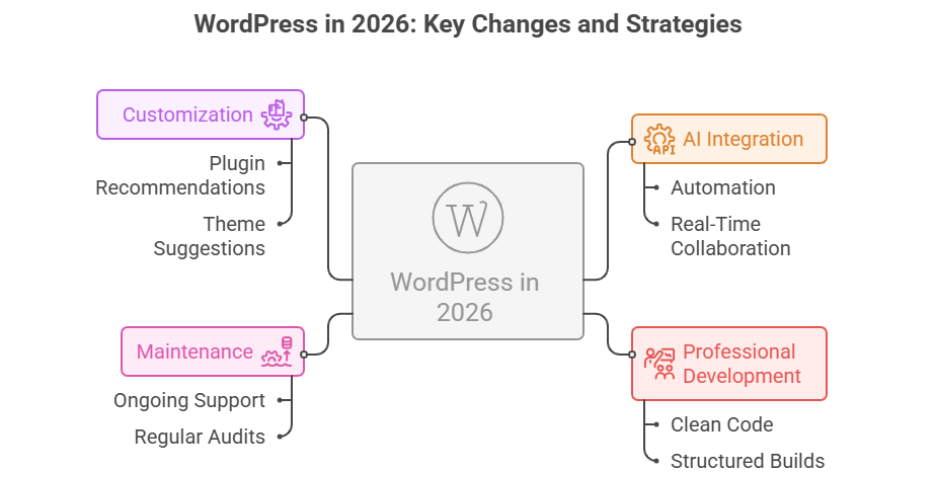
WordPress in 2026 will be shaped by key 2025 changes, including enhanced AI integration, improved plugin ecosystems, and performance-focused updates from WordPress 6.9. Site owners who adopt professional development, maintain their builds, and leverage these tools will gain long-term business benefits, future-proofing their websites for real-time collaboration and growth.
Professional development plays a critical role in turning a website into a business asset. Clean code, structured builds, and informed updates ensure stability as platforms evolve. Good design is not only visual it improves usability, conversion flow, and trust. Ongoing support and maintenance protect your investment, especially when updates introduce new capabilities. For example, while a basic setup may cost a few hundred dollars, long-term-ready builds often require thoughtful planning and higher upfront investment to deliver measurable returns.
Looking ahead to WordPress in 2026, the shifts introduced during 2025 and the growing role of ai will define which websites stay competitive. This blog explores which changes matter long-term, how WordPress adapts, and how smart decisions today support sustainable growth beyond 2026.
How site owners rely on WordPress AI in 2026
As WordPress evolves, site owners are increasingly relying on WordPress AI to streamline workflows, enhance performance, and deliver better user experiences. The future of WordPress in 2026 will emphasize automation, real-time collaboration, and smart integrations, allowing businesses to achieve measurable business benefits while maintaining flexibility.
AI Integration and Real-Time Collaboration
One of the most significant 2025 changes is the integration of AI directly into the WordPress dashboard. With the abilities API and other AI tools, site owners can automate repetitive tasks, optimize content, and gain insights for performance optimization. Real-time collaboration features allow teams to work on WordPress websites simultaneously, improving efficiency and minimizing errors. This is especially critical for businesses relying on WooCommerce or multi-user blogging platforms, where content speed and accuracy directly impact revenue.
Customization and Automation for Business Needs
Modern WordPress development now supports custom development and AI-driven automation. For instance, a WordPress AI client can suggest plugins and themes, recommend performance optimization features, and help maintain core security and bug fixes. This reduces the dependency on expensive plugins and allows site owners to focus on content strategy and business needs rather than manual site management.
Staying Updated with the WordPress Roadmap
The WordPress AI team continues to evolve the platform based on feedback from the State of the Word 2025 report. By understanding the roadmap and future development, site owners can prioritize updates, adopt new features, and ensure their WordPress sites remain competitive. Leveraging AI for real-time collaboration, workflow management, and customization ensures that every site aligns with modern best practices while offering business benefits that extend well into 2026.
Preparing for the Future of WordPress
To maximize the advantages of WordPress AI, site owners should invest in training, regular audits, and customization aligned with their business needs. The combination of professional development, core platform enhancements, and AI-driven automation positions WordPress in 2026 as a platform where efficiency, innovation, and scalability converge. Companies that embrace these tools now will gain a competitive edge, ensuring that their WordPress websites deliver long-term value and measurable ROI.
Conclusion
The journey of WordPress in 2026 is built on the critical shifts introduced during 2025, from AI integration to improved plugin ecosystems and performance-focused updates. For site owners, success is no longer just about choosing a platform—it’s about leveraging professional development, smart customization, and AI-driven automation to maximize efficiency and deliver measurable business benefits.
By staying updated with the WordPress roadmap, adopting real-time collaboration, and prioritizing structured maintenance, you can future-proof your WordPress website while enhancing user experience, security, and scalability. Thoughtful investment in design, development, and ongoing support ensures your site not only performs well today but continues to grow and adapt to emerging technologies.
Ultimately, WordPress in 2026 rewards those who make informed, strategic decisions. By embracing AI, automation, and professional best practices, site owners can transform their WordPress websites into resilient, high-performing business assets that drive long-term value, efficiency, and competitive advantage.
Frequently Asked Questions (WordPress in 2026 which 2025 Changes Will Matter long-term)
Is WordPress still in demand in 2025?
Yes WordPress is still in demand in 2025 because it powers around 43% of all websites worldwide and dominates the CMS market with over 60% share, keeping strong need for developers, designers, and site maintenance work.
What is the future of WordPress?
In 2025 and beyond, WordPress’s future is strong with AI-driven tools, full-site editing, and no-code design making site building easier, plus headless architecture and enhanced performance/security improvements keeping it modern and competitive for businesses, creators, and developers.
Will AI replace WordPress?
No AI won’t replace WordPress itself, but it will transform how sites are built and managed. AI can automate content, design suggestions, and basic tasks, but WordPress’s core platform, plugins, developers, and complex custom work remain essential into the future.
How much does WordPress pay for 1000 views?
On WordPress you don’t get a fixed pay per 1,000 views it depends on how you monetize your site. With ads (like AdSense), typical earnings are roughly $1–$8 per 1,000 views, and in top niches it can reach $10+ per 1,000 views. Premium ad networks or affiliate income can boost this further.
After launch, a WordPress site built using the Divi theme showed unexpected mobile display issues across different devices, including tablets and varying screen sizes—ranging from broken navigation to layout inconsistencies in Divi layouts. Integriti Studio conducted a full mobile audit, diagnosed Divi preview vs live output differences, cleared cache layers, and implemented responsive design fixes using CSS and custom CSS for a clean, optimized mobile experience.
Issue Background
Post-launch testing on mobile devices revealed multiple layout and display issues in Divi:
Cropped or misaligned navigation header in mobile view
Missing icons in the mobile menu due to visibility and style conflicts
Uneven spacing, font rendering problems, and inconsistent font sizes across modules
Mid-word line breaks in headings affecting user experience
Unwanted play button overlay appearing on the homepage image in mobile view
Layout problems in team member modules caused by inconsistent image sizes and missing responsive fallbacks
Though everything appeared correct in Divi Builder preview and Divi preview mode on desktop, the live Divi website output differed—especially across mobile and tablet screen sizes and different browsers.
Diagnosis
After testing across different devices and browsers, the following issues were identified:
The Divi Builder preview mismatch was caused by mobile-specific CSS overrides, media queries, and caching discrepancies
Global typography and font rules were not consistently applied across Divi layouts and templates
Custom layouts lacked responsive design fallbacks for images, modules, and content blocks on smaller screen sizes
Cache and loading behavior from plugins and built-in optimization features caused preview inconsistencies
Resolution Steps
Cache Flush + Live Domain Verification
Confirmed testing on the correct WordPress website URL, cleared all cache layers, including plugin cache, browser cache, and server-side caching, and verified results in incognito mode.
Navigation + Icon Repairs
Applied targeted CSS and custom CSS fixes to navigation height, spacing, header visibility, and mobile menu icon display to resolve broken or distorted layouts.
Typography Cleanup
Enforced global font and style rules using Divi Theme Options, the style.css file, and supplemental CSS overrides to ensure consistency across mobile, tablet, and desktop devices.
Hero Overlay Removal
Disabled the unwanted play button overlay on mobile devices to align mobile display with the desktop experience and improve performance and user experience.
Team Section Alignment
Normalized image aspect ratios, adjusted module spacing, and equalized text block heights to fix layout shifts across team member profiles and across all devices.
Final Outcome
With all mobile layout issues resolved, the Divi site now delivers a fully responsive, consistent experience across mobile devices, tablets, and desktop screen sizes. The fixes ensure that what’s built in Divi Builder preview matches the live output—improving usability, responsive behavior, and overall SEO performance.
Launching a site and seeing mobile bugs or Divi preview issues?
Integriti Studio helps you diagnose issues, resolve mobile display problems, optimize Divi layouts, and close the gap between preview and reality using mobile-first audits and responsive fixes that stick.