Integriti Studio investigated a WordPress site where subscriber-level WordPress users were unexpectedly uploading media files through file uploads in WordPress and possibly creating unauthorized WordPress accounts. By auditing user roles, reviewing plugin and theme behavior, and tightening file upload permissions, the team resolved the issue and strengthened overall WordPress security and access control.
Issue Background
The client noticed unusual activity on their WordPress website, including:
A large number of suspicious subscriber accounts on the WordPress installation using free email providers
Unexpected image and file uploads by non-admin users with limited user permissions
No clear URL, dashboard, or form source for how these unauthorized WordPress users were being created
Initial suspicion pointed toward a compromised WordPress site, a vulnerable WordPress plugin, or misconfigured user role permission and access based issues.
Diagnosis
After a full security audit and permission review, the following findings were confirmed:
Subscriber user roles in standard WordPress should not have media access or upload files through the WordPress dashboard
A form-based file upload field (likely in Gravity Forms or similar plugins) allowed upload files in WordPress based on user roles, bypassing normal restrict access rules
XML-RPC was active, increasing exposure to automated attacks and potential unauthorized access despite firewall layers
A custom plugin named “Hospital Doctor Directory New” was reviewed for vulnerability, file access, and directory permissions but ultimately retained
Several outdated plugins and the Avada theme had potential security vulnerabilities affecting file security, file integrity, and access to sensitive media files
Resolution Steps
User Cleanup + Audit
All unfamiliar WordPress user accounts were removed, and admin access, editor roles, and subscriber permissions were reviewed to prevent unauthorized WordPress access and restrict access to sensitive files.
Form Restrictions
File upload security was improved by limiting file types, restricting file size, blocking malicious files such as PHP files, and controlling the number of file uploads per entry to protect uploads and prevent harmful files.
Update Critical Plugins + Theme
All WordPress core files, plugins, and the Avada theme were updated to the latest versions to harden WordPress, fix known vulnerabilities, and improve basic security measures.
XML-RPC Confirmation
Confirmed with the hosting provider (Pressable) that XML-RPC was blocked by default via a firewall and WAF, reducing exposure to brute force and unauthorized access attempts.
Permission Testing
Verified that dashboard-based uploads were restricted properly and confirmed the issue originated from an unprotected form allowing direct file upload access outside standard WordPress permission rules.
Final Outcome
With WordPress user roles audited, file upload permissions secured, plugins and themes updated, and file restrictions enforced, the WordPress website no longer allows unauthorized media uploads or suspicious account creation. A stronger security layer is now in place to protect WordPress media files, directories, and private files, and ongoing WordPress security awareness was recommended.
A client’s WordPress homepage appeared to load slowly—even with strong performance scores and solid page speed metrics. Integriti Studio traced the issue to an Airlift plugin setting related to JavaScript deferral and executing JavaScript on user interaction. Here’s how the delay was identified and resolved to restore a smooth, immediate user experience and better Core Web Vitals.
Issue Background:
Although tools like BlogVault, PageSpeed Insights, and GTMetrix are commonly used for web performance testing, BlogVault showed excellent performance stats (94%+) for this WordPress site. However, users noticed a lag before any primary content appeared on the homepage during the initial page load. GTMetrix failed to complete its analysis, and the client became concerned about website speed, first impressions, conversion impact, and bounce rates despite effective caching.
Diagnosis:
Performance looked fine on paper — fast scores, minimal page size, reduced HTTP request count, optimized cache behavior, and no obvious render-blocking warnings.
Visual lag persisted — the homepage page content didn’t visibly load until a mouse movement or user interacts with the site, indicating page rendering and JavaScript execution delays.
Plugin culprit identified — Airlift’s “Execute JavaScript on user interaction” toggle, designed to defer non-essential JavaScript files, was the likely cause of the page load bottleneck affecting the main thread.
Dashboard mismatch — Even though the setting appeared turned off in the plugin dashboard, it was still affecting behavior, a common issue when multiple plugins or automation-based optimization tools are involved.
Resolution Steps:
Disable Airlift temporarily
Confirmed that turning off the WordPress plugin resolved the rendering delays, isolating the root cause without downtime or breaking your site.
Deep dive into plugin settings
Reviewed Airlift’s plugin settings, caching strategies, and JavaScript execution rules, and found the problematic toggle visually disabled—but still active behind the scenes.
Vendor support collaboration
Contacted BlogVault/Airlift support to report the UI discrepancy, exclusion behavior, and ensure the setting was fully deactivated across all URLs and cache layers.
Final validation
Once the bug was addressed, page content began loading immediately without requiring interaction, restoring proper page rendering, smoother experience, and better user experience across desktop and mobile cache.
Final Outcome:
The homepage now loads instantly, delivering a polished and responsive first impression with improved load times and site loads behavior. The issue—caused by a hidden plugin behavior tied to JavaScript deferral—highlighted the importance of troubleshooting beyond surface-level metrics, always testing real user experience, and validating performance with developer tools, not just scores.
Experiencing invisible delays or inconsistent load behavior on your WordPress site, even with cache plugins, CDN setups, or tools like WP Rocket, LiteSpeed Cache, or Cloudflare?
Integriti Studio can help uncover hidden blockers, optimize JavaScript code, CSS delivery, caching strategies, and ensure faster pages without breaking functionality—improving SEO, conversions, and overall website speed.
For WooCommerce stores handling high-volume, serialized products, or custom order workflows, searching orders by serial numbers, order number, or sequential order number in the WordPress dashboard can significantly improve order management. Integriti Studio implemented a custom WooCommerce solution to make manually entered serial numbers searchable in the backend—without changing how the WooCommerce store manages existing orders, order IDs, or default WooCommerce order numbers.
This approach works within WooCommerce admin order search and remains compatible with custom order numbers, metadata, and future WooCommerce plugin updates.
Issue Background:
A WooCommerce store owner needed to find existing orders using serial numbers added manually via custom order metadata. While these serial numbers existed in the WordPress database and were tied to WooCommerce orders, WooCommerce’s native order search did not return any results—even with exact number matches.
This limitation affected backend workflows, order references, and traceability for high order volumes where searching by order number alone was inefficient.
Diagnosis:
WooCommerce’s default admin order search only checks standard fields such as order ID, order number, customer name, and email within WooCommerce.
Serial numbers were stored as custom meta fields and metadata, which are not indexed or included in WooCommerce order search by default.
Even formatted or bracketed searches like [131003846], sequential formats, or specific number queries failed because the custom metadata was not registered within WooCommerce’s admin search process.
This behavior is consistent across WooCommerce sites, regardless of sequential order numbers plugins, prefixes, suffixes, or custom order number formats.
Resolution Steps:
Tested Search Behavior
The team tested multiple query formats, including serial numbers, order number length variations, and formatted values, confirming that the data existed in the WordPress database but was not searchable in the WooCommerce dashboard.
Mapped Relevant Meta Keys
All custom order metadata fields where serial numbers might be stored were identified. These meta keys were then mapped and registered so WooCommerce admin search could include them when searching orders using serial numbers, custom order numbers, or related identifiers.
This solution remains compatible with WooCommerce order search, HPOS, and does not interfere with plugins used for sequential order numbers, prefixes, or custom starting numbers.
Verified the Fix
After implementing the mapping, searching for serial number 131003846 within WooCommerce successfully returned the correct order. Store admins could now search orders using serial numbers, metadata, or custom references directly from the backend.
Recommended Admin Tools
While not required for the fix, the team noted that admin-focused plugins like Dashify or other WooCommerce plugins could further enhance order search UX, CSV exports, invoice handling, and dashboard usability in the future.
Final Outcome:
WooCommerce’s admin interface now supports searching orders by serial numbers stored in custom meta fields. This enhancement makes backend order management faster, more reliable, and scalable—especially for WooCommerce stores handling serialized products, custom order numbers, or large volumes of existing orders.
The solution works within WooCommerce, remains plugin-compatible, and improves operational efficiency without altering how orders are created, formatted, or displayed on the front end.
Need to lock down access to your WooCommerce portal and protect your WooCommerce store from spam registrations? At Integriti Studio, we implemented a secure WooCommerce registration process that restricts user registration by email domain—helping prevent fake accounts, spam users, and unauthorized access while keeping the WordPress site usable and secure.
This custom WooCommerce registration solution reduces registration spam, blocks spam domains, and ensures only verified email addresses from approved domains can create accounts on your WooCommerce site.
Issue Overview
A private WooCommerce support portal was facing increasing registration spam and privacy concerns. During the WooCommerce registration process, a public registration form displayed a visible company dropdown—exposing the names of all approved partner companies to spammers, bots, and malicious users attempting to create fake user accounts.
This created a risk of spam registrations, fake sign-ups, and potential fraudulent orders in WooCommerce.
The client needed to:
Hide the list of partners from the public WooCommerce registration form
Automatically assign users to a company based on their email domain or specific email addresses
Block email domains that were not authorized
Prevent spam registrations, fake users, and bot-driven spam attempts
Allow flexible updates to registration rules directly from the WordPress dashboard
What We Did
🔐 Removed public company selector
The visible company selector was removed from the WooCommerce registration page to avoid exposing internal partner data. This reduced spam attacks, prevented fake registrations, and improved overall WordPress security without relying on a third-party WordPress plugin.
✉️ Email-based validation
We implemented a custom WooCommerce registration validation function that checks the user’s email address during the registration process. The system scans the email domain and compares it against a whitelist of approved domains, helping block spam domains and stop fake accounts before they reach the WordPress database.
🧠 Smart company assignment
When a valid email domain match was found, the user was automatically assigned to the correct partner company. This custom registration flow removed the need for dropdowns, reduced user friction, and kept the WooCommerce registration form clean and private.
⛔ Block unauthorized access
If the email domain didn’t match the approved list, the WooCommerce registration was blocked with a clear error message shown on the registration page:
“Only authorized work email addresses will be approved.”
This approach helps stop WooCommerce registration spam, fake user accounts, spam bots, and unauthorized attempts to create accounts or place orders.
🛠️ Admin-editable messaging
To keep things flexible, the error message and validation rules were made editable via the WordPress admin using the Code Snippets plugin. This allows admins to manage registration features, adjust spam prevention rules, and update messaging without touching core code or installing additional plugins for WordPress.
Final Result
WooCommerce registrations are now secure, automated, and privacy-friendly. Spam registrations, fake sign-ups, and bot-driven attempts are blocked at the registration stage. Authorized users can create accounts smoothly, while spam users are filtered out silently—helping protect your WooCommerce site from spam orders, fraudulent registrations, and malicious activity.
This solution supports ongoing spam prevention, reduces spam effectively, and strengthens the entire WooCommerce registration workflow without CAPTCHA, reCAPTCHA, or extra plugins.
Custom post types in WordPress—such as “Team Members” or “Attorneys”—often rely on modular content blocks, cards, or widgets like Credentials, Education, Court Admissions, or other custom fields. When these sections are empty, they can clutter the front-end display and negatively impact visibility, UX, and SEO for a WordPress site.
To solve this, Integriti Studio implemented a lightweight, content-based solution using JavaScript and PHP to hide empty content cards automatically. This flexible implementation works without plugins, avoids manual editing in the post editor, and keeps WordPress templates clean and scalable across custom post types.
Issue Background:
A WordPress site built with custom post types was displaying empty content cards on individual profile pages. Even when no data existed in custom fields or ACF fields, cards like “Court Admissions” still appeared on the front end. This created blank sections, unnecessary layout clutter, and confusion for users browsing the WordPress content.
The challenge wasn’t just to hide one empty section—but to conditionally hide any empty card across templates without hardcoding logic for every custom post or CPT layout.
The Goal:
Automatically detect and hide empty content areas in WordPress custom post types—without using a plugin, shortcode, checkbox, or manual condition for each card—while keeping the solution reusable, lightweight, and SEO-friendly.
Diagnosis:
The site used modular HTML .card elements to display custom content blocks
Each card rendered by default, regardless of whether custom fields contained data
Manually editing every WordPress template or array condition was not scalable
A dynamic, front-end solution was needed to manage visibility and hide empty content
This approach also needed to work with different categories, taxonomies, and future content-based layouts.
Resolution Steps:
1. Scoped the solution to the Custom Post Type
Using PHP, the JavaScript file was enqueued only on relevant custom post type templates (such as Attorneys or Team Members). This avoided unnecessary script loading on unrelated WordPress posts, widgets, sidebars, or search results and kept performance optimized.
2. Wrote lightweight JavaScript
On page load, the script checks each .card element and evaluates its text content. If the content is empty or contains only whitespace, the card is hidden from display.
js
CopyEdit
document.addEventListener(‘DOMContentLoaded’, function () { const cards = document.querySelectorAll(‘.card’); cards.forEach(card => { if (!card.textContent.trim()) { card.style.display = ‘none’; } }); });
This JavaScript-based solution works seamlessly with WordPress themes, REST API-driven content, Elementor layouts, and custom HTML structures—without affecting the editor experience.
3. Scalable and flexible implementation
The logic can be easily extended to hide specific content blocks, manage conditional visibility, or support additional selectors. It also integrates well with ACF, custom fields, accordions, widgets, and future WordPress functionality.
Final Outcome:
Empty content cards—such as unused Court Admissions, credentials, or education sections—were automatically removed from the front-end display. The result was a cleaner, more professional layout with improved usability, reduced clutter, and better content control across custom post types.
This reusable solution now applies to multiple WordPress templates, categories, and CPT-driven pages without relying on third-party plugins or manual editing.
Lessons from wordpress in 2025 that will shape 2026
Why do some WordPress websites thrive effortlessly while others struggle to convert visitors into customers? The difference often goes beyond the platform itself and lies in how a site is designed, built, and maintained. Factors influencing website performance such as optimization, user experience, and plugin integration play a critical role in determining whether your WordPress site can scale effectively.
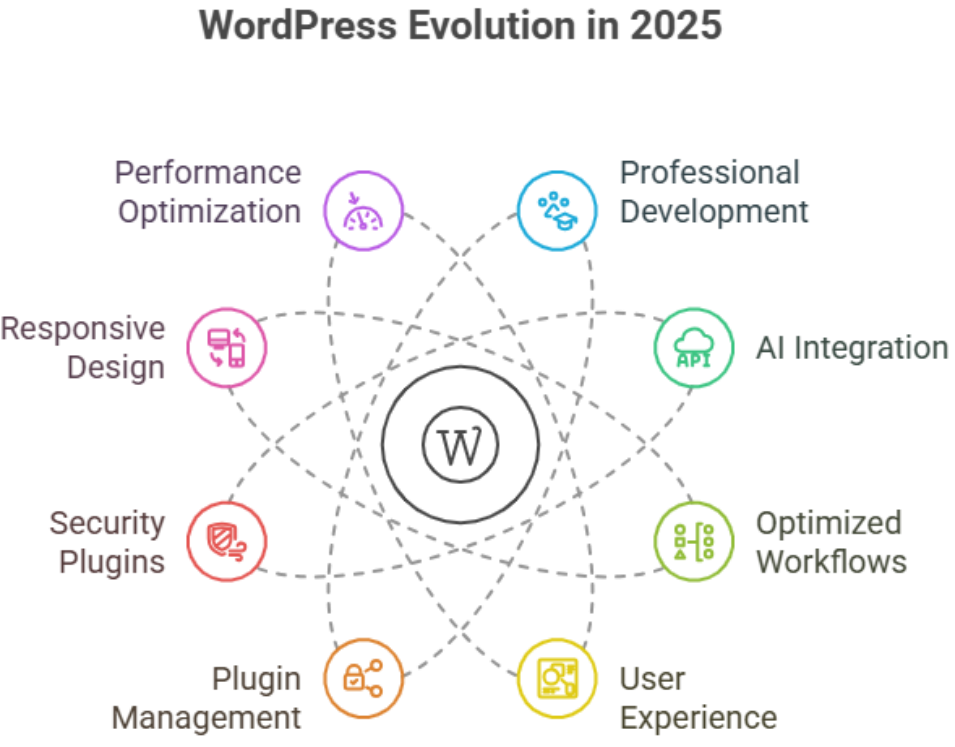
WordPress in 2025 highlighted the importance of professional development, AI integration, and optimized workflows. Developers and site owners who focused on user experience, plugin management, and intuitive design gained a competitive edge. These lessons will shape 2026, guiding smarter site redesigns, efficient maintenance, and future-ready WordPress roadmaps.
Professional development for developers and site owners is more important than ever. In 2025, we saw how investing in AI-powered tools, careful workflow planning, and advanced builder techniques not only speeds up development but ensures sites remain flexible for future updates. Good design, ongoing support, and maintenance deliver real value, helping avoid costly errors and downtime. For example, a professional WordPress redesign or plugin integration can vary in pricing, reflecting the complexity and level of expertise required.
This blog will explore key lessons from WordPress in 2025, including practical insights for developers and site owners, the evolving role of AI, and strategies to optimize workflow, plugins, and overall functionality. By following these lessons, you can shape your roadmap for 2026 and ensure your WordPress projects are smarter, faster, and more future-ready.
WordPress AI Tools Helping Developers with Real-Time Collaboration
As WordPress continues to evolve, AI tools have become essential for developers aiming to streamline workflows, optimize performance, and enhance real-time collaboration. These tools allow developers and site owners to reduce errors, accelerate site redesigns, and ensure WordPress websites remain future-ready.
How AI Tools Enhance Real-Time Collaboration
AI tools enable multiple developers and site owners to work simultaneously on a WordPress website without conflicts. Tasks such as content creation, plugin customization, and code updates can now happen in a synchronized environment. This reduces bottlenecks during redesign phases and ensures new features are integrated efficiently.
Optimizing WordPress Core and Plugins
With AI-powered insights, developers can natively optimize WordPress core, themes, and plugins for performance and scalability. AI can suggest caching improvements, highlight redundant PHP code, and recommend strategies for performance optimization, creating smoother experiences for users.
Streamlined Content and Feature Management
AI tools assist with content creation and management systems, allowing site owners to maintain original content, blog posts, and product updates efficiently. This ensures that sites stay current with web design trends and align content with business objectives.
Benefits for Site Owners and Developers
For site owners, AI-enabled collaboration means faster redesign cycles, better portability of WordPress websites, and enhanced analytics. Developers gain seamless repository management, phase updates without disruption, and plan future development efficiently.
A Strategic Investment for Long-Term Success
Investing in AI tools is a powerful move for WordPress site owners and developers who want to optimize workflow, reduce reliance on freelance resources, and maintain a competitive edge. Every redesign, plugin integration, and core update is executed efficiently, saving time and costs.
WordPress 2025 Insights Every Developer Needs for 2026
WordPress in 2025 offered developers crucial lessons that will directly impact strategies and site performance in 2026. Understanding these insights ensures developers can deliver responsive, secure, and future-ready WordPress websites while optimizing workflows and enhancing real-time collaboration.
Key Performance and Security Takeaways
Invest in Security Plugins: Implementing reliable security plugins in 2025 proved essential for safeguarding WordPress websites against emerging threats. Developers should continue prioritizing these tools in 2026.
Optimize for Responsiveness: Responsive design ensures websites perform well across devices, a non-negotiable expectation from users and site owners.
Performance Optimization: Efficient caching, code management, and AI-driven tools enhance speed and reliability.
Enhancing Collaboration and Workflow
Real-Time Collaboration: 2025 highlighted how AI-driven real-time collaboration tools streamline teamwork between developers and site owners.
Project Management Integration: Embedding project management systems within WordPress workflows improves task tracking, deadlines, and transparency.
API Utilization: Leveraging APIs facilitates smoother integrations, especially for SaaS solutions and e-commerce platforms.
Content and Design Strategies
Structured Content: Maintaining a clear content structure improves SEO, user experience, and manageability.
Preview Functionality: Allowing site owners to preview content in real-time reduces errors and speeds up the redesign process.
Portfolio and E-Commerce Sites: Specific design strategies from 2025 emphasize creating intuitive layouts for both portfolio sites and e-commerce platforms, enhancing engagement and conversions.
Preparing for 2026
By integrating lessons from WordPress 2025, developers can deliver smarter, more secure, and user-focused websites. Focusing on security plugins, responsive design, real-time collaboration, and AI-driven tools ensures that workflows are optimized and sites are future-ready, setting a strong roadmap for 2026.
Conclusion
The lessons from WordPress in 2025 provide a clear roadmap for success in 2026. Developers and site owners who embrace AI tools, prioritize real-time collaboration, and focus on performance optimization, responsive design, and security plugins are better positioned to deliver WordPress websites that are efficient, scalable, and user-focused. Investing in professional development, strategic workflow planning, and thoughtful site redesigns ensures that your WordPress projects remain future-ready, flexible, and aligned with business objectives. By applying these insights, you can not only streamline development and maintenance but also create websites that engage users, support growth, and maintain a competitive edge in the rapidly evolving digital landscape.
Frequently Asked Questions (Lessons from wordpress in 2025 that will shape 2026)
Why do some WordPress websites perform better than others?
Performance depends on factors like optimization, user experience, plugin integration, and professional development. Sites with efficient workflows, responsive design, and strategic plugin management tend to convert better and scale more effectively.
How is AI shaping WordPress development in 2025?
AI tools enhance real-time collaboration, streamline content creation, optimize workflows, and provide insights for plugin and core management. Developers and site owners using AI can reduce errors and accelerate redesigns.
What should developers focus on for WordPress in 2026?
Developers should prioritize security plugins, responsive design, real-time collaboration, performance optimization, and future-ready workflows. Understanding lessons from 2025 ensures smoother site updates and better scalability.
How important is professional development for WordPress site owners?
Extremely important. Investing in learning AI tools, builder techniques, and best practices ensures site owners can maintain and optimize their websites efficiently while reducing reliance on external resources.
Why do some websites built on popular platforms struggle to convert, while others thrive effortlessly? The difference often comes down to more than just the choice between Webflow or WordPress it lies in factors influencing website performance, from professional development quality to thoughtful design and ongoing maintenance. In 2025, businesses increasingly recognize that the real value of good web design extends beyond aesthetics. A carefully optimized user experience, accessible layouts, and seamless AI-driven personalization can dramatically improve engagement and SEO, while data-driven decisions and smart integrations help marketing teams maximize ROI.
Webflow in 2025 signals a future driven by AI, no-code efficiency, and seamless integrations. Marketing leaders leverage its SEO, analytics, and personalization capabilities to optimize user experience, improve conversions, and enable data-driven decisions. Businesses using Webflow can scale faster while maintaining modern, high-performing web design.
Professional development ensures that your website not only looks modern but functions reliably, with features that support growth. Maintenance and support often overlooked keep your site secure, fast, and optimized for conversions. Small investments, such as allocating $2,000–$5,000 for focused improvements or enhancements, can yield measurable results without breaking budgets.
This blog will explore the growth signals for Webflow in 2025, highlighting how AI, SEO, integration, and no-code capabilities are shaping the future. You’ll learn how marketing leaders use Webflow to optimize websites, improve user experience, and leverage data-driven insights for smarter decisions.
AI, SEO, Analytics: Key Webflow 2025 Takeaways
Webflow in 2025 continues to redefine how marketing websites are designed, optimized, and scaled. For businesses looking to build smarter, leveraging AI, SEO, and analytics is no longer optional—it’s essential. Understanding these core areas helps marketers, designers, and developers create future-proof web experiences that maximize ROI and deliver measurable impact.
AI-Driven Personalization Enhances User Experience
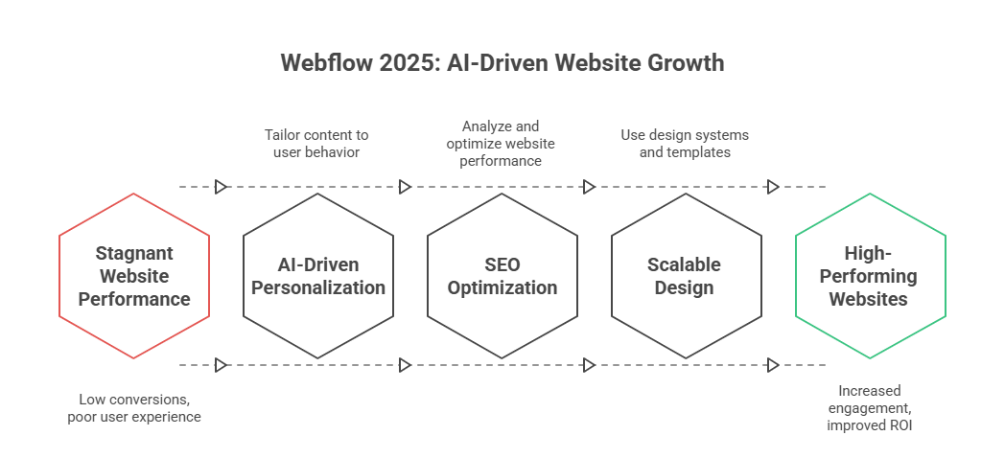
One of the most significant growth signals for Webflow in 2025 is AI-driven personalization. Platforms like Webflow now allow marketers to dynamically tailor content based on user behavior and preferences. By integrating AI, teams can deliver relevant experiences without code, reducing the bottleneck of manual content updates. Designers and developers can combine AI with visual web development and motion design to create immersive digital experiences that resonate with audiences.
Benefits for Marketing Leaders and Teams
Deliver content-rich, personalized experiences across entire websites.
Automate repetitive tasks, freeing teams to focus on strategy and design.
Improve ROI by increasing engagement and conversion through smarter, data-driven personalization.
SEO Optimization and Analytics Integration
In 2025, SEO rankings are increasingly tied to data and user engagement. Webflow’s new tools make it simple to analyze and optimize websites using integrated analytics, allowing marketers to track performance in real-time. Whether you use Webflow for scalable websites or smaller webflow sites, having built-in insights reduces reliance on third-party tools and empowers non-developers to make informed decisions.
Key Takeaways for SEO in Webflow
Leverage analytics to understand user behavior and optimize layout and content placement.
Combine dynamic content with AI-driven strategies to improve search visibility.
Ensure future-proof websites by aligning design systems, templates, and reusable components with evolving website trends.
Designing Scalable, Data-Driven Web Experiences
Webflow’s 2025 state highlights the importance of design and development workflows that support scalable websites. From core areas like accessibility and inclusive design to backend logic and content management, Webflow provides tools to iterate efficiently. Freelancers, teams, and agencies can leverage reusable components and curated collections to streamline projects, ensuring future-proof websites that meet modern web standards.
Practical Applications
Use design systems and templates to maintain consistency across large projects.
Integrate analytics to continuously refine digital experiences.
Adopt AI and automation for dynamic content, ai-driven personalization, and smarter team collaboration.
Takeaways:
By focusing on AI-driven personalization, integrated analytics, and SEO optimization, Webflow in 2025 enables marketers and designers to build content-rich, scalable websites without code. These innovations help teams analyze and optimize continuously, delivering relevant experiences that drive growth, improve ROI, and future-proof web projects.
Conclusion
Webflow in 2025 clearly demonstrates that the future of websites is no longer just about aesthetics—it’s about building smarter, scalable, and data-driven digital experiences. By leveraging AI-driven personalization, integrated analytics, and SEO optimization, businesses can create marketing websites that not only engage users but also deliver measurable ROI. Thoughtful webflow design, professional development, and ongoing maintenance ensure your site remains reliable, future-proof, and optimized for growth.
Marketing leaders and teams who use Webflow effectively can streamline workflows, reduce dependency on developers, and implement dynamic content strategies that respond to real-time user behavior. Small, targeted investments in design systems, templates, and AI integrations can yield outsized results, making modern web development both efficient and impactful.
Ultimately, the growth signals for Webflow in 2025 point toward a future where content-rich, scalable websites powered by AI and analytics become the standard. By embracing these capabilities, businesses can stay ahead of website trends, improve user experience, and make confident, data-driven decisions for long-term success.
Are you ready to take your website to the next level why not contact Integriti Studio today and see how we can help?
Frequently Asked Questions (What webflow 2025 growth signals for the future)
What is the future of Webflow?
The future of Webflow is promising, as it continues evolving into a full-fledged no-code platform for designers and developers. In 2025, its focus on AI-driven design, real-time collaboration, and scalable workflows enables businesses to build responsive, visually compelling websites efficiently, bridging creativity with production-ready functionality.
Should I learn Webflow in 2025?
Yes, learning Webflow in 2025 is valuable. Its no-code capabilities, AI-driven design tools, and real-time collaboration features empower designers and developers to build responsive, scalable websites efficiently. Mastering Webflow can enhance your skillset, improve workflow efficiency, and open opportunities in modern web design and digital agencies.
Is web design still in demand in 2025?
Yes, web design remains in high demand in 2025. Businesses increasingly prioritize user experience, responsive design, and AI-driven functionality. Skilled designers who can create visually appealing, optimized, and future-ready websites are essential for brand growth, digital engagement, and maintaining a competitive edge in the evolving online marketplace.
What will marketing look like in 2025?
Marketing in 2025 will be data-driven, AI-powered, and highly personalized. Brands will leverage advanced analytics, automation, and real-time collaboration tools to deliver targeted campaigns across multiple channels. Creative content, seamless user experiences, and predictive insights will define strategies, making marketing more efficient and measurable than ever.
Shopify in 2025 the updates that quietly changed ecommerce
Why do some ecommerce brands grow steadily while others struggle, even on the same platform? The difference is rarely the tool itself—it’s how you use it. In 2025, Shopify introduced a series of quiet but meaningful changes that reshaped how modern ecommerce businesses operate, scale, and compete. These updates didn’t arrive with noise, yet their impact on performance, flexibility, and long-term growth has been significant.
Shopify in 2025 introduced subtle yet powerful updates that improved ecommerce performance, flexibility, and scalability. These changes focused on smarter workflows, better platform stability, and future-ready features, helping businesses build sustainable growth without complexity while adapting to modern commerce demands.
Website success today is influenced by far more than themes or apps. Factors like clean development, fast-loading experiences, reliable integrations, and thoughtful architecture directly affect how users engage and convert. Professional development ensures your Shopify setup is not only functional but built to evolve, especially as ecommerce demands become more complex in 2025. Good design, ongoing support, and consistent maintenance often deliver more value than flashy features—especially when even a basic monthly investment compared to enterprise-level builds can shape results.
This blog explores howShopify evolved in 2025, the role of ai in shaping smarter ecommerce decisions, and why these updates matter for sustainable digital commerce. You’ll learn what changed, why it matters, and how the right approach helps future-proof your business in 2025 and beyond.
Shopify in 2025: Quiet Updates Reshaping Modern Ecommerce
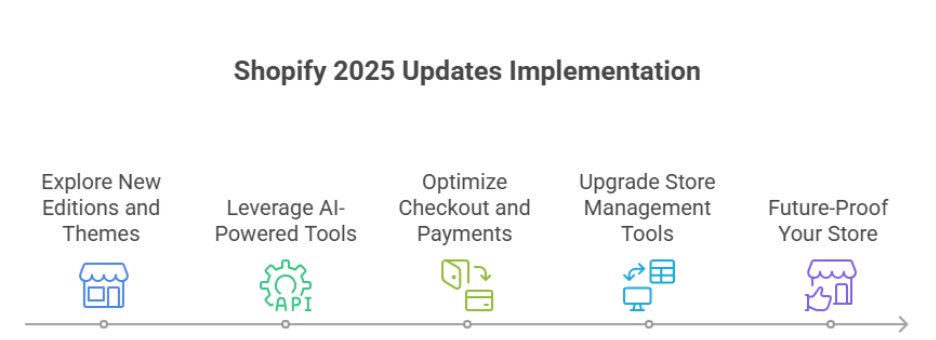
In 2025, Shopify quietly rolled out updates that improve efficiency, automation, and user experience. These changes help merchants scale and optimize their stores without complicated processes. Here’s a step-by-step breakdown.
Step 1: Explore Shopify’s New Editions and Themes
What’s new: Shopify editions and new themes provide modern, flexible storefronts.
Why it matters: Faster, visually appealing stores improve customer experience and reduce bounce rates.
Pro tip: Choose themes that balance design with speed for higher conversions.
Step 2: Leverage AI-Powered Tools
Shopify’s AI and the AI store builder help automate tasks like content creation, personalized recommendations, and product descriptions.
Impact: Saves time, reduces errors, and allows merchants to use Shopify more efficiently.
Pro tip: Test AI-generated suggestions but keep human oversight for brand voice.
Step 3: Optimize Checkout and Payments
Shopify Payments and updated checkout flows streamline the process and reduce abandoned carts.
Shop Pay improvements make transactions faster and smoother.
Pro tip: Monitor average order value and conversion metrics after implementing checkout updates.
Step 4: Upgrade Store Management Tools
POS upgrades and admin dashboard improvements simplify daily operations.
Refund processes are faster, and analytics are easier to track.
Certified Shopify Plus merchants can access scalable B2B commerce workflows.
Step 5: Future-Proof Your Store for 2026
Shopify evolves continuously with AI-driven automation, better storefront builders, and industry-aligned tools.
Merchants who use Shopify efficiently now will be ready for higher conversions and growth in the next year.
Are Shopify 2025 updates quietly holding back growth?
Even as Shopify continues to evolve in 2025, some updates may unintentionally limit growth for merchants who aren’t leveraging them effectively. Understanding these subtle limitations is key for ecommerce brands seeking to scale without unnecessary friction.
Checkout Flows – Efficiency vs. Complexity
Checkout upgrades introduced in Shopify have streamlined the purchasing process, but merchants must evaluate whether their current setup maximizes efficiency. Complex apps or workarounds can slow down checkout, increasing friction for customers. Implementing smart checkout flows ensures fewer abandoned carts while maintaining fast, secure transactions.
Onboarding and Store Setup – Time Matters
For new merchants or ecommerce companies expanding into new markets, Shopify’s onboarding and setup process is fast but sometimes requires workarounds to achieve full functionality. Missing these nuances may prevent merchants from leveraging the latest features like headless commerce or advanced personalization.
Performance and Core Web Vitals
Even with core web vitals improvements in Shopify, stores may underperform if themes or integrations aren’t optimized. Slow loading times or poorly coded apps can limit conversion potential without compromising the user experience.
Long-Term Growth Avoiding Hidden Barriers
While Shopify introduced helpful features in 2025, growth can still be unintentionally restricted if updates aren’t fully leveraged. Strategic planning, automation, and thoughtful use of personalization help merchants launch a store, improve UX, and scale without losing momentum.
Conclusion
The updates Shopify introduced in 2025 quietly reshaped ecommerce, offering tools and features that improve efficiency, automation, and scalability. However, these changes alone do not guarantee growth how you use Shopify, optimize checkout flows, leverage AI-powered tools, and maintain strong core web vitals directly impacts results.
Merchants who actively explore new Shopify editions and themes, streamline onboarding, and implement thoughtful workflows can reduce friction, improve customer experience, and achieve higher conversions. At the same time, overlooking these subtle updates or relying on workarounds may unintentionally hold growth back, even on a leading ecommerce platform.
Ultimately, success in Shopify 2025 depends on a strategic, proactive approach: combining smart use of technology, personalization, and professional development to launch a store, optimize performance, and scale without stress. By understanding and applying these quiet updates effectively, your business can stay competitive, future-proof operations, and position itself for long-term growth in 2026 and beyond.
Want expert guidance on leveraging Shopify 2025 updates for your business? Contact Integriti Studio today to get started.
Frequently Asked Questions (Shopify in 2025 the updates that quietly changed ecommerce)
Is Shopify still relevant in 2025?
Yes, Shopify remains highly relevant in 2025. Continuous updates, AI-powered tools, and enhanced e-commerce features help businesses streamline operations, optimize user experience, and scale efficiently. Brands that leverage Shopify’s integrations, analytics, and customizable workflows maintain a competitive edge in an evolving digital marketplace.
What is Shopify and how does it work in 2025?
Shopify in 2025 is a comprehensive e-commerce platform that enables businesses to create, manage, and scale online stores. It works by combining AI-driven tools, customizable themes, secure payment gateways, and seamless integrations, allowing merchants to optimize workflows, manage products, and enhance user experience efficiently.
What is the outlook for Shopify in 2025?
The outlook for Shopify in 2025 is strong, driven by AI-powered tools, enhanced integrations, and improved scalability for merchants. Businesses using Shopify can expect streamlined operations, better analytics, and more efficient workflows, positioning the platform as a leading solution for both new and established e-commerce ventures.
Why are businesses moving from Drupal to Shopify in 2025?
In 2025, businesses are moving from Drupal to Shopify for faster setup, user-friendly management, and superior e-commerce capabilities. Shopify’s AI tools, seamless integrations, and scalable workflows make online store management easier, while Drupal’s complexity and maintenance demands push site owners toward a more efficient, growth-focused platform.
Migrating a large archive of content to WordPress isn’t always as simple as hitting “import.” During a WordPress migration while moving legacy news posts to a new WordPress website, we encountered messy data—repeated featured images and broken links in WordPress, including broken external links and broken URLs. With some smart import adjustments, a careful site audit, and thoughtful custom field logic, we were able to find and fix broken links and turn a frustrating import into a fully functioning archive on the WordPress site
Issue Background
During the migration of a legacy website while moving to a new WordPress environment, two major problems appeared after the first import on the WordPress dashboard:
➡️ Duplicate Featured Images:
Multiple news posts ended up displaying the same featured image, creating issues across the WordPress site and hurting visual consistency.
➡️ Broken External Links:
A custom “external link” field caused broken links on your WordPress site and triggered errors if the URL wasn’t perfectly formatted with https://, leading to broken URLs, 404 error issues, and poor user experience.
Both issues made the WordPress website look unprofessional, negatively impacted search engine visibility, and broke user trust.
Diagnosis
We ran a detailed site audit during WordPress development to identify broken links and review the import scripts, plugins, and custom fields setup:
✔️ The duplicate images came from a scraping tool and plugin configuration that didn’t handle similar metadata properly—often assigning one image URL to multiple posts.
✔️ The broken links traced back to a strict URL validation rule rejecting plain text or incomplete URLs in the external links field, which caused broken outgoing links and dead links across internal and external links.
Resolution Steps
1️⃣ Refining the Import Script
We rebuilt the import process to fetch individual featured images for each post during the WordPress migration, ensuring unique images and preventing issues like broken internal links caused by reused metadata.
2️⃣ Image Optimization
We resized and compressed oversized images and ran an update to improve load times, performance, and overall WordPress hosting efficiency.
3️⃣ Fixing the External Link Field
By converting the external link field from strict URL validation to plain text, we eliminated errors caused by broken URLs while keeping flexibility for editors and preventing links that no longer exist.
4️⃣ Conditional Logic for Display
External links now open in new tabs as outbound references, while internal links remain native to the site, improving navigation, SEO, and user experience.
Final Outcome
With custom coding, content clean-up, and careful handling of plugins and WordPress plugins, we transformed the chaotic import into a polished news archive. Every post now displays correctly, links behave reliably, broken links on the WordPress site are removed, and the entire system works smoothly without redirect issues or crawl errors.
Need help finding and fixing broken links, managing tricky WordPress migrations, or custom post logic? 👉 Let’s Solve It → Contact Integriti Studio
Humans are wired for stories and narrative. Unlike plain information or features, stories evoke emotions, create emotional connection, leave a lasting impression, and resonate on a personal level. The power of storytelling lies in its ability to build trust and connect with your target audience. In marketing, storytelling in marketing bridges the gap between what you sell and why it matters—helping audiences relate, foster brand loyalty, and buy into your brand narrative and brand identity.
Key Elements of a Good Marketing Story
A compelling marketing story and effective storytelling approach typically includes:
A relatable character (often your customer or user-generated content)
A conflict or pain points that they face Your products or services as the solution
A transformation or outcome that paints a better future
The best compelling stories don’t focus on the brand—they focus on the customer’s journey and how the brand supports it through a narrative that resonates.
Types of Stories You Can Use
Different storytelling strategy formats can be used across marketing channels and digital marketing:
Customer success stories and testimonials
Behind-the-scenes narratives about your team or process
Origin stories that show how your brand started
Problem-solution frameworks in landing pages or emails
Use-case stories that walk readers through real-life scenarios
Making Your Story Stick
To master the art of storytelling and create meaningful connections:
Use conversational, human language
Anchor stories in real problems and outcomes
Include visual storytelling or interactive content where possible
End with a clear takeaway or CTA
At Integriti Studio, we believe the importance of storytelling in marketing remains central to all marketing efforts. Whether we’re writing a landing page, an email sequence, or a case study, our focus is on crafting a brand’s story that builds trust and loyalty, connects on a deeper level, and leaves a lasting impact—one story at a time.