Author: admin

  • How to Design a Shopify Website

    How to Design a Shopify Website

    How to Design a Shopify Website

    Introduction

    A well designed Shopify website is highly important to engage and retain customers. Whether you have launched a complete new Shopify store or revamped an existing online store, having a well structured Shopify site in context to website design ensures quite a seamless shopping experience.

    In this blog, we will highlight the very essential steps to design a Shopify website. Covering almost everything from Shopify themes selection to mobile optimization. Whether you are a total beginner or working with web designers or a Shopify website designer, this blog will help you completely understand the process of creating a very user friendly and visually appealing shopify web design or Shopify store design.

    Why Shopify for eCommerce?

    Shopify is a highly well known eCommerce platform only due to its high ease of use, extreme scalability, and unique customization options. Unlike other platforms that require highly complex codingShopify makes it easy for business owners to set up their Shopify website very quickly with very intuitive design tools and complete built-in features.

    Shopify design agency or individual developers can help highly enhance the platform’s default capabilities. However even without technical expertise, you can build your site or design a beautiful Shopify store with Shopify’s completely unique tools and resources, including no-code options and Shopify app store integrations.

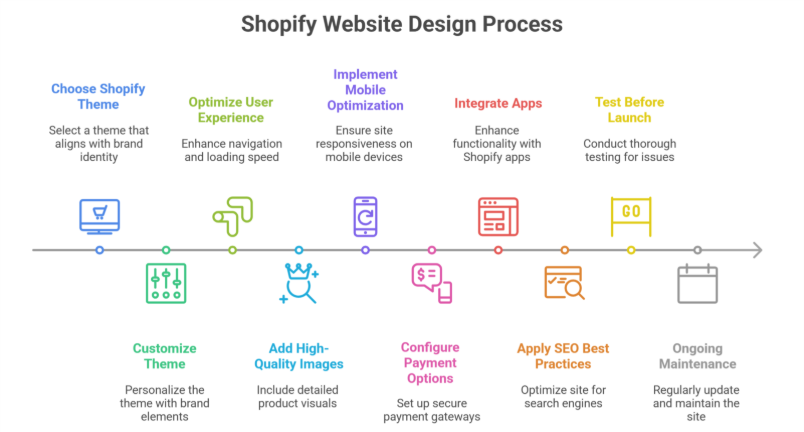
    Step-by-Step Guide to Designing a Shopify Website
    Step-by-Step Guide to Designing a Shopify Website

    1. Choosing the Right Shopify Theme

    Your Shopify themes highly determine the entire look and feel of your Shopify site. Shopify provides free and paid themes that cater to specific business needs. To select the best theme:

    • Consider your brand identity and aesthetics.
    • Ensure the theme is mobile-responsive.
    • Look for customization options.
    • Check customer reviews and ratings.
    • Test the demo version before committing.

    If you need more flexibility, hiring a professional Shopify designer or developer can help create a completely custom template tailored to your business unique requirements.

    2. Customizing the Theme

    Once you’ve chosen a theme, the next step is to customize your Shopify store. Shopify allows you to highly modify your store’s complete appearance using the theme editor. Key customizations include:

    • Changing fonts and color schemes.
    • Uploading a high-resolution logo.
    • Adjusting homepage layout and sections.
    • Adding promotional banners and sliders.
    • Configuring the navigation menu for easy browsing.
    3. High Optimizing for User Experience (UX)

    A well designed Shopify website focuses highly on user experience to keep visitors very engaged. Consider the following UX principles:

    • Clear Navigation: Ensure menus and categories are easy to understand.
    • Fast Loading Speed: Optimize images and remove unnecessary scripts.
    • Simple Checkout Process: Reduce cart abandonment by offering a quick checkout.
    • Consistent Branding: Maintain uniform colors, fonts, and styles.

    A Shopify design agency can help fine-tune these elements for maximum conversions.

    4. Adding High-Quality Images & Product Descriptions

    Your product pages are the heart of your online store. To make them effective:

    • Use high-quality images with multiple angles.
    • Include zoom functionality for better viewing.
    • Write detailed product descriptions highlighting features and benefits.
    • Add customer reviews and ratings to build trust.

    5. Implementing Mobile Optimization

    With a majority of online shoppers using mobile devices, ensuring a mobile-friendly Shopify site is quite crucial. Shopify themes are inherently responsive, but additional steps include:

    • Using a mobile-friendly menu.
    • Ensuring buttons and CTAs are easily tappable.
    • Optimizing image sizes to prevent slow loading.
    • Testing the site on multiple devices before launch.

    6. Configuring Payment & Shipping Options

    A very seamless checkout process is pretty vital for conversion rates. Shopify integrates with multiple payment gateways, allowing customers to pay via credit cards, PayPal, or many other methods. Set up:

    • Secure payment options with Shopify Payments.
    • Transparent shipping policies.
    • Tax calculations based on customer location.
    • A return and refund policy for clarity.

    7. Integrating Apps for Enhanced Functionality

    Shopify’s App Store offers quite numerous plugins to highly enhance your Shopify store functionality. Some must-have apps include:

    • SEO apps to improve search rankings.
    • Live chat support for real-time assistance.
    • Email marketing tools to boost customer engagement.
    • Abandoned cart recovery apps to increase sales.

    These tools ensure a smooth user experience and improved performance.

    8. Complete Search Engine Optimization (SEO) Best Practices

    To attract complete organic traffic, implement SEO strategies:

    • Use relevant keywords like Shopify website design services in product descriptions and meta tags.
    • Optimize URLs for readability.
    • Write informative blog posts related to your products.
    • Use alt tags for images.
    • Submit your total sitemap to Google Search Console.

    SEO plays quite a significant role in bringing visitors to your Shopify store without highly relying solely on paid ads.

    9. Testing Before Launch

    Before going live, conduct a thorough test of your Shopify site:

    • Check for broken links.
    • Ensure all pages load correctly on different devices.
    • Test the checkout process.
    • Verify email notifications.
    • Run speed tests using tools like Google PageSpeed Insights.

    Addressing these issues beforehand ensures a highly smooth launch with very minimal technical glitches.

    10. Ongoing Maintenance & Updates

    Shopify website isn’t just a one-time project. Regular maintenance helps keep your Shopify store updated and secure. Best practices include:

    • Updating plugins and themes regularly.
    • Monitoring analytics to understand customer behavior.
    • Refreshing content and product listings.
    • Conducting A/B testing for design improvements.
    • Keeping up with Shopify’s latest features.

    Conclusion

    Designing a Shopify website involves some specific steps. From choosing a Shopify theme to optimizing for UX and SEO, whether you do it totally yourself or hire a Shopify design agency. Ensuring a high user-friendly, mobile-optimized, and high performing Shopify site is quite essential for success.

    By following this guide, you can take your Shopify store to the next level and build a highly visually appealing and highly functional eCommerce website that stands out in a competitive market.

    Want your business to be seen and heard online? Explore our Services

    Frequently Asked Questions (How to Design a Shopify Website)

    Can I design a website on Shopify?

    Yes, you can design a website on Shopify. It provides an intuitive drag-and-drop editor, customizable themes, and a wide range of apps to enhance functionality. Even without coding skills, you can create a professional, responsive eCommerce site tailored to your brand and business needs.

    How to design a Shopify store step by step?

    To design a Shopify store, first sign up and choose a theme. Customize it using the editor, add products with descriptions and images, set up navigation, payment, and shipping. Enhance functionality with apps, test your store on desktop and mobile, then connect a domain and launch it live.

    How to custom design a Shopify website?

    To custom design a Shopify website, select a flexible theme, use the drag-and-drop editor to adjust layouts, colors, fonts, and sections, and add custom code if needed. Incorporate your branding, upload products, configure navigation, and use apps to enhance functionality, then preview and launch your store.

    Does Shopify require coding?

    No, Shopify does not require coding for most users. You can create and manage a fully functional online store using its drag-and-drop themes and built-in tools. Coding is only needed for advanced customizations, unique features, or modifying the underlying Liquid templates and CSS.

  • How a WooCommerce Development Company Can Build Your Brand’s Identity

    How a WooCommerce Development Company Can Build Your Brand’s Identity

    Beyond Templates: How a WooCommerce Development Company Can Build Your Brand’s Identity

    Introduction

    In today’s highly competitive eCommerce landscape, simply having an online store isn’t enough. Your store needs to totally reflect your brand identity, ensuring that customers recognize and highly trust you. While WooCommerce offers soo many ready-made themes, they may not always capture your brand’s unique personality or overall brand message. This is where a WooCommerce Development Company can make a huge difference.

    By leveraging WooCommerce development services, businesses can create totally custom, high-performance WooCommerce stores that completely align with their branding and business goals. Whether you are a startup or a well-established WooCommerce store owner, working with a WooCommerce specialist can help you a lot in going beyond standard templates and craft a store that totally stands out, reflecting your new logovisual identitybrand voice, and tone of voice.

    Why Branding Matters in WooCommerce

    Why Branding Matters in WooCommerce

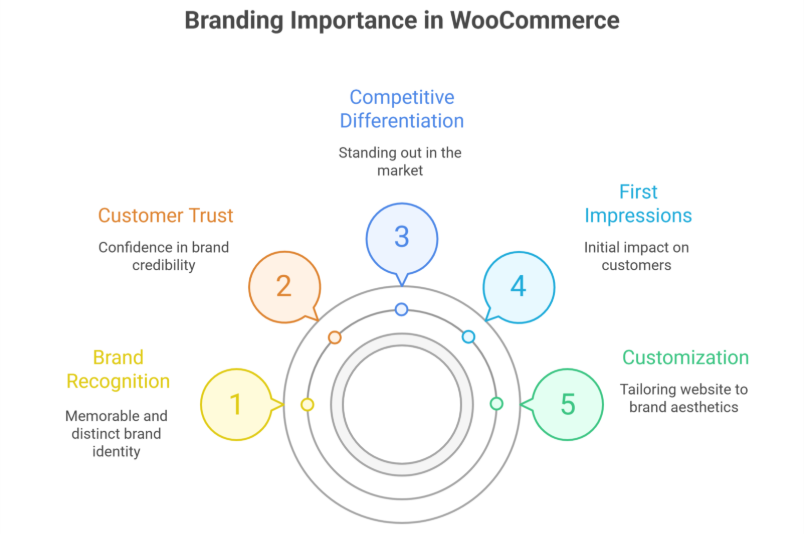
    1. First Impressions Count

    Your website is mostly the first interaction a customer has with your new brand. A very generic, template-based design can make your store look like countless others, highly reducing brand recognition. Investing in WooCommerce web development allows you to totally customize every aspect of your website. It will reflect your brand colors, typography, and refreshed color palette.

    2. Enhancing Customer Trust

    A well-branded WooCommerce store instills high confidence. Consistency in design, tone, and visuals makes a strong brand appear highly professional and very credible. Customers are more likely to buy from a store that looks polished and very trustworthy, helping brand awareness grow.

    3. Competitive Differentiation

    The e-commerce space is very saturated with businesses selling pretty similar products. Custom branding helps highly differentiate your store from competitors. Making your brand more recognizable and very memorable, allowing your overall user experience to connect with your audience.

    How a WooCommerce Development Company Builds Your Brand Identity

    1. Custom Design Tailored to Your Brand

    WooCommerce Development Company in USA or anywhere else can help design a WooCommerce store that totally aligns with your brand identity. This includes:

    • Custom layouts that highly reflect your brand’s personality.
    • Personalized fonts, colors, and graphics.
    • A user interface (UI) that completely enhances user experience (UX).

    Unlike pre-built themes, a totally custom design ensures that every visual element contributes highly to your brand story and overall brand.

    2. Personalized User Experience

    Every WooCommerce store owner has a unique audience with specific needs. A WooCommerce development company can optimize your site’s UX by:

    • Creating intuitive navigation structures.
    • Developing personalized product recommendations.
    • Implementing smooth checkout processes.

    This results in a highly engaging shopping experience, leading to higher conversion rates and reinforcing your brand identity isn’t generic.

    3. Custom Functionalities and Features

    Out-of-the-box WooCommerce themes may not always fully support the functionalities your business requires. A WooCommerce specialist can highly integrate features such as:

    • Custom product filters.
    • Subscription services.
    • Dynamic pricing strategies.
    • Advanced analytics tools.

    These tailored features ensure that your store meets both your business and the entire Woo expectations.

    4. Mobile-Optimized Experience

    More than half of online shopping happens completely on mobile devices. A WooCommerce web development team highly ensures your store is very responsive, providing a highly optimal shopping experience across devices.

    5. Seamless Third-Party Integrations

    To highly enhance branding and operations, you may need integrations such as:

    • Email marketing tools (e.g Mailchimp, Klaviyo).
    • CRM software (e.g HubSpot, Salesforce).
    • Social media feeds for high much brand engagement.

    A WooCommerce development company helps integrate these tools seamlessly, making brand communication more effective.

    6. SEO Optimization for Better Visibility

    SEO is essential for your WooCommerce product visibility and overall brand update. Developers ensure your site is totally SEO friendly, optimizing factors such as:

    • Page speed and performance.
    • Schema markup for better search engine indexing.
    • SEO-friendly URLs and meta descriptions.

    An optimized WooCommerce store improves search rankings, driving organic traffic and reinforcing brand credibility.

    The Role of Custom WooCommerce Themes

    While ready-made themes provide convenience, they often come with pretty limitations in customization and branding. A WooCommerce Development Company can build total custom themes that:

    • Align with your brand’s vision.
    • Provide better scalability and performance.
    • Ensure high security and compliance.

    Custom themes give you great control over the website’s design and functionality, allowing for a highly unique Woo identity.

    Choosing the Right WooCommerce Development Company

    Not all development services are equal. Here’s what to look for when hiring a WooCommerce development company:

    1. Experience and Portfolio

    Check if the company has experience in your industry and has worked on similar projects. A strong portfolio is a really good indicator of expertise.

    2. Client Reviews and Testimonials

    Look for client feedback and ratings. Platforms like Clutch, Upwork, or Google Reviews can be used to gauge reliability and better quality.

    3. Technical Expertise

    A good WooCommerce specialist should be skilled in:

    • Custom theme development.
    • Plugin development and integration.
    • Performance optimization.

    4. Post-Launch Support

    Your WooCommerce store will need ongoing maintenance and updates. Choose a company that offers post-launch support to ensure highly smooth operations.

    Conclusion

    Your WooCommerce store should be more than just a selling platform. It should be a true reflection of your brandbrand elements, and brand voice. A WooCommerce development company helps create a store that stands out by highly customizing design, functionality, and user experience. This aligns with your brand identity and overall user experience.

    By investing in WooCommerce development services, you highly ensure that your store not only looks very unique but also provides a pretty seamless shopping experience. Whether you’re starting totally fresh or looking to upgrade, partnering with a WooCommerce specialist can highly elevate your brand to new heights.

    Want your business to be seen and heard online? Explore our Services
     

    Frequently Asked Questions (How a WooCommerce Development Company Can Build Your Brand’s Identity)

    How to build a WooCommerce?

    To build a WooCommerce store, first install WordPress and choose a suitable theme. Then, install the WooCommerce plugin, configure store settings, add products with descriptions and images, set up payment and shipping options, and optimize for SEO. Finally, test the store before going live.

    What is WooCommerce built on?

    WooCommerce is built on WordPress, which is a PHP-based content management system. It uses MySQL for database management and relies on HTML, CSS, and JavaScript for front-end design. WooCommerce leverages WordPress’s plugin architecture, making it highly flexible, customizable, and compatible with themes and extensions.

    What is a WooCommerce developer?

    A WooCommerce developer is a specialist who creates and customizes eCommerce websites using the WooCommerce plugin on WordPress. They manage store setup, theme and plugin integration, payment and shipping configuration, and performance optimization, ensuring a smooth, secure, and fully functional online shopping experience.

    What programming language does WooCommerce use?

    WooCommerce primarily uses PHP as its core programming language since it is built on WordPress. It also relies on MySQL for database management and uses HTML, CSS, and JavaScript for front-end design and interactivity. Developers can extend functionality through PHP, hooks, and WordPress APIs.

  • How a Shopify Plus Development Agency Improves Store Performance & UX

    How a Shopify Plus Development Agency Improves Store Performance & UX

    How a Shopify Plus Development Agency Improves Store Performance & UX

    Introduction

    Running quite a success full eCommerce store isn’t just about having very great products. It’s also about delivering a very exceptional user experience (UX). Also maintaining top-notch performance. This is exactly where a Shopify Plus Development Agency will come in handy. With highly advanced features, custom development, and optimization strategies. They help brands scale efficiently and provide a very seamless shopping experience.

    In this blog, we will explore how working with a Shopify Plus Development Agency can highly enhance your store’s performance and user experience. It will ensure customers stay highly engaged and convert more often.

    What is Shopify Plus?

    Shopify Plus an enterprise level e Commerce platform is highly designed for growth of  many businesses. Not similar to standard Shopify. It offers highly enhanced customization, automation, and scalability options. In order to unlock its full potential, brands often need high expertise of a Shopify Plus Developer or a very specialized Shopify Plus Development Company.

    A Shopify Plus Development Agency provides highly technical expertise. It ensures that your store is pretty optimized for speed, performance, and seamless user experience.

    How a Shopify Plus Development Agency Enhances Store Performance

    1. Optimizing Page Speed

    A very slow loading website leads to high bounce rate and lost quite sales. A Shopify Plus Development Company helps a lot to optimize your store’s speed by:

    • Implementing lazy loading for images and videos.
    • Compressing and optimizing images without losing quality.
    • Reducing unnecessary code and scripts.
    • Utilizing Content Delivery Networks (CDNs) to highly speed up load times globally.
    • Enabling browser caching to improve return visitor experience.
    • Minifying CSS, JavaScript, and HTML files to highly enhance load times.
    • Optimizing Shopify’s Liquid code for total efficiency.

    2. Customizing Shopify Plus for Performance

    A Shopify Plus Developer can fine-tune your store’s architecture for better performance by:

    • Creating custom themes that eliminate bloated code.
    • Optimizing server response times.
    • Improving database queries for faster backend operations.
    • Enabling progressive web app (PWA) features for better mobile performance.
    • Ensuring third-party apps do not slow down your store.
    • Enhancing API performance for smooth integrations.

    3. Ensuring Mobile Optimization

    With mobile shopping on the high rise. Ensuring a very seamless mobile experience is quite crucial. A Shopify Plus Development Agency will:

    • Implement mobile-first design principles.
    • Optimize touch elements and navigation for smaller screens.
    • Reduce excessive pop-ups and intrusive elements.
    • Improve checkout flows for effortless mobile transactions.
    • Ensure pages load within three seconds for mobile users.
    • Develop Accelerated Mobile Pages (AMP) for quite faster load times.

    How a Shopify Plus Development Agency Improves UX

    1. Enhancing Navigation & Site Structure

    A well-structured website improves usability and keeps visitors engaged. A Shopify Plus Development Company can:

    • Design intuitive navigation menus.
    • Optimize category pages for easier product discovery.
    • Implement AI-driven search functionality.
    • Create a user-friendly mega menu for large inventories.
    • Ensure breadcrumb navigation for better user journey tracking.
    • Improve internal linking to enhance product discoverability.

    2. Improving Checkout Experience

    A lengthy or complicated checkout process leads to cart abandonment. A Shopify Plus Developer can simplify it by:

    • Enabling one-click checkout.
    • Integrating multiple payment gateways.
    • Auto-filling customer details for returning buyers.
    • Reducing form fields to the essentials.
    • Implementing trust signals like secure payment icons and guarantees.
    • Offering post-purchase upsell opportunities.

    3. Personalization & Customer Engagement

    Personalization plays a key role in modern eCommerce UX. A Shopify Plus Development Agency can enhance engagement by:

    • Implementing AI-driven product recommendations.
    • Enabling dynamic content based on customer behavior.
    • Using chatbots and live chat for quite real-time support.
    • Automating follow-up emails and abandoned cart recovery messages.
    • Creating customer segments for targeted marketing campaigns.

    4. Enhancing Security & Trust

    Customers are more likely to shop on secure websites. A Shopify Plus Development Company ensures top-tier security by:

    • Implementing SSL certificates for encrypted transactions.
    • Enabling fraud detection tools.
    • Ensuring compliance with PCI DSS security standards.
    • Providing secure customer data management.
    • Regularly updating and patching possible security vulnerabilities.

    Why Work with a Shopify Plus Development Agency?

    While Shopify Plus offers powerful features, maximizing them requires expertise. A Shopify Plus Development Agency ensures your store remains competitive by:

    • Handling complex customizations that go beyond built-in features.
    • Providing continuous maintenance to prevent performance issues.
    • Implementing data-driven strategies for optimization.
    • Offering dedicated support to resolve technical challenges.
    • Scaling your store efficiently as your business grows.
    • Integrating third-party applications very seamlessly with your Shopify Plus store.
    • Creating automation workflows to highly improve operational efficiency.

    Conclusion

    A Shopify Plus Development Agency plays a quite vital role in enhancing your store’s performance and user experience. From much faster page speeds and mobile optimization to highly improved navigation and checkout flows. Their expertise helps you provide quite a seamless shopping journey.

    If you’re looking to highly scale your eCommerce business. Partnering with Shopify Plus Development Company quite ensures you stay way ahead in today’s highly competitive market.

    Want your business to be seen and heard online? Explore our Services
  • How a Shopify App Development Agency Can Solve Your eCommerce Pain Points

    How a Shopify App Development Agency Can Solve Your eCommerce Pain Points

    How a Shopify App Development Agency Can Solve Your eCommerce Pain Points

    Introduction

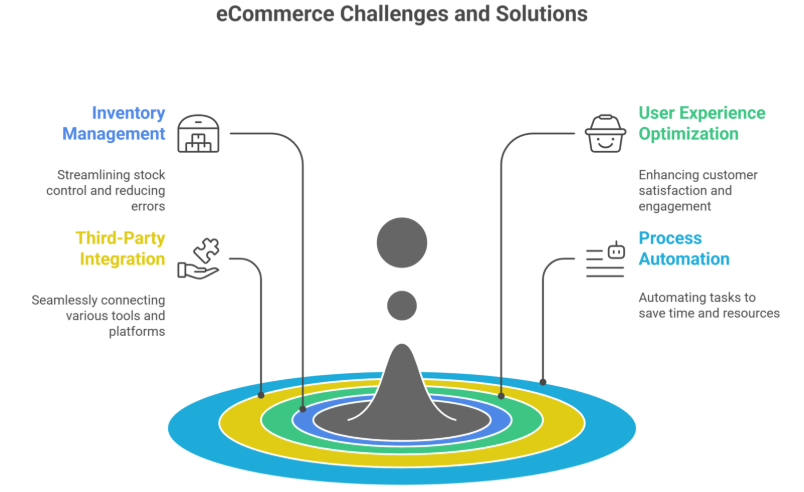
    Running a complete online store on Shopify comes with many immense opportunities. However, it also presents quite some challenges. From managing inventory and highly optimizing user experience to integrating third party tools and automating processes. Business owners often face hurdles that slow down growth on their ecommerce platforms and Shopify stores.

    This is where a Shopify App Development Agency or a Shopify development partner will come in. These agencies highly specialize in creating custom Shopify apps and solutions tailored to a store’s unique business needs. Helping businesses overcome bottlenecks, streamline operations, and scale effectively to achieve ecommerce success.

    In this blog, we will explore the common eCommerce challenges and Shopify merchant pain points. These problems can be solved by a Shopify app development agency smartly with custom development solutions.

    Common eCommerce Pain Points & Their Solutions

    Common eCommerce Pain Points & Their Solutions

    1. Limited Store Functionality

    While Shopify offers quite a huge range of built-in features, many business owners require advanced features that aren’t available by default. A Shopify app developer or app development agency can create custom apps to:

    • Add advanced filtering and search options.
    • Develop custom pricing models for wholesale or B2B customers.
    • Build unique checkout experiences that fit business needs.
    • Integrate subscription based models for many recurring purchases.

    With a tailored app, your ecommerce store can function exactly the way you need it to, highly improving the overall shopping experience and increasing average order value.

    2. Slow & Inefficient Order Management

    Managing orders efficiently is crucial for customer satisfaction and business growth. A Shopify app development agency can automate and optimize order processes by:

    • Creating automated invoicing systems.
    • Developing custom dashboards for real-time order tracking.
    • Highly Integrating order fulfillment solutions with third party logistics (3PL) services.
    • Enabling bulk order processing to save time and reduce manual effort.

    This results in faster deliveries, fewer errors, and improved efficiency.

    3. Integration Issues with Third-Party Tools

    Many businesses rely highly on external tools such as CRM, ERP, accounting software, and marketing platforms. However, integrating these third-party apps with Shopify can be very complex. A Shopify app development company can:

    • Seamlessly connect Shopify with inventory management and POS systems.
    • Sync customer databases with email marketing platforms.
    • Develop real-time data synchronization between Shopify and third-party services.
    • Ensure all integrations are stable and secure.

    These integrations streamline business operations and provide a unified workflow, enabling data-driven decision-making.

    4. Poor User Experience (UX) & Design Limitations

    A cluttered or confusing store layout can drive potential customers away. A Shopify design agency enhances user experience (UX) by:

    • Creating custom, responsive themes tailored to brand aesthetics.
    • Optimizing page speed and mobile performance.
    • Implementing user friendly navigation for much better product discovery.
    • Highly personalizing the shopping journey with total AI driven recommendations.

    A well designed store leads to much increased engagement and pretty high conversions.

    5. Cart Abandonment & Low Conversion Rates

    Cart abandonment is a very major issue for ecommerce businesses. A Shopify app development agency can help reduce drop-offs by:

    • Developing one-click checkout solutions.
    • Implementing exit-intent popups with discounts.
    • Creating automated abandoned cart recovery emails.
    • Integrating multiple payment gateways for a highly seamless transaction experience.

    These improvements make the checkout process very smooth and completely hassle free. This leads to higher conversions.

    6. Limited Analytics & Data Insights

    Without proper analytics, it’s quite hard to make data-driven decisions. A Shopify app development company can:

    • Develop custom analytics dashboards for sales tracking.
    • Implement heatmaps and user behavior tracking.
    • Enable AI driven demand forecasting for much better inventory management.
    • Integrate Shopify with Google Analytics and other highly advanced tools.

    These insights help businesses optimize their strategies and improve performance.

    7. Scaling & Performance Issues

    As your Shopify store grows, handling increased traffic and transactions can become challenging. A Shopify app development agency ensures your store remains scalable by:

    • Optimizing database queries for faster load times.
    • Implementing server-side caching for better performance.
    • Enabling cloud-based solutions for high-traffic handling.
    • Creating multi-store setups for international expansion.

    This ensures a seamless shopping experience even during peak sales periods.

    8. Security & Compliance Concerns

    With rising cybersecurity threats, keeping your Shopify store secure is a top priority. A Shopify development agency enhances security by:

    • Implementing SSL encryption and PCI compliance.
    • Enabling two-factor authentication (2FA) for store access.
    • Securing customer payment information with tokenization.
    • Regularly updating apps and security patches.

    A secure store builds trust and protects both business and customer data.

    Why Work with a Shopify App Development Agency?
    1. Expertise in Shopify Ecosystem

    A Shopify app development agency understands Shopify’s architecture, APIs, and best practices. This ensures that your store operates efficiently and leverages the full potential of the Shopify app store.

    2. Custom-Tailored Solutions

    Instead of relying on generic third-party apps, an agency develops custom solutions based on your business requirements.

    3. Ongoing Support & Maintenance

    A Shopify app development company offers continuous support, regular updates, and improvements to keep your store running smoothly and ensure customer satisfaction.

    4. Time & Cost Efficiency

    Custom-built apps eliminate the need for multiple third-party apps, reducing development costs and improving operational efficiency in the long run.

    Conclusion

    A Shopify app development agency can solve many critical ecommerce challenges. From improving store functionality and order management to enhancing user experience, conversion rates, and security, custom Shopify app development empowers businesses to scale efficiently.

    If you are looking to take your Shopify store to the very next level. Partnering with a Shopify development agency will highly ensure you stay pretty competitive in the ever evolving eCommerce landscape.

    Want your business to be seen and heard online? Explore our Services
     

    Frequently Asked Questions (How a Shopify App Development Agency Can Solve Your eCommerce Pain Points)

    What are the pain points of Shopify?

    Shopify’s main pain points include high app and transaction costs, limited design flexibility without coding, dependency on third-party apps, slower load speeds with heavy plugins, and challenges in SEO customization. Scaling can also get expensive as advanced features often require paid apps or higher-tier plans.

    What does a Shopify developer do?

    A Shopify developer builds, customizes, and optimizes Shopify stores. They handle theme development, app integrations, speed improvements, custom features, and bug fixes. They ensure the store looks professional, functions smoothly, converts well, and aligns with the brand’s goals while providing ongoing technical support.

    What are the skills required for Shopify developer?

    A Shopify developer needs strong skills in HTML, CSS, JavaScript, and Liquid for theme customization. They should understand UX/UI, Shopify APIs, app integrations, site speed optimization, and eCommerce best practices. Problem-solving, debugging, and knowledge of SEO and conversion-focused design are also essential.

    How difficult is Shopify development?

    Shopify development is moderately difficult. Basic setup is easy, but advanced customization requires strong coding skills in Liquid, JavaScript, HTML/CSS, and API handling. Challenges arise with complex features, performance optimization, and integrating third-party apps. With practice, developers can build highly customized, high-converting stores.

  • How To Use Responsive Web Design for Your Ecommerce Store in 2025: A Future-Proof Guide

    How To Use Responsive Web Design for Your Ecommerce Store in 2025: A Future-Proof Guide

    How To Use Responsive Web Design for Your Ecommerce Store in 2025: A Future-Proof Guide

    Picture this-A customer browses your Shopify store on their phone while waiting for their coffee. Your product images load instantly, buttons are thumb-friendly, and checkout takes fewer taps than ordering a latte. By the time their name is called, they’ve bought two items and tagged your brand on Instagram.  

    This isn’t just convenience—it’s 2025’s make-or-break standard for ecommerce success. With mobile shoppers projected to drive 75% of global online sales by next year (Statista), responsive web design (RWD) is no longer optional. For Integriti’s clients, it’s the secret weapon turning casual browsers into loyal buyers. Let’s unpack how to future-proof your store today.  

    Discover more

    Why 2025 Demands a Mobile-First Overhaul (Hint: It’s Not Just Phones)

    Google’s 2024 “Mobile-First Evolution” update made one thing clear: Sites not optimized for all devices will vanish from search results. But “responsive” in 2025 means more than fitting screens—it’s about anticipating how, where, and why people shop:  

    • 73% of shoppers abandon sites that feel “clunky” on their device (Baymard Institute)  
    • AI-driven layouts now adjust to ambient light and user grip patterns  
    • Voice commerce is exploding, with 45% of Gen Z using smart speakers to shop (Adobe)

    5 Game-Changing Responsive Design Tactics for 2025

    1. AI-Powered “Self-Healing” Layouts

    Forget manual tweaks. Tools like Google’s Auto-RWD now:  

    • Fix overlapping elements in real-time  
    • Adjust font sizes based on reading distance (hello, smartwatches!)  
    • Prioritize “tap zones” for left- vs. right-handed users
    2. Haptic Feedback Menus That Guide Thumbs

    The 2025 shopper expects tactile responses:  

    • Vibrating CTAs confirm button presses  
    • Pressure-sensitive scrolling (light vs. hard swipes)  
    • Edge-swiping menus inspired by TikTok’s UX
    3. 6G-Optimized Media That Loads in 0.2 Seconds

    With 6G rolling out globally, shoppers expect lightning speed:  

    • Context-aware images (show winter coats if local temp drops)  
    • Auto-degrading video quality during spotty connections  
    • Predictive caching that pre-loads products you’ll likely view
    4. Voice-First Navigation for Hands-Free Shopping

    “Hey Shopify, find eco-friendly yoga mats under $50”:  

    • Voice-search hotspots in headers  
    • Audio product descriptions for accessibility  
    • Tone-analysis suggesting items based on vocal stress cues
    5. “Invisible” Checkouts That Feel Like Magic

    2025’s gold standard? Checkouts that:  

    • Auto-fill details via biometric scans (no more typing CVV codes)  
    • Offer dynamic payment options (Apple Pay on iOS, GPay on Android)  
    • Use device tilt to confirm orders (tilt right = purchase)

    The Hidden Costs of Outdated RWD (And How to Avoid Them)

    PSA: Google’s 2025 Core Web Vitals will penalize sites that:  

    • Take >0.5 seconds to respond to taps  
    • Lack foldable/flexible screen support  
    • Ignore “ambient commerce” (shopping via AR glasses, car dashboards)

    Scary Stat: 81% of shoppers distrust sites that fail basic mobile tests (McKinsey).  

    Your 3-Step 2025 Responsive Design Checklist
    1.Audit Ruthlessly
    1. Test on emerging devices: Samsung Rollable Phones, Meta VR headsets  
    1. Simulate 6G speeds with Cloudflare’s new testing suite  
    1. Track “rage clicks” (frustrated multiple taps) via Hotjar
    2.Prioritize Profit-Boosting Fixes
    1. First: Checkout flow & core product pages  
    1. Then: Blog/media layouts  
    1. Finally: Experimental features (AR try-ons)
    3.Prepare for the Next Shift
    1. Bookmark Google’s 2025 RWD guidelines (updated quarterly)  
    1. Invest in AI tools that auto-adapt to new devices  
    1. Train staff on “anticipatory design” principles

    “But Wait—My Desktop Traffic Still Matters!”

    Here’s the kicker: 2025’s best-performing sites use device-agnostic design:  

    • Desktops get keyboard shortcuts (Ctrl + “/” opens search)  
    • Tablets activate stylus hover menus  
    • TVs show 3D product zooms during ads

    3 RWD Myths Debunked (Stop Believing These!)

    “Mobile-first means mobile-only”
    → Truth: 2025’s RWD is context-aware. Your site should:
    • Enlarge buttons in cold weather (gloves!)
    • Simplify layouts during peak commute hours

    “All devices get the same content”
    → Truth: Smart RWD delivers tailored experiences:

    • Show video demos on Wi-Fi
    • Display text summaries on cellular

    “Shopify handles it automatically
    → Truth: Shopify provides tools, not strategy.  

    Need help with Shopify website design and development? Integriti’s team of Shopify website designers are your best bet!

    Click here for Shopify support and maintenance

    How to Future-Proof Any Site (Shopify or Not)

    Test on 2025’s devices (not just iPhones):

    • Meta Quest VR headsets
    • BMW’s in-car browsers
    • Samsung’s Flex In & Out laptops
    Adopt AI-powered RWD tools:
    • Adobe Firefly: Auto-generates responsive images
    • Google’s Aurora: Predicts device trends (e.g., surge in AR shopping)
    Audit quarterly:
    • 67% of sites break after adding new features (WebAIM)
    The Bottom Line

    Responsive web design is non-negotiable for every website—Shopify, WordPress, or custom-coded. The difference? Shopify gives you a head start; other platforms require more heavy lifting.  

    Here’s the kicker: 58% of shoppers won’t recommend brands with poor mobile experiences (2024 Moz data). In 2025, shoppers won’t just prefer responsive sites—they’ll demand them. But with Integriti’s RWD solutions, you’re not just keeping up. You’re staying 10 steps ahead.  

    Claim your spot with Integriti

    SEO Optimization

  • How To Recover Your Traffic After a Web Migration (2025)

    How To Recover Your Traffic After a Web Migration (2025)

    How To Recover Your Traffic After a Web Migration (2025)

    Introduction

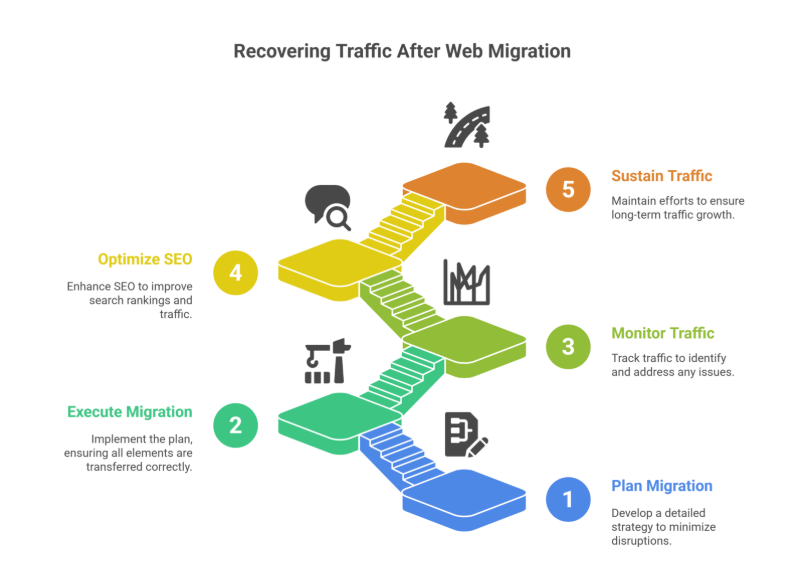
    Migrating a website to a completely new platform or domain can be a highly daunting task. If its not handled very properly, it could result in quite a significant drop in organic traffic. Many businesses and store owners experience this quite often after moving to Shopify or any other platform. However, with a well-planned strategy, you can quickly recover your traffic after a web migration and even highly improve your search rankings.

    This blog will walk you through the key steps to regain and highly sustain your lost traffic. It will also ensure a pretty seamless transition to your new website, improving your search visibility and rankings and traffic.

    Understanding Web Migration and Its Impact

    Understanding Web Migration and Its Impact

    A web migration involves major changes to a website, such as:

    • Moving to a new domain
    • Switching to a new CMS (e.g., moving to Shopify)
    • Redesigning site structure and URLs
    • Implementing HTTPS

    Search engines take time to re-index your pages, and if migration is not done correctly, it can lead to broken links, missing pages, and SEO issues—ultimately reducing organic search traffic and causing a drop in organic traffic.

    Steps to Recover Traffic After Migration

    1. Conduct a Pre-Migration Audit

    Before making any major changes, you have to assess your current site’s total performance. Tools like Google Analytics, Google Search Console, and SEMrush help a lot in analyzing traffic sources, top-ranking pages, and backlinks.

    Checklist for pre-migration audit:

    • Identify top-performing pages
    • Analyze traffic patterns
    • Export metadata (title tags, meta descriptions, URLs)
    • Check backlinks and referring domains

    This data will serve as a benchmark after the migration to measure progress and help you recover your organic traffic.

    2. Set Up Proper Redirects

    One of the biggest reasons for traffic loss after migration is broken links. Ensure that every old URL correctly redirects to its new counterpart using 301 redirects, avoiding redirect chains.

    Steps to implement proper redirects:

    • Map old URLs to new URLs
    • Use 301 redirects to maintain SEO value
    • Test redirects using tools like Redirect Checker

    Avoid 404 errors, as they can very badly impact user experience, SEO rankings, and cause a drop in traffic due to web migration.

    3. Submit Updated Sitemaps to Google

    After migrating, tell search engines about your new website structure. Generate and submit an updated XML sitemap in Google Search Console, including all important pages and new URLs.

    How to do it:

    1. Generate some new sitemap using highly effective tools like Yoast SEO (for WordPress) or Shopify’s built-in sitemap feature.
    1. Submit completely updated sitemap to Google Search Console.
    1. Monitor indexing progress in Google Search Console’s Coverage Report.

    4. Monitor Google Search Console for Errors

    Google Search Console is your best friend after a migration. Regularly check for issues like:

    • Indexing errors
    • Crawl issues
    • 404 errors
    • Mobile usability issues

    Fixing these errors quickly ensures faster recovery of your lost traffic and improved rankings.

    5. Retain and Reclaim Backlinks

    Backlinks are quite crucial for SEO. However, a migration can cause many possible backlinks to break. Losing backlinks can result in a high drop in domain authority, SEO value, and organic traffic.

    Steps to retain backlinks:

    • Identify top-linked pages using tools like Ahrefs or Moz.
    • Reach out to site owners and request them to update links.
    • Set up the proper 301 redirects to always maintain link equity.

    6. Optimize Your Content for SEO

    Ensure your content is highly optimized for search engines by:

    • Keeping meta titles and descriptions intact
    • Using SEO-friendly URLs
    • Maintaining keyword density and placement
    • Improving page speed and mobile responsiveness

    For Shopify migration, leverage Shopify’s SEO features like highly customizable meta tags, alt text, and completely automatic sitemaps to help recover lost traffic.

    7. Improve Internal Linking Structure

    Internal links help search engines crawl and understand your website efficiently. Post-migration, update all internal links to reflect the new URL structure.

    Best practices:

    • Link from high-authority pages to new pages
    • Use descriptive anchor text
    • Fix broken internal links

    8. Leverage Paid Ads and Social Media

    While waiting for your complete organic traffic to recover, consider using Google Ads, Facebook Ads, or Instagram Ads to drive traffic due to migration. Actively promote the new site on social media platforms to inform your followers and customers about the migration.

    9. Monitor Performance and Make Adjustments

    Track your website’s performance post-migration using Google Analytics, Google Search Console, and other SEO tools.

    Key metrics to monitor:

    • Organic traffic trends
    • Bounce rate and session duration
    • Indexed pages in Google Search Console
    • Keyword rankings

    If traffic is not recovering as expected, identify problem areas and adjust your strategy accordingly.

    10. Seek Professional Help if Necessary

    If you’re struggling to recover traffic after migration, consult with SEO consultants or Shopify migration specialists. It can help identify and resolve technical SEO and optimization issues quite effectively.

    Conclusion

    Web migrations can be tricky, but with careful planning and execution, you can recover your traffic after a Shopify migration, website migration, or any other platform transition. By implementing proper redirects, optimizing content, reclaiming backlinks, and monitoring performance post-migration, you can minimize traffic loss and even improve your site’s overall visibility, rankings and traffic.

    With patience and a structured recovery plan, your website can regain its rankings, recover lost traffic, and thrive post-migration.

    Frequently Asked Questions (How To Recover Your Traffic After a Web Migration (2025)

    How to fix website traffic?

    To fix website traffic, first analyze analytics to identify drop points. Improve SEO with relevant keywords, optimize site speed, and enhance mobile experience. Publish high-quality content consistently, use social media and email marketing, and build backlinks. Regularly monitor performance and adjust strategies for better traffic results.

    Why 96.55% of content gets no traffic from Google?

    96.55% of content gets no traffic from Google because it lacks proper SEO, targets low-demand or highly competitive keywords, has poor quality or outdated content, and fails to meet user intent. Without optimization, promotion, and backlinks, even published content remains invisible in search results.

    Which is the easiest way to get traffic to a brand new site?

    The easiest way to get traffic to a brand-new site is through social media promotion, sharing content in relevant communities, and leveraging paid ads like Google or Facebook Ads. Guest posting, email outreach, and influencer collaborations can also drive initial visitors quickly while building credibility.

    How to transfer SEO from one website to another?

    To transfer SEO to a new website, set up 301 redirects from old URLs to corresponding new URLs, migrate all high-quality content, update internal links, and submit a new sitemap to search engines. Maintain metadata, backlinks, and structured data to preserve rankings and traffic during the transition.


  • Experience a New Era in WordPress Development with Studio Sync

    Experience a New Era in WordPress Development with Studio Sync

    Experience a New Era in WordPress Development with Studio Sync

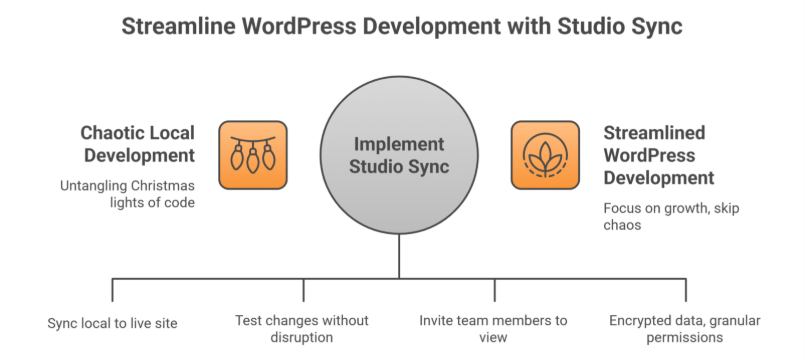
    Let’s face it: Local WordPress development has always felt a bit like untangling a box of Christmas lights. You tweak a plugin here, adjust a theme there, and pray nothing breaks when you push changes live. But what if you could skip the chaos and sync your local WordPress site or local studio site with your live WordPress.com site without the migraines?

    Enter WordPress Studio Sync, the long-awaited development app that’s turning heads in the developer community. Launched on August 15, 2024, this new feature isn’t just another shiny gadget—it’s solving real problems for agencies, entrepreneurs, and businesses juggling multiple WordPress.com sites.

    But here’s why you should care

    Whether you’re a DIY blogger or a Fortune 500 company, Studio Sync streamlines your development workflow so you can focus on growth. And if you’re thinking, “Sounds great, but I’d rather leave the tech stuff to pros,” better stick around. We’ll show how Integriti Studio’s WordPress maintenance and support services turn this tool into your secret weapon.

    Get Started

    What Makes Studio Sync Different? (Spoiler: It’s Not Just for Coders)

    What Makes Studio Sync Different? (Spoiler: It’s Not Just for Coders)

    Studio Sync lets developers build locally and test sites in a local development environment while seamlessly pushing or pulling changes to a live WordPress.com site or staging site. Think of it as a bridge between your computer and the cloud no more manual uploads, broken plugins, or “it worked on my machine” headaches.

    For agencies and solo developers alike, this means:  

    • Faster workflows: Test design changes, plugins, or custom code without disrupting your live site.  
    • Real-time collaboration: Invite team members or clients to view changes in real time—perfect for agencies juggling 10+ projects.  
    • Built-In Security: All synced data is encrypted, and permissions are granular (e.g., you can let a designer access themes but not plugins). Automatic syncing minimizes human mistakes during deployment.

    But here’s the kicker: Studio Sync integrates with popular page builders like Elementor and Bricks. Translation? Even if you’re using a WordPress website builder for your online store, you can test new product layouts locally before going live.

    4 Hidden Studio Sync Features You’ll Wish You Knew Sooner

    1. “Undo” Button for Live Sites (Yes, Really)

    Accidentally deleted a critical plugin during testing? Studio Sync’s version rollback lets you revert to any previous state in 2 clicks. Pair this with Integriti Studio’s WordPress maintenance service—which includes daily backups of your local WordPress site and staging site—and you’ve got a disaster-proof safety net.

    2. Client Demo Mode

    Agencies, listen up: Studio Sync lets you create shareable, password-protected live preview links. No more exporting dummy sites or worrying about clients seeing half-baked changes.

    3. Performance Analytics Built-In

    Before syncing changes, Studio Sync generates a report on:  

    • Page load speed impact  
    • Plugin conflicts  
    • Mobile responsiveness

    4. Multi-Site Management

    Managing 5+ WordPress Studio sites or local studio sites? Studio Sync’s dashboard lets you toggle between projects like switching Netflix profiles. Overwhelmed? Integriti’s WordPress site maintenance services handle the upkeep, so you can focus on strategy.

    Sign up now  

    Studio Sync vs. Competitors: Why It’s Winning Over Agencies

    ‘Local’ by Flywheel and DevKinsta have dominated the local WordPress development space for years. But since Studio Sync’s launch, 42% of agencies surveyed by WordPress Tavern say they’re switching—here’s why:

    Pain Point

    Traditional Tools

    Studio Sync’s Solution

    Client Feedback Loops

    Endless email threads

    Live preview links with comment threads

    Security

    Self-managed SSL certificates

    Auto-renewing HTTPS for all test sites

    Onboarding New Developers

    2+ hours per team member

    Role-based access in <10 minutes

    Cost

    $20–$50/month per user

    Free for WordPress.com users

    5 Common Studio Sync Mistakes

    1. Overloading Local Environments  

    Mistake: Testing 10+ plugins at once.  

    1. Ignoring Mobile Previews  

    Mistake: Assuming desktop edits will look fine on phones.  

    1. Forgetting to Limit User Access  

    Mistake: Giving clients full admin rights in demo mode.  

    1. Skipping Post-Sync Backups  

    Mistake: Assuming Studio Sync’s version control is enough.  

    1. Underestimating SEO Impact  

    Mistake: Not checking how changes affect metadata or alt tags.  

    How Integriti Studio Enhances Your Studio Sync Experience

    While Studio Sync simplifies local WordPress development, even the best tools need expert hands. Here’s where Integriti Studio’s custom WordPress development services shine:

    • Pre-Launch Audits: Before syncing your site live, we’ll check for speed issues, broken links, or security gaps.  
    • Post-Sync Maintenance: Our WordPress site maintenance services include nightly backups, malware scans, and performance optimizations.  
    • Custom Plugins & Themes: Studio Sync works smoothly with bespoke solutions—no off-the-shelf compromises.

    Let’s connect

    “But I’m Not a Developer Can I Still Use Studio Sync?”

    Absolutely! Studio Sync’s intuitive interface is designed for users of all skill levels. However, if terms like “GitHub,” “Git integration,” “staging environment,” or “local WordPress site” make your head spin, Integriti Studio’s WordPress website maintenance team can handle the technical heavy lifting.

    Pro tip: Pair Studio Sync with our WordPress maintenance and support services for a bulletproof workflow:  

    1. Draft changes locally.  
    1. Let us review and optimize them.  
    1. Sync and deploy with confidence.

    Learn more

    What’s Next for Studio Sync?

    WordPress.com’s CTO hinted at these 2024 Q4 updates:  

    • AI-Powered Conflict Detection: Get alerts like, “This plugin update broke 12% of sites last week—proceed?”  
    • E-Commerce Mode: Test payment gateways and inventory changes locally without risking real transactions.  
    • Agency Tier: Bulk user management and custom SLAs for large teams.

    Ready to Ditch Development Drama?

    Studio Sync is a leap forward, but let’s be real you didn’t start your business to babysit software updates. That’s where Integriti Studio comes in.

    Whether you need a custom WordPress development services partner to build your dream WordPress studio site or a WordPress maintenance support team to keep it safe, we’ve got your back.

    Don’t let local development hassles slow you down.

    Frequently Asked Questions (Experience a New Era in WordPress Development with Studio Sync)

    What skills should a WordPress developer have?

    A WordPress developer should have strong PHP, HTML, CSS, and JavaScript skills, plus experience with MySQL and WordPress themes/plugins. They should know responsive design, SEO basics, website performance optimization, security best practices, and version control (Git). Problem-solving and communication skills are also essential.

    Why are people moving away from WordPress?

    People are moving away from WordPress due to concerns about speed, security vulnerabilities, and frequent plugin conflicts. Modern website builders offer easier drag-and-drop design, lower maintenance, and better scalability. Additionally, some prefer lightweight, headless, or static-site solutions for improved performance and flexibility.

    How to create a WordPress development environment?

    To create a WordPress development environment, install a local server like XAMPP, WAMP, or Local. Set up a database, download WordPress, and configure wp-config.php. Use a code editor, enable debugging, and integrate version control like Git to manage changes efficiently during development.

    How long does it take to develop a WordPress theme?

    Developing a WordPress theme typically takes 2 to 6 weeks, depending on complexity and customization. A simple theme with basic features can be completed in a couple of weeks, while advanced themes with custom designs, plugins, and functionality may require over a month, including testing and revisions.

  • Data Migration to Shopify: A Comprehensive Checklist

    Data Migration to Shopify: A Comprehensive Checklist

    Data Migration to Shopify: A Comprehensive Checklist

    Making the move to Shopify as your e-commerce platform might highly transform your online business. Shopify is quite full of unique features, scalable, and it is an easy-to-use platform that makes store management feasible and gives you strong tools to increase sales. But moving the entire data from your store to Shopify is a quite crucial procedure that has to be very carefully planned and carried out. A thorough shopify migration checklist is included in this article to guarantee a very seamless and easy Shopify data migration process. This migration checklist helps ensure no data loss and a smooth transition for your new Shopify store.

    Why Is Data Migration to Shopify Important?

    Moving your data is only one aspect of migrating to Shopify; another is making sure your ecommerce store to Shopify can run very effectively on a platform designed specifically for success. A successful transfer maintains the high integrity of your online store’s operations while preserving the important customer dataproduct data, and the entire purchase history.

    A well-conducted Shopify migration totally guarantees that your business and customer experience will be very minimally disrupted, regardless of whether you’re switching from WooCommerce, Magento, BigCommerce, or another old platform. Using a structured migration process and possibly a migration expert can further reduce risks in any platform migration.

    Pre-Migration Checklist

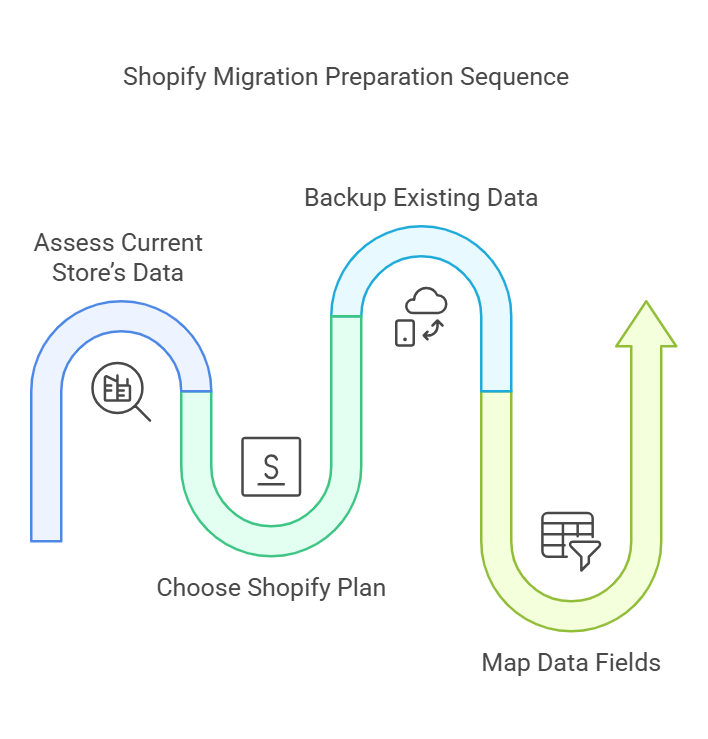
    1. Assess Your Current Store’s Data

    Before initiating the migration process, take stock of your current e-commerce store. Identify all the data you want to migrate, including:

    • Product information (titles, descriptions, images, prices)
    • Customer data (names, emails, purchase histories)
    • Order history and transaction details
    • Website content (blogs, policies, FAQs)

    This stage guarantees that during the migration to Shopify, no important information is missed. Additionally, it is an excellent time to eliminate any unnecessary or obsolete data and audit the store assets and product pages.

    2. Choose the Right Shopify Plan

    Shopify offers various pricing plans tailored to different business needs. Before migration, review Shopify’s features and choose a plan that aligns with your store’s requirements. Consider factors such as product inventory size, sales volume, and advanced features like analytics, reporting, and shopify admin tools.

    3. Backup Your Existing Data

    Backing up your store’s data is a non-negotiable step. In case anything goes wrong during the data transfer, a backup ensures you have a safety net to restore your data. Many platforms offer built-in backup tools, third-party apps from the Shopify App Store, or tools like Cart2Cart or LitExtension to simplify the csv import process.

    4. Map Data Fields

    Shopify may use different naming conventions or field structures compared to your current platform. To ensure data import is accurate, create a mapping document that aligns your current data fields (e.g., product titles, SKU numbers, and images) with Shopify’s format. Consider using migration apps to reduce manual work.

    Migration Checklist

    1. Export Data from Your Current Platform

    Export all relevant data from your existing ecommerce business platform. Most platforms allow you to download data as CSV files, which can then be formatted and imported into Shopify. Be sure to export:

    • Products and categories
    • Customers and user accounts
    • Orders and transactions

    2. Import Data into Shopify

    Once your complete data is properly formatted, you can easily upload it using third-party software like Matrixify, Shopify’s built-in shopify admin tools, or migration apps. Shopify offers very detailed instructions for importing data to make sure you never overlook any important details, ensuring a successful Shopify migration.

    3. Test the Imported Data

    After the initial import, thoroughly test your new Shopify store to ensure the data from your current platform has been transferred accurately. Review:

    • Product listings and images
    • Customer profiles and order histories
    • Website navigation and categories

    Testing allows you to identify and fix any errors before the store goes live.

    4. Set Up Payment and Shipping Options

    During the shopify migration process, configure shopify payments, payment gateways, and shipping zones in your Shopify store. Ensure that your store supports all relevant payment methods and shipping regions to avoid disruptions for your customers. Consider setting shipping rules and configure apps as needed.

    Post-Migration Checklist

    1. Optimize Your Store Design

    Once the entire data has been fully migrated, modify the store setup and layout to highly reflect your brand. There are tons of Shopify themes available on the theme store that can be customized according to your tastes. Make sure your website is quite easy to use, responsive, and visually very appealing.

    2. Set Up Redirects

    The URL structure for your store can change if you’re switching from one platform to another. Maintaining your SEOorganic traffic, and ensuring that clients can locate your products depend on the setup of 301 redirects or URL redirects. Shopify provides tools to help you create redirects efficiently.

    3. Enable Analytics and Tracking

    Google Analytics and other external platforms can be integrated with Shopify’s built-in analytics features. By turning on monitoring, you can keep an eye on your store’s performance, see patterns, and make informed decisions for meta titlessearch engines, and shopify sales.

    4. Notify Your Customers

    Inform your customers about the migration and any potential changes to their user experience. Reassure them that their accounts and customer records remain secure. To alert clients, use email campaigns, posts on your website, and social media.

    Key Benefits of Data Migration to Shopify

    1. Streamlined Management

    Shopify’s user-friendly dashboard and automation features make store management easier. You can handle products, orders, and customers more effectively by moving to Shopify.

    2. Enhanced Scalability

    Shopify can effortlessly handle growing traffic and sales volumes as your company expands. Consistent performance during peak periods is guaranteed by the platform’s strong infrastructure.

    3. Access to Advanced Features

    Among the many services that Shopify provides are multi-channel selling, SEO optimization, and integrated marketing tools. These characteristics help businesses a lot in maintaining their competitive edge in the highly evolving ecommerce migration market.

    Conclusion

    Making a highly strategic choice to move to Shopify can open up many opportunities for growth for your company. You can guarantee a successful migration and smooth store migration with little interruption to your business operations by following a thorough Shopify migration checklist and making use of Shopify’s extensive skills.

    Keep in mind that extensive planning, implementation, and testing is essential for a successful Shopify migration. You can position your company for long-term success on Shopify by giving data accuracystore optimization, and client communication top priority.

    Want your business to be seen and heard online? Explore our Services
     

    Frequently Asked Questions (Data Migration to Shopify: A Comprehensive Checklist)

    What are the steps for data migration?

    Data migration involves assessing existing data, defining requirements, and creating a migration plan. Next, clean and map the data to the new system, run tests, and perform the transfer. After migration, validate accuracy, fix issues, and monitor performance to ensure everything runs smoothly in the new environment.

    What are the 4 types of data migration?

    The four types of data migration are storage migration, database migration, application migration, and cloud migration. Storage involves moving data to new hardware, database shifts data between database systems, application migration moves entire software environments, and cloud migration transfers data or systems to cloud platforms.

    Why migrate to Shopify?

    Brands migrate to Shopify for its ease of use, fast performance, secure hosting, and built-in ecommerce tools. It reduces maintenance, supports powerful apps, and offers responsive themes. Shopify also scales easily, provides reliable checkout, and simplifies managing products, orders, and payments, making online selling smoother.

    How to import Shopify data?

    Importing data into Shopify is easy using the built-in Import tool. Prepare a CSV file for products, customers, or orders, then upload it in the Shopify admin. Review the preview, fix errors, and confirm the import. Apps like Matrixify can also help with large or complex migrations.

  • Building Shopify App (2025): Tools, APIs & Best Practices

    Building Shopify App (2025): Tools, APIs & Best Practices

    Building Shopify App (2025): Tools, APIs & Best Practices

    Introduction

    Shopify, a well-known e-commerce platform, offers a free seamless experience to sell online. With the high demand for custom functionalities, creating apps and building your app in Shopify has gained pretty significant traction. Whether you want to extend Shopify’s capabilitiesintegrate with Shopify’s ecosystem, or create a totally unique feature for store owners, developing a Shopify app can completely change your business game.

    We will explore pretty much everything you need to know about building a Shopify app in 2025, including the common essential toolsrobust toolsShopify APIs, and very best practices to ensure a highly smooth development process, helping you improve user experienceidentify and resolve issues, and add new features based on specific business requirements.

    Building Shopify App (2025): Tools, APIs & Best Practices

    What is a Shopify App?

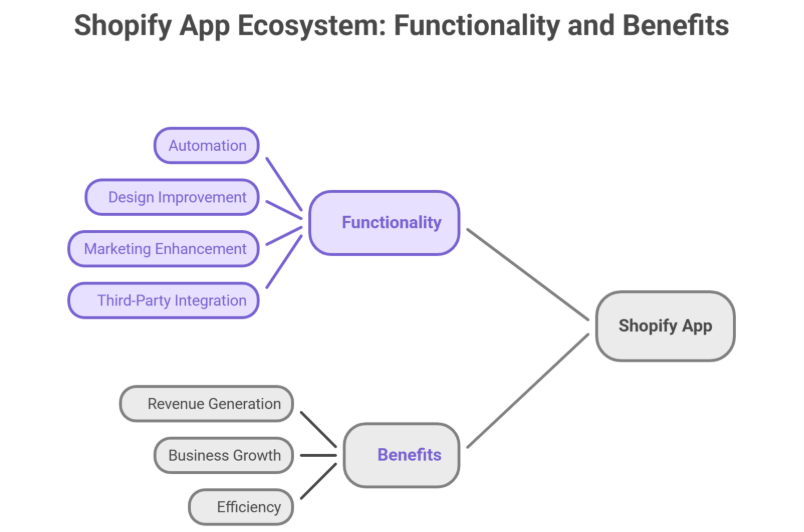
    A Shopify app is a software solution. It provides additional high functionality to store owners. These apps can:

    • Completely automate processes like inventory management and order fulfillment.

    • Highly improve your app for Shopify store design and user experience.

    • Enhance marketing and sales strategies.

    • Connect third-party services with Shopify stores, supporting multiple storefronts.

    There are two types of Shopify apps:

    • Public Apps: Readily available on the Shopify App Store. Accessible to all merchants.

    • Custom Apps: Built for a specific store and not listed publicly, supporting custom Shopify app solutions and specific business requirements.

    Why Develop a Shopify App?

    With thousands of businesses using Shopify, there is a growing demand for scalable Shopify apps that enhance Shopify store functionality. Some key benefits of shopify app development services include:

    • Revenue Generation: Developers can monetize your app, via subscriptions, one-time charges, or other monetizing your app requires methods.

    • Business Growth: Agencies and freelancers can offer Shopify development services through development services or creating a robust app for clients.

    • Automation & Efficiency: Store owners save a lot of time by automating repetitive tasks, improving app functions and app performance.

    Essential Tools for Shopify App Development

    Complete development of a Shopify app requires the right set of tools. Here are some must-have resources for a Shopify developer:

    1. Shopify CLI (Command Line Interface)
      The Shopify CLI pretty much simplifies shopify development, automating common tasks like authentication, project setup, app setup, and quick testing.

    2. Shopify Partners Dashboard
      Before you start coding, register as a Shopify Partner to gain access to dashboard, development tools, API keys, and local development environments.

    3. Shopify API
      The Shopify API is the backbone of creating a Shopify app. Allowing apps to interact totally with store data. The key APIs include:

    • Admin API – Manages Shopify admin, store data, products, and orders.

    • Storefront API – Enables custom storefront experiences.

    • GraphQL API – Allows efficient API calls with minimal requests.

    1. Ngrok
      Since Shopify requires a secure HTTPS connection, Ngrok provides an easy way to expose your backend local development server to the web.

    2. React & Polaris UI Framework
      For building user-friendly interfaces, Shopify provides Shopify’s Polaris design system, a UI framework designed for Shopify apps. Using React ensures smooth performance for app using JavaScript.

    How to Develop a Shopify App

    1. Set Up Your Development Environment
      Install Node.js and Shopify CLI on your system.
      Register your app in the Shopify Partners Dashboard to get API keys.
      Use Ngrok to create a secure tunnel for local development.

    2. Choose Your App Type

    • Embedded Apps: Run inside the Shopify admin panel using Shopify App Bridge.

    • Standalone Apps: Operate independently but still interact with Shopify stores via Shopify APIs.

    1. Authenticate Your App
      Authentication is a very crucial step in shopify app development. Use OAuth 2.0 to securely connect with Shopify stores, ensuring security best practices.

    2. Utilize Shopify APIs
      Use the Admin API to fetch product and order data.
      Leverage the Storefront API for customizing front-end experiences.
      Optimize API calls using GraphQL for faster app performance.

    3. Develop the App’s Features
      Implement app functionality based on business requirements.
      Use webhooks to trigger real-time updates when sudden changes occur in the store.
      Ensure the app is mobile-friendly for merchants using Shopify on their phones.

    4. Test the App
      Run tests in a Shopify development store before deployment.
      Use Shopify CLI’s dev mode to test real-time updates.
      Monitor app performanceAPI calls, and error logs to ensure smooth functionality.

    5. Deploy & Launch
      Host the app on a reliable platform like Heroku or AWS.
      Submit your public apps for review if listed on the Shopify App Store.
      Provide detailed documentation and support for users, helping achieve a successful launch.

    Best Practices for Shopify App Development

    1. Focus on Performance
      Optimize API calls to reduce server load.
      Minimize unnecessary background processes and implement cache for better response times.

    2. Ensure Data Security
      Use OAuth authentication to protect store data.
      Encrypt sensitive customer information and implement SSL certificates.

    3. Follow Shopify’s Design Guidelines
      Use Shopify Polaris for a consistent UI/UX experience.
      Ensure a clean, intuitive design that aligns with Shopify store design standards.
      Keep forms and navigation elements simple to improve user experience.

    4. Make Your App Scalable
      Use microservices architecture for flexibility.
      Optimize database queries for handling large stores.
      Support multi-language and multi-currency features for scalable apps targeting Shopify Plus merchants.

    5. Provide Excellent Documentation & Support
      Offer clear installation and app setup guides.
      Include troubleshooting steps for common issues and provide highly responsive customer support to resolve queries.

    Common Challenges in Shopify App Development & How to Overcome Them

    1. API Rate Limits
      Shopify imposes API rate limits, which can slow down requests. To avoid this:
      Use GraphQL API for optimized data fetching.
      Implement request queuing to prevent exceeding limits.

    2. Handling Webhooks Efficiently
      Webhooks are essential for real-time updates, but mismanagement can lead to performance issues.
      Use a message queue like RabbitMQ to handle incoming webhook requests.
      Ensure webhook retries for failed responses.

    3. App Approval Process
      If you’re launching public apps, you must pass Shopify’s approval process.
      Follow Shopify App Store requirements strictly.
      Test your app thoroughly before submission to avoid common pitfalls.

    Conclusion

    Developing a Shopify app in 2025 presents very exciting opportunities for Shopify development. By leveraging the right tools like Shopify CLI, APIs, React, Polaris, and following best practices for Shopify app development, you can create a robust, scalable Shopify app that enhances store data access, improves user experience, and supports automation.

    Whether you’re building a Shopify app for personal use or launching on the Shopify App Store, structured development processes and focusing on Shopify app best practices will set you up for a successful launch and long-term growth.

    Want your business to be seen and heard online? Explore our Services
     

    Frequently Asked Questions (Building Shopify App (2025): Tools, APIs & Best Practices)

    What is Shopify and how does it work in 2025?

    Shopify is a leading e-commerce platform that allows businesses to create, manage, and scale online stores. In 2025, it works by providing a secure, user-friendly interface, integrating with Shopify APIs, apps, and custom storefronts, automating sales, inventory, and marketing for seamless online business operations.

    How to create a Shopify app step by step?

    To create a Shopify app, first set up your development environment with Node.js, Shopify CLI, and Ngrok. Register your app in the Shopify Partners Dashboard for API keys. Choose app type, implement Shopify APIs, authenticate via OAuth, develop features, test in a development store, then deploy and launch.

    How to create an API in Shopify?

    To create an API in Shopify, register your app in the Shopify Partners Dashboard to get API keys. Choose between Admin API or Storefront API, configure access scopes, implement GraphQL or REST endpoints, authenticate using OAuth 2.0, and test API requests in a development store before deployment.

    How to build a Shopify store step by step?

    To build a Shopify store, first sign up on Shopify and choose a plan. Select a theme, customize the design using Shopify’s Polaris or built-in tools, add products, configure store data like payments and shipping, integrate apps for functionality, test the store, and launch for customers.

  • Building Omnichannel Experiences: Integrating Social Media Into a Seamless Customer Journey

    Building Omnichannel Experiences: Integrating Social Media Into a Seamless Customer Journey

    BUILDING OMNICHANNEL EXPERIENCES: INTEGRATING SOCIAL MEDIA INTO A SEAMLESS CUSTOMER JOURNEY

    Hey there, digital explorers! In the exciting world of B2C marketing, let’s dive into how you can turbocharge your customer journey by integrating social media into every step. Buckle up for a thrilling ride where we combine creativity with technology to create seamless, engaging experiences across multiple channels.

    Social Media Safari: Discover and Engage

    First stop: the wild and wonderful world of social media discovery! Imagine Instagram as your virtual fashion runway. Brands strut their stuff with stunning visuals and product tags that let you shop right from your feed. It’s like window shopping, but without leaving your couch!

    Picture this: a cosmetics brand dazzling you with makeup tutorials on TikTok. You’re hooked by the fun, engaging content and inspired to try their latest lip kit. With just a few taps, you’re on their website, ready to make your beauty dreams come true.

    Smooth Sailing to Checkout

    Helloooo, shoppers! Social media isn’t just for likes—it’s your ticket to a seamless path to purchase. Ever browsed Facebook and stumbled upon an ad for the perfect gadget you’ve been eyeing? Click, and you’re whisked away to a personalized shopping experience, complete with exclusive deals just for you.

    Let’s say you’re into fitness. A sports brand sends you a personalized offer via Messenger, tailored to your workout style. Before you know it, you’re hitting “checkout” and gearing up for your next adventure—all thanks to a smooth, social media-powered journey.

    Customer Care Carnival: Support and Relationships

    Need a helping hand? Social media has your back! Imagine tweeting a question to your favorite tech brand and getting a lightning-fast response. They’re not just solving problems—they’re building relationships one tweet at a time.

    Think of Twitter as your direct line to VIP customer service. Brands showcase their dedication to satisfaction by resolving issues publicly and turning frowns into virtual high-fives. It’s customer care with a personal touch!

    Join the UGC Party: User-Generated Content Magic

    Lights, camera, action! Social media is the stage where user-generated content (UGC) steals the spotlight. Brands throw a virtual party, inviting customers to share their stories and star in their campaigns.

    Imagine a travel agency hosting a TikTok challenge. You and fellow adventurers post your epic travel moments with a special hashtag. Suddenly, your story goes viral, inspiring others to embark on their own journeys. It’s not just content—it’s a community coming together to share the joy of exploration.

    Conclusion: Unleash Your Social Side for Epic Omnichannel Adventures!

    Ready to embark on your omnichannel adventure? Integrate social media into your customer journey and watch the magic unfold. From discovery to checkout, from support to storytelling, social media is your secret weapon for building fun, interactive experiences that keep customers coming back for more.

    As you navigate the digital landscape, remember to infuse creativity and authenticity into every interaction. Your customers aren’t just followers—they’re co-stars in your brand’s blockbuster story. So, let’s raise the curtain and let your social media journey begin!