Author: admin

  • Evaluating Your WordPress Website’s Readiness For The Next Phase 

    Evaluating Your WordPress Website’s Readiness For The Next Phase 

    Evaluating Your Wordpress Website’s Readiness For The Next Phase 

    Why do some businesses outgrow their WordPress site while others struggle to scale despite steady traffic and content? The difference often lies in how prepared your wordpress site truly is for its next phase of growth. Factors such as architecture, plugins, code quality, hosting provider, and long-term maintenance directly influence speed and performance, stability, and user trust. 

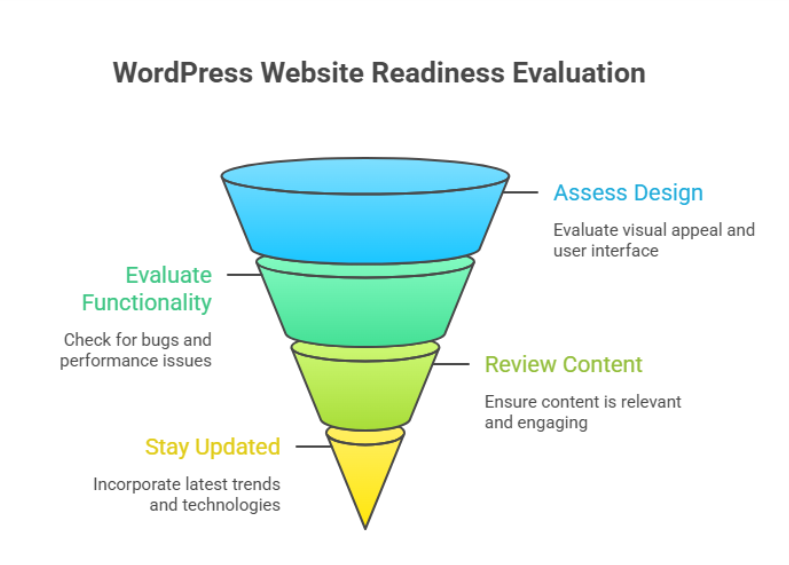
    Evaluating your WordPress website’s readiness means assessing performance, structure, scalability, and maintenance quality. It helps identify limitations that affect growth, user experience, and conversions, ensuring your site can support future business goals through better development, optimization, and long-term technical planning. 

    When professional development is overlooked, even a well-designed wordpress website can face slow page load, inconsistent behavior on mobile and desktop, and declining user experience. Agencies frequently see cases where a business spends a few hundred dollars on a wordpress theme, then thousands later trying to fix deeper issues that could have been avoided with proper planning, testing, and optimization from the start. 

    How to test your WordPress site speed effectively today 
    How to test your WordPress site speed effectively today 

    Testing site speed is not a one-time task. It is a structured process that helps you understand how your website performs under real-world conditions and what actions are required to fix speed and performance issues before they impact growth. 

    Step 1: Prepare your website for accurate testing 

    Before testing your wordpress, make sure no major changes or updates are running in the background. Pause heavy imports, complete updating WordPress if pending, and confirm your wordpress hosting environment is stable. This ensures your results reflect the real performance of your site speed, not temporary activity. 

    Step 2: Choose the right performance testing tools 

    Use reliable tools designed forWordPress environments to test your wordpress site. These tools simulate real visitors and measure page speed, load behavior, and interaction delays. A proper website speed test provides a clear performance score and highlights how quickly key elements respond on different devices. 

    What these tools measure 

    • Page speed and visual stability 
    • Interaction to next paint for responsiveness 
    • Core web vital indicators that affect rankings and usability 

    Step 3: Analyze results with a strategic mindset 

    Do not focus only on raw numbers. Look at how site speed affects user journeys, conversion paths, and engagement. Understanding the performance score helps agencies identify whether issues stem from the website builder, theme structure, or development decisions made during wordpress development. 

    Step 4: Retest after improvements 

    After applying changes, always re-run tests. Testing your site repeatedly ensures improvements are measurable and sustainable. This step confirms that your actions genuinely enhance page speed and support long-term optimizing your website rather than creating short-term gains. 

    Fix speed and performance issues for long term success 

    Long-term performance improvements require a strategic mindset rather than reactive fixes. Slow websites often emerge when growth outpaces structure, leaving the speed of your website affected by hidden technical debt. For any online business, consistent load speed and reliability are essential to maintain trust, engagement, and conversions. 

    Protecting stability before optimization 

    Before making changes, backing up your site is a critical safeguard. Using a trusted backup plugin ensures you retain full control of your website while implementing improvements. This safety net allows updates, adjustments, or even a wordpress update to be rolled out without risking data or functionality for the wordpress user. 

    Understanding what truly impacts performance 

    Performance issues are rarely caused by a single factor. The elements on your website, including media files, scripts, and third-party features, directly influence wordpress speed. Poor image optimization, excessive parts of your site loading at once, or a poorly chosen new plugin can make a site significantly slow. Testing the performance with a free tool or professional tools to test helps assess total blocking time, load responsiveness, and how fast your site loads under real conditions. 

    Building sustainable performance improvements 

    Fixes should focus on reducing complexity and improving efficiency, not shortcuts. Smart optimization ensures the site is performing well even as content grows. WordPress offers flexibility, and the wordpress community provides guidance and tools, but success depends on applying them thoughtfully creating a website without unnecessary overhead that scales smoothly over time. 

    Conclusion 

    Evaluating your WordPress website’s readiness for the next phase is not just a technical exercise it is a business decision. Performance, structure, scalability, and maintenance all play a direct role in how well your site supports growth, user trust, and long-term conversions. From testing site speed correctly to addressing deeper performance bottlenecks, every improvement contributes to a more stable and future-ready foundation. 

    Businesses that take a proactive approach avoid the costly cycle of temporary fixes and reactive troubleshooting. Instead, they build a site that evolves with their goals, handles increasing demands, and delivers consistent experiences across devices. When performance is treated as an ongoing strategy rather than a one-time task, your WordPress site becomes an asset not a limitation. 

    Is your current setup strong enough to support what comes next, or is it time to talk to Integriti Studio? 

    Frequently Asked Questions (Evaluating Your Wordpress Website’s Readiness For The Next Phase )

    How to check the performance of a WordPress website?

    To check a WordPress website’s performance, use tools like Google PageSpeed Insights, GTmetrix, or Lighthouse. Analyze loading speed, Core Web Vitals, mobile usability, and server response time. Regular testing helps identify issues and improve user experience and SEO.

    How to set a WordPress website to coming soon?

    To set a WordPress website to “Coming Soon,” install a plugin like SeedProd or Coming Soon Page. Activate the mode, customize the message and design, and publish it. This hides the live site from visitors while allowing admins to work in the background.

    How to build a WordPress website in 2026?

    To build a WordPress website in 2026, choose fast hosting, install WordPress, and use a lightweight theme. Customize with block editor or page builders, add essential plugins for SEO, security, and performance, and optimize for mobile, accessibility, and Core Web Vitals before launch.

    What steps would you take to update or maintain a WordPress website?

    To update and maintain a WordPress website, regularly update WordPress core, themes, and plugins. Backup the site, check for broken links, optimize database and images, monitor security, and test performance. Ensure content stays current, review SEO, and fix any issues to keep the site fast and secure.

  • WordPress Capabilities That Will Become More Important Over Time 

    WordPress Capabilities That Will Become More Important Over Time 

    WordPress Capabilities That Will Become More Important Over Time 

    Why do some websites built on wordpress remain scalable and efficient, while others struggle to keep up with changing expectations? The answer lies in how well evolving capabilities are understood and implemented over time. As the future of wordpress takes shape, performance differences are increasingly driven by structure, maintenance, and the ability to adapt to smarter technologies like ai. 

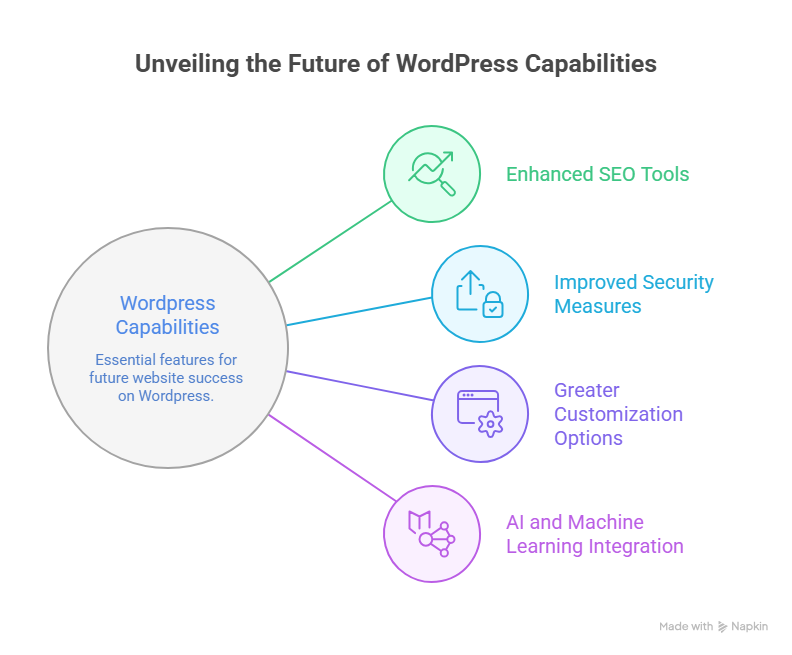
    WordPress capabilities that will become more important include advanced customization, AI-driven features, stronger security, scalable content management, and performance optimization. As the future of WordPress evolves, professional development, reliable plugins, and strategic maintenance will be essential for long-term growth, usability, and competitive advantage. 

    Factors influencing website performance now extend far beyond appearance. Speed, security, flexibility, and long-term adaptability directly affect trust and usability. This is where professional wordpress development becomes critical. When you invest in thoughtful architecture, reliable support, and ongoing maintenance, your site remains user-friendly while supporting business goals. In practical terms, professional services may cost anywhere from a few hundred to several thousand dollars annually often a modest investment compared to the long-term value they protect. 

    Future of WordPress development trends shaping modern website development 

    Future of WordPress development trends shaping modern website development

    The future of WordPress development is rapidly evolving, and staying ahead requires understanding emerging trends and technologies that will define WordPress in 2026. As a content management system, WordPress remains a dominant platform for website development, but its capabilities are expanding beyond traditional blogging into fully customizable, scalable, and secure web solutions. 

    Key Trends Shaping the Future of WordPress 

    One major trend is the rise of headless WordPress, allowing developers to separate the frontend and backend for faster, more flexible user experiences. Integration of the Gutenberg block editor continues to empower WordPress users with drag-and-drop customization, while modern WordPress themes and improved wordpress themes and plugins provide more design flexibility and scalability. 

    Security is also evolving. As threats become more sophisticated, WordPress introduces advanced security features and recommends managed WordPress hosting to safeguard websites without compromising speed or usability. Performance optimization, SEO enhancements, and AI-driven content tools are becoming standard, helping websites maintain strong search engine ranking and better user experience. 

    Shaping the Growth and Evolution 

    The evolution of WordPress reflects a broader shift toward modular, user-friendly, and future-ready solutions. WordPress professionals now focus on leveraging technologies within WordPress to streamline workflows, enhance customization, and provide better scalability for businesses. By tracking key trends and adopting best practices, your website can stay competitive while harnessing the growth of WordPress and its thriving WordPress community. 

    WordPress in 2026 ai security features user-friendly evolution 

    The evolution of WordPress is accelerating, with a clear focus on AI, enhanced security features, and more user-friendly experiences. As a content management system, WordPress remains central to modern website development, empowering businesses to scale efficiently while protecting both data and user trust. Here’s a breakdown of what to expect by 2026: 

    Key Trends Shaping the Future 

    • AI Integration: 
    • WordPress offers AI-driven tools for content creation, SEO optimization, and workflow automation. 
    • Predictive analytics and smart suggestions help WordPress users optimize website development strategies. 
    • Enhanced Security Features: 
    • With threats becoming more sophisticated, security features such as two-factor authentication, automated backups, and real-time monitoring will become standard. 
    • Managed WordPress hosting continues to protect websites without compromising speed or flexibility. 
    • User Experience and Customization: 
    • The Gutenberg block editor and modern WordPress themes provide intuitive user-friendly design tools. 
    • Streamlined wordpress themes and plugins simplify customization, reducing development time while improving overall site aesthetics. 
    • Performance and SEO Optimization: 
    • Faster load times, mobile responsiveness, and optimized layouts support higher search engine ranking. 
    • Technologies within WordPress enable improved accessibility and enhanced workflow for developers and content managers alike. 
    • Community and Ecosystem Growth: 
    • The WordPress community drives innovation, offering resources, training, and updates that keep the platform competitive. 
    • The growth of WordPress ensures a sustainable ecosystem, with new trends to watch continuously shaping the future of web development. 

    Conclusion 

    As WordPress continues to evolve, its future lies in advanced AI integration, robust security features, and a more user-friendly experience. By leveraging modern WordPress themes, reliable plugins, and professional WordPress development, you can optimize performance, improve search engine ranking, and create a scalable, future-ready website. The platform’s ongoing evolution and active WordPress community ensure that staying updated with key trends is essential for long-term success. Investing in strategic customization, managed hosting, and thoughtful workflows not only protects your online business but also enhances usability, trust, and growth potential. 

    Are you ready to future-proof your WordPress site should you contact Integrity Studio today? 

    Frequently Asked Questions (WordPress Capabilities That Will Become More Important Over Time )

    What are the capabilities of WordPress?

    WordPress offers capabilities like custom website creation, content management, and theme customization. It supports plugins for SEO, e-commerce, security, and performance, enabling blogs, business sites, and online stores. Its flexibility allows scalable design, user management, multilingual support, and integration with third-party tools for diverse website needs.

    Which of these is a future of WordPress?

    The future of WordPress lies in headless architecture, AI-driven content management, and advanced block-based editing. Emphasis on speed, security, scalability, and seamless integration with third-party tools will continue, making it a versatile platform for businesses, e-commerce, and creators seeking flexible, modern, and future-proof websites.

    What are the most exciting and useful features of WordPress?

    The most exciting and useful WordPress features include flexible themes and plugins, block-based Gutenberg editor, SEO-friendly structure, and strong community support. It also offers customizable user roles, e-commerce integration, multilingual support, and robust security options, enabling businesses and creators to build scalable, professional, and versatile websites.

    Which is the latest version of WordPress and why is it important to update WordPress regularly?

    The latest WordPress version is 6.9.1. Regular updates ensure security, bug fixes, plugin compatibility, improved performance, new features, and protect your site from vulnerabilities and crashes.

  • Outdated Shopify Practices Store Owners Should Reconsider 

    Outdated Shopify Practices Store Owners Should Reconsider 

    Outdated Shopify Practices Store Owners Should Reconsider 

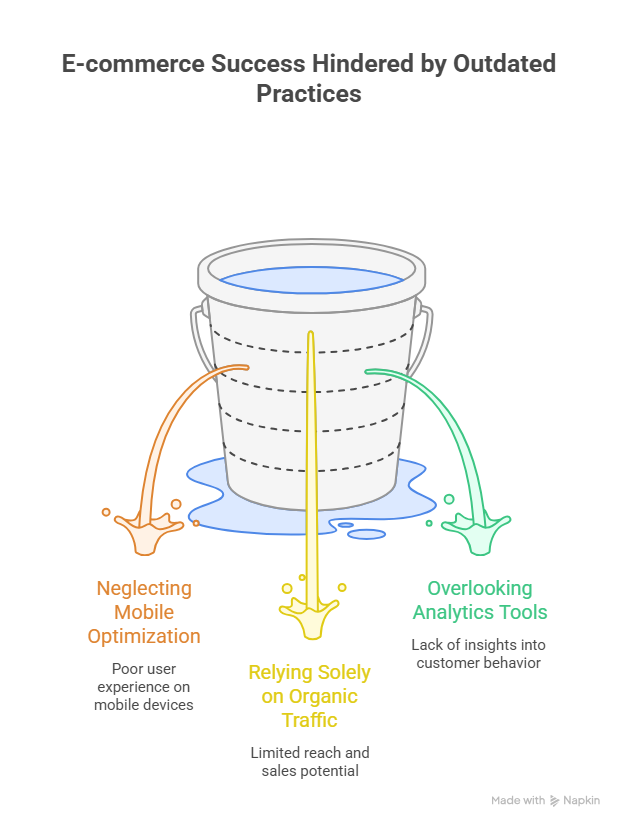
    Why do some shopify businesses grow steadily while others struggle to scale despite similar products? The difference often lies in outdated decisions that quietly impact performance. As a store owner, you may not realize how older shopify workflows, rushed setups, or neglected updates can hold back your shopify store from reaching its full potential in today’s competitive ecommerce space. 

    Outdated Shopify practices include using unoptimized themes, neglecting site structure, relying on default settings, and skipping ongoing optimization. These choices hurt performance, brand credibility, and scalability. Modern Shopify success requires professional development, strategic customization, faster load times, and continuous improvements aligned with evolving ecommerce standards. 

    Factors influencing website performance go beyond visuals. Poor structure, weak optimization, and unrefined processes affect how your brand is perceived, how users interact with your store, and how effectively search engines evaluate your site. Professional development ensures your shopify setup supports long-term growth, improves optimization, and aligns with modern expectations for speed, reliability, and trust. Many businesses hesitate due to cost, yet typical professional support may range from a few hundred to a few thousand dollars often far less than the revenue lost through inefficiency. 

    New Shopify optimization strategies to boost sales search engine 

    New Shopify optimization strategies to boost sales search engine 

    Modern new shopify optimization is no longer limited to visuals or basic setup. It focuses on aligning performance, usability, and search visibility to drive measurable growth. Many shopify store owners make the mistake of assuming default settings are enough, but real results come from intentional improvements that support both users and search engines. Addressing common shopify gaps early helps prevent scalability issues later. 

    Performance, Structure, and Search Alignment 

    A strong optimization strategy begins with technical clarity. Clean urls, properly structured meta data, and a logical layout allow search engines to understand your store while improving navigation for users. Ignoring these elements is a common pitfall that affects store performance, especially as product catalogs grow. Professional optimization ensures your store avoids unnecessary clutter and delivers a clear first impression. 

    Mobile and Checkout Experience 

    With most purchases happening on mobile phones, a mobile-friendly approach is essential. Slow interfaces, complex checkout flows, or poor mobile experience directly impact whether visitors make a purchase. Reducing friction improves customer experience, lowers bounce rates, and supports better results across all e-commerce stores. 

    Conversion-Focused Enhancements 

    Strategic customization allows your store to guide users naturally toward conversion. Well-placed ctas, relevant upsells, and optimized order value tactics improve revenue without harming trust. Avoiding slow load times and resolving hidden performance issues ensures your online business remains competitive. 

    Common Shopify store mistakes harming brand ecommerce growth optimization 

    Step 1: Ignoring Structural Foundations During Early Setup 

    One of the most common shopify issues begins at the setup stage. With new shopify projects, rushing decisions often leads to weak foundations. This is a pitfall many shopify store owners make, especially when launching an online business quickly. Poor layout, messy urls, and missing meta structure reduce clarity for both users and search engines, weakening brand authority from day one.Many new shopify launches also overlook scalability. As many shopify store owners expand, these early decisions start affecting store performance and limit future growth across e-commerce stores. 

    Step 2: Overcomplicating Design and Customization 

    Excessive customization without strategy creates visual clutter and distracts users. Overdesigned pages often confuse visitors using mobile phones, harming the mobile experience and increasing bounce rates. This is one of the common shopify design mistakes seen across many shopify businesses.A clean, mobile-friendly design improves the first impression, supports the customer experience, and delivers better results across devices. Strategic customization should guide users, not overwhelm them. 

    Step 3: Weak Checkout and Conversion Flow 

    A complicated checkout process is a silent revenue killer. When users struggle to make a purchase, abandoned carts increase and performance issues surface. Repeated checkout friction directly impacts order value and limits your ability to boost sales.Well-placed ctas and thoughtful upsells simplify decision-making while improving trust in your e-commerce presence. 

    Step 4: Performance and Speed Neglect 

    Ignoring slow load times damages credibility and hurts conversions. Poor speed creates friction, affects store performance, and signals low quality to users. Optimized structure and minimal distractions are essential to protect brand perception and sustain long-term growth. 

    Conclusion 

    Outdated Shopify practices rarely fail overnight, but they quietly limit growth, weaken brand trust, and reduce long-term profitability. From poor structural decisions and excessive customization to weak checkout flows and ignored performance issues, each small mistake compounds over time. Sustainable success on Shopify requires intentional optimization, professional development, and continuous improvements aligned with modern ecommerce standards. When your store is built with clarity, speed, and user experience in mind, it becomes easier to scale, improve conversions, and protect your brand’s credibility in a competitive market. 

    Ready to fix what’s holding your Shopify growth back should you contact Integrity Studio now? 

    Frequently Asked Questions (Outdated Shopify Practices Store Owners Should Reconsider )

    What are the challenges of Shopify store owners?

    Shopify store owners face challenges like high competition, managing inventory, and optimizing for SEO and conversions. Other issues include platform fees, integrating third-party apps, ensuring fast page speed, handling customer support, and scaling operations while maintaining a smooth user experience and sustainable profit margins.

    How to recover an old Shopify store?

    To recover an old Shopify store, log in to your Shopify account and check for any paused or archived stores. Restore backups if available, update products, themes, and apps, verify domain settings, and ensure all payment and shipping configurations are current before relaunching the store to customers.

    Why do so many Shopify stores fail?

    Many Shopify stores fail due to poor market research, low-quality products, and weak branding. Other reasons include ineffective marketing, high competition, slow website performance, poor customer experience, and inadequate inventory or fulfillment management, which prevent stores from attracting and retaining customers, ultimately affecting profitability and growth.

    How can I improve my Shopify store?

    You can improve your Shopify store by optimizing site speed, enhancing mobile responsiveness, and refining product pages with clear descriptions and high-quality images. Focus on SEO, effective marketing strategies, user-friendly navigation, and reliable customer support to boost conversions, increase traffic, and ensure long-term growth.

  • How Webflow Development Approaches Are Gradually Evolving 

    How Webflow Development Approaches Are Gradually Evolving 

    How Webflow Development Approaches Are Gradually Evolving 

    Why do some websites built with Webflow scale effortlessly while others struggle to deliver consistent performance? The answer lies in how Webflow development approaches continue to evolve, shaping both the user experience and the technical efficiency of modern web design. Factors such as SEO, optimization, scalability, and integration determine whether your website can maintain fast load times, seamless functionality, and long-term growth. 

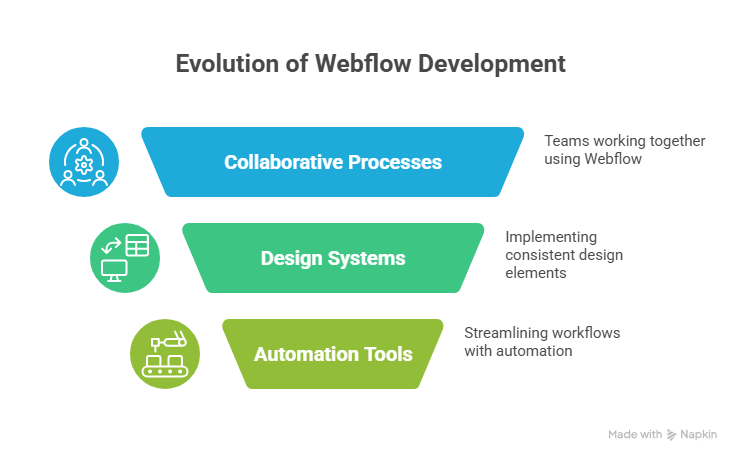
    Webflow development approaches are gradually evolving toward more scalable, no-code, and SEO-optimized solutions. Modern web design now emphasizes seamless integration, faster launch times, and improved user experience, allowing businesses to streamline workflows, reduce reliance on coding, and achieve long-term growth with efficient, future-ready websites. 

    Professional Webflow development ensures your site is not just visually appealing but also strategically structured for performance. Investing in skilled development, thoughtful launch planning, and ongoing maintenance allows you to avoid common bottlenecks and optimize no-code workflows. Typical professional support may range from a few hundred to a few thousand dollars often a modest investment compared to the revenue lost from inefficiencies, slow sites, or poor user experiences. 

    This blog will explore how Webflow development approaches are gradually evolving. You’ll learn about emerging trends, scalable design techniques, advanced integration, and strategies to improve SEO and long-term site performance, empowering your business to stay competitive while maximizing both efficiency and growth. 

    Webflow development trends shaping scalable modern web design 

    Webflow development trends shaping scalable modern web design 

    The landscape of modern web design is evolving rapidly, and Webflow is at the forefront of this change. Businesses today demand websites that are not only visually appealing but also scalable, fast, and optimized for performance. By embracing Webflow development, you can reduce bottlenecks common in traditional approaches while delivering a seamless design and development experience. 

    No-Code Platform Empowering Efficiency 

    Webflow is the future for many businesses because it combines design elements and content management into a no-code platform. This allows teams to scale your website without heavy reliance on traditional web development or extensive coding. Features such as real-time editing and responsive design tools let your site adapt instantly, improving responsiveness and fast load times, which positively impact LCP and core web vitals. 

    Optimized Performance and SEO 

    Performance optimization is critical for both user experience and search engine rankings. With Webflow, pages are automatically structured to reduce load times, prevent bottlenecks, and maintain smooth website loads. Efficient workflows improve bounce rates, support better SEO rankings, and enhance organic traffic. 

    Customization and Professional Support 

    A Webflow development agency or Webflow experts can help you create a custom website tailored to your brand. With access to advanced plugins and the ability to unlock additional features, you can build scalable landing pages and full websites that maintain aesthetic quality, functionality, and speed. 

    No-code tools integration optimizing launch seo and scalability 

    In today’s fast-paced digital landscape, leveraging no-code tools has become essential for businesses building websites efficiently while maintaining high performance and scalability. Unlike traditional approaches, no-code platforms empower teams to launch websites without heavy coding dependencies, ensuring faster go-to-market and simplified maintenance. By integrating these tools strategically, organizations can optimize search engine optimization, enhance fast load times, and set their digital presence up for long-term success. 

    Step 1: Choosing the Right No-Code Platform 

    Selecting a robust no-code platform is the foundation of scalable web development. Platforms like Webflow today are revolutionizing web design by combining intuitive interfaces with professional-grade development capabilities. Key considerations include: 

    • Availability of a free starter plan for testing features. 
    • Ability to unlock additional features such as CMS, e-commerce, and advanced analytics. 
    • Pre-built design elements that accelerate development while maintaining brand consistency. 

    Step 2: Optimizing Site Performance for Fast Load Times 

    Site speed is critical for both user experience and search engine optimization. No-code tools often integrate built-in performance optimization, which allows your website loads quickly across devices. Key strategies include: 

    • Utilizing content delivery networks (CDNs) to deliver content rapidly to global users. 
    • Compressing images and minimizing scripts to reduce page weight. 
    • Prioritizing metrics like LCP (Largest Contentful Paint) and CL (Cumulative Layout Shift) to improve perceived and real performance. 

    Step 3: Enhancing Scalability and Flexibility 

    One of the primary advantages of no-code tools is their inherent scalability. As your website grows, these platforms allow you to: 

    • Easily add new pages, sections, or design elements without a developer. 
    • Implement advanced integrations like marketing automation and analytics, which enables marketing teams to act on user behavior insights. 
    • Maintain a consistent structure while supporting global expansion through global content delivery. 

    Step 4: Leveraging SEO and Conversion Optimization 

    Integrating no-code tools with SEO best practices provides a competitive edge. Steps to maximize visibility include: 

    • Structuring URLs, headings, and metadata effectively for search engine optimization. 
    • Leveraging built-in tools for meta tags, sitemaps, and schema markup. 
    • Performing conversion rate optimization by analyzing user flows and implementing CTAs strategically. 

    Step 5: Continuous Improvement and Monitoring 

    The true benefit of websites without heavy coding lies in ongoing optimization. No-code platforms allow teams to: 

    • Test new design elements without downtime. 
    • Monitor fast load times and LCP metrics continuously. 
    • Adjust strategies based on real-time user behavior insights. 

    Conclusion 

    Webflow development and no-code tools integration are no longer optional they are central to creating websites without traditional coding bottlenecks, ensuring fast load times, improved LCP, and a scalable, future-proof site. By strategically selecting platforms, optimizing performance, leveraging design elements, and continuously monitoring user behavior, businesses can achieve higher conversion rates, streamline workflows, and maximize their digital presence. 

    Investing in professional development, thoughtful launch planning, and unlocking additional features allows teams to combine efficiency with functionality, delivering websites that are both visually appealing and technically robust. In the modern landscape, the difference between a website that thrives and one that struggles often comes down to how effectively no-code tools are integrated into long-term growth strategies. 

    Ready to take your website to the next level and see how Webflow today can transform your business? Or, to make it a little trickier why not contact Integriti Studio and see what they would suggest for your unique goals? 

    Frequently Asked Questions (How Webflow Development Approaches Are Gradually Evolving)

    What is the future of Webflow?

    Webflow’s future looks strong as it continues evolving beyond traditional web design, focusing on no-code development, seamless CMS integration, and scalability for businesses. With growing adoption, advanced SEO features, and a user-friendly interface, it’s positioned to remain a key platform for modern, flexible, and visually-driven websites.

    What are the 7 stages of web development?

    The 7 stages of web development are: 1) Planning – defining goals and requirements, 2) Analysis – understanding target users, 3) Design – creating layouts and UI/UX, 4) Development – coding the website, 5) Testing – fixing bugs and ensuring functionality, 6) Deployment – launching online, 7) Maintenance – ongoing updates and improvements.

    What are the approaches to website development?

    Website development approaches include traditional coding, where developers build from scratch using HTML, CSS, and JavaScript; CMS-based development using platforms like WordPress for faster setup; and no-code/low-code solutions like Webflow or Wix, enabling rapid, visual-driven development with minimal technical expertise.

    How has web development changed?

    Web development has shifted from purely code-based approaches to no-code and low-code platforms, emphasizing speed, scalability, and user experience. Modern practices prioritize responsive design, SEO, and integration with third-party tools, enabling businesses to launch and maintain websites efficiently without heavy reliance on traditional coding.

  • Webflow Practices That Will Remain Relevant Beyond 2026

    Webflow Practices That Will Remain Relevant Beyond 2026

    Webflow Practices That Will Remain Relevant Beyond 2026

    Why do some webflow sites outperform others even when their content or products are similar? The answer often lies in factors influencing website performance clean layout, responsive design, fast load times, and seamless UX all play a role. Businesses that underestimate these elements can struggle with conversion, scaling, and overall ROI, especially when targeting B2B or SaaS audiences. 

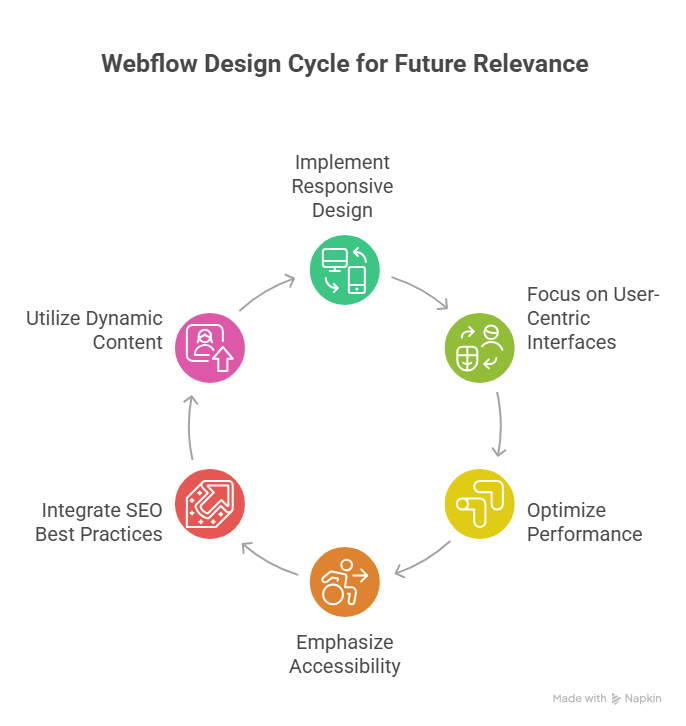
    Webflow practices that will remain relevant beyond 2026 focus on clean, responsive web design, seamless UX, scalable frameworks, and SEO-friendly structures. Prioritizing professional development, ongoing maintenance, and analytics-driven improvements ensures marketing sites and landing pages deliver consistent conversion, ROI, and long-term value for B2B, SaaS, and e-commerce businesses. 

    Investing in professional development ensures your webflow site remains efficient and adaptable. From maintaining design systems and templates to leveraging animations and landing page best practices, ongoing support and maintenance make a measurable difference. For instance, professional agencies may charge anywhere from $2,000–$5,000 for a single high-quality marketing site or redesign, reflecting the value of strategic UX, integrated analytics, and SEO optimization. 

    This blog will explore webflow practices that will remain relevant beyond 2026, highlighting how marketers and designers can unlock long-term success. You’ll learn which best practices, design frameworks, and technical choices support high-performing webflow sites, improve user experience, and ensure your marketing teams achieve sustained ROI well into the future. 

    Webflow Practices Every Web Designer Should Follow Beyond 2026 

    Webflow Practices Every Web Designer Should Follow Beyond 2026 

    Creating webflow sites that remain relevant and high-performing beyond 2026 requires a thoughtful combination of design, technical strategy, and workflow optimization. Whether you are a webflow agency or an independent designer, following proven practices ensures your projects are scalable, maintainable, and conversion-focused, particularly for B2B SaaS companies and SaaS marketing teams. 

    Prioritize Scalable and Maintainable Webflow Development 

    A scalable webflow development approach allows your webflow project to grow alongside your client’s business. This includes structured CMS collections, reusable components, and clear naming conventions. Emphasizing maintainability helps both non-technical marketers and web designers manage content without breaking functionality. Platforms like webflow offer built-in tools to unlock additional features, reducing reliance on external plugins and streamlining workflows for redesigns or migrations to webflow. 

    Optimize Performance and SEO for Every Webflow Site 

    Performance and SEO are critical for B2B and SaaS teams targeting high-converting audiences. Optimizing core web vitals, compressing media, and structuring URLs properly enhances website experience platforms for users and search engines alike. Implementing 301 redirects during redesigns and ensuring proper localization supports global reach, while analytics integration allows teams to measure ROI effectively. 

    Design with User Experience and Brand Identity in Mind 

    Webflow design should balance aesthetic appeal with functional UX. Adopting a design-first mindset ensures web experiences reflect the client’s brand identity while supporting intuitive navigation and conversion-focused layouts. Keeping up with web design trends, exploring design ideas from the webflow community, and referencing top webflow projects can inspire innovative solutions.using templates strategically and built-in webflow features helps web designers deliver consistent, high-quality results for B2B SaaS companies and ecommerce websites. 

    Embrace No-Code Workflows and Webflow Community Resources 

    No-code tools like webflow streamline the workflow, allowing web designers to focus on strategy and UX rather than complex coding. Engaging with the webflow community, reading the webflow blog, and following platform updates help teams stay ahead in what’s next for website builders and web experiences. For SaaS websites or marketing sites, this ensures both performance and scalability while empowering marketing teams to maintain control without relying solely on technical staff. 

    Get Started For Free With Smart Webflow SEO Strategies 

    Implementing effective SEO strategies in Webflow doesn’t have to be complex or costly. By focusing on performance and SEO from the start, you can transform your webflow site into a polished, high-converting platform. These strategies are especially valuable for B2B SaaS companies and growing teams who want to convert visitors into customers while keeping scalability in mind. 

    Step 1: Optimize SEO and Performance from Day One 

    Ensuring performance and SEO go hand-in-hand is crucial. Webflow allows you to manage metadata, alt attributes, and semantic markup seamlessly. Teams that need content at scale can also integrate tools like Contentful or APIs to manage content efficiently without sacrificing speed. Minimalist design combined with fast load times improves user experience and positively impacts search engine rankings. 

    Step 2: Choose the Right Structure for Long-Term Growth 

    Choosing the right CMS structure and layout ensures your site continues to evolve as your business grows. For B2B SaaS companies, this means designing for scalability in mind, building templates that support multiple products or landing pages, and maintaining polished user experience for all visitors. Launching a new webflow site with these principles reduces the need for frequent redesigns. 

    Step 3: Implement Tracking and Analytics 

    To convert visitors into customers, tracking is essential. Integrate analytics to monitor SEO performance, user behavior, and traffic sources. Teams who want actionable insights can use these metrics to refine content strategy, optimize internal linking, and improve on-page SEO elements without relying solely on external consultants. 

    Step 4: Get Started for Free and Iterate 

    Webflow offers the ability to get started for free, allowing marketers and web designers to test SEO strategies without upfront investment. Begin with foundational best practices, track results, and iterate based on performance. By following these steps, growing teams can maintain a site that performs well for both users and search engines while positioning their brand for long-term success. 

    Conclusion 

    Sustaining a high-performing webflow site beyond 2026 requires a careful balance of design, technical strategy, and ongoing optimization. By prioritizing scalable development, polished UX, SEO and performance, and no-code workflows, you can ensure your marketing sites and SaaS platforms remain competitive and deliver consistent ROI. Leveraging analytics, maintaining design systems, and following best practices allows both web designers and growing teams to convert visitors into customers while reducing the need for frequent redesigns. 

    Whether you are launching a new webflow site or planning a redesign, these strategies support long-term growth, brand identity, and user experience. Webflow’s flexibility, combined with professional guidance, ensures your projects continue to evolve seamlessly alongside your business. 

    if you want expert support to implement these practices and unlock your site’s full potential, why not contact Integriti Studio today? 

    Frequently Asked Questions (Webflow Practices That Will Remain Relevant Beyond 2026 )

    Is Webflow still relevant in 2025?

    Yes Webflow is still relevant in 2025. It continues growing in adoption, powering hundreds of thousands of sites with a rising CMS market share and strong no-code design appeal. Its AI, design flexibility, and increasing enterprise use keep it meaningful in web development today.

    What is the future of Webflow?

    The future of Webflow looks strong and innovative beyond 2025. It will keep expanding AI-driven design, automation, and content tools, making websites smarter and faster to build. Webflow is also improving performance, security, enterprise features, CMS flexibility, and integrations, positioning itself as a major no-code/low-code platform for business and advanced web projects.

    What are the web design trends in 2026?

    In 2026 web design trends, expect AI-driven personalization, immersive 3D/AR experiences, voice UI, and micro-animations for engagement. Minimal, performance-first layouts, responsive mobile-first design, and eco-friendly websites will also dominate. Bold typography, organic shapes, and human-centred interfaces are shaping modern aesthetics.

    Is there anything better than Webflow?

    Yes there are platforms often considered “better” than Webflow for specific needs. For example, Wix and Squarespace are easier for beginners with drag-and-drop simplicity, WordPress offers unmatched flexibility with plugins, and Framer gives strong design tools; other options like Webstudio also compete closely.

  • Building A Shopify Store Structure That Supports Sustainable Growth 

    Building A Shopify Store Structure That Supports Sustainable Growth 

    Building A Shopify Store Structure That Supports Sustainable Growth

    Why do some ecommerce brands grow steadily on Shopify while others struggle to scale despite strong products? The answer often lies in how your shopify store is structured, optimized, and maintained over time. A high-performing shopify setup goes beyond visuals it reflects strategic planning, clean architecture, and development choices that support sustainable growth as your business evolves. 

    Building a Shopify store structure that supports sustainable growth requires strategic planning, scalable design, and ongoing optimization. By focusing on performance, SEO, user experience, and professional maintenance, you ensure your Shopify store can handle growth, improve conversions, and support long-term ecommerce success. 

    Website performance is shaped by multiple factors working together, including design consistency, technical structure, load efficiency, and how well your store is built to optimize both search visibility and user experience. Professional development ensures your shopify store remains scalable, secure, and aligned with modern seo and scalability requirements. Strong design, ongoing support, and structured maintenance directly improve conversion and protect long-term performance. Many businesses typically invest a few hundred dollars per month in optimization and support far less than the cost of rebuilding a poorly structured store later. 

    Building a scalable Shopify store structure for sustainable ecommerce growth 

    Building a scalable Shopify store structure for sustainable ecommerce growth 

    Why scalability matters for Shopify success 

    When building a scalable Shopify store, the goal is to create a foundation that supports sustainable ecommerce growth without frequent overhauls. A scalable Shopify store ensures your infrastructure can handle increased traffic, a growing product catalog, and higher order volumes, while maintaining speed, security, and a seamless user experience. Planning for scalability from the start reduces future costs and prevents disruptions as your business expands. 

    Core principles for building a scalable Shopify store 

    1. Modular store architecture: Use flexible templates and modular sections that allow you to add new products, collections, and pages without redesigning the entire site. 
    1. Optimized apps and integrations: Choose apps that integrate efficiently with your store and avoid unnecessary plugins that can slow performance or create conflicts. 
    1. Performance and SEO focus: Ensure product pages, collections, and checkout workflows are optimized to improve load speed and conversion, while aligning with shopify’s SEO best practices. 

    Sustainable ecommerce practices in store design 

    Incorporating sustainable business practices into your store can enhance brand reputation and appeal to eco-conscious consumers. Examples include highlighting sustainable products, using energy-efficient hosting, and reducing digital waste. A sustainable ecommerce approach not only supports environmental responsibility but also builds trust with a loyal customer base. 

    Strategies to scale your Shopify store effectively 

    To scale your Shopify store, invest in professional development services to ensure long-term stability. Regularly review workflows, optimize apps and integrations, and monitor analytics to inform decisions. By building with scalability in mind, your store can grow organically, improve customer retention, and achieve ecommerce success over time. 

    Optimizing Shopify store user experience SEO and conversion scalability 

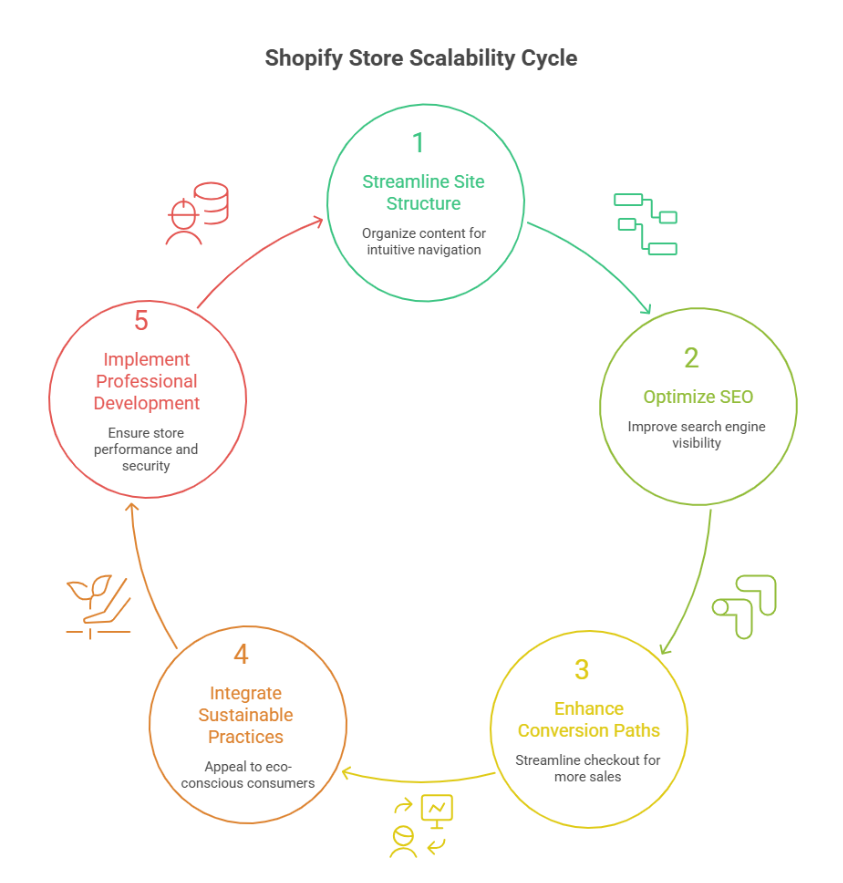
    Creating a scalable Shopify store isn’t just about adding products it’s about ensuring every aspect of your store drives ecommerce success, improves customer retention, and supports long-term growth. Optimizing user experience (UX), SEO, and conversion processes in a structured, step-by-step manner allows you to scale a Shopify store efficiently while maintaining performance and engagement. 

    Step 1: Streamline site structure for better user experience 

    A modular layout makes navigation intuitive and scalable. Organize collections, menus, and product pages logically to ensure a seamless browsing experience. Highlight sustainable products and eco-conscious messaging to appeal to eco-conscious shoppers, improving trust and encouraging repeat purchases. 

    Step 2: Optimize SEO for discoverability 

    Use shopify’s built-in SEO features and carefully structured URLs to improve search rankings. Optimize product titles, meta descriptions, and images to enhance visibility. This helps attract new traffic while also supporting organic growth from existing customers. Implementing proper SEO practices ensures your scalable Shopify store grows sustainably without losing relevance. 

    Step 3: Enhance conversion paths 

    Focus on streamlining checkout flows, optimizing product pages, and improving page speed to maximize conversion. Integrate apps and analytics tools to monitor customer behavior and test actionable strategies. This step ensures your building a scalable Shopify plan converts visitors into loyal buyers efficiently. 

    Step 4: Integrate sustainable business practices 

    Show your commitment to sustainable operations, whether through eco-friendly packaging, energy-conscious hosting, or messaging about sustainable products. Incorporating sustainable practices reinforces brand values, builds a loyal customer base, and supports long-term scalability. 

    Step 5: Implement professional development services 

    Leverage expert development services to audit, optimize, and maintain your store. Regular updates, testing, and apps and integrations ensure your scalable Shopify store remains fast, reliable, and capable of handling growth without compromising user experience or SEO. 

    Conclusion 

    Building a Shopify store that truly supports sustainable growth requires more than attractive design or product variety. It demands a carefully scalable Shopify store structure, optimized user experience, strong SEO, and professional maintenance. By focusing on modular layouts, efficient apps and integrations, streamlined conversion paths, and eco-conscious practices, you ensure your store can handle increasing traffic, improve customer retention, and achieve long-term ecommerce success. Regular audits and professional development services further safeguard performance, allowing your store to grow organically while maintaining reliability, speed, and engagement. 

    Every strategic choice from highlighting sustainable products to optimizing checkout flows contributes to building a sustainable business that appeals to both eco-conscious and loyal shoppers. By combining performance, scalability, and sustainability, your Shopify store becomes a robust platform ready to evolve with your business needs. 

    if building a truly scalable, sustainable Shopify store could transform your growth, why not reach out to Integriti Studio and see how they can help you achieve it?

    Frequently Asked Questions (Building A Shopify Store Structure That Supports Sustainable Growth )

    How to make your Shopify store grow?

    To grow your Shopify store, focus on strong product positioning, fast and mobile-optimized design, SEO-friendly structure, and data-driven marketing. Use email and paid ads strategically, improve conversion rates, analyze customer behavior, and continuously optimize checkout, apps, and performance for long-term scalable growth.

    What is the organizational structure of Shopify?

    Shopify follows a decentralized, product-led organizational structure. Teams are arranged around functions like product development, engineering, design, marketing, sales, and operations. This structure promotes cross-functional collaboration, faster decision-making, innovation, and scalability while supporting millions of merchants globally.

    How to make a retail store more sustainable?

    Make a retail store sustainable by using eco-friendly materials, reducing energy consumption, minimizing waste, sourcing locally, offering reusable packaging, promoting recycling, and adopting green supply chain practices.

    Is Shopify eco-friendly?

    Yes Shopify is considered eco-friendly in several ways. Its platform runs on renewable-energy cloud hosting that is carbon neutral, and it offers tools like the Planet app for carbon-neutral shipping. Shopify also supports sustainable packaging, carbon offset programs, and eco-focused merchant integrations.

  • Common WordPress Website Issues That May Impact Visibility In  2026 

    Common WordPress Website Issues That May Impact Visibility In 2026 

    Common Wordpress Website Issues That May Impact Visibility In 2026

    Why do some businesses struggle to gain visibility on WordPress while others consistently perform better in search results? The difference often lies in how a wordpress website is built, managed, and maintained over time. As 2026 approaches, even a well-designed wordpress site can lose traction due to overlooked technical factors, bloated plugins, weak seo, or poor decisions made inside the admin panel. 

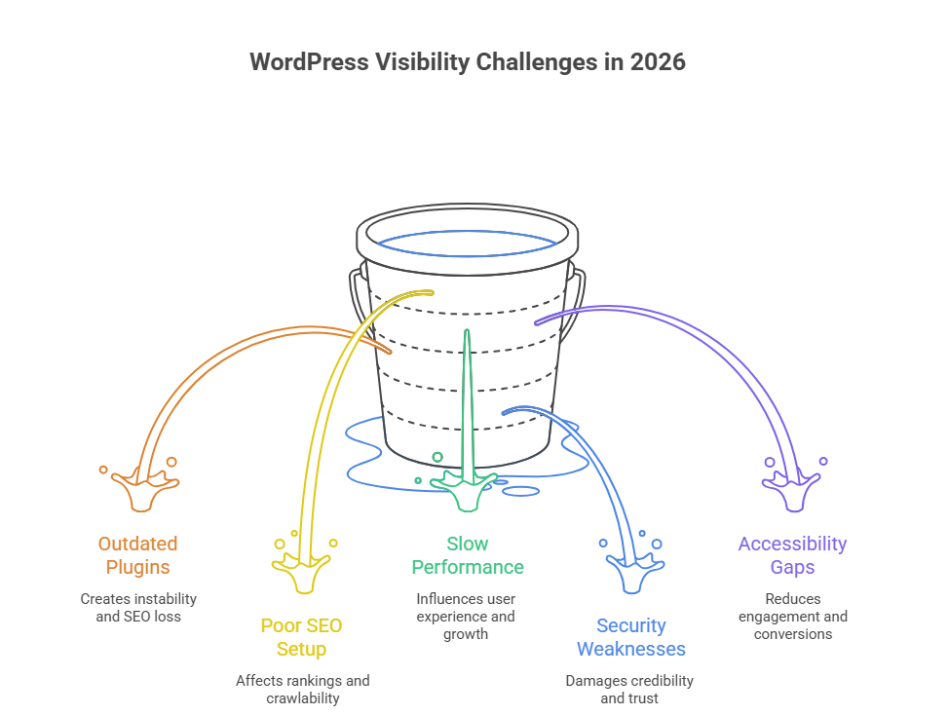
    Common WordPress website issues impacting visibility in 2026 include outdated plugins, poor SEO setup, slow performance, security weaknesses, and accessibility gaps. Without regular updates, professional maintenance, and technical audits, even a well-built WordPress site can lose search engine rankings and user trust. 

    Website performance is influenced by multiple elements working together, including code quality, design structure, hosting environment, and ongoing maintenance. Professional development ensures these components remain aligned, helping you fix issues before they impact rankings or credibility. Smart design choices, reliable support, and routine maintenance directly improve user experience and long-term growth. For example, businesses often invest a few hundred dollars monthly for maintenance and updates, compared to the much higher cost of repairing damage later. 

    Common WordPress site SEO issues affecting visibility in 2026 

    Common WordPress site SEO issues affecting visibility in 2026

    Understanding common WordPress SEO challenges 

    Many visibility problems stem from common WordPress configuration gaps that site owners overlook as their platform grows. These common WordPress issues are not always obvious but can significantly affect rankings, crawlability, and trust signals. For wordpress sites in 2026, search engines are far less forgiving of technical weaknesses, especially when common WordPress practices are not followed correctly. 

    Technical errors that weaken search performance 

    One major issue is broken URLs leading to 404 errors, which interrupt crawl paths and frustrate users. Another frequent concern is outdated plugins, often caused by delayed regular updates, creating instability and SEO loss. Poorly managed plugin or theme choices can also introduce compatibility issues, reducing site efficiency and visibility. 

    Security and accessibility impact on SEO 

    Search engines increasingly evaluate wordpress security as part of ranking signals. Unaddressed security vulnerabilities create a security risk that can damage credibility. At the same time, website accessibility and unresolved accessibility issues affect usability, especially on mobile devices, reducing engagement and conversions. 

    Strategic approach for long-term visibility 

    A structured review of the wordpress core, supported by a skilled wordpress developer, ensures your business website remains stable, compliant, and competitive. Addressing common WordPress mistakes through proactive audits helps protect SEO performance and supports sustainable growth beyond 2026. 

    Plugins admin errors 404 problems and fixes for WordPress 

    Step 1: Review plugin and admin configuration 

    Begin by checking settings inside the wordpress admin area. Many issues start from common mistakes such as activating a plugin or theme that conflicts with the wordpress core. Ensure the configuration supports website accessibility and does not introduce early technical gaps. 

    Step 2: Identify causes of 404 errors 

    Next, audit pages and links producing 404 errors. These often occur after plugin removals, URL structure changes, or failed updates. Persistent 404 issues reduce trust and impact user flow, especially on mobile devices. 

    Step 3: Update or replace outdated plugins 

    Running outdated plugins increases maintenance complexity and creates a serious security risk. Apply regular updates carefully, confirming compatibility before activation. If plugins are no longer supported, replace them with stable alternatives. 

    Step 4: Resolve compatibility and accessibility issues 

    Multiple tools can create compatibility issues that affect layouts, forms, and navigation. Addressing accessibility issues ensures your business website remains usable for all audiences and compliant with evolving standards. 

    Step 5: Apply long-term fixes with professional support 

    Consistent regular updates and expert oversight from a wordpress developer ensure stability. This structured approach prevents admin errors, protects performance, and supports sustainable growth as WordPress environments become more complex. 

    Conclusion 

    As WordPress continues to evolve, visibility challenges in 2026 will be less about the platform itself and more about how strategically it is managed. From outdated plugins and unresolved 404 errors to security gaps and accessibility limitations, small technical oversights can quietly erode search performance and user trust. A successful WordPress strategy requires more than basic setup it demands consistent updates, informed decision-making, and a proactive approach to SEO, security, and performance. 

    When plugin management, admin configurations, and core updates are handled professionally, your website remains stable, accessible, and competitive. Investing in expert support today not only prevents costly fixes tomorrow but also protects long-term growth, credibility, and conversion potential for your business. 

    if these issues are already impacting visibility for many sites, isn’t it time to ask whether partnering with Integriti Studio could be the smarter move for your WordPress success? 

    Frequently Asked Questions (Common Wordpress Website Issues That May Impact Visibility In 2026)

    What are common WordPress issues?

    Common WordPress issues include slow website speed, plugin or theme conflicts, outdated core, plugins, or themes, broken links, security vulnerabilities, white screen of death, database connection errors, poor SEO optimization, and incompatible updates. Regular maintenance, updates, and backups help prevent these problems.

    Is WordPress still in demand in 2025?

    Yes WordPress is still in demand in 2025. It powers about 43 % of all websites worldwide and holds over 60 % of the CMS market, making it the most widely used platform for blogs, business sites, and e‑commerce with WooCommerce.

    Is there a problem with WordPress right now?

    No WordPress itself isn’t having a major global outage right now; status checks show WordPress.com services are up and user reports don’t indicate widespread downtime. However, many individual WordPress sites still face issues like update‑related errors, plugin conflicts, or admin access problems.

    What is the most vulnerable part of a WordPress website?

    The most vulnerable part of a WordPress website is third-party plugins and themes. Poorly coded or outdated plugins often contain security flaws that attackers exploit. Weak login credentials, outdated WordPress core files, and improper permissions also increase the risk of hacking and data breaches.

  • Adding Metafields In Shopify For Better Product Customization

    Summary

    Metafields in Shopify allow you to store and display custom information beyond Shopify’s default fields. Whether it’s product specs, size charts, care instructions, or downloadable guides, metafields let you tailor Shopify product pages for a richer shopping experience and improve the appearance of your Shopify store.

    Why use metafields?

    Shopify’s standard product fields (like title, price, and product description) are often not enough to meet unique business needs. Metafields in Shopify let you:

    • Add custom content that enhances product storytelling or product details
    • Control where and how information appears on your online store or product page template
    • Keep backend data structured for apps, filters, automation, or internal tracking
    • Improve flexibility across different product types, product categories, or product attributes

    How to add metafields

    You can add metafields using Shopify Admin, Shopify Admin panel, built-in settings (available on all plans), or via a metafield management app. Here’s the basic approach using Shopify Admin:

    • Go to Settings → Custom data or custom data fields
    • Select the resource type (e.g., Products, Variants, Collections)
    • Click “Add definition” to create a metafield definition, select a metafield type, and name your field (e.g., Fabric Composition, care instructions, or product specifications)
    • Save and go to any Shopify product page, product template, or single product template in the backend to add values to your metafields or add extra information
    • Use your theme editor, theme customization, online store 2.0 theme, or Liquid code to display metafields on the frontend

    Example: A “Fabric Composition” metafield can show up below the product description only for apparel items and provide conversion-boosting detail to your product listings.

    Use cases for metafields

    • Display nutritional info or product care instructions for food or apparel products
    • Add size charts per category metafields (e.g., footwear, shirts)
    • Show technical specifications for electronics or product attributes
    • Include downloadable PDFs like manuals or care guides
    • Add embedded videos or extra product details unique to each product

    Final outcome

    Using metafields empowers your Shopify store to deliver customized, high-converting Shopify product pages that feel tailored and informative. Metafields can help improve the customer experience, give you more control over information in metafields, and make the online store more flexible. Metafields allow you to add custom data fields, add specialized information, and display metafields on your product pages. They also let developers and marketers create custom content, add extra product details, or customize the functionality and appearance of your Shopify product using Shopify Admin or Liquid code.

    Want to customize your Shopify product pages with metafields?
    Integriti Studio helps brands create advanced Shopify experiences with structured data, product metafields, and stunning design.

    🛍️ Let’s talk Shopify customization

  • Migrating From Woocommerce To Shopify What To Know

    Summary

    Switching from WooCommerce to Shopify can simplify store management, improve performance, and unlock new growth features but the migration process needs careful planning. This guide outlines the key considerations, steps, and potential pitfalls when moving a WooCommerce store to Shopify or performing a WooCommerce to Shopify migration.

    Why migrate to Shopify?

    While WooCommerce offers flexibility through WordPress, Shopify provides a fully hosted, scalable ecommerce platform that handles updates, security, and payments out of the box. Key reasons store owners choose to switch from WooCommerce to Shopify include:

    • Easier setup and maintenance of a new Shopify store
    • Faster load times and improved reliability for an online store
    • Built-in SEO and sales tools for ecommerce
    • Access to powerful apps, Shopify app store, and integrations

    What gets migrated—and what doesn’t?

    A typical WooCommerce to Shopify migration includes:

    ✅ Products, variants, images, SKUs, and categories (collections)
    ✅ Customer data and order history from WooCommerce
    ✅ Blog posts and static pages (with some formatting cleanup)

    ❌ Plugins, themes, or custom code—Shopify uses its own ecosystem and Shopify theme
    ❌ Checkout flows—these must be rebuilt on Shopify using Shopify customization or Shopify API

    Tools like Matrixify or LitExtension can automate much of the data migration, import data from WooCommerce, or move from WooCommerce with a migration app, but manual QA is still essential to ensure data transfer accuracy.

    Key steps to migrate smoothly

    • Backup everything: Export data from WooCommerce, including store data, products from WooCommerce, and reviews from WooCommerce
    • Set up your Shopify store: Choose a Shopify theme, install key apps, and configure collections or product options
    • Migrate data: Use a migration tool, migration service, or hire a Shopify expert to migrate your WooCommerce store, migrate your WooCommerce, and import your data to Shopify
    • Review SEO and URLs: Set up 301 redirects from old WooCommerce URLs to corresponding Shopify URLs
    • Test before going live: Review product listings, variants, payment flow, mobile responsiveness, and integrations

    Final outcome

    Migrating to Shopify can dramatically improve store performance and management if done right. With clean data from your WooCommerce store, optimized URLs, and thoughtful setup in a new Shopify store, you’ll retain search rankings while unlocking Shopify’s growth potential. Platforms like WooCommerce and Shopify allow seamless migrations, and full migration with careful planning ensures every step of the migration preserves customer support, store data, and order history.

    Planning a platform migration?
    Integriti Studio handles full-service migration from WooCommerce to Shopify seamlessly, securely, and using apps to help with the entire migration.

    🚚 Talk to our migration team

  • How To Add Custom Fields To Your Shopify Product Pages

    Summary

    Custom fields also known as metafields—let you display additional product information beyond Shopify’s default options on your Shopify product pages. Whether you want to show care instructions, ingredients, dimensions, or compatibility notes, adding custom fields to your Shopify product helps create richer, more informative product pages in Shopify.

    Why use custom fields?

    Default Shopify product pages are limited to basic details like title, description, and variants. With custom fields in Shopify, you can:

    • Enhance the buying experience with extra info or custom text
    • Organize technical or niche product data, product options, or custom product details
    • Improve SEO by targeting long-tail queries
    • Display unique features without cluttering the main description

    They’re especially useful for stores with complex, high-detail products, and fields to your Shopify product pages can allow product personalization or adding custom text boxes for engraving, personalized text, or custom product forms.

    Adding custom fields in Shopify

    Here’s a step-by-step overview to add custom field in Shopify or fields to Shopify product pages:

    • Go to Settings → Custom data in your Shopify admin
    • Select Products, then click Add definition to create a new custom field or add a custom text field
    • Choose your content type (e.g., text field, number, file) and name your field (e.g., “Fabric Care” or “Compatibility Notes”)
    • Save and return to a Shopify product or Shopify product admin page to enter custom values under the new field

    To display the field on your storefront, you’ll need to edit code, use a product template, or use a Shopify theme that supports dynamic sources and custom fields via theme customization.

    Displaying fields on the storefront

    • For Online Store 2.0 themes: Use the theme editor’s dynamic source option to bind metafields or fields in Shopify product to specific product sections
    • For older themes: Insert Liquid code in your product.liquid, main-product.liquid, or product page template to manually render the custom field values
    • Apps: Shopify apps for no-code custom fields like Metafields Guru or Custom Fields by Bonify offer a no-code experience and extended customization options

    Final outcome

    Custom fields give you more flexibility to inform and convert visitors. Custom fields to your Shopify product or fields to the Shopify product allow unlimited custom product details, personalized text, or advanced custom fields. Done right, they improve the user experience, make your product pages in Shopify more informative, and elevate product personalization.

    Need help structuring or styling Shopify custom fields in Shopify step 2 or adding fields to Shopify product pages?
    Integriti Studio can help you create fully customized, conversion-driven product pages and custom fields in Shopify without touching liquid files or coding.

    🛍️ Lets elevate your product display