
WordPress 2025 review wins misses & hard lessons
Why do some WordPress sites thrive while others struggle to deliver results? Website performance isn’t accidental it’s shaped by multiple factors, from server host reliability and theme choices to plugin efficiency and workflow optimization. For businesses navigating WordPress in 2025, understanding these elements is critical to avoid unnecessary loss and ensure a platform that supports growth.
WordPress 2025 shows significant wins with AI-powered tools, improved workflow, and enhanced UI, helping websites perform better and engage users. Misses include plugin conflicts, theme limitations, and occasional update issues. Key hard lessons emphasize professional development, proper maintenance, and strategic design to ensure long-term site success.
Professional development plays a pivotal role. Investing in skilled developers and designers allows you to leverage the latest AI-generated tools, optimize coding standards, and maintain seamless updates without breaking your site. Good design, thoughtful support, and consistent maintenance translate into tangible business value higher engagement, better SEO ranking, and improved conversion rates. Even small projects can see pricing ranging from a few hundred to several thousand dollars depending on customization and premium plugin usage, reflecting the real costs behind quality WordPress sites.
This blog will provide a detailed WordPress 2025 review, highlighting wins, misses, and hard lessons learned. You’ll explore technical insights, workflow improvements, AI tools, and platform updates, along with actionable guidance to help you make informed decisions that evolve your website strategy and maximize long-term success.
Challenges and Hard Lessons for Smart WordPress Decisions
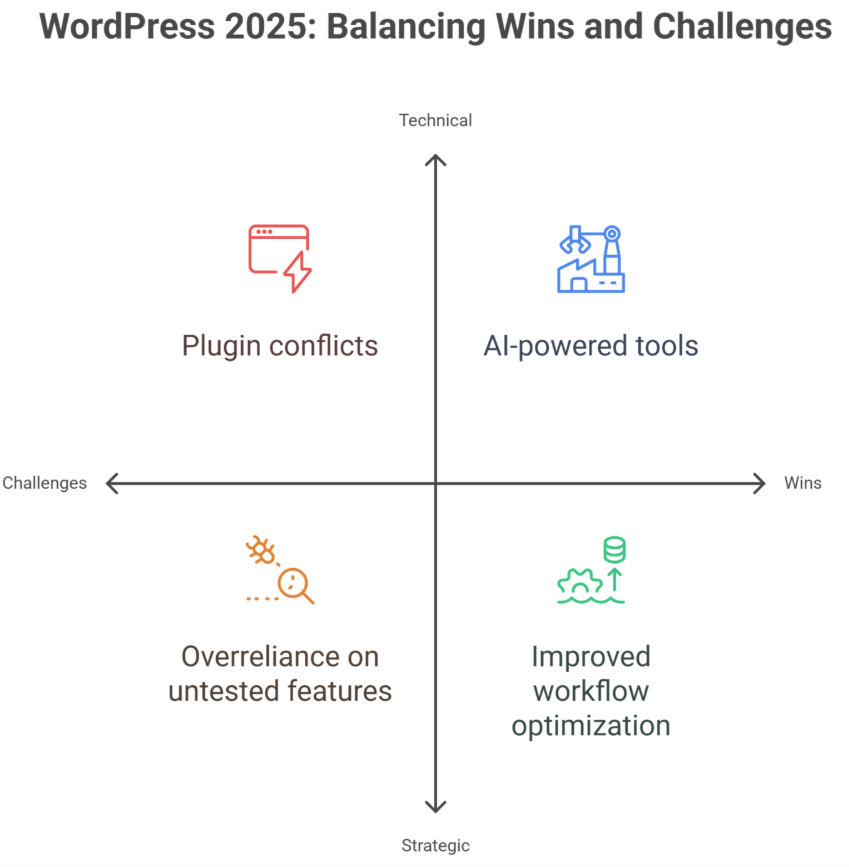
Navigating WordPress in 2025 requires understanding both its strengths and challenges. While WordPress continues to dominate the CMS market and remains a preferred website builder, businesses face hurdles that can impact performance, user experience, and growth.
Plugin and Theme Bloat
- Excessive plugins or heavy themes create bloat, slowing down websites and increasing friction during updates.
- Gutenberg blocks and block editor offer flexibility, but poor implementation can hurt UI and site performance.
Workflow and Maintenance
- Regular backup routines and security updates are essential to prevent data loss or costly rebuilds.
- AI tools and AI-generated websites can improve workflow, but oversight from a skilled designer or developer is critical.
Adapting to Trends
- WordPress in 2025 must align with social media apps, mobile apps, and AI-driven solutions to stay competitive.
- Overreliance on untested features can create friction and interface issues despite potential engagement gains.
Strategic Lessons
- Balancing flexibility with performance ensures smoother WooCommerce setups and better cache efficiency.
- Observing market share and CMS trends helps predict which features will remain relevant and reduce rebuild needs.
Advantages and Smart Wins in WordPress 2025
WordPress in 2025 continues to dominate as a flexible and powerful platform. Its enhancements in workflow, AI tools, and maintenance practices offer tangible benefits for businesses and developers. Here’s a step-by-step breakdown of the advantages and smart wins:
Step 1: Enhance Functionality and Usability
Leverage WordPress Development to build dynamic, responsive websites that adapt to user needs. Improved WordPress Design and AI-powered tools simplify layouts and enhance usability, reducing friction for both teams and visitors. Integrations with e-commerce platforms, Shopify Development, and Webflow Development further extend functionality.
Step 2: Optimize Maintenance and Ownership
Regular WordPress Maintenance ensures smooth plugin and theme updates, minimizing downtime and technical issues. Businesses gain better ownership of their websites, allowing customization without dependency on external providers. Complementary Webflow Maintenance and Shopify Support make cross-platform management seamless and efficient.
Step 3: Invest in Scalability and Long-Term Value
Investing in modern WordPress Development prepares websites for growth, supporting both startups and enterprise-scale operations. Enhanced graphic design, layout options, and AI tools improve engagement and make the site more adaptable. Smarter workflows and integrated suites reduce cumbersome processes and maximize ROI.
Step 4: Achieve Cross-Platform Efficiency
Integration with Shopify Design and Webflow Design expands capabilities and ensures consistent layout and usability across platforms. Reducing friction between platforms streamlines development, saves time, and allows you to focus on strategy, marketing, and user experience.
Conclusion
WordPress 2025 demonstrates that success is not accidental—it comes from understanding the platform’s strengths, addressing its challenges, and making strategic, informed decisions. While AI-powered tools, improved workflows, and enhanced UI represent major wins, businesses must remain mindful of plugin conflicts, theme limitations, and maintenance demands.
Professional development, thoughtful design, and consistent upkeep remain critical for long-term success. By leveraging WordPress Development, Design, and Maintenance effectively—and integrating complementary platforms like Shopify and Webflow—businesses can achieve scalability, better usability, and reduced friction across workflows.
Want to transform your website with smart WordPress solutions and AI-powered design? Contact Integriti studio today to discuss how we can help your business thrive, streamline workflows, and maximize long-term results. What’s the first improvement you’d like to see on your site?
Frequently Asked Questions (WordPress 2025 review wins misses & hard lessons)
Is WordPress still in demand in 2025?
Yes, WordPress remains in demand in 2025. Its flexibility, extensive plugin ecosystem, and AI-powered tools make it ideal for businesses, bloggers, and e-commerce sites. While newer platforms exist, WordPress continues to thrive due to ease of use, scalability, and a large developer community supporting constant innovation.
Is WordPress difficult to learn?
WordPress is generally easy to learn, especially for beginners. Its intuitive dashboard, drag-and-drop editors, and extensive tutorials simplify website creation. Advanced customization or development may require coding knowledge, but most users can build and manage functional sites quickly without deep technical skills.
How much does WordPress pay for 1000 views?
WordPress itself doesn’t pay for views. Earnings depend on monetization methods like ads, affiliate links, or sponsored content. For example, using Google AdSense, 1,000 views (CPM) typically earn $1–$5, but rates vary by niche, audience location, and engagement. WordPress only provides the platform.
Can I learn WordPress in 3 days?
You can learn WordPress basics in 3 days, including site setup, themes, and plugins. However, mastering advanced features like custom coding, SEO optimization, or e-commerce integration requires more time. Three days is enough to start building functional sites, but expertise develops with practice and experience.
Leave a Reply