Category: Webflow

  • Why Core Web Vitals are the New SEO Frontier for Ecommerce Website Development 

    Why Core Web Vitals are the New SEO Frontier for Ecommerce Website Development 

    Why Core Web Vitals are the New SEO Frontier for Ecommerce Website Development

    Why do some ecommerce websites convert better while others struggle? Website performance is influenced by multiple factors, from server response times and page load speed to layout shifts and content delivery efficiency. Investing in professional ecommerce website development ensures that your shop is built with performance, reliability, and user experience in mind. Well-executed design, ongoing support, and maintenance deliver real value small-scale optimization projects can start from a few hundred dollars, scaling up for advanced features. This blog explores why core web vitals are critical for SEO, how improving metrics like LCP and interactivity impacts ranking, and how smart Shopify store optimization drives higher conversions. 

    Core Web Vitals are crucial SEO metrics that impact ecommerce website development, improving user experience, page speed, and search rankings. 

    Core Web Vitals Why They Really Matter for SEO 

    In ecommerce website development, understanding why core web vitals matter for SEO is essential. These metrics directly affect your site’s performance, user experience, and ultimately, search rankings. Google’s algorithm increasingly prioritizes websites that meet performance and usability standards, making core web vitals still matter in SEO in 2025. Let’s explore why and how you can evaluate and improve these crucial metrics. 

    What Are Core Web Vitals? 

    Core web vitals are specific key metrics defined by Google that measure the real-world experience of users on your website. They include: 

    • Largest Contentful Paint (LCP): Measures load speed for the main content. 
    • First Input Delay (FID): Assesses interactivity. 
    • Cumulative Layout Shift (CLS): Evaluates visual stability during page load. 

    How Core Web Vitals Impact SEO 

    1. Improving Search Rankings: Sites that perform well on core web vitals are favored by Google’s algorithm, enhancing your technical SEO and overall visibility. 
    1. Enhancing User Experience: Faster load times and stable layouts reduce frustration, increase user engagement, and lower bounce rates. 
    1. Supporting Long-Term Growth: Optimizing site’s performance through web design improvements ensures your website remains competitive and aligned with evolving search standards. 

    Steps to Evaluate and Improve Core Web Vitals 

    Step 1: Evaluate a Site’s Performance 

    Use tools like Google PageSpeed Insights or Google Search Console to assess site’s core web vitals. Identify LCP, FID, and CLS scores to understand current performance. 

    Step 2: Identify Technical SEO Gaps 

    Analyze your site’s web design and backend structure. Check server response times, uncompressed images, or excessive scripts that affect load speed. 

    Step 3: Meet Core Web Vitals Standards 

    Implement optimizations to improve metrics: 

    • Compress images and use modern formats like WebP. 
    • Minimize render-blocking scripts to improve interaction to next paint. 
    • Reduce unexpected layout shifts to maintain visual stability. 

    Step 4: Monitor and Adjust Regularly 

    Core web vitals are dynamic. Continuous monitoring ensures your ecommerce store adapts to algorithm changes and maintains optimal site’s performance. 

    Why It Matters for Ecommerce 

    For ecommerce websites, slow load times or layout shifts can directly reduce conversions and core web vitals impact SEO. A technically optimized, visually stable site builds trust, improves user experience, and strengthens your SEO in 2025 strategy. By prioritizing core web vital metrics, you position your store for better visibility, higher engagement, and long-term business growth. 

    Smart Development Choices Boost Core Web Vitals And Conversions 

    Making smart development choices can directly improve rankings and user experience, increase web traffic, and drive higher conversions. Sites with poor core web vitals scores often lose visitors and search visibility, making optimization essential. Focusing on the three core web vitals LCP, FID, and CLS ensures fast loading, smooth interactivity, and stable layouts. 

    Why Core Web Vitals Are Critical 

    Maintaining critical core web metrics ensures your ecommerce site delivers a seamless experience and meets user expectations, which influences SEO and conversions. 

    Optimizing Load Speed and Interactivity 

    Compress images, minimize scripts, and streamline code to improve LCP and FID, giving users faster interaction and engagement. 

    Reducing Layout Shifts 

    Define dimensions for media and content to reduce CLS, keeping pages visually stable and ensuring core web vitals will remain strong. 

    Business Benefits of Smart Development 

    Improved core web vitals boost user satisfaction, increase repeat visits, and positively impact search visibility, ultimately enhancing ROI for your ecommerce store. 

    Conclusion 

    Core Web Vitals are no longer optional they are a critical part of ecommerce website development, directly influencing SEO in 2026, user experience, and conversion rates. By understanding and optimizing the three core web vitals LCP, FID, and CLS you ensure your site loads quickly, interacts smoothly, and remains visually stable for users. Smart development choices, ongoing monitoring, and professional support help maintain critical core web metrics, improve rankings and user experience, and deliver measurable business results. 

    Ready to turn your store into a high-performing, conversion-driven machine? Why waitcould Integriti Studio optimize your core web vitals today? 

    Frequently Asked Questions (Why Core Web Vitals are the New SEO Frontier for Ecommerce Website Development)

    Why are Core Web Vitals important in SEO?

    Core Web Vitals matter in SEO because they measure loading speed, interactivity, and visual stability, directly impacting rankings and user experience.

    Why did Core Web Vitals fail?

    Core Web Vitals fail when pages have slow loading times, heavy scripts, layout shifts, poor hosting, unoptimized images, and excessive third-party apps.

    What are the 3 C’s of SEO?

    The three C’s of SEO are content, code, and credibility, focusing on quality information, technical optimization, and strong authoritative backlinks.

    What’s your strategy for improving Core Web Vitals and technical SEO?

    Improve Core Web Vitals and SEO by optimizing images, minifying code, enabling caching, reducing scripts, using a CDN, and structured data.

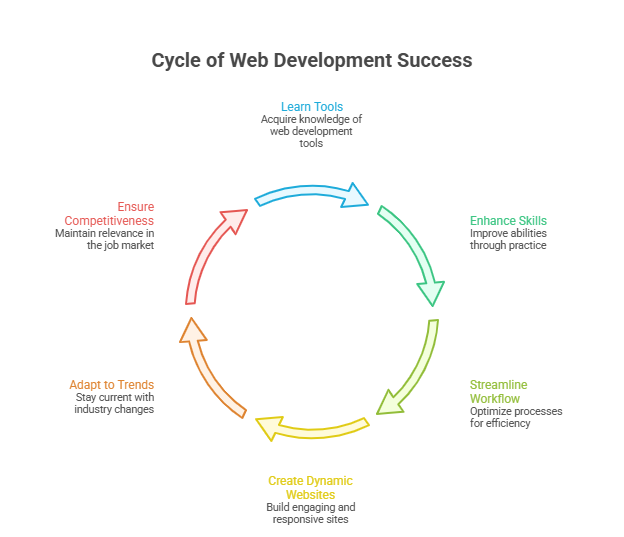
  • Web Development Strategies for Premium Digital Agency Success 

    Web Development Strategies for Premium Digital Agency Success 

    Web Development Strategies for Premium Digital Agency Success 

    Why do some websites convert better while others struggle? The secret lies in effective web development. Factors like clean front-end coding with HTML, CSS, and JavaScript, a robust back-end using PHP, Python, or Java, and a well-structured database all shape website performance. Even web applications rely on proper frameworks, server-side logic, and responsive design to deliver seamless experiences. 

    Effective web development combines skilled web developers, clean front-end and back-end coding, responsive web pages, optimized web applications, and ongoing maintenance for premium agency success. 

    A skilled web developer ensures your web pages are interactive, fast, and secure. From markup and cascading style sheets to programming languages and coding best practices, professional development creates real value. With ongoing support and maintenance, your website becomes more than a digital presence it becomes a business asset. Typical professional projects start from a few thousand dollars depending on complexity. 

    In this blog, you’ll learn key web development strategies, how to structure front-end and back-end workflows, and tips to make your site responsive, interactive, and future-ready. 

    Learn Web Development Tools For Long-Term Success 

    Learn Web Development Tools For Long-Term Success

    Mastering the right web development tools is essential for building scalable, interactive, and professional websites. Whether you aim to become a front-end developer, back-end developer, or a full-stack developer, understanding these tools will shape your long-term success. 

    Core Front-End Tools 

    • HTML, CSS, and Sass: The foundation of front-end web development, creating structured and visually appealing websites and web pages. 
    • JavaScript (JS) & jQuery: Enable dynamic, interactive web elements; essential to learn JavaScript for modern web programming. 
    • Bootstrap & Responsive Web Design: Ensures your web pages look great on all devices with mobile-first, responsive design layouts. 
    • Front-end Frameworks: Tools like React.js, Vue.js, Next.js, and Redux help manage interface states and build scalable applications. 

    Essential Back-End Tools 

    • Node.js & Django: Popular frameworks for back-end web development, enabling efficient building web server-side logic. 
    • SQL, MySQL, NoSQL Databases, and Relational Databases: Manage and structure data for robust back-end development. 
    • APIs & Server-side Integration: Connect front-end web interfaces with databases and third-party services. 
    • Python, PHP, and Java: Core web programming languages for server-side tasks. 

    Full-Stack & Version Control Tools 

    • Git & GitHub: Essential version control for tracking changes in your projects and collaborating with teams. 
    • Full-Stack Development: Combines front-end web and back-end web expertise for full-stack developers. 
    • AWS & Open-Source Tools: Host, deploy, and scale websites securely using cloud services and open-source libraries. 

    Additional Skills for Success 

    • Markup Language & XML: Organize and structure data efficiently for interactive web features. 
    • Data Structures & Syntax Mastery: Essential for solving programming challenges in web programming
    • Online Courses & Web Development Courses: Continuous learning ensures you stay updated with the latest website development trends. 
    • User Interface & Responsive Design: Focus on usability, accessibility, and seamless interface interactions across devices. 

    How Front-End And Back-End Choices Impact Performance 

    The performance, scalability, and user experience of your website are deeply influenced by the front-end and back-end technologies you choose. Making informed decisions ensures faster load times, interactive interfaces, and easier maintaining websites over time. 

    Choosing the Right Front-End Framework 

    Selecting a popular front-end framework like Vue is crucial for creating responsive and dynamic web interfaces. Frameworks like these allow developers to write code efficiently, reuse components, and maintain a clean structure. Following solid design principles ensures that pages are visually consistent, accessible, and optimized for performance. By focusing on best practices, you can deliver interactive features that engage users while reducing rendering time. 

    Optimizing Back-End Architecture 

    Your back-end choices define how quickly data is processed and delivered to users. Using a reliable database such as PostgreSQL enables smooth handling of complex queries. Applying object-oriented programming principles helps build fast, maintainable applications, making maintaining websites over time much simpler. Choosing popular programming languages tailored to your project ensures efficient integration with the front-end, enabling scalable and secure server-side operations. 

    Integrating Front-End and Back-End Systems 

    A seamless connection between front-end and back-end is key to delivering smooth user experiences. Optimized APIs and proper server-side logic allow you to create dynamic content without lag. Careful coordination ensures that interactive features work reliably, performance remains high, and maintaining websites is easier in the long term. By combining these strategies, your website can achieve faster load times, improved responsiveness, and a professional, modern design. 

    Conclusion 

    Successful digital agencies understand that premium website performance is not accidental it is the result of strategic web development. From mastering front-end frameworks like Vue and responsive web design to optimizing back-end architecture with PostgreSQL and object-oriented programming, every choice impacts speed, scalability, and user engagement. Skilled web developers who follow design principles, implement clean front-end and back-end coding, and leverage modern web programming tools create interactive, secure, and future-ready websites. Continuous learning through web development courses and proper use of version control, APIs, and cloud services like AWS ensures that websites remain maintainable and adaptable over time. 

    When these strategies are combined, your digital presence transforms into a high-performing business asset, not just a website. 

    So, if you’re ready to elevate your projects and achieve measurable results, why not see what Integriti Studio can do for your business today? 

    Frequently Asked Questions (Web Development Strategies for Premium Digital Agency Success )

    What does a web development agency do?

    A web development agency designs, develops, and maintains websites and web applications, handling front-end and back-end coding, responsive design, server-side integration, and ongoing technical support.

    What makes an agency successful?

    An agency succeeds by delivering high-quality services, effective project management, skilled professionals, innovative strategies, client-focused solutions, strong communication, consistent results, and ongoing support for long-term growth.

    What are the web development strategies?

    Web development strategies include optimizing front-end and back-end coding, using responsive design, selecting proper frameworks, ensuring database efficiency, integrating APIs, maintaining websites, and following best programming practices.

    How to create a web development agency?

    To create a web development agency, define your services, hire skilled developers, build a strong portfolio, use modern tools, attract clients, and deliver high-quality, scalable websites.

  • Webflow Practices That Will Remain Relevant Beyond 2026

    Webflow Practices That Will Remain Relevant Beyond 2026

    Webflow Practices That Will Remain Relevant Beyond 2026

    Why do some webflow sites outperform others even when their content or products are similar? The answer often lies in factors influencing website performance clean layout, responsive design, fast load times, and seamless UX all play a role. Businesses that underestimate these elements can struggle with conversion, scaling, and overall ROI, especially when targeting B2B or SaaS audiences. 

    Webflow practices that will remain relevant beyond 2026 focus on clean, responsive web design, seamless UX, scalable frameworks, and SEO-friendly structures. Prioritizing professional development, ongoing maintenance, and analytics-driven improvements ensures marketing sites and landing pages deliver consistent conversion, ROI, and long-term value for B2B, SaaS, and e-commerce businesses. 

    Investing in professional development ensures your webflow site remains efficient and adaptable. From maintaining design systems and templates to leveraging animations and landing page best practices, ongoing support and maintenance make a measurable difference. For instance, professional agencies may charge anywhere from $2,000–$5,000 for a single high-quality marketing site or redesign, reflecting the value of strategic UX, integrated analytics, and SEO optimization. 

    This blog will explore webflow practices that will remain relevant beyond 2026, highlighting how marketers and designers can unlock long-term success. You’ll learn which best practices, design frameworks, and technical choices support high-performing webflow sites, improve user experience, and ensure your marketing teams achieve sustained ROI well into the future. 

    Webflow Practices Every Web Designer Should Follow Beyond 2026 

    Webflow Practices Every Web Designer Should Follow Beyond 2026 

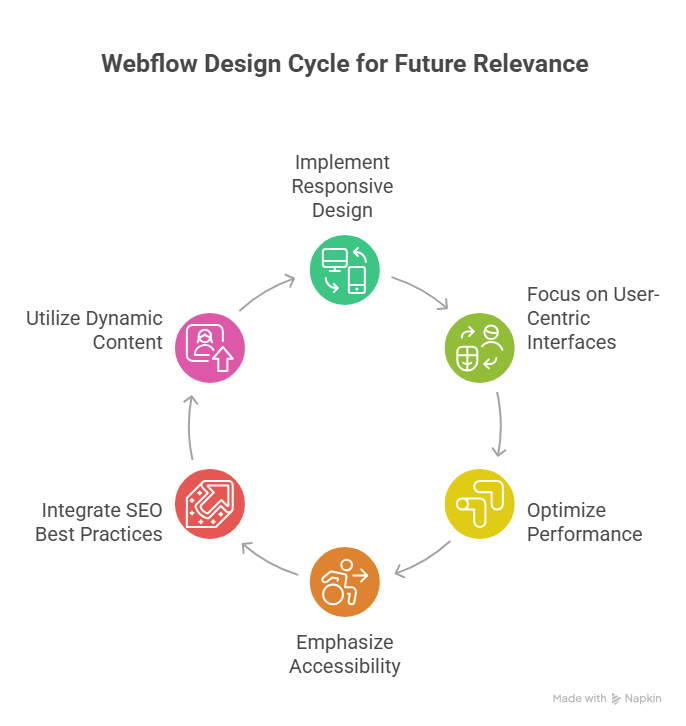
    Creating webflow sites that remain relevant and high-performing beyond 2026 requires a thoughtful combination of design, technical strategy, and workflow optimization. Whether you are a webflow agency or an independent designer, following proven practices ensures your projects are scalable, maintainable, and conversion-focused, particularly for B2B SaaS companies and SaaS marketing teams. 

    Prioritize Scalable and Maintainable Webflow Development 

    A scalable webflow development approach allows your webflow project to grow alongside your client’s business. This includes structured CMS collections, reusable components, and clear naming conventions. Emphasizing maintainability helps both non-technical marketers and web designers manage content without breaking functionality. Platforms like webflow offer built-in tools to unlock additional features, reducing reliance on external plugins and streamlining workflows for redesigns or migrations to webflow. 

    Optimize Performance and SEO for Every Webflow Site 

    Performance and SEO are critical for B2B and SaaS teams targeting high-converting audiences. Optimizing core web vitals, compressing media, and structuring URLs properly enhances website experience platforms for users and search engines alike. Implementing 301 redirects during redesigns and ensuring proper localization supports global reach, while analytics integration allows teams to measure ROI effectively. 

    Design with User Experience and Brand Identity in Mind 

    Webflow design should balance aesthetic appeal with functional UX. Adopting a design-first mindset ensures web experiences reflect the client’s brand identity while supporting intuitive navigation and conversion-focused layouts. Keeping up with web design trends, exploring design ideas from the webflow community, and referencing top webflow projects can inspire innovative solutions.using templates strategically and built-in webflow features helps web designers deliver consistent, high-quality results for B2B SaaS companies and ecommerce websites. 

    Embrace No-Code Workflows and Webflow Community Resources 

    No-code tools like webflow streamline the workflow, allowing web designers to focus on strategy and UX rather than complex coding. Engaging with the webflow community, reading the webflow blog, and following platform updates help teams stay ahead in what’s next for website builders and web experiences. For SaaS websites or marketing sites, this ensures both performance and scalability while empowering marketing teams to maintain control without relying solely on technical staff. 

    Get Started For Free With Smart Webflow SEO Strategies 

    Implementing effective SEO strategies in Webflow doesn’t have to be complex or costly. By focusing on performance and SEO from the start, you can transform your webflow site into a polished, high-converting platform. These strategies are especially valuable for B2B SaaS companies and growing teams who want to convert visitors into customers while keeping scalability in mind. 

    Step 1: Optimize SEO and Performance from Day One 

    Ensuring performance and SEO go hand-in-hand is crucial. Webflow allows you to manage metadata, alt attributes, and semantic markup seamlessly. Teams that need content at scale can also integrate tools like Contentful or APIs to manage content efficiently without sacrificing speed. Minimalist design combined with fast load times improves user experience and positively impacts search engine rankings. 

    Step 2: Choose the Right Structure for Long-Term Growth 

    Choosing the right CMS structure and layout ensures your site continues to evolve as your business grows. For B2B SaaS companies, this means designing for scalability in mind, building templates that support multiple products or landing pages, and maintaining polished user experience for all visitors. Launching a new webflow site with these principles reduces the need for frequent redesigns. 

    Step 3: Implement Tracking and Analytics 

    To convert visitors into customers, tracking is essential. Integrate analytics to monitor SEO performance, user behavior, and traffic sources. Teams who want actionable insights can use these metrics to refine content strategy, optimize internal linking, and improve on-page SEO elements without relying solely on external consultants. 

    Step 4: Get Started for Free and Iterate 

    Webflow offers the ability to get started for free, allowing marketers and web designers to test SEO strategies without upfront investment. Begin with foundational best practices, track results, and iterate based on performance. By following these steps, growing teams can maintain a site that performs well for both users and search engines while positioning their brand for long-term success. 

    Conclusion 

    Sustaining a high-performing webflow site beyond 2026 requires a careful balance of design, technical strategy, and ongoing optimization. By prioritizing scalable development, polished UX, SEO and performance, and no-code workflows, you can ensure your marketing sites and SaaS platforms remain competitive and deliver consistent ROI. Leveraging analytics, maintaining design systems, and following best practices allows both web designers and growing teams to convert visitors into customers while reducing the need for frequent redesigns. 

    Whether you are launching a new webflow site or planning a redesign, these strategies support long-term growth, brand identity, and user experience. Webflow’s flexibility, combined with professional guidance, ensures your projects continue to evolve seamlessly alongside your business. 

    if you want expert support to implement these practices and unlock your site’s full potential, why not contact Integriti Studio today? 

    Frequently Asked Questions (Webflow Practices That Will Remain Relevant Beyond 2026 )

    Is Webflow still relevant in 2025?

    Yes Webflow is still relevant in 2025. It continues growing in adoption, powering hundreds of thousands of sites with a rising CMS market share and strong no-code design appeal. Its AI, design flexibility, and increasing enterprise use keep it meaningful in web development today.

    What is the future of Webflow?

    The future of Webflow looks strong and innovative beyond 2025. It will keep expanding AI-driven design, automation, and content tools, making websites smarter and faster to build. Webflow is also improving performance, security, enterprise features, CMS flexibility, and integrations, positioning itself as a major no-code/low-code platform for business and advanced web projects.

    What are the web design trends in 2026?

    In 2026 web design trends, expect AI-driven personalization, immersive 3D/AR experiences, voice UI, and micro-animations for engagement. Minimal, performance-first layouts, responsive mobile-first design, and eco-friendly websites will also dominate. Bold typography, organic shapes, and human-centred interfaces are shaping modern aesthetics.

    Is there anything better than Webflow?

    Yes there are platforms often considered “better” than Webflow for specific needs. For example, Wix and Squarespace are easier for beginners with drag-and-drop simplicity, WordPress offers unmatched flexibility with plugins, and Framer gives strong design tools; other options like Webstudio also compete closely.

  • Strategic Considerations For Webflow Projects Heading into 2026 

    Strategic Considerations For Webflow Projects Heading into 2026 

    Why do some webflow sites outperform others in both user experience and conversion? The answer often lies in factors influencing website performance load times, semantic structure, seamless integration, and robust workflow management all play critical roles. As businesses look toward 2026, optimizing your webflow site is no longer optional; it’s essential for measurable results in SEO, UX, and conversion. 

    To succeed with Webflow projects in 2026, focus on optimizing user experience, SEO, and conversion through efficient workflows, semantic layouts, and seamless integrations. Regular audits, performance monitoring, and professional support ensure measurable results, while scalable design and maintenance keep your Webflow site fast, accessible, and future-ready. 

    Professional development remains a cornerstone of success. Investing in skilled webflow designers ensures layouts are both visually compelling and technically sound. Beyond initial design, ongoing support, maintenance, and performance audits drive long-term value, helping you optimize your website efficiently. Even a small investment in these services—typically starting around a few thousand dollars can dramatically improve speed, accessibility, and scalability, delivering a tangible ROI. 

    This blog will explore strategic considerations for webflow projects heading into 2026, covering workflow optimization, SEO best practices, layout and UX improvements, integration strategies, and practical audit techniques. By the end, you’ll understand how to leverage webflow for a powerful, measurable online presence that performs today and scales tomorrow. 

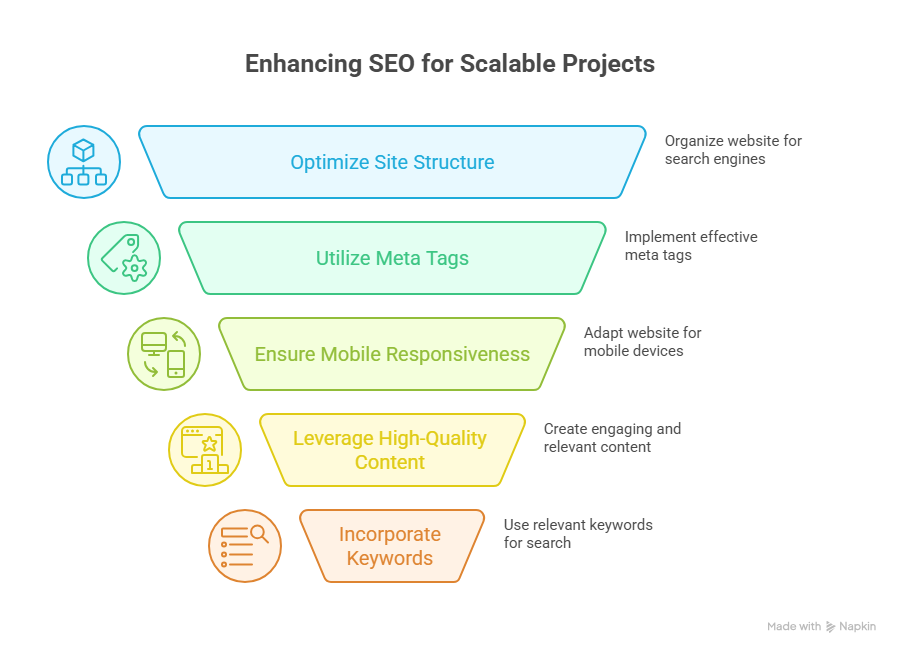
    Key Webflow SEO Strategies For Scalable 2026 Projects 

    Key Webflow SEO Strategies For Scalable 2026 Projects 

    Conduct a Comprehensive Migration or Redesign Audit 

    Before migrating to Webflow or planning a webflow redesign, it’s essential to evaluate your current website. Identify common mistakes, technical debt, and usability issues that could impact SEO and user experience. A thorough migration checklist ensures your Webflow project aligns with business goals, improves online presence, and sets the stage for scalable growth. 

    Evaluate Core Web Vitals and Load Times 

    Improving core web vitals is critical for SEO and visitor retention. Focus on metrics like largest contentful paint, cumulative layout shift, and seconds to load. Use lazy loading, optimized CSS, and streamlined site structure to enhance performance and ensure your Webflow site delivers measurable results in search engines. 

    Optimize On-Page SEO and Content Readability 

    Webflow SEO best practices include semantic HTML, structured headings, alt text for images, and internal linking. Prioritize readability and accessibility to meet customer expectations and improve user experience. AI-driven tools and plugins can help optimize your content for search engines while maintaining a scalable design system. 

    Build a Scalable Framework With Best Practices 

    A scalable Webflow project requires a structured workflow and a consistent design framework. Use Figma or design system guidelines to standardize layouts and responsive design. Focus on accessibility, responsive design, and avoiding overuse of plugins to maintain long-term performance and SEO capabilities. 

    Focus on Conversion and User Experience 

    Turning visitors into customers requires more than technical optimization. Align your webflow development with usability principles, business goals, and design trends. Ensure intuitive navigation, clear calls-to-action, and seamless UX to maximize conversion while maintaining performance and accessibility. 

    Track Analytics and Continuously Optimize 

    Monitoring analytics allows you to refine your Webflow site over time. Track SEO metrics, user engagement, and load times to optimize your website continually. Regular audits and AI-driven performance optimization ensure your online presence remains powerful, measurable, and ready for 2026 trends. 

    Avoid Common Mistakes When Migrating To Webflow Sites 

    Migrating to Webflow can unlock a powerful Webflow project with better scalability, improved SEO capabilities, and enhanced user experience, but it requires careful planning. Avoiding common mistakes ensures your site meets business goals, improves online presence, and converts visitors into customers. Below is a step-by-step guide for a successful migration. 

    Step 1: Conduct a Migration Checklist and Audit 

    Before migrating to Webflow, start with a migration checklist to evaluate your current website. Identify technical debt, broken links, and usability issues. Analyze core web vitals like largest contentful paint and seconds to load to ensure optimal performance. Review webflow SEO, on-page SEO, and accessibility compliance to prevent future issues. 

    Step 2: Plan a Scalable Webflow Framework 

    A scalable Webflow project requires a clear design system and structured framework. Use Figma to standardize layouts, CSS, and responsive design. Prioritize accessibility and readability to improve UX and meet customer expectations. Avoid overloading your site with unnecessary plugins or inconsistent design patterns. 

    Step 3: Optimize Performance and SEO 

    Improving core web vitals, performance and SEO, and on-page SEO ensures your Webflow site ranks well in search engines. Implement lazy loading, clean site structure, and semantic HTML. Use AI-driven tools to optimize content, metadata, and readability. Proper optimization converts more visitors into customers. 

    Step 4: Align With Business Goals and Design Trends 

    Your webflow redesign should align with business goals and current design trends. Maintain usability, intuitive navigation, and clear CTAs. A scalable Webflow project allows you to add new pages and content while maintaining accessibility and SEO best practices. 

    Step 5: Monitor, Audit, and Continuously Improve 

    After migrating to Webflow, continually audit your site structure, core web vitals, and SEO performance. Track analytics to optimize user experience and refine the workflow. Continuous improvement ensures your Webflow site remains fast, accessible, and scalable, delivering measurable business results. 

    Conclusion 

    Successfully executing a Webflow project in 2026 requires more than just moving your website it demands strategic planning, scalable design frameworks, and a focus on SEO, accessibility, and user experience. From conducting thorough migration audits to optimizing core web vitals, implementing webflow SEO best practices, and maintaining a consistent design system, every step contributes to measurable results in conversion, performance, and long-term scalability. 

    By aligning your webflow redesign with business goals, design trends, and accessibility standards, and continuously monitoring analytics, your site can remain fast, responsive, and fully optimized for both visitors and search engines. Leveraging professional development and AI-driven tools ensures that your Webflow site not only meets today’s standards but is also prepared to adapt to the evolving demands of 2026. 

    Frequently Asked Questions (Strategic Considerations For Webflow Projects Heading into 2026)

    What are the 7 major steps to designing a webpage?

    The 7 major steps to designing a webpage are: 1) Define goals and target audience, 2) Plan site structure and layout, 3) Create wireframes and mockups, 4) Design visuals and branding, 5) Develop the website with coding or CMS, 6) Test functionality and responsiveness, 7) Launch and maintain.

    What are the 5 major components of a web page?

    The 5 major components of a web page are: 1) Header – contains navigation and branding, 2) Content main text, images, or videos, 3) Sidebar optional navigation or additional info, 4) Footer – contact info and links, 5) Call-to-Action (CTA) buttons or forms driving user interaction.

    What makes Webflow a strategic choice in 2026?

    Webflow allows rapid, no-code development, highly customizable designs, and scalable CMS options, making it ideal for startups and agencies seeking efficiency and innovation.

    What are the 7 C’s of a website?

    The 7 C’s of a website are: Content relevant information, Context design and layout, Community user interaction, Customization personalized experience, Communication two-way engagement, Connection links to other sites, and Commerce – online transactions. Together, they ensure an effective website.

  • How Webflow Websites Will Be Built Differently In 2026

    How Webflow Websites Will Be Built Differently In 2026

    How Webflow Websites Will Be Built Differently In 2026

    Why do some Webflow websites outperform others, even with similar content? The answer lies in a combination of factors influencing website performance from seamless UX design and AI-driven functionality to SEO optimization and strategic layout choices. By 2026 businesses that rely solely on templates or basic configurations risk falling behind competitors who leverage professional development ongoing support and intelligent integrations.

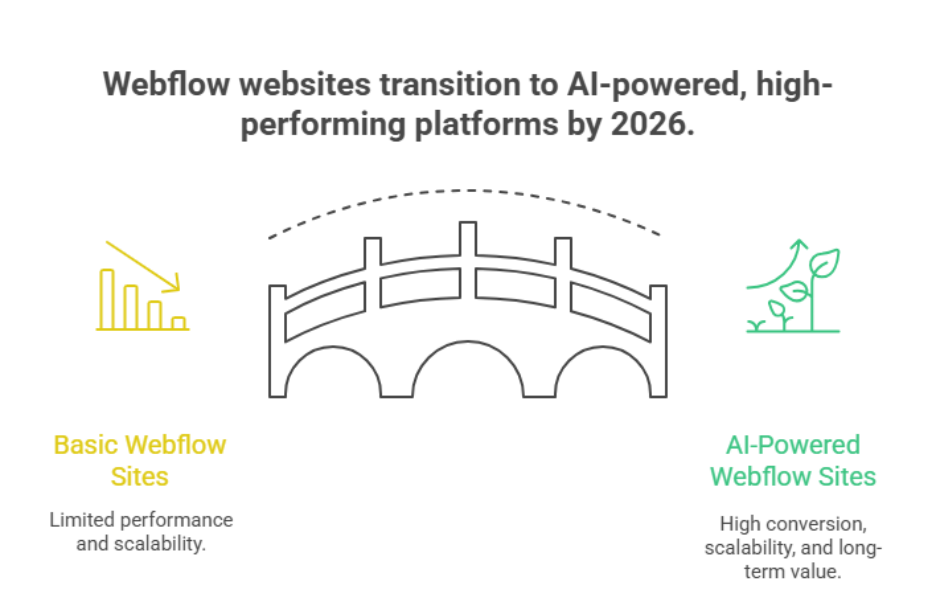
    By 2026, Webflow websites will be built using AI-driven tools seamless Figma integrations, and advanced Webflow CMS workflows. Professional development smart SEO and optimized layouts will drive higher conversion while plugins and automation enhance functionality. Businesses will prioritize performance support and design to future-proof and transform their websites effectively.

    You need more than just a functional website the real value comes from a well-designed Webflow site that converts scales and aligns with your marketing goals. Investing in professional development ensures your Webflow CMS plugins and AI tools work together efficiently while expert maintenance keeps your site secure and optimized. For context professional agencies typically structure pricing to cover design development and ongoing optimization reflecting the long-term value of a high-performing conversion-focused website.

    This blog will explore how Webflow websites will be built differently in 2026, highlighting AI-driven enhancements, Figma integrations, SEO strategies, and powerful Webflow workflows. You’ll discover practical approaches to transform your website, optimize conversion, and future-proof your online presence while understanding the essential role of expert guidance.

    How AI Will Transform Your Webflow Website 2026

    How AI Will Transform Your Webflow Website 2026

    The landscape of website building is evolving rapidly, and Webflow has integrated artificial intelligence to redefine how modern websites are designed, managed and optimized. Heading into 2026 businesses can leverage AI-powered tools to enhance user experience, boost Webflow SEO and streamline Webflow development for both content-driven and e-commerce projects.

    AI-Driven Design and User Experience

    Webflow uses AI to automate design tasks suggest layout improvements and create visually consistent elements across a Webflow project. By analyzing user behavior and engagement, AI can optimize UX ensuring that visitors navigate your Webflow site effortlessly. AI features also help identify design inefficiencies early reducing technical debt and supporting long-term scalability.

    Automation, CMS, and Content Optimization

    With AI integration, Webflow CMS collections can be managed more efficiently. AI-driven content suggestions and analytics ensure your content aligns with search engines improving visibility without manual intervention. Automation of repetitive tasks from tagging to layout adjustments allows marketing teams to focus on strategy rather than manual upkeep. Plugins further extend AI capabilities enabling customization and advanced optimization.

    AI for Performance and SEO

    Webflow hosting combined with powerful Webflow AI tools ensures faster load times and better Core Web Vitals directly impacting conversion. AI-powered insights allow your Webflow site to continuously adapt optimizing images, scripts and content for both website performance and online presence. Compared to platforms like Wix or WordPress using Webflow with AI provides a more streamlined high-performance website builder experience.

    Future-Ready Websites

    As Webflow has become increasingly AI-driven businesses can focus on strategic growth rather than maintenance. From automated optimization to smarter analytics and e-commerce solutions AI ensures modern websites stay competitive visually engaging and fully functional in 2026.

    Integrating SEO Plugins And AI Tools Into Webflow

    Effectively integrating SEO plugins and AI tools into your Webflow site can streamline workflows boost search visibility, and enhance user engagement. Here’s how agencies approach it in a professional, value-driven way:

    Streamlining SEO With Plugins

    • Technical SEO Made Simple: Webflow allows plugins that handle meta tags, structured data and sitemap updates automatically.
    • Alt Text Automation: AI-assisted tools can generate descriptive alt text for images improving accessibility and answer engine optimization.
    • Content Optimization: Plugins identify keywords readability and current website content gaps to boost search engine ranking.
    • Google Analytics Integration: AI tools help track visitor behavior and conversion metrics seamlessly without complex coding.

    Using AI Tools to Automate Repetitive Tasks

    • Using AI for CMS Management: AI-assisted workflows reduce manual updates repetitive tasks and content scheduling.
    • Content Recommendations: AI makes suggestions to enhance engagement and align content with user intent.
    • Localization: Automated translation and localization features allow global reach for live sites.
    • SEO Prioritization: AI-driven search identifies which pages need optimization first, letting marketing teams prioritize optimization efficiently.

    Benefits for Webflow Design and Development

    • Streamlined Workflow: Combining Figma design handoff with AI-powered SEO integration reduces manual effort.
    • No-Code Flexibility: AI tools enable enhancements without relying on custom development.
    • Transform Your Website: Integrating SEO and AI ensures your site remains competitive and future-proof in 2026.
    • Performance and Delivery: Plugins and AI optimize content delivery and maintain fast load times on managed hosting.

    Conclusion

    By 2026, building a successful Webflow website is no longer just about choosing a template or publishing content. The future lies in AI-driven enhancements, seamless Figma integrations, and Webflow CMS workflows that optimize performance, UX, and SEO. Integrating plugins and AI tools allows you to automate repetitive tasks, prioritize optimization, and maintain a high-performing online presence with minimal technical debt. Businesses that invest in professional development, expert support, and smart design and development practices will enjoy higher conversion, scalability, and long-term value.

    The combination of AI, SEO, and intelligent workflows ensures your Webflow site not only meets current standards but is prepared for the evolving digital landscape. Whether it’s automation, content recommendations, or analytics-driven improvements, a powerful Webflow site is central to a competitive digital strategy.

    Ready to transform your website and future-proof your online presence? Here’s a tricky question for you: if you could optimize your Webflow site for maximum conversion and performance tomorrow, would you contact Integriti Studio today?

    Frequently Asked Questions (How Webflow Websites Will Be Built Differently In 2026)

    Is Webflow still relevant in 2025?

    Yes Webflow is still relevant in 2025. It continues growing in adoption, powers millions of websites with strong no‑code visual design tools, expanding CMS and e‑commerce features, AI enhancements, and professional use in design and business sites, despite a competitive landscape.

    What is the future of Webflow?

    Webflow’s future beyond 2025 looks strong: it’s evolving into an AI‑native, enterprise‑ready no‑code platform with faster design workflows, smarter automation, built‑in analytics, and expanding global infrastructure. Growth in market share, AI tools, and scalable features suggests broader adoption and deeper business integration.

    What is the future of web development in the next 5 years?

    In the next five years, web development will increasingly focus on AI-driven automation, no-code/low-code platforms, and personalized user experiences. Progressive web apps, voice interfaces, AR/VR integration, and enhanced security will dominate, while faster performance, accessibility, and seamless cross-device functionality become standard expectations.

    Will Webflow replace web developers?

    No, Webflow will not fully replace web developers. It empowers designers and small businesses to build websites without coding, but complex projects, custom integrations, performance optimization, and enterprise-level solutions still require skilled developers. Webflow complements, rather than replaces, traditional web development roles.

  • What webflow’s 2025 Growth Signals About The Future of No-Code

    What webflow’s 2025 Growth Signals About The Future of No-Code

    Why do some websites perform flawlessly while others struggle to load, scale, or convert despite using similar tools? The answer often lies in the choices you make around web development, not just the platform itself. In 2025, businesses are rethinking heavy coding, bloated plugins, and fragile setups that slow growth. This shift is placing webflow at the center of conversations about efficiency, performance, and long-term control.

    Webflow’s growth in 2025 signals a clear shift toward no-code as a serious web development solution. Businesses want speed, scalability, and control without heavy coding. Webflow bridges design and development, proving no-code platforms are shaping the future of professional, performance-driven websites.

    Website performance is influenced by many factors: clean structure, optimized design, reliable integrations, and ongoing maintenance. Without professional development, even well-designed websites can fail to deliver results. Investing in strong architecture, thoughtful design systems, and expert support ensures stability, scalability, and measurable ROI. While a basic build may start around a few hundred dollars, high-performing websites require strategic planning, customization, and long-term upkeep.

    The growth of webflow in 2025 signals more than popularity—it reflects how businesses are adopting a mature no-code approach without sacrificing quality. As a leading no-code platform, webflow empowers teams to build faster while maintaining precision and flexibility in an evolving digital economy.

    This blog explores what webflow’s momentum in 2025 reveals about modern no-code adoption, how it compares to traditional approaches, and how you can prepare for smarter, future-ready growth.

    Webflow vs Competitors in 2025 Preparing Web Development Future

    Webflow vs Competitors in 2025 Preparing Web Development Future

    Understanding the Competitive Shift

    The web development landscape is changing rapidly, and webflow in 2025 clearly reflects this shift. Traditional tools and generic builders are no longer enough for modern businesses. The rise of no-code platforms shows how companies now prioritize speed, flexibility, and maintainability over complex setups. This marks a defining moment in the future of no-code, where platforms are evaluated on real performance not just ease.

    Webflow Compared to Other No-Code Platforms

    Many no-code platforms offer simplicity, but they often limit customization and scalability. As a website builder, Webflow stands apart by supporting structured website development without sacrificing control. Unlike platforms that rely on rigid templates, platforms like Webflow enable teams to scale confidently, aligning better with web development in 2025 expectations and broader development in 2025 trends.

    Why Agencies and Businesses Choose Webflow

    From an agency perspective, use Webflow means efficiency across the entire development process. Webflow supports advanced design systems, making collaboration smoother and future updates easier. Webflow provides the flexibility to build high-quality web applications and marketing sites alike, which is why Webflow leads much of the modern no-code web development movement.

    Preparing for the Future

    For a small business owner, choosing the right platform is critical. The rise of no-code is not about shortcuts—it’s about smarter delivery. As web development in 2025 evolves, Webflow positions itself as a long-term solution that prepares businesses for scalable growth, evolving demands, and the future of digital experiences.

    Why Businesses Use Webflow Over Coding WordPress in 2025

    • Webflow stands as a modern alternative to heavy traditional development, reducing dependency on manual coding workflows.
    • Unlike wordpress in 2025, Webflow enables teams to build fully functional websites without code or a single line of code.
    • Webflow empowers non-technical users and teams with little or no technical background to manage and scale sites confidently.
    • Built-in responsive design tools ensure consistent performance across devices without extra plugins.
    • Compared to many competitors in 2025, Webflow offers faster execution, cleaner structure, and fewer maintenance risks.
    • The platform supports complex projects while still simplifying building a website from design to launch.
    • As part of the broader no-code evolution, Webflow is actively shaping the future of how businesses approach digital growth.
    • This makes Webflow a strong choice for companies preparing for the future of web platforms and long-term scalability.

    Conclusion

    Webflow’s growth in 2025 clearly reflects how businesses are redefining web development priorities. Performance, scalability, and long-term control now matter more than relying on heavy coding or fragile plugin-based systems. As a mature no-code platform, Webflow allows companies to move faster, maintain design consistency, and adapt to changing digital demands without compromising quality.

    When compared with competitors and traditional platforms like WordPress, Webflow stands out for its structured approach, cleaner development process, and ability to support complex, future-ready projects. This shift is not about avoiding expertise—it’s about investing in smarter tools, professional execution, and sustainable growth. Businesses that choose platforms aligned with these values are better positioned to scale, optimize, and compete in an evolving digital landscape.

    If your website is critical to growth, the real question is not whether to adopt modern platforms—but how well they are implemented.

    Is your current website strategy strong enough, or is it time to talk to Integriti Studio and rethink it?

    Frequently Asked Questions (What webflow’s 2025 Growth Signals About The Future of No-Code)

    What is the future of webflow?

    Webflow’s future in 2025 is strong, evolving as a no‑code, AI-enhanced platform that enables fast, scalable, and high-performance websites. With AI tools, enterprise capabilities, and flexible integrations, Webflow helps businesses and creators build, optimize, and maintain websites efficiently while bridging no-code and traditional development workflows.

    What is the future of no-code platforms?

    The future of no-code platforms is rapidly expanding, driven by AI integration and increased demand for fast, scalable, and customizable digital solutions. These platforms enable businesses and creators to build websites, apps, and workflows efficiently, reducing reliance on traditional coding while supporting innovation, automation, and faster time-to-market.

    Should I learn Webflow in 2025?

    Yes, learning Webflow in 2025 is valuable. As a no-code, AI-enhanced platform, it enables you to build responsive, high-performance websites without extensive coding. Mastering Webflow enhances your career opportunities, supports efficient web development, and prepares you for the growing demand for scalable, modern web solutions.

    Is web development still relevant in 2025?

    Yes, web development remains highly relevant in 2025. Despite the rise of no-code and AI-powered platforms, skilled developers are essential for creating custom, scalable, and secure websites, optimizing performance, integrating advanced features, and ensuring a superior user experience that meets evolving business and technological demands.

  • Why Webflow Sites Started Competing With Custom Code in 2025

    Why Webflow Sites Started Competing With Custom Code in 2025

    Why Webflow Sites Started Competing With Custom Code in 2025

    Why do some websites outperform others despite using similar platforms? The difference often comes down to factors influencing website performance, from coding quality and clean CSS to optimized content management and seamless third-party integrations. As a startup or growing business, you might assume that a custom website built for a few hundred dollars is enough but without professional development, ongoing support, and thoughtful maintenance, hidden costs often accumulate, affecting speed, SEO, and user experience.

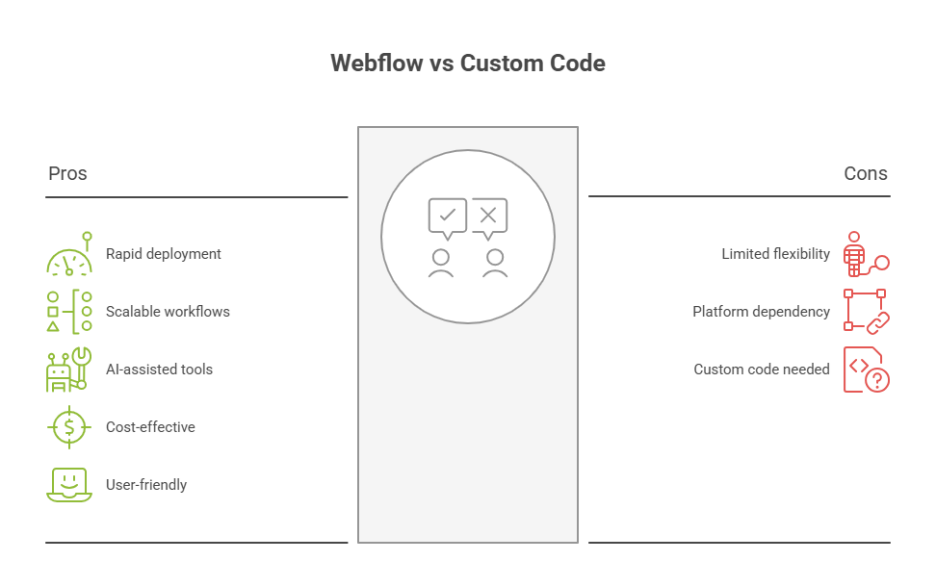
    Webflow sites started competing with custom code in 2025 because they combine no-code efficiency with advanced customization, AI-assisted tools, and scalable workflows. Businesses and developers realized that Webflow offered faster deployment, easier maintenance, and strong SEO performance, making it a cost-effective, professional alternative to fully coded custom websites.

    Webflow sites in 2025 have emerged as a compelling alternative to custom code, offering a no-code, user-friendly builder that balances customization with efficiency. Developers now recognize that leveraging Webflow’s platform, coupled with AI-assisted tools and scalable workflows, can deliver sophisticated animations, integrations, and content management capabilities previously reserved for traditional coding. Good design, robust support, and adherence to best practices are no longer optional—they’re critical to long-term success.

    This blog will explore why Webflow started competing with custom code in 2025, examining performance factors, the real value of professional development, and strategic use cases for startups. You’ll also see how making the right choice between Webflow and custom coding can impact scalability, SEO, and overall web development workflows.

    Why Startups Choose Webflow in 2025 Strategically

    Why Startups Choose Webflow in 2025 Strategically

    Startups in 2025 are increasingly turning to Webflow as a strategic alternative to fully custom development. The platform offers a unique combination of speed, scalability, and flexibility, allowing emerging businesses to launch professional websites without compromising on design, functionality, or long-term growth potential. Understanding why startups are making this shift requires a closer look at the benefits Webflow brings compared to traditional custom coding approaches.

    Speed and Efficiency in Web Development

    One of the primary reasons startups choose Webflow in 2025 is the speed at which websites can be launched. Unlike fully custom development, which may require extensive coding and debugging, Webflow’s visual interface allows teams to build functional, responsive sites quickly. Webflow generates clean code and semantic code automatically, reducing errors while ensuring compatibility with SEO best practices. For startups, this means faster time-to-market and the ability to iterate quickly based on user feedback.

    Scalability Without Compromising Quality

    Scalability is another critical factor. Webflow remains a strong choice for startups that anticipate rapid growth. Webflow’s platform allows for advanced features, complex functionalities, and integration with third-party tools without the need to rebuild the site from scratch. Startups can add custom code or implement custom business logic where necessary, ensuring the site grows alongside the business. Compared to platforms like Webflow vs custom code, Webflow often reduces long-term maintenance costs while maintaining flexibility.

    Balance Between Design and Development

    Webflow is great for bridging the gap between design and development. Startups can leverage Webflow University resources to train in webflow development or collaborate with webflow experts to create custom layouts. The platform gives startups the ability to maintain clean code while implementing advanced features, animations, and AI site builder tools without writing a line of code.

    Strategic Decision: Webflow vs Custom

    Choosing the right choice between Webflow and custom development comes down to balancing budget, timeline, and functionality. While fully custom sites offer ultimate flexibility, they are often resource-intensive. Webflow in 2025 gives startups the ability to build custom websites, add custom code selectively, and maintain semantic code all while avoiding platform limitations.

    Long-Term Value and Maintenance

    Startups also benefit from Webflow’s sustainable approach to web development. The platform provides ongoing updates, reliable hosting, and analytics tools to monitor site performance. Webflow gives teams insights to optimize workflows, maintain scalability, and future-proof their digital presence critical considerations for businesses planning long-term growth.

    Webflow vs Custom Code: 2025 Developer Comparison Insights

    As the web development landscape evolves in 2025, businesses and developers are increasingly evaluating whether to invest in fully custom code or switch to Webflow. Understanding the practical differences, benefits, and limitations of each approach is essential for making informed decisions that align with business needs, scalability, and long-term performance.

    Speed and Efficiency for Designers and Developers

    • Rapid Development: Webflow is a visual web development platform that allows designers and developers to build responsive sites faster than traditional coding.
    • Clean Code Generation: Webflow generates clean, semantic code automatically, reducing errors and ensuring compatibility with SEO and performance optimization best practices.
    • Visual Control: Webflow allows teams to manage layouts, animations, and styling visually while still providing the option to add custom code where necessary.

    Integration and Third-Party Tools

    • Seamless Connections: Webflow provides integration with third-party tools like CRMs, analytics, and marketing platforms, simplifying workflows for startups and enterprises.
    • Custom Content Types: While fully custom development allows complete control over data structures, Webflow users can create custom content types and easily add dynamic content through its CMS features.

    Cost, Maintenance, and Scalability

    • Total Cost of Ownership: Deciding between Webflow and custom solutions often comes down to long-term costs. Custom development may require more technical resources, dedicated maintenance, and custom SLAs, which can lead to unexpected costs.
    • Sustainable Scalability: Webflow pages are optimized to handle millions of users, with scalable hosting and reliable performance, making the platform helpful for startups building growth-focused digital products.

    Flexibility vs Platform Limitations

    • Custom Code Advantage: Fully custom sites offer complete flexibility for complex functionalities and unique business logic.
    • Webflow Advantage: Webflow is a visual web development builder that simplifies most tasks, from the basics to advanced features, and allows designers and developers to focus on user experience and workflow optimization.

    Best Fit for Your Business

    • Startups and SMEs: For businesses seeking speed, reduced maintenance, and integrated tools like analytics, Webflow provides a practical solution without sacrificing scalability.
    • Enterprises with Unique Needs: Companies requiring highly customized solutions may benefit from custom code, provided they have the technical resources to manage development and ongoing updates.

    Conclusion

    In 2025, Webflow sites proved they could compete with fully custom code by combining speed, scalability, and flexibility with professional-grade design and development capabilities. Startups and growing businesses found that leveraging Webflow’s visual platform, AI-assisted tools, and clean code generation enabled faster launches, easier maintenance, and optimized performance. Compared to traditional custom development, Webflow reduces long-term costs, simplifies integrations with third-party tools, and allows selective addition of custom code, making it a practical, scalable choice for businesses aiming for sustainable growth.

    Deciding between Webflow and custom code ultimately depends on your business needs, technical resources, and long-term goals. For startups, Webflow provides a strategic, cost-effective solution that balances efficiency, design, and advanced functionality. Meanwhile, enterprises with highly specific requirements may still benefit from fully custom development, provided they can manage the associated complexity and costs.

    Curious which approach Webflow or custom code would maximize your growth? Why not ask Integriti Studio?

    Frequently Asked Questions (Why Webflow Sites Started Competing With Custom Code in 2025)

    Is Webflow still relevant in 2025?

    Yes Webflow remains highly relevant in 2025. Its no‑code visual development, responsive design, CMS capabilities, and AI-assisted features make it essential for designers, freelancers, and businesses. With growing adoption and continued updates, Webflow stays a strong tool for modern web design and development.

    Does Webflow allow custom code?

    Yes Webflow allows custom code. Designers can embed HTML, CSS, and JavaScript directly into pages or the site’s header/footer, enabling advanced functionality beyond the visual builder. This flexibility makes Webflow suitable for both no‑code users and developers needing custom, dynamic web solutions.

    Who does Webflow compete with?

    Webflow competes with platforms like Wix, Squarespace, WordPress, Shopify, and Bubble. It stands out for visual no‑code development and CMS flexibility, but these competitors offer alternative solutions for website building, e‑commerce, and app development, targeting both beginners and professional designers.

    What is the difference between Webflow and custom website?

    The difference between Webflow and a custom website is that Webflow uses a visual, no‑code platform with templates and built-in CMS, enabling faster development, while a custom website is coded from scratch, offering full control, unique features, and optimization, but requires more time, skill, and maintenance.

  • What Webflow Designers Had to Unlearn in 2025

    What Webflow Designers Had to Unlearn in 2025

    What Webflow Designers Had to Unlearn in 2025

    Why do some websites scale smoothly while others stall even when built on the same tools? The answer often lies not in the platform, but in the assumptions behind how it’s used. In 2025, many webflow professionals realized that success required unlearning habits that once felt efficient but no longer supported performance, scalability, or long-term growth.

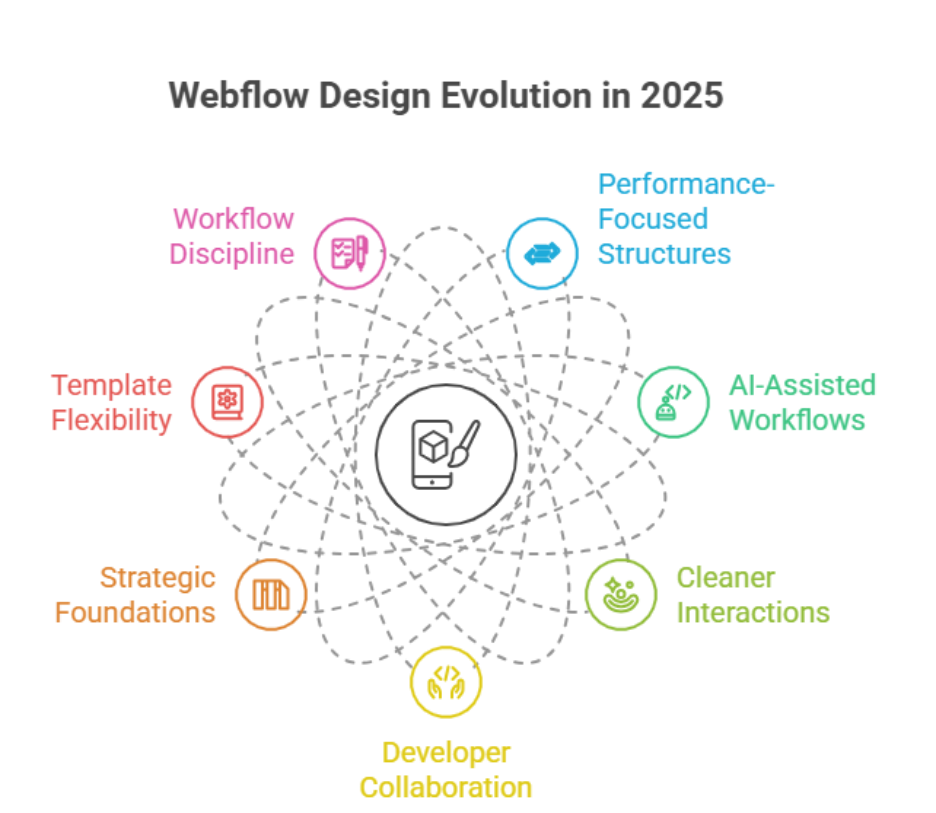
    In 2025, Webflow designers had to unlearn over-reliance on templates, visual-only decisions, and quick builds without scalability. They shifted toward performance-focused structures, AI-assisted workflows, cleaner interactions, and closer collaboration with developers to deliver websites that support long-term business growth.

    Website performance is influenced by multiple factors: clean structure, optimized interactions, thoughtful animations, and how well ai-driven workflows are integrated. When these elements are handled without professional oversight, even visually impressive work can result in slow load times, poor conversions, and difficult maintenance. A skilled designer working alongside a developer understands that strong web design is not just about aesthetics it’s about systems, consistency, and measurable outcomes.

    Businesses also began to recognize the real cost of shortcuts. A website priced at $500–$800 may look acceptable initially, but without proper support, updates, and optimization, it often demands costly fixes later. Strategic development, ongoing maintenance, and informed decision-making deliver far greater value over time.

    This blog explores what webflow designers had to unlearn in 2025, how expectations changed, and which smarter design and development choices are shaping more sustainable digital results moving forward.

    Webflow in 2025 Taught Startups Smarter Web Design Choices Toward 2026

    Webflow in 2025 Taught Startups Smarter Web Design Choices Toward 2026

    Startups Moved From Speed-First Builds to Strategic Foundations

    For many early-stage companies, speed was once the main decision driver. Launch fast, adjust later. Webflow in 2025 challenged that mindset. Startups learned that rushed execution often created long-term inefficiencies especially when structure, scalability, and performance were ignored. Modern web design decisions began focusing on systems rather than screens, ensuring that early choices would not block future expansion.

    Templates Became a Starting Point, Not a Strategy

    A common lesson was understanding the role of a template. While templates helped accelerate launches, startups realized they should never dictate architecture. Over-customized templates frequently led to bloated layouts and inconsistent logic. Instead, teams adopted cleaner frameworks that supported flexibility, maintainability, and measurable outcomes as the business evolved.

    Workflow Discipline Defined Sustainable Growth

    Another major shift was the importance of a documented workflow. Startups stopped treating design and deployment as isolated tasks. Clear workflows improved collaboration, reduced rework, and created repeatable processes that could scale. This operational clarity directly influenced performance, stability, and long-term cost control especially when web design decisions aligned with business goals.

    Designing With 2026 in Mind

    By the end of 2025, a forward-looking startup no longer asked what worked now, but what would still work in 2026. The lesson was clear: smarter web design choices are those that anticipate growth, not just launch dates.

    Conclusion

    The lessons from Webflow in 2025 highlight that effective web design goes beyond aesthetics or speed it requires strategic thinking, disciplined workflows, and collaboration between designers and developers. Startups and businesses learned to move away from over-reliance on templates, rushed builds, and purely visual decisions, instead prioritizing scalable structures, AI-assisted workflows, and performance-driven design.

    Investing in professional development, ongoing maintenance, and thoughtful design choices ensures websites not only launch successfully but continue to support growth into 2026 and beyond. Ultimately, the key takeaway for anyone learning Webflow in 2025 is that unlearning outdated habits is as important as adopting new tools and strategies delivering websites that are faster, cleaner, and more resilient for the long term.

    Struggling to implement these smarter design strategies on your website? Why not contact Integriti Studio and get expert guidance today?

    Frequently Asked Questions (What Webflow Designers Had to Unlearn in 2025)

    Is Webflow still relevant in 2025?

    Yes Webflow is still relevant in 2025. It’s widely used for professional, responsive, no‑code website design, with growing market adoption, advanced features, and strong performance and SEO tools. Its role in no‑code/AI‑assisted web development keeps it valuable for designers and businesses.

    Do professional web designers use Webflow?

    Yes, professional web designers use Webflow for client projects, startups, and agency work. Its visual no‑code interface, responsive design capabilities, CMS integration, and fast prototyping make it ideal for delivering polished, scalable websites efficiently, while still allowing custom code for advanced functionality.

    Is Webflow still popular?

    Yes Webflow is still popular in 2025. It powers millions of websites globally, has a growing user base, and continues increasing its market share among CMS platforms. Designers, freelancers, and businesses still choose it for no‑code, responsive web design and visual development.

    Are Webflow designers in demand?

    Yes Webflow designers are in demand in 2025. Businesses, agencies, and startups increasingly hire Webflow pros for fast, responsive, and custom websites. Job openings and freelance gigs continue growing as Webflow adoption rises, especially in no‑code development and digital design roles.

  • Webflow in 2026: Which 2025 Trends Will Shape Client Expectations

    Webflow in 2026: Which 2025 Trends Will Shape Client Expectations

    Webflow in 2026: Which 2025 Trends Will Shape Client Expectations

    Why do some Webflow websites outperform others, even when built on the same platform? The answer lies in multiple factors influencing website performance clean code, intuitive interface, optimized UX, AI-driven personalization, and seamless workflow integration. Businesses that overlook professional development, ongoing support, or design maintenance often face slower load times, lower conversions, and missed opportunities for SEO optimization.

    Webflow in 2026 will be shaped by 2025 trends like AI-driven personalization, minimalism-focused layouts, improved UX/UI, and accessibility. Clients will expect faster performance, seamless interfaces, real-time analytics, and professional design support. Prioritizing SEO, animation, and data-driven workflows will be essential to meet these evolving expectations.

    Investing in professional design and development can transform how users interact with your website. A well-crafted layout, minimalism-focused UI, and subtle animation improve user experience, while AI tools and analytics help you optimize content in real-time. Even small investments often starting from a few hundred dollars per month for maintenance, updates, and support can deliver measurable ROI and scalable results.

    This blog explores how Webflow in 2026 will evolve, highlighting which 2025 trends continue to shape client expectations. You’ll learn how AI-driven tools, modern design trends, accessibility, and minimalism transform web design, how interface and UX choices influence engagement, and why prioritizing professional support is crucial for long-term success. By the end, you’ll have actionable insights to plan, optimize, and scale your Webflow projects with confidence.

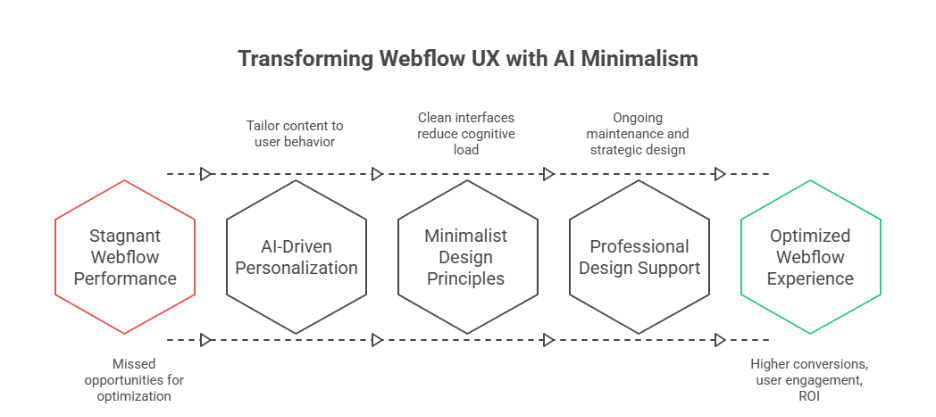
    How AI-Driven Minimalism Transforms Webflow UX in 2026

    How AI-Driven Minimalism Transforms Webflow UX in 2026

    As Webflow continues to evolve, 2026 marks a pivotal shift where AI-driven layouts and minimalism converge to redefine user experience. Businesses heading into 2026 must understand how these innovations impact website design, usability, and customer expectations while streamlining workflows through no-code solutions.

    The Role of AI in Modern Web Design

    AI is changing how designers approach modern web interfaces. From homepage structures to adaptive content, ai-powered tools enable personalization that caters to individual users, helping users navigate sites seamlessly. By analyzing behavior and interaction patterns, AI can optimize visualization and interactive elements, creating intuitive digital experiences that align with brand identity.

    Personalized Layouts for Better Usability

    AI-driven layouts allow adaptive content placement, guiding users to key sections and improving usability. Elements like dynamic menus, voice and chat interfaces, and context-aware calls-to-action ensure the site loads faster and responds to user intent. This approach also guides users toward meaningful actions, enhancing engagement.

    Minimalism Meets AI for Seamless Experiences

    Minimalism paired with AI ensures that design is not only aesthetic but functional. Clean interfaces reduce cognitive load while ai-powered personalization delivers content seamlessly. This trend addresses customer expectations for speed, clarity, and efficiency, making website design more intuitive.

    Integrating Interactive Elements Without Clutter

    Using subtle interactive elements like hover effects, micro-animations, or adaptive content sections enhances engagement without overwhelming users. AI assists in predicting which elements improve conversion, aligning web design trends with trends for 2026.

    Real-Time Personalization and Analytics

    AI tools provide insights through API integrations and dashboards, offering real-time visualization of user behavior. By continuously adapting layouts, 2026 highlight is the ability to deliver personalization that evolves with user interactions, ensuring digital experiences remain relevant and efficient.

    Preparing for What’s Next

    As designers explore trends of 2026, AI-driven minimalism will dominate modern web projects. Focusing on usability, brand identity, and seamless experiences ensures your website design aligns with customer expectations, while ai-powered layouts and no-code tools make scaling and adaptation more efficient.

    AI-Driven Personalization Shapes Minimalism in Web Design 

    AI-driven personalization is revolutionizing modern web design, particularly in platforms like Webflow. By combining minimalism with intelligent automation, businesses can deliver higher conversion rates, streamlined interfaces, and digital experiences that resonate with users. Below is a detailed breakdown of how this approach works:

    Personalization Based on User Behavior

    • Based on behavior: AI monitors user interactions and adapts content dynamically, instead of static layouts, ensuring every visit feels tailored.
    • Scroll-based engagement: Features like scrollytelling guide users through content naturally, improving retention and usability.
    • AI-assisted recommendations: Personalized suggestions for products, articles, or services enhance engagement while respecting user intent.

    Minimalism Meets Strategic Design

    • Fewer resources: Minimalist layouts reduce clutter and optimize performance, allowing pages to load faster without sacrificing impact.
    • Bold type and bold colors: Selective use of bold type or bold colors emphasizes key messages while maintaining a clean interface.
    • Maximalist elements only when needed: Interactive or decorative elements are used sparingly, preserving focus and efficiency.

    Leveraging AI-Powered Tools for Optimization

    • AI-powered tools analyze user behavior and provide actionable insights for UX, interface, and content optimization.
    • Real-time adjustments improve higher conversion rates by presenting content tailored to individual preferences.
    • Integrations support ownership and privacy concerns, ensuring compliance with data privacy standards.

    Benefits for Businesses and Users

    • Personalized, minimalist design creates a seamless experience that reduces cognitive load.
    • Businesses achieve higher conversion rates and measurable ROI with optimized, AI-assisted layouts.
    • Users enjoy interactive, scroll-based experiences that feel intuitive, engaging, and relevant.

    Conclusion

    Webflow in 2026 is set to redefine client expectations by blending AI-driven personalization with minimalist design principles. Businesses that prioritize usability, clean interfaces, and seamless workflows will see measurable improvements in conversion rates, user engagement, and long-term ROI. By leveraging AI-powered tools, scroll-based interactions, and adaptive layouts, you can create digital experiences that feel intuitive, responsive, and tailored to each visitor.

    Investing in professional development, ongoing maintenance, and strategic design ensures your Webflow projects not only meet customer expectations but also stay ahead of web design trends heading into 2026. Minimalism combined with intelligent personalization simplifies navigation, guides users naturally, and delivers content based on behavior, while respecting data privacy and ownership concerns. The result is a modern, scalable, and efficient website design that resonates with users and supports your brand identity.

    As you plan your next Webflow project, consider how AI-driven minimalism and personalization can transform your homepage, layout, and overall UX.

    Do you know if your current Webflow setup is fully optimized for AI-driven personalization or should you contact Integriti Studio to find out?

    Frequently Asked Questions (Webflow in 2026: Which 2025 Trends Will Shape Client Expectations)

    What are the web development trends for 2026?

    AI‑driven development and personalization will dominate, while Progressive Web Apps (PWAs), Web3/blockchain, low‑code/no‑code platforms, serverless and edge computing, WebAssembly high‑performance apps, and strong cybersecurity/zero‑trust design will shape fast, scalable, and secure web experiences.

    Should I learn Webflow in 2025?

    Yes, learning Webflow in 2025 is a smart move. Its visual development approach, combined with AI-powered design tools, allows faster, responsive, and professional website creation without heavy coding. Webflow skills are in high demand for modern web design, startups, and freelance opportunities.

    What is the future of Webflow?

    The future of Webflow looks strong and evolving: it will grow with AI‑powered design and automation, expand enterprise and no‑code adoption, boost market share, and offer powerful visual tools for both creators and businesses—bridging design ease with professional web capabilities.

    What are the latest trends in web design?

    AI‑powered personalization, 3D and immersive visuals, motion micro‑interactions, minimalist clarity with bold typography, adaptive dark/light themes, voice UI integration, and spatial layering depth are shaping modern sites for 2026. These trends focus on engagement, accessibility, and clear, dynamic user experiences.

  • What webflow  2025 growth signals for the future

    What webflow  2025 growth signals for the future

    What webflow  2025 growth signals for the future

    Why do some websites built on popular platforms struggle to convert, while others thrive effortlessly? The difference often comes down to more than just the choice between Webflow or WordPress it lies in factors influencing website performance, from professional development quality to thoughtful design and ongoing maintenance. In 2025, businesses increasingly recognize that the real value of good web design extends beyond aesthetics. A carefully optimized user experience, accessible layouts, and seamless AI-driven personalization can dramatically improve engagement and SEO, while data-driven decisions and smart integrations help marketing teams maximize ROI.

    Webflow in 2025 signals a future driven by AI, no-code efficiency, and seamless integrations. Marketing leaders leverage its SEO, analytics, and personalization capabilities to optimize user experience, improve conversions, and enable data-driven decisions. Businesses using Webflow can scale faster while maintaining modern, high-performing web design.

    Professional development ensures that your website not only looks modern but functions reliably, with features that support growth. Maintenance and support often overlooked keep your site secure, fast, and optimized for conversions. Small investments, such as allocating $2,000–$5,000 for focused improvements or enhancements, can yield measurable results without breaking budgets.

    This blog will explore the growth signals for Webflow in 2025, highlighting how AI, SEO, integration, and no-code capabilities are shaping the future. You’ll learn how marketing leaders use Webflow to optimize websites, improve user experience, and leverage data-driven insights for smarter decisions.

    AI, SEO, Analytics: Key Webflow 2025 Takeaways

    AI, SEO, Analytics: Key Webflow 2025 Takeaways

    Webflow in 2025 continues to redefine how marketing websites are designed, optimized, and scaled. For businesses looking to build smarter, leveraging AI, SEO, and analytics is no longer optional—it’s essential. Understanding these core areas helps marketers, designers, and developers create future-proof web experiences that maximize ROI and deliver measurable impact.

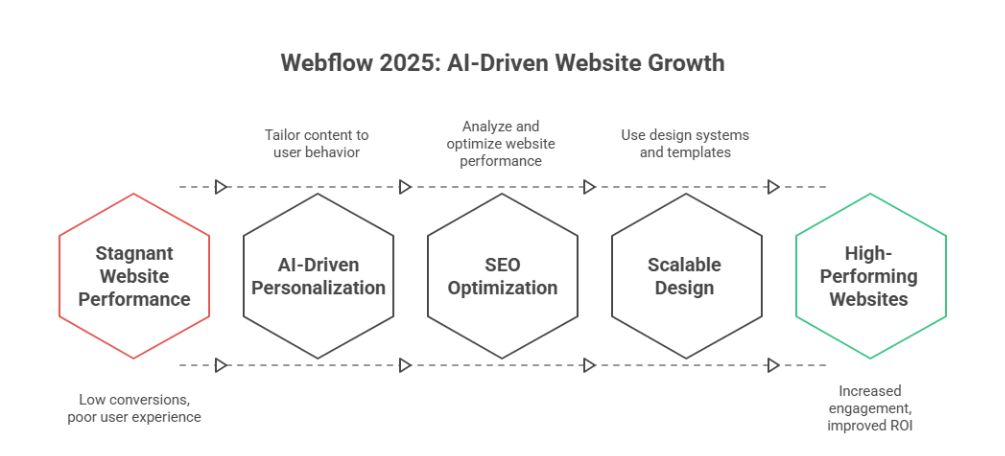
    AI-Driven Personalization Enhances User Experience

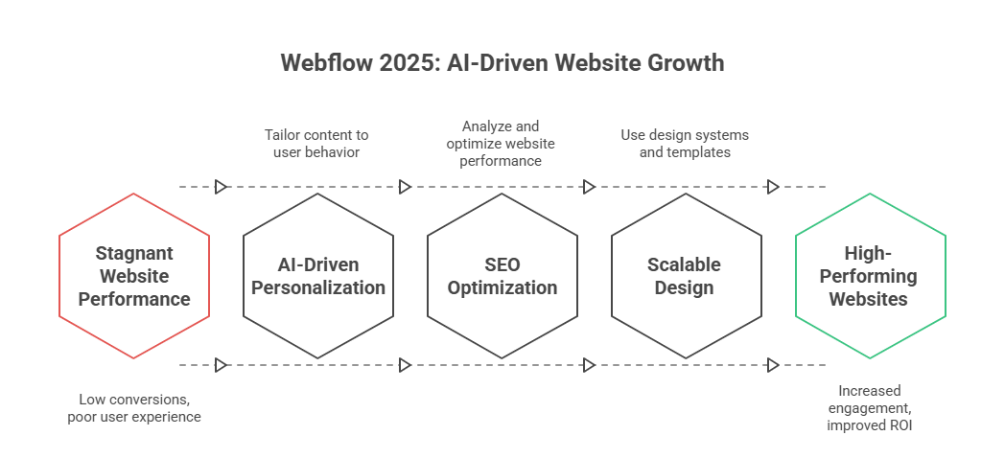
    One of the most significant growth signals for Webflow in 2025 is AI-driven personalization. Platforms like Webflow now allow marketers to dynamically tailor content based on user behavior and preferences. By integrating AI, teams can deliver relevant experiences without code, reducing the bottleneck of manual content updates. Designers and developers can combine AI with visual web development and motion design to create immersive digital experiences that resonate with audiences.

    Benefits for Marketing Leaders and Teams

    • Deliver content-rich, personalized experiences across entire websites.
    • Automate repetitive tasks, freeing teams to focus on strategy and design.
    • Improve ROI by increasing engagement and conversion through smarter, data-driven personalization.

    SEO Optimization and Analytics Integration

    In 2025, SEO rankings are increasingly tied to data and user engagement. Webflow’s new tools make it simple to analyze and optimize websites using integrated analytics, allowing marketers to track performance in real-time. Whether you use Webflow for scalable websites or smaller webflow sites, having built-in insights reduces reliance on third-party tools and empowers non-developers to make informed decisions.

    Key Takeaways for SEO in Webflow

    • Leverage analytics to understand user behavior and optimize layout and content placement.
    • Combine dynamic content with AI-driven strategies to improve search visibility.
    • Ensure future-proof websites by aligning design systems, templates, and reusable components with evolving website trends.

    Designing Scalable, Data-Driven Web Experiences

    Webflow’s 2025 state highlights the importance of design and development workflows that support scalable websites. From core areas like accessibility and inclusive design to backend logic and content management, Webflow provides tools to iterate efficiently. Freelancers, teams, and agencies can leverage reusable components and curated collections to streamline projects, ensuring future-proof websites that meet modern web standards.

    Practical Applications

    • Use design systems and templates to maintain consistency across large projects.
    • Integrate analytics to continuously refine digital experiences.
    • Adopt AI and automation for dynamic content, ai-driven personalization, and smarter team collaboration.

    Takeaways:

    By focusing on AI-driven personalization, integrated analytics, and SEO optimization, Webflow in 2025 enables marketers and designers to build content-rich, scalable websites without code. These innovations help teams analyze and optimize continuously, delivering relevant experiences that drive growth, improve ROI, and future-proof web projects.

    Conclusion

    Webflow in 2025 clearly demonstrates that the future of websites is no longer just about aesthetics—it’s about building smarter, scalable, and data-driven digital experiences. By leveraging AI-driven personalization, integrated analytics, and SEO optimization, businesses can create marketing websites that not only engage users but also deliver measurable ROI. Thoughtful webflow design, professional development, and ongoing maintenance ensure your site remains reliable, future-proof, and optimized for growth.

    Marketing leaders and teams who use Webflow effectively can streamline workflows, reduce dependency on developers, and implement dynamic content strategies that respond to real-time user behavior. Small, targeted investments in design systems, templates, and AI integrations can yield outsized results, making modern web development both efficient and impactful.

    Ultimately, the growth signals for Webflow in 2025 point toward a future where content-rich, scalable websites powered by AI and analytics become the standard. By embracing these capabilities, businesses can stay ahead of website trends, improve user experience, and make confident, data-driven decisions for long-term success.

    Are you ready to take your website to the next level why not contact Integriti Studio today and see how we can help?

    Frequently Asked Questions (What webflow  2025 growth signals for the future)

    What is the future of Webflow?

    The future of Webflow is promising, as it continues evolving into a full-fledged no-code platform for designers and developers. In 2025, its focus on AI-driven design, real-time collaboration, and scalable workflows enables businesses to build responsive, visually compelling websites efficiently, bridging creativity with production-ready functionality.

    Should I learn Webflow in 2025?

    Yes, learning Webflow in 2025 is valuable. Its no-code capabilities, AI-driven design tools, and real-time collaboration features empower designers and developers to build responsive, scalable websites efficiently. Mastering Webflow can enhance your skillset, improve workflow efficiency, and open opportunities in modern web design and digital agencies.

    Is web design still in demand in 2025?

    Yes, web design remains in high demand in 2025. Businesses increasingly prioritize user experience, responsive design, and AI-driven functionality. Skilled designers who can create visually appealing, optimized, and future-ready websites are essential for brand growth, digital engagement, and maintaining a competitive edge in the evolving online marketplace.

    What will marketing look like in 2025?

    Marketing in 2025 will be data-driven, AI-powered, and highly personalized. Brands will leverage advanced analytics, automation, and real-time collaboration tools to deliver targeted campaigns across multiple channels. Creative content, seamless user experiences, and predictive insights will define strategies, making marketing more efficient and measurable than ever.