
A Google Business Profile (GBP) aka Google My Business (GMB) is an essential tool for any company, especially those targeting local markets. Few firms make the most of their profiles, despite the fact that many develop them. Having a well-maintained business listing can significantly improve your online visibility and search rankings in Google search results.
According to Google’s GBP statistics, if your profile is complete, users are 50% more likely to think about making a purchase and 70% more likely to visit your shop. Optimizing your Google business profile helps customers find your business in local searches and boosts your local SEO strategies.
In this blog, we’ll explore how optimizing your Google Business Profile can enhance visibility, attract local customers, boost engagement, and improve your business’s online presence.
Why does Google Business Profile matter?
Customers can find your company immediately through Google Maps and Search with a Google Business Profile, which is more than simply a digital listing. Regardless of the size of your business, having a well-optimized GBP helps you reach a wider audience, be more visible in search engines, interact with potential clients, and gain their confidence. Your business pin ensures your listing is trusted across directories.
Many potential buyers search Google to start their buying journey, often looking for products or services by the label “near me.” Your company can more easily show up in local searches if your profile is completely optimized, giving you an advantage over the competition. A GBP serves as an instant point of contact for customers to phone, message, or locate your company, making it an essential component of your customer service and engagement plan.
Knowing how to make the most out of it:
Now that Google has made it possible for companies to include social media accounts in their Google Business Profile, this is a fantastic chance to improve your SEO efforts and digital marketing approach. By displaying your services, contact details, business description, landing page, and photographs, GBP aims to make it simple for consumers to learn about your business’s offerings without them having to visit your website. Having your business’s GBP optimized is crucial for visibility since paid advertisements are driving organic results lower on the search results page.
You may greatly expand the reach of Google My Business, interact with clients, and stand out in the congested search results of today by preserving your GBP with genuine material, adding photos and videos, connecting it to social media accounts, and maintaining consistent information across all directories.
Steps to take for your Google Business Profile/ Google My Business improvement:
Optimizing your Google Business Profile (GBP) is important for improving your online presence and connecting with potential customers. Here’s how to do it efficiently:
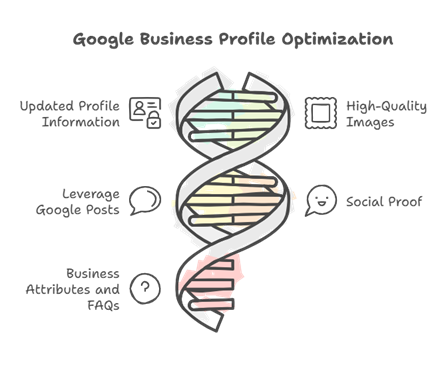
1. Updated Profile Information:
Make sure that all of your company’s information, including your name of your business, address, phone number (NAP), and operating hours (keep in mind to adjust your hours in accordance with special occasions or holidays) is correct and up to date. Moreover, a well-written business description that includes relevant keywords and search terms draws attention, making it easier for clients to find you, boosting your SEO efforts, and improving your search rankings.
2. High-Quality Images:
Keep clear of stock photos and upload real shots to offer customers a sense of authenticity. Include pictures of your shopfront, staff, merchandise, and service-specific landing pages to give prospective buyers an idea of who you are. Businesses with high-quality photos get a lot more interaction and traction in local search results.
3. Leverage Google Posts:
By using this function, you can keep your profile interesting and up to date by sharing events, promotions, updates about your business, newsletters, and special offers right on it. Frequent postings can draw attention to new services, significant occasions, or special deals, making it simple for clients to discover what’s going on, increasing website traffic, and helping improve your business’s online visibility.
4. Social proof:
Good customer reviews and positive reviews increase credibility and trust. By responding to negative reviews and customer reviews, you show your concern for the client experience. Although most customers are not avid commenters, a rating of one or a rating between 0 and 5 stars is a little suspect.
5. Add Business Attributes and FAQs:
Use terms like “accessible,” “women-led,” or other business attributes to make a statement. By answering commonly asked questions (FAQs) immediately on your profile, you can reduce the volume of queries you have to answer, help improve customer understanding, and provide prospective clients clarity.
Key message to take away:
The first step to engaging local customers is creating a Google Business Profile. Optimizing it on a regular basis increases traffic, visibility, and customer attraction without incurring additional expenses. You will experience an increase in customer engagement and trust if you take the effort to update and maintain your profile on a regular basis.
Want your business to be seen and heard online? Explore our Services
Frequently Asked Questions (How to make the most of your Google Business Profile for online advertising?)
How do I advertise my Google Business Profile?
To advertise your Google Business Profile, optimize your listing with accurate info, high-quality photos, and engaging posts. Use Google Ads Local campaigns to target nearby customers, encourage reviews, and share promotions. Consistently update your profile to improve visibility and attract more local traffic.
Is $10 a day enough for Google Ads?
A $10 daily budget for Google Ads can work for small campaigns or local businesses, but results may be limited. It’s enough to test keywords, ads, and targeting, but scaling or competing in high-demand markets usually requires higher budgets to achieve meaningful traffic and conversions.
Is $500 a month enough for Google Ads?
A $500 monthly budget for Google Ads can be enough for small to medium local businesses or niche campaigns. It allows testing multiple keywords, optimizing ads, and driving some conversions. However, highly competitive industries may need larger budgets to achieve significant traffic and measurable ROI.
How to maximize your Google Business Profile?
To maximize your Google Business Profile, ensure complete and accurate information, add high-quality photos, and regularly post updates or offers. Encourage customer reviews and respond promptly. Use relevant keywords, enable messaging, and track insights to optimize visibility, engagement, and local search performance effectively.
Leave a Reply