A WooCommerce store on WordPress experienced a critical backend crash due to a failed database migration in the Shipping & Tax plugin, along with outdated Stripe checkout settings that affected the checkout page and payment gateway flow. Automated tax calculation was also limited to Virginia, impacting the overall checkout process. Integriti Studio diagnosed and resolved these WooCommerce checkout issues, restoring a stable, compliant WooCommerce store and improving the checkout experience.
Issue Overview
The WooCommerce site faced three major checkout problems affecting order processing and failed payments:
A stuck database migration from the WooCommerce Shipping & Tax plugin triggered a critical error message in the system status, blocking admin access.
Stripe was still using the legacy Stripe checkout experience instead of the modern WooCommerce Stripe checkout flow.
Automated sales tax and tax rate calculation only worked for Virginia due to misconfigured tax settings and services connection.
What We Found
🚨 Migration failure
The WooCommerce Shipping plugin’s database migration was stuck, causing plugin conflicts and preventing access to order details and failed orders in WooCommerce admin.
🧾 Outdated checkout
Stripe checkout settings were tied to an older payment method version, affecting the checkout flow and overall WooCommerce payment performance.
🧮 Limited tax coverage
Automated tax calculation via WooCommerce Services and Jetpack was misconfigured, so taxes weren’t dynamically calculated beyond VA.
What We Fixed
✅ Restored access with patch
We temporarily bypassed the error using WooCommerce troubleshooting tools to access the dashboard. A plugin update later resolved the migration issue without downtime.
✅ Upgraded Stripe checkout
Enabled the modern Stripe checkout interface within WooCommerce settings and tested the checkout process in sandbox mode to ensure smooth checkout and order confirmation.
✅ Expanded tax calculation
Verified Jetpack and WooCommerce Services were active, enabled automated taxes, configured tax settings, and activated geolocation for accurate tax calculation across multiple states.
Result
The WooCommerce storefront now runs smoothly with:
A resolved database migration and healthy WooCommerce system status
Modernized Stripe checkout and optimized checkout page
Correct automated tax handling and tax calculation for nationwide sales
Struggling with WooCommerce plugin errors, checkout problems, or payment gateway issues? Let Integriti Studio help you fix WooCommerce checkout errors, troubleshoot plugin conflicts, modernize Stripe checkout, and optimize your tax setup. Let’s stabilize your WooCommerce checkout flow and improve your store’s performance.
Webflow in 2025 What Changed for Designers and Teams
Why do some websites built in 2025 outperform others, even when using the same tools like WordPress or Webflow? The difference often lies in how teams leverage modern platforms to optimize performance, ensure SEO readiness, and deliver a seamless user experience. For designers and teams, Webflow in 2025 is no longer just a visual builder it’s a full-fledged environment that combines no-code flexibility with production-ready capabilities. Real-time collaboration, built-in animations, clean code, and a responsive layout framework allow you to maintain creative control while scaling efficiently.
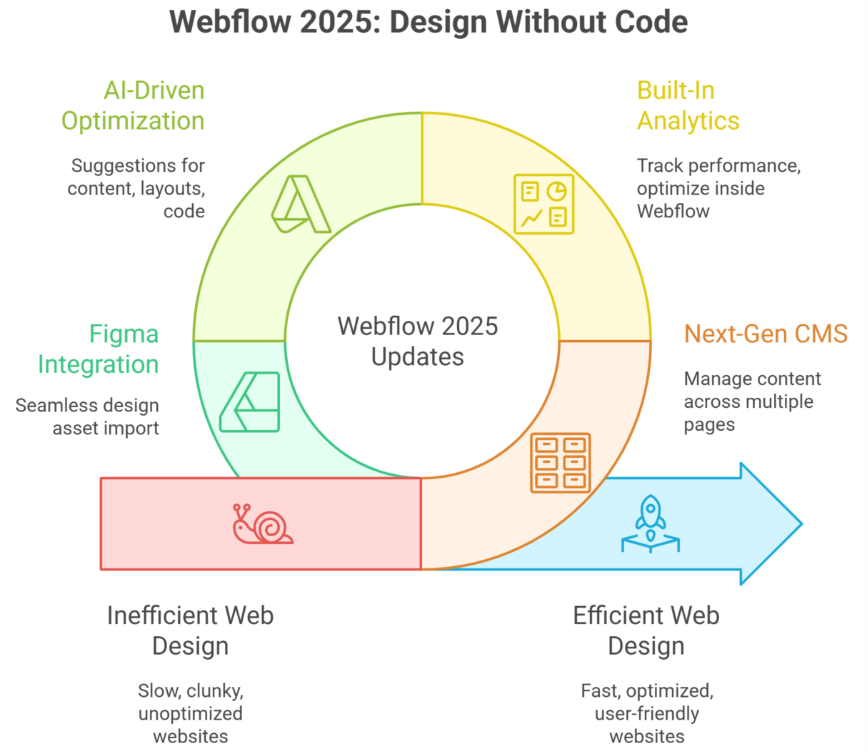
In 2025, Webflow transformed for designers and teams by combining no-code flexibility with production-ready features. Real-time collaboration, built-in animations, responsive layouts, and clean code streamline workflows, while AI assistants, Figma integration, and scalable Webflow CMS enable faster, SEO-optimized websites with full creative control.
Professional development and thoughtful maintenance have become crucial. A well-planned Webflow CMS structure or optimized landing pages can mean the difference between a slow, clunky site and a high-converting digital asset. Even basic support packages now often start around a few hundred dollars monthly, reflecting the true value of design, optimization, and ongoing updates.
This blog will explore what changed in Webflow for designers and teams in 2025, including workflow improvements, AI assistant integration, advanced SEO strategies, Figma-to-Webflow design translation, and tips to maximize creative control while keeping your projects production-ready.
Next-Gen CMS and Built-In Analytics Optimize Webflow
Webflow’s 2025 updates have redefined how designers and developers manage dynamic content and analyze performance. By combining a next-gen CMS with built-in analytics, teams can now build, optimize, and personalize websites without coding, while maintaining full design freedom and efficiency.
Streamlined CMS for Scalable Webflow Sites
Webflow’s CMS now allows marketing teams and developers to manage multiple CMS items effortlessly. From blogs to product pages, each CMS content block can be structured with a consistent design system, ensuring responsive websites that maintain visual consistency. Integrations like Figma to Webflow translation make importing design assets seamless, enabling designers to move from prototype to live site without losing fidelity.
Managing Multiple CMS Items Efficiently
Managing multiple CMS items is simplified with Webflow Canvas, where designers can see real-time previews of each item in context. This approach reduces errors, improves content workflows, and ensures every piece of content aligns with the site’s overall layout and brand standards.
Built-In Analytics for Data-Driven Decisions
With Webflow Analyze, teams can track core metrics like Core Web Vitals, user behavior, and SEO performance directly within the site builder. This enables marketing teams to make informed decisions, personalize content, and continuously optimize Webflow sites for higher conversions. Unlike relying on external analytics tools, built-in reporting saves time and ensures data accuracy.
Leveraging AI Tools for Performance
Webflow’s AI tools can now suggest optimizations for CMS content, responsive layouts, and even custom code snippets. These enhancements help teams reduce manual work while maintaining design freedom and keeping sites production-ready.
What’s New in Webflow 2025
The Webflow Conf 2025 highlighted several new features, including:
Advanced features for personalization and user segmentation
Enhanced design freedom for designers and developers
Seamless integration of webflow university tutorials for rapid learning
New tools for optimizing multi-page responsive websites
Pros and Cons of Webflow CMS
Pros:
Complete design freedom
Scalable CMS with personalization options
Real-time analytics through Webflow Analyze
Efficient Figma to Webflow workflows
Cons of Webflow:
Some advanced features may require familiarity with custom code
Managing multiple webflow accounts can be complex for larger teams
Slight learning curve for non-technical marketing teams
Webflow in 2025: Key Features for Designers’ Success
Next-Gen CMS enables seamless management of content and design across multiple pages.
Built-in CMS supports dynamic content like blogs, portfolios, and e-commerce items.
Built-in analytics allows designers to track performance and optimize websites inside Webflow without third-party tools.
Reduced back-and-forth between designers and developers for faster project delivery.
Websites without writing code can be created using the visual website builder and visual web development platform.
CSS Grid and enhanced layout options enable precise, responsive, and scalable designs.
Custom Webflow components allow tailored solutions for enterprise and client-specific projects.
Additional features like animations, interactive elements, and AI-driven suggestions improve engagement and workflow efficiency.
Efficient handling of multiple projects simultaneously for agency and enterprise teams.
Content and design remain fully integrated, ensuring design consistency across next-gen CMS structures.
2025 updates bring enhanced key features for creative freedom, scalability, and production-ready websites.
Conclusion
Webflow in 2025 has evolved from a simple visual website builder into a robust visual web development platform that empowers designers and teams to create responsive websites efficiently. With next-gen CMS, built-in analytics, AI-driven optimization, and seamless Figma to Webflow workflows, teams can manage multiple projects, maintain creative control, and ensure high-performing, SEO-optimized websites without writing code. Features like CSS Grid, interactive components, and real-time previews streamline collaboration, reduce the back-and-forth between designers and developers, and enable scalable, production-ready solutions. Whether for enterprise teams or marketing-driven projects, Webflow’s 2025 updates provide the tools needed to deliver exceptional web experiences.
Now, here’s a practical question for users to explore:
How would you structure a multi-page Webflow site using next-gen CMS and built-in analytics to optimize both user experience and SEO performance across multiple projects?
Frequently Asked Questions (Webflow in 2025 What Changed for Designers and Teams )
Should I learn Webflow in 2025?
Yes, learning Webflow in 2025 is a smart move for designers and agencies. It enables faster development, clean production-ready code, strong SEO control, and real-time collaboration. Webflow is especially valuable for building high-performance marketing websites without heavy reliance on developers.
What is the web design trend in 2025?
In 2025, web design trends include immersive 3D and AR elements, micro-interactions and motion UI, AI-assisted design and personalization, minimalist yet dynamic layouts, dark mode options, voice-activated interfaces, and accessibility-first, performance-focused sites that load fast and engage users deeply.
What is the future of Webflow?
The future of Webflow in 2025 is strong, as it evolves into a full no-code production platform. With AI-assisted design, enhanced CMS capabilities, faster performance, real-time collaboration, and seamless integration with marketing and eCommerce tools, Webflow empowers designers and teams to build scalable, high-quality websites efficiently.
Is web design still in demand in 2025?
Yes, web design is still in high demand in 2025. Businesses, eCommerce, and digital platforms need engaging, fast, and accessible websites. Demand is driven by AI-enhanced experiences, mobile-first design, SEO optimization, and interactive interfaces, making skilled web designers essential for modern digital growth.
What WordPress Taught Us in 2025 About Better Websites
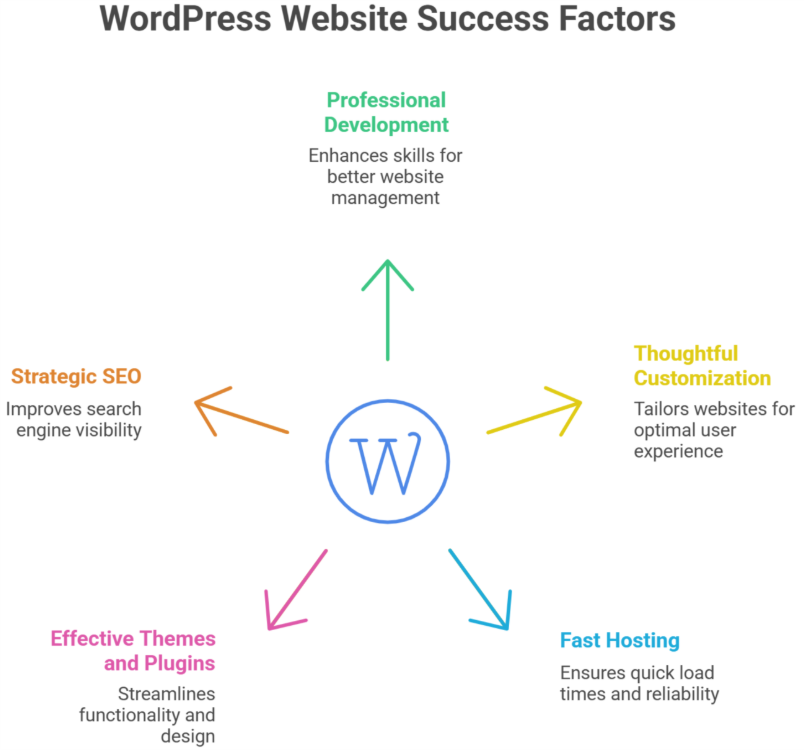
Why do some WordPress websites consistently outperform others, even when built on the same platform? In 2025, the answer goes beyond simply choosing a website builder. Factors like professional development quality, thoughtful customization, fast hosting, effective use of themes and plugins, and strategic SEO all shape website performance. Even small differences in coding standards or plugin choices can influence load times, conversion rates, and user experience.
In 2025, WordPress taught us that website success depends on more than the platform itself. High performance, effective SEO, smart use of themes and plugins, professional development, and ongoing maintenance are key. A well-built WordPress website delivers better user experience, higher conversions, and long-term business value.
Working with professionals ensures that your WordPress site not only looks polished but functions seamlessly, with ongoing support and maintenance that protect your investment. High-quality design, robust plugins, and tailored customization are no longer optional—they directly impact your website’s ability to engage visitors and generate results. For perspective, basic professional development for a WordPress website often starts in the hundreds of dollars, while fully optimized ecommerce setups or customizations can scale higher depending on complexity.
This blog will explore what WordPress taught us in 2025 about building better websites. You’ll discover actionable insights on performance optimization, leveraging the right plugins, designing for usability, and maintaining long-term SEO and functionality. By the end, you’ll understand how to make informed choices when you use WordPress to grow your online presence effectively.
Why WordPress Thrives in 2025 for SEO
WordPress continues to dominate as the platform of choice for websites worldwide, and its SEO capabilities are a major reason why. In 2025, businesses, developers, and marketers recognize that WordPress gives you the tools to build websites that are not only visually appealing but also optimized for search engines. From flexible themes to advanced plugins, WordPress thrives by making SEO implementation accessible and effective.
Built-In SEO Advantages
One of the reasons WordPress is the best platform for SEO is its inherent structure. WordPress websites have clean, crawlable code, mobile-friendly themes, and semantic HTML—all crucial for search engine ranking. With thousands of free plugins and themes available, WordPress makes it easy to optimize meta tags, URLs, and content without deep coding knowledge.
Plugins That Enhance SEO
Tools like Yoast SEO, Rank Math, and other WordPress plugins help implement seo best practices efficiently. A well-chosen WordPress plugin can guide you through keyword optimization, XML sitemaps, structured data, and more. These capabilities make WordPress still worth using for both new websites and established online stores.
Flexibility for Different Types of Websites
Whether you are launching a blog, ecommerce site, or corporate website, WordPress can handle your needs. Self-hosted WordPress offers unmatched customization, letting you make WordPress development decisions that directly improve SEO performance. With headless WordPress, builders like Elementor, and new features in block editors, WordPress gives you the tools to tailor your site for both users and search engines.
Professional WordPress Hosting and Speed
Website speed and hosting are critical for SEO, and WordPress hosting providers now specialize in fast, secure, and optimized environments. WordPress websites benefit from caching, CDN integration, and automated updates that support both performance and search visibility.
Future of WordPress: Website Builder for Any Type
WordPress remains one of the most versatile platforms, allowing businesses and individuals to build websites globally with unmatched flexibility. Its future as a website builder is promising, catering to all kinds of websites from blogs and portfolios to ecommerce stores while supporting both beginners and professional developers.
Build Websites Without Coding
WordPress excels in enabling users to build a site without writing a single line of code.
Tools like the WordPress editor and page builders like Elementor allow you to design pages visually, giving a better user experience for both creators and visitors.
Thousands of free and premium plugins like WooCommerce extend functionality, letting you manage online stores, memberships, and more.
SEO and Optimization Made Easy
Plugins like Yoast SEO simplify search engine optimization, helping your website rank higher in search engines like Google.
WordPress delivers the tools to optimize content, meta descriptions, and site structure, making it a choice for website owners who value performance.
Managed Hosting and Performance
Managed WordPress hosting ensures fast load times, security, and automatic updates, reducing technical overhead.
Websites using managed solutions enjoy stability, scalability, and better SEO results.
Global Community and Continuous Growth
WordPress has a massive global community, offering support, tutorials, and innovations.
With plenty of free resources and professional guidance, WordPress remains the best platform to build websites of any type.
The ecosystem continues to evolve, making WordPress a reliable choice for website builders worldwide.
Conclusion
WordPress in 2025 continues to prove why it is the best choice for building websites of any type. From robust SEO capabilities and flexible themes to powerful plugins and managed hosting, WordPress delivers the tools and features needed for high-performing, user-friendly websites. Its ease of use, combined with a massive global community and ongoing innovation, ensures that businesses can create, optimize, and maintain websites efficiently.
With professional development, thoughtful customization, and best practices in SEO and performance, WordPress still remains a top platform for achieving long-term digital success.
So, if WordPress gives you everything you need, why do some websites still underperform?
Frequently Asked Questions (What WordPress Taught Us in 2025 About Better Websites )
What is the future of WordPress in 2025?
In 2025, WordPress stays dominant as the world’s top CMS with strong market share and growth. It evolves with AI-powered tools, full-site editing, headless options, better performance, and security, making sites faster and smarter for blogs, businesses, and eCommerce.
What is the best way to build a website in 2025?
The best way to build a website in 2025 is to choose the right platform based on goals WordPress, Webflow, or Shopify—focus on performance, mobile-first design, SEO, and accessibility, and use AI tools, clean code, and professional customization to ensure scalability, speed, and long-term growth.
Which of these is a future of WordPress?
The future of WordPress includes AI-powered content creation, full-site editing, improved performance and security, headless WordPress adoption, and deeper SEO integration. These advancements allow businesses to build faster, more scalable, and highly customizable websites while maintaining flexibility for evolving digital and marketing needs in 2025 and beyond.
Is WordPress the future of web design?
WordPress remains a strong part of the future of web design, but not the only one. In 2025, its flexibility, open-source ecosystem, AI integrations, and customization options keep it relevant, while modern tools like Webflow and headless frameworks complement different design and performance needs.
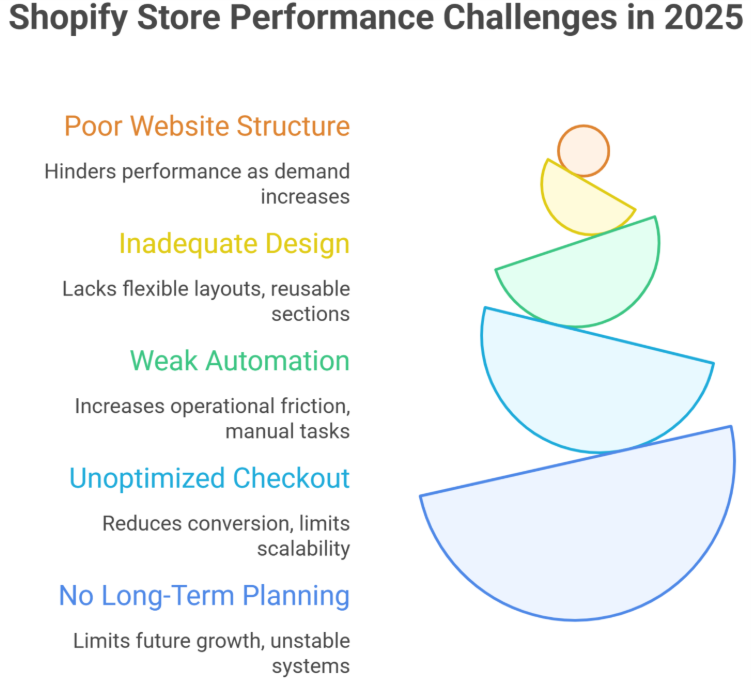
Why do some shopify businesses grow steadily while others struggle to generate consistent results? Why does one shopify store achieve higher conversion, even when selling similar products? The difference is rarely the platform itself. Performance is shaped by multiple factors website structure, development quality, load speed, data-driven decisions, and how effectively the checkout experience is optimized.
In 2025, Shopify worked best when businesses focused on performance-driven design, optimized checkout, automation, and data-based decisions. Stores failed when relying on poor development, bloated apps, weak conversion strategy, and no long-term planning. Success came from scalable builds, not shortcuts.
In 2025, shopify continued to evolve, but success depended on how professionally it was implemented. Businesses that invested in thoughtful design, reliable support, and ongoing maintenance saw stronger outcomes than those relying on quick setups or shortcuts. A well-built shopify solution typically ranges from a basic setup to a professionally developed system with advanced functionality, long-term support, and measurable returns. The upfront cost may vary, but the long-term value comes from stability, adaptability, and informed decision-making powered by analytics.
This blog explores what truly worked on shopify in 2025, what failed to deliver results, and how smart development choices directly impact growth, efficiency, and sustainable success.
What Worked on Shopify in 2025 for Scalable Growth
Step 1: Build a Strong Foundation
In 2025, scalable growth on Shopify started with structure. Every successful shopify business focused on clean architecture that could optimize performance as demand increased. Poor foundations are a key reason shopify stores fail when growth begins.
Step 2: Design for Scalability
A scalable Shopify setup avoided unnecessary complexity. Flexible layouts, reusable sections, and performance-first logic allowed store owners to grow without rebuilding their systems later.
Step 3: Implement Smart Automation
Effective automation reduced operational friction. Order handling, customer communication, and reporting workflows were streamlined so teams could focus on strategic decisions instead of manual tasks.
Step 4: Optimize for Conversion
High-performing brands continued to optimize product pages, navigation, and checkout flow. These improvements directly supported stronger conversion while maintaining long-term scalability.
Step 5: Plan for Sustainable Growth
Many store owners learned that rushing a launch limits future growth. Brands that planned early avoided the pattern where many shopify stores fail during scaling and instead built systems ready for long-term success.
The Hidden Shopify Decisions That Drove Real Conversion
Strategic Choices Most Store Owners Miss
Many store owners focus on visuals, but conversion is driven by structure and decision flow.
Poor early decisions explain why shopify stores fail, even when traffic is strong.
A conversion-focused shopify business aligns design, logic, and data from day one.
Conversion Starts With Structure
A scalable setup allowed brands to grow without rebuilding systems.
Weak foundations are a reason many shopify stores fail as traffic increases.
Planning for scalability early protected long-term performance.
Product-Level Decisions That Matter
Clear product pages reduced hesitation and improved buying confidence.
Well-written product descriptions guided decisions without overwhelming users.
Teams continued to optimize layouts based on behavior, not assumptions.
Automation That Supported Conversion
Smart automation reduced friction across the buying journey.
Automated workflows helped a shopify business respond faster to customer actions.
Over-automation, however, was avoided excessive tools are why shopify stores fail operationally.
Balancing Growth and Control
A scalable system ensured growth did not harm performance.
Thoughtful automation supported operations without replacing strategy.
Maintaining scalability allowed teams to optimize experiences consistently.
Why Some Stores Converted and Others Didn’t
Many store owners chased trends instead of fundamentals.
Many store setups lacked testing and refinement.
Successful brands continued to optimize, stayed scalable, and avoided the patterns where shopify stores fail repeatedly.
Conclusion
The results from Shopify in 2025 made one thing clear: success depended on strategy, structure, and execution not the platform alone. Businesses that invested in scalable architecture, professional development, and continuous optimization achieved stronger conversion and long-term growth. Those who rushed launches or relied on shortcuts often faced performance limits as demand increased.
Many Shopify stores failed due to poor planning, bloated systems, and the absence of expert guidance. Visual design without structure, automation without strategy, and growth without scalability consistently led to lost opportunities.
So the real question is this: if your Shopify store is not converting, scaling, or performing as it should do you need another platform, or do you need a development partner like Integriti Studio to fix what’s holding it back?
Frequently Asked Questions (What worked on shopify in 2025 (and what failed)
Is Shopify still profitable in 2025?
Yes Shopify is still profitable in 2025. It has reported consistent revenue growth and positive free-cash-flow margins, marking multiple consecutive profitable quarters and continued bottom-line strength as the company grows.
Why does the Shopify store fail?
Most Shopify stores fail due to poor product research, weak branding, slow website performance, lack of SEO, and ineffective marketing. Many owners rely only on ads without optimizing user experience, pricing strategy, or conversion funnels, leading to low trust, high bounce rates, and unsustainable costs.
What is Shopify and how does it work in 2025?
Shopify is a cloud-based eCommerce platform that lets businesses create, manage, and scale online stores. In 2025, it works with AI-powered tools, built-in payments, automation, and analytics, enabling sellers to manage products, marketing, orders, and customer experience from one dashboard efficiently.
Why did Shopify fall?
Shopify “fell” mainly because its stock and market sentiment weakened, not because the business completely collapsed. Investors got worried by slowing growth, high valuation multiples, rising costs (especially big AI investments), and competition, leading to downward pressure on its share price.
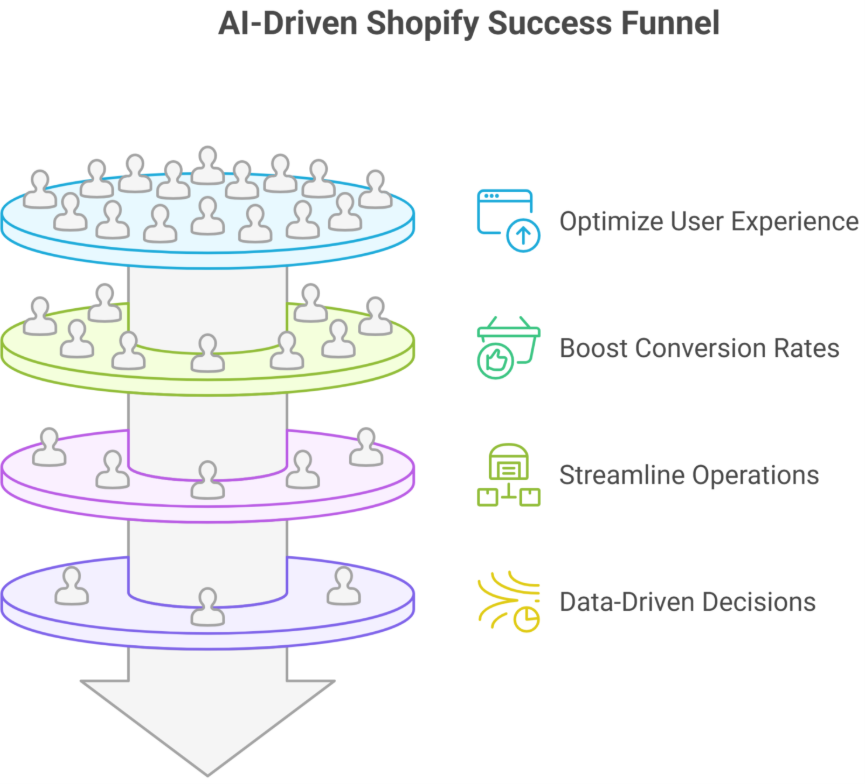
Why do some Shopify stores consistently outperform others, even when selling similar products? The answer lies in more than just design it’s about performance, strategy, and professional execution. In 2025, smart Shopify stores are winning by leveraging AI tools, AI-powered automation, and precise analytics to optimize user experience, increase conversion rates, and scale efficiently.
Smart Shopify stores won in 2025 by leveraging AI-powered tools, automation, and analytics to optimize user experience, boost conversion rates, and scale efficiently. Professional design, ongoing support, and personalized features like AI-driven chatbots helped stores increase AOV, forecast trends, and maximize ecommerce performance consistently.
You’ll often see that factors like site speed, mobile responsiveness, and intuitive navigation can make or break a store’s success. Professional development ensures these elements are implemented correctly, while ongoing support, maintenance, and thoughtful design create real value for your customers. Even basic enhancements like AI-driven chatbots or personalized product recommendations can boost your average order value (AOV) and overall ecommerce performance. Typical professional development and optimization projects start around $3,000–$5,000, reflecting the tangible impact of quality work on conversion and scaling potential.
This blog will explore how the most successful Shopify stores in 2025 use AI-powered tools to automate tasks, forecast trends, and personalize user experiences. You’ll discover actionable strategies to optimize your Shopify store, improve analytics, and harness the power of automation to maximize conversion and growth.
Why Smart Shopify Stores Thrive with AI in 2025
In 2025, smart Shopify stores leverage AI to optimize operations, improve customer experience, and boost ROI. Generative AI and AI-powered Shopify apps help store owners automate workflows, forecast trends, and deliver personalized experiences at scale.
Streamlined Workflows with AI
AI transforms inventory management, order tracking, and customer support in real-time, allowing Shopify store owners to focus on growth rather than manual tasks. Shopify’s ecosystem makes it easy for merchants to implement these tools efficiently.
Data-Driven Decisions
AI provides instant insights into sales trends, product performance, and customer behavior. Smart Shopify stores in 2025 use analytics to reshape strategies, improve ROI, and maintain a competitive edge.
Personalized Customer Experience
AI-driven chatbots and personalized recommendations enhance engagement and support. Shopify store owners can deliver tailored experiences that increase conversion rates and average order value.
Shopify Magic in Action
Combining AI apps and smart workflows creates “Shopify magic” automation that feels seamless. Store owners can forecast demand, manage inventory, and interact with customers more efficiently than ever.
Early Adoption Benefits
Shopify still offers huge opportunities for merchants who adopt AI. Early integration leads to optimized operations, better customer support, and sustainable growth for e-commerce businesses.
Advantages of AI Shopify Store for Higher Conversion
Using Shopify with AI tools helps store owners drive higher conversions, optimize operations, and deliver personalized customer experiences. AI improves workflows, enhances product recommendations, and supports smarter decision-making for better ROI.
1. Personalized Shopping Experiences
Product Recommendations: Intelligent AI analyzes customer behavior to suggest products, boosting average order value (AOV) and lifetime value.
Dynamic Product Pages: AI improves product descriptions and UX design, reducing bounce rates and guiding customers to complete purchases.
2. Smarter Customer Engagement
AI-Powered Chatbots: Provide instant support, resolve queries, and enhance customer experience.
Abandoned Cart Recovery: AI automates follow-ups through email or notifications, recovering potential lost sales.
3. Operational Efficiency
Inventory Management: AI monitors stock levels, predicts stockouts, and prevents overstock.
Point of Sale Optimization: AI streamlines online and in-store operations, increasing operational efficiency.
4. Data-Driven Growth
SEO and Marketing Insights: AI analyzes competitor pricing and customer trends to optimize marketing campaigns.
Performance Forecasting: Helps store owners understand customer lifetime value and plan strategic growth.
Conclusion
Smart Shopify stores in 2025are winning not by chance, but through strategic use of AI-powered tools, automation, and data-driven insights. From streamlining workflows and improving operational efficiency to delivering personalized shopping experiences, AI enables store owners to optimize every aspect of their online store. By leveraging AI-driven chatbots, personalized product recommendations, and real-time analytics, merchants can increase conversion rates, boost average order value, and scale their e-commerce business efficiently.
The success of these stores also highlights the importance of professional development, thoughtful design, and ongoing support. Even relatively small enhancements—like AI-powered automation or improved UX—can have a measurable impact on customer experience and ROI.
For Shopify store owners looking to stay competitive in 2025, embracing AI is no longer optional it’s a strategic advantage. Integriti Studio can help you implement these solutions, optimize your Shopify store, and ensure every element of your e-commerce strategy drives growth, efficiency, and higher conversions.
So, how can your Shopify store leverage AI to optimize performance, increase conversions, and stay ahead in 2025? That’s exactly what Integriti Studio can help you achieve.
Frequently Asked Questions (How Smart Shopify Stores Won in 2025)
Is Shopify still profitable in 2025?
Yes Shopify is still profitable and growing in 2025. It’s reporting strong revenue growth (over 30% YoY) and consistent double‑digit free cash flow margins, showing continued financial strength and demand from merchants worldwide.
What is the Shopify Build Award 2025?
The Shopify Build Award 2025 is an annual recognition by Shopify that celebrates the most innovative apps, themes, and custom storefronts built on its platform. Winners are selected for exceptional design, performance, and impact on merchants, highlighting top developer creativity and technical excellence.
What is Shopify and how does it work in 2025?
In 2025, Shopify is a leading e-commerce platform that allows businesses to create online stores without coding. It works by providing hosted storefronts, integrated payment processing, AI-powered marketing tools, and automation for inventory, shipping, and customer management, enabling merchants to sell efficiently across multiple channels.
Why are businesses moving from Drupal to Shopify in 2025?
Businesses are moving from Drupal to Shopify in 2025 because Shopify offers lower maintenance costs, hosted infrastructure, built‑in security, and easier scalability, reducing technical burdens. It also provides a large app ecosystem and unified commerce tools that let teams focus on growth instead of complex custom code.
Why do some businesses see strong returns from their WordPress investment while others struggle to scale, convert, or even stay stable? The answer is rarely the platform itself. Performance gaps usually come from development quality, structure, and long-term planning—not from using the wrong system.
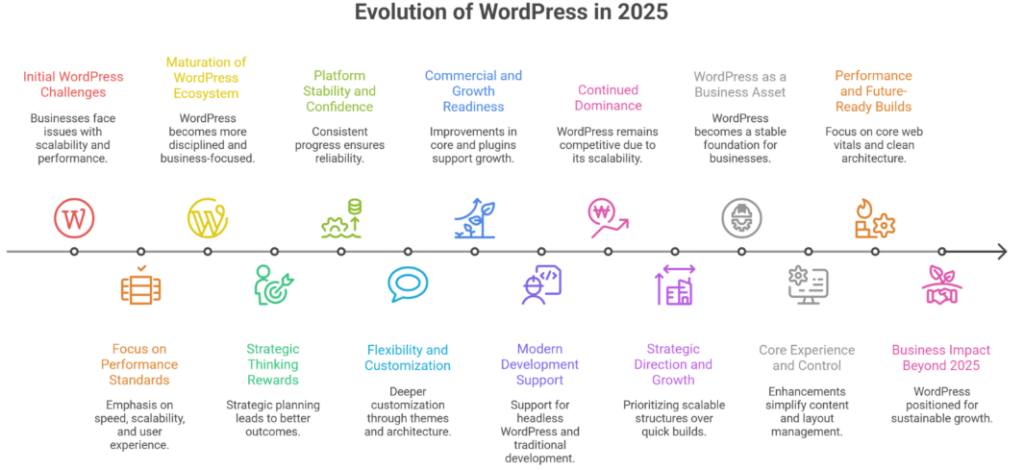
WordPress sites in 2025 evolved through better performance standards, cleaner development practices, and smarter use of modern tools. Businesses focused more on speed, scalability, and user experience, treating WordPress as a long-term platform rather than just a quick website solution.
WordPress matured into a more disciplined, business-focused ecosystem. In 2025, a well-built wordpress site depended on clear architecture, thoughtful customization, reliable hosting providers, and clean php foundations. Speed, seo readiness, and measurable user experience became outcomes of professional decisions, not afterthoughts. When budgets are unclear, even a typical setup ranging from basic builds to premium implementations can deliver very different results based on expertise.
WordPress continues to power serious digital operations because wordpress still rewards strategic thinking. A second wordpress site built with the same tools can outperform the first when design, support, and maintenance are handled correctly. WordPress today is less about shortcuts and more about precision.
Why Businesses Still Rely on WordPress Websites Today
Step 1: Platform Stability and Long-Term Confidence
Updates shared during state of the word 2025 and earlier state of the word sessions showed consistent progress, not disruption. The word 2025 recap reinforced that wordpress is still built for longevity, making it a reliable foundation for growing businesses.
Step 2: Flexibility Beyond a Basic Website Builder
Compared to a typical website builder, WordPress allows deeper customization using wordpress themes and scalable architecture. Many high-performing platforms run on wordpress because it adapts as business needs evolve.
Step 3: Commercial and Growth Readiness
With ongoing improvements to wordpress core, businesses extend functionality through wordpress plugins and woocommerce without sacrificing performance. This ecosystem explains the strong market share WordPress maintains today.
Step 4: Modern Development Without Lock-In
Support for headless wordpress and traditional web development gives teams freedom to build smarter. In wordpress in 2025, this balance is why wordpress powers serious digital operations.
Step 5: Why It Continues to Win
wordpress isn’t restrictive it scales. wordpress still wins because it offers control, flexibility, and a clear path forward. wordpress websites built with purpose remain competitive, raising the question businesses now ask: what’s next?
What WordPress Sites Will Look Like Next After 2025
Strategic Direction and Platform Growth
Businesses using wordpress will prioritize scalable, performance-driven structures over quick builds.
wordpress reflects the broader future of shaping digital strategies in 2025 and beyond.
WordPress continues evolving as a dependable website platform for long-term growth.
WordPress as a Business Asset
Many organizations rely on wordpress as a stable foundation rather than a temporary solution.
For small businesses, this means predictable costs, easier expansion, and reduced platform switching.
WordPress remains relevant because it adapts to changing business needs.
Core Experience and Site Control
Enhancements inside the wordpress dashboard simplify content and layout management.
Full site editing enables consistent design control without complex redevelopment.
As an open source content management system, WordPress aligns with the values of the open web.
Performance and Future-Ready Builds
Future WordPress sites emphasize core web vitals, clean architecture, and maintainable setups.
Modern builds reduce dependency on outdated plugins and focus on stability.
These changes define what modern wordpress looks like for serious businesses.
Business Impact Beyond 2025
wordpress today is positioned for sustainability, not experimentation.
Its continued role in the wider web ecosystemshows why WordPress remains a practical, future-ready choice well beyond 2025.
Conclusion
WordPress in 2025 proved that long-term success is not driven by the platform alone, but by how intentionally it is planned, built, and maintained. Businesses that invested in structure, performance, and professional development saw WordPress evolve from a simple website tool into a reliable digital foundation. Those results came from cleaner architecture, smarter customization, and decisions aligned with real business goals—not shortcuts.
As WordPress matured, it became clear that scalability, stability, and user experience are outcomes of disciplined execution. From improved core capabilities to modern workflows and future-ready builds, WordPress now supports growth at every stage. When treated as a strategic asset rather than a quick solution, it continues to deliver measurable value.
Looking ahead, WordPress remains positioned for sustainable growth beyond 2025.
Is your WordPress site fully optimized for speed, scalability, and modern workflows—and are you leveraging expert guidance from Integriti Studio to unlock its full growth potential?
In 2025, WordPress continues to evolve as a flexible, AI-friendly website builder. With faster performance, improved security, and seamless integration with automation tools, it supports both small businesses and large enterprises. Its future lies in smart, scalable websites that balance design, speed, and functionality for long-term growth.
Is WordPress a good career in 2025?
Yes, WordPress remains a strong career choice in 2025. With growing demand for custom websites, e-commerce, and AI-integrated solutions, skilled developers, designers, and SEO specialists can build profitable opportunities. Continuous learning and mastering advanced plugins, performance optimization, and security practices make WordPress expertise highly valuable.
How many websites use WordPress in 2025?
In 2025, about 43–44% of all websites globally use WordPress, which translates to roughly 500–600 million websites powered by the platform worldwide, making it the most widely used web platform on the internet.
How to build a WordPress website in 2025?
To build a WordPress website in 2025, choose a reliable hosting provider and install WordPress. Select a responsive theme, customize it with the block editor or AI-assisted tools, add essential plugins for SEO, security, and performance, then create content. Finally, optimize and launch for mobile and speed.
WordPress in 2025 what changed what worked & what’s next
Why do some WordPress sites thrive while others struggle to deliver results? Performance is not accidental it depends on factors like server reliability, plugin efficiency, theme choices, and overall workflow. For businesses navigating WordPress in 2025, understanding these elements is essential to avoid unnecessary loss and ensure a platform that supports growth.
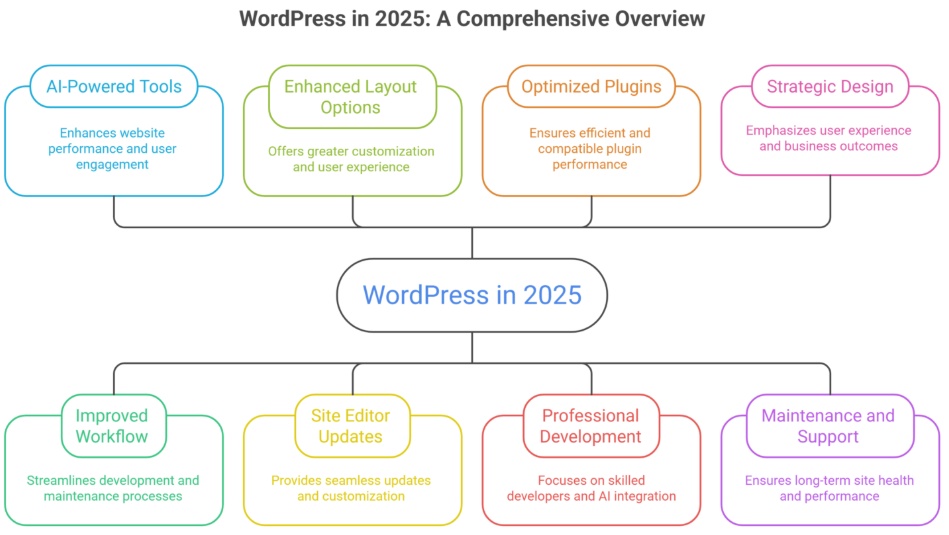
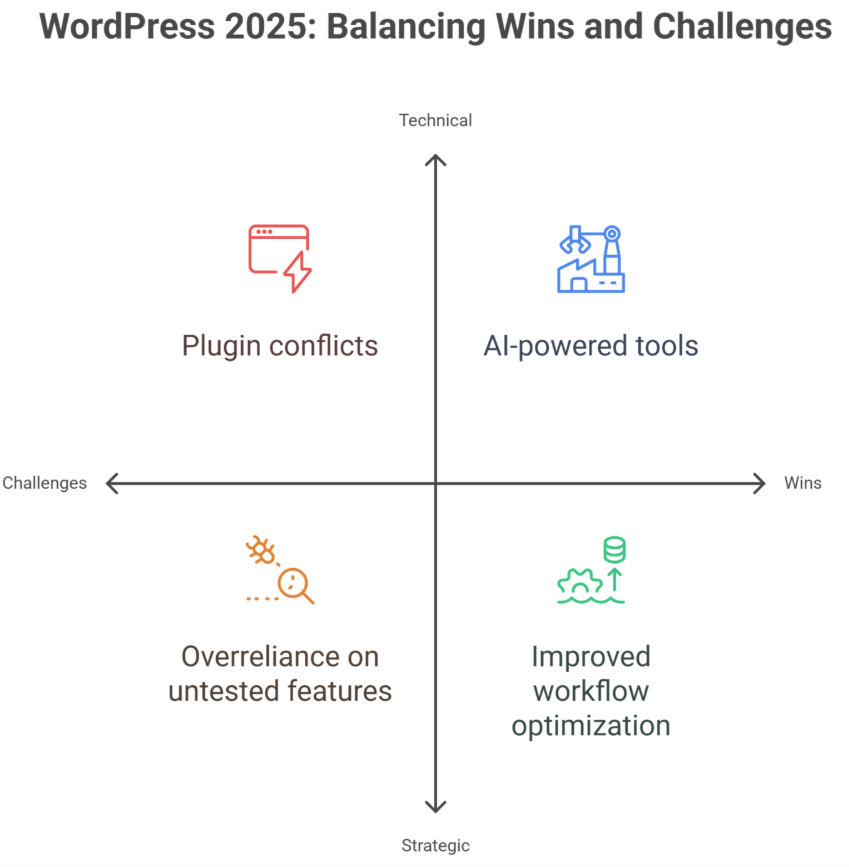
WordPress in 2025 introduced AI-powered tools, improved workflow, and enhanced layout options, helping websites perform better and engage users. Wins include seamless site editor updates and optimized plugins, while misses involve occasional compatibility issues. Key lessons highlight professional development, maintenance, and strategic design for long-term success.
Professional development remains a key differentiator. Investing in skilled developers allows you to leverage AI-powered features, optimize coding standards like PHP, and maintain seamless updates using tools like Gutenberg and the site editor. A well-trained team ensures that design, layout, and user experience are not compromised, turning technical wins into measurable business outcomes.
Good design, thoughtful support, and consistent maintenance translate into real value higher engagement, faster load times, better caching, and streamlined workflow. Even small projects can range from a few hundred to several thousand dollars depending on customizations, plugins, and built-in features, reflecting the actual costs behind a high-performing WordPress site.
Key Changes in WordPress 2025 Every Developer Should Know
WordPress in 2025 continues to evolve, introducing features and workflows that developers need to understand to stay ahead. Here’s a structured overview:
WordPress 6.9 and Core Updates
WordPress 6.9 launched with enhanced global styles, better CSS customization, and smoother full site editing.
WordPress core improvements improve page load speed, reduce plugin conflicts, and make sites easier to manage.
Size presets in WordPress 6.9 and radius presets allow faster design adjustments for developers and designers.
Full Site Editing and Block Themes
Full site editing expands customization, letting developers control headers, footers, and layouts via the site editor.
Block themes and block patterns streamline web development, offering pre-built design sections that simplify workflow.
Accordion block and other new blocks enhance WordPress web development capabilities for dynamic content.
Headless WordPress and API Integrations
Headless WordPress enables developers to build decoupled websites, integrating with modern frameworks for faster performance.
New APIs allow seamless integration with AI tools, third-party apps, and website builder extensions.
Improves flexibility for WordPress hosting and multi-platform deployment.
Developer Tools and Workflow Enhancements
WordPress developer blogs now share updates on best practices, new WordPress 6.9 features, and future of WordPress trends.
Playground environments and testing tools allow developers to experiment safely without affecting live sites.
Streamlined WordPress development reduces friction, making updates and design iterations faster.
What’s Next for WordPress in 2025 and Beyond
Continued evolution towards headless architectures and AI-powered web development.
Enhanced block themes, global styles, and improved pages load performance.
Developers should prepare for WordPress 7.0, focusing on flexibility, scalability, and modern workflows.
WordPress 2025: Year in Review and Recommendations
WordPress in 2025 introduced key updates, AI-driven tools, and workflow improvements that impacted development, design, and maintenance. Understanding these changes helps you optimize your website strategy and make informed decisions for the future.
Key WordPress Development Wins
WordPress Development saw improved workflows with AI tools and collaborative editing. Integration with Shopify and Webflow enhanced cross-platform compatibility, while custom CSS and updated APIs made it easier for developers to create personalized, high-performing websites.
Design Improvements and User Experience
WordPress Design gained new blocks and border radius size presets, improving layout flexibility. Real-time previews and collaborative editing enhanced user experience, while optimized core web vitals ensured faster loading and smoother navigation.
Maintenance and Performance Enhancements
WordPress Maintenance became more proactive with automated updates and better plugin compatibility. Built-in caching and AI-powered monitoring help maintain site health and performance, making long-term upkeep simpler and more efficient.
Cross-Platform and Strategic Recommendations
Integration with Shopify and Webflow platforms expands e-commerce and multi-site management. Investing in training, AI tools, and optimized workflows allows businesses to leverage the WordPress ecosystem effectively and prepare for future releases.
Conclusion
WordPress in 2025 has proven that success depends on understanding both its opportunities and challenges. AI-powered tools, improved workflows, full site editing, and enhanced layouts are clear wins, while plugin conflicts and compatibility issues highlight areas requiring careful attention. Key lessons emphasize professional development, strategic design, and proactive maintenance to ensure your website remains high-performing, user-friendly, and future-ready.
By leveraging WordPress Development, WordPress Design, and WordPress Maintenance, along with integrations across Shopify and Webflow, businesses can build scalable, cross-platform websites that drive engagement and improve overall performance. Adopting these best practices and preparing for future updates ensures your website continues to evolve with the platform, delivering measurable results over time.
Ready to transform your WordPress site and maximize its potential? Contact Integriti Studio today to discuss how our expert team can enhance your website, streamline workflows, and help you achieve long-term success. What’s the first improvement you’d like to see on your site?
Frequently Asked Questions (WordPress in 2025 what changed what worked & what’s next)
What is the scope of WordPress in 2025?
The scope of WordPress in 2025 is strong and expanding. It powers a large share of websites, supports AI integrations, e-commerce, and custom development, and remains in demand for businesses, freelancers, and agencies due to its flexibility, scalability, and cost-effectiveness across industries.
What is the future of WordPress?
The future of WordPress is promising, with continued focus on AI-powered tools, performance optimization, and full-site editing. It will remain a leading platform for content, e-commerce, and custom websites, supported by a massive global community, open-source innovation, and ongoing adaptability to modern web standards.
How much does WordPress pay for 1000 views?
WordPress does not pay for 1,000 views directly. Income depends on how you monetize your site, such as ads, affiliates, or sponsorships. With ad networks like Google AdSense, 1,000 views usually earn around $1–$5, varying by niche, traffic quality, and visitor location.
How to build a WordPress website in 2025?
To build a WordPress website in 2025, choose reliable hosting, install WordPress, and select a lightweight theme. Use block or AI-powered editors for design, install essential plugins for SEO, security, and performance, then create optimized content and test responsiveness before launching.
Why do some WordPress sites thrive while others struggle to deliver results? Website performance isn’t accidental it’s shaped by multiple factors, from server host reliability and theme choices to plugin efficiency and workflow optimization. For businesses navigating WordPress in 2025, understanding these elements is critical to avoid unnecessary loss and ensure a platform that supports growth.
WordPress 2025 shows significant wins with AI-powered tools, improved workflow, and enhanced UI, helping websites perform better and engage users. Misses include plugin conflicts, theme limitations, and occasional update issues. Key hard lessons emphasize professional development, proper maintenance, and strategic design to ensure long-term site success.
Professional development plays a pivotal role. Investing in skilled developers and designers allows you to leverage the latest AI-generated tools, optimize coding standards, and maintain seamless updates without breaking your site. Good design, thoughtful support, and consistent maintenance translate into tangible business value higher engagement, better SEO ranking, and improved conversion rates. Even small projects can see pricing ranging from a few hundred to several thousand dollars depending on customization and premium plugin usage, reflecting the real costs behind quality WordPress sites.
This blog will provide a detailed WordPress 2025 review, highlighting wins, misses, and hard lessons learned. You’ll explore technical insights, workflow improvements, AI tools, and platform updates, along with actionable guidance to help you make informed decisions that evolve your website strategy and maximize long-term success.
Challenges and Hard Lessons for Smart WordPress Decisions
Navigating WordPress in 2025 requires understanding both its strengths and challenges. While WordPress continues to dominate the CMS market and remains a preferred website builder, businesses face hurdles that can impact performance, user experience, and growth.
Plugin and Theme Bloat
Excessive plugins or heavy themes create bloat, slowing down websites and increasing friction during updates.
Gutenberg blocks and block editor offer flexibility, but poor implementation can hurt UI and site performance.
Workflow and Maintenance
Regular backup routines and security updates are essential to prevent data loss or costly rebuilds.
AI tools and AI-generated websites can improve workflow, but oversight from a skilled designer or developer is critical.
Adapting to Trends
WordPress in 2025 must align with social media apps, mobile apps, and AI-driven solutions to stay competitive.
Overreliance on untested features can create friction and interface issues despite potential engagement gains.
Strategic Lessons
Balancing flexibility with performance ensures smoother WooCommerce setups and better cache efficiency.
Observing market share and CMS trends helps predict which features will remain relevant and reduce rebuild needs.
Advantages and Smart Wins in WordPress 2025
WordPress in 2025 continues to dominate as a flexible and powerful platform. Its enhancements in workflow, AI tools, and maintenance practices offer tangible benefits for businesses and developers. Here’s a step-by-step breakdown of the advantages and smart wins:
Step 1: Enhance Functionality and Usability
Leverage WordPress Development to build dynamic, responsive websites that adapt to user needs. Improved WordPressDesign and AI-powered tools simplify layouts and enhance usability, reducing friction for both teams and visitors. Integrations with e-commerce platforms, Shopify Development, and Webflow Development further extend functionality.
Step 2: Optimize Maintenance and Ownership
Regular WordPress Maintenance ensures smooth plugin and theme updates, minimizing downtime and technical issues. Businesses gain better ownership of their websites, allowing customization without dependency on external providers. Complementary Webflow Maintenance and Shopify Support make cross-platform management seamless and efficient.
Step 3: Invest in Scalability and Long-Term Value
Investing in modern WordPress Development prepares websites for growth, supporting both startups and enterprise-scale operations. Enhanced graphic design, layout options, and AI tools improve engagement and make the site more adaptable. Smarter workflows and integrated suites reduce cumbersome processes and maximize ROI.
Step 4: Achieve Cross-Platform Efficiency
Integration with Shopify Design and Webflow Design expands capabilities and ensures consistent layout and usability across platforms. Reducing friction between platforms streamlines development, saves time, and allows you to focus on strategy, marketing, and user experience.
Conclusion
WordPress 2025 demonstrates that success is not accidental—it comes from understanding the platform’s strengths, addressing its challenges, and making strategic, informed decisions. While AI-powered tools, improved workflows, and enhanced UI represent major wins, businesses must remain mindful of plugin conflicts, theme limitations, and maintenance demands.
Professional development, thoughtful design, and consistent upkeep remain critical for long-term success. By leveraging WordPress Development, Design, and Maintenance effectively—and integrating complementary platforms like Shopify and Webflow—businesses can achieve scalability, better usability, and reduced friction across workflows.
Want to transform your website with smart WordPress solutions and AI-powered design? Contact Integriti studio today to discuss how we can help your business thrive, streamline workflows, and maximize long-term results. What’s the first improvement you’d like to see on your site?
Yes, WordPress remains in demand in 2025. Its flexibility, extensive plugin ecosystem, and AI-powered tools make it ideal for businesses, bloggers, and e-commerce sites. While newer platforms exist, WordPress continues to thrive due to ease of use, scalability, and a large developer community supporting constant innovation.
Is WordPress difficult to learn?
WordPress is generally easy to learn, especially for beginners. Its intuitive dashboard, drag-and-drop editors, and extensive tutorials simplify website creation. Advanced customization or development may require coding knowledge, but most users can build and manage functional sites quickly without deep technical skills.
How much does WordPress pay for 1000 views?
WordPress itself doesn’t pay for views. Earnings depend on monetization methods like ads, affiliate links, or sponsored content. For example, using Google AdSense, 1,000 views (CPM) typically earn $1–$5, but rates vary by niche, audience location, and engagement. WordPress only provides the platform.
Can I learn WordPress in 3 days?
You can learn WordPress basics in 3 days, including site setup, themes, and plugins. However, mastering advanced features like custom coding, SEO optimization, or e-commerce integration requires more time. Three days is enough to start building functional sites, but expertise develops with practice and experience.
Imagine this: Your team is out in the field distributing QR codes with links or URLs. Each QR code should lead to a contact form or form via the URL, capturing url parameters to know who gave it to the lead. That way, every form submission, lead, and campaign source is attributed to the right sales rep, marketing, or CRM.
When the visitor scans the QR code, the value of the variable (salesperson) appears in a hidden field in the form fields of your wordpress forms. Neat, right?
How It Works
✅ Carry hidden fields or dynamic field population from the QR code directly into the form fields in WordPress. ✅ That data fills a field on the form via the URL—visible or hidden. ✅ When the form submission occurs, the lead is automatically assigned to the correct sales rep, campaign source, or CRM.
Resolution Steps
Step 1: Create a Hidden Form Field
➡ Choose your form plugin like Gravity Forms, WPForms, Ninja Forms, or Formidable Forms. ➡ Add a field and name it as variable, id, or value.
Step 2: Turn On Dynamic Population
➡ In the form settings, turn on dynamic field population or auto-fill forms. ➡ Set the parameter name to match the URL parameter you want to capture.
➡ If you don’t want users to change the value, use a hidden field or set it to read-only. You can even use this dynamic value in form fields automatically using URL parameters or pre-fill form fields, like: “Thanks! Your request has been sent to Alex Smith.”
Final Outcome
✅ Fields automatically using URL parameters or form via the URL filled in automatically. ✅ No missed leads, manual errors, or form-filling mistakes. ✅ Marketing attribution and campaign tracking made easy and fully trackable.
Why This Works
Works across marketing campaigns, QR codes, emails, social links, or direct the user to form fields in WordPress. Makes lead collection, form-filling, and conversion rates easier, faster, cleaner. No need for custom, advanced form, or expensive form plugins like Gravity Forms or WPForms.
A client reached out when they noticed that their utm parameter tracking were no longer showing up in their google analytics reports. Both old and new utm links failed to populate traffic source fields like source and medium, or campaign names. Initial concerns pointed toward possible misconfigurations in their google analytics setup or broken integration between gtm container and GA4.
What We Found
After digging into the tracking setup, here’s what we discovered:
GTM was installed—but inactive
The gtm container was embedded on the landing page, but had no active tags or trigger configured. In short, gtm wasn’t being used for any analytics or event tracking functions.
GA4 was running independently
Google analytics 4 was tracking page_view, sessions, conversions, and user clicks—but it wasn’t doing so through google tag manager.
UTM parameters were never routed through GTM
The client had assumed gtm was handling utm parameter tracking. In reality, ga4 utm tags are captured natively by GA4 and don’t require google tag manager at all.
How We Fixed It
With a clearer picture in place, we walked the client through a few simple but important checks:
✅ Confirmed GA4 was tracking UTM data
We tested utm-tagged urls using GA4 real time and realtime reports. The utm params (source, medium, campaign) showed up immediately in ga4 reports.
✅ Reviewed historical campaign traffic
Looking back four months, we found limited use of utm codes and utm tags—confirming it wasn’t a missing tracking issue but a lack of consistent marketing campaigns tagging.
✅ Verified new campaigns
The client shared a fresh utm URL. We tested it live and confirmed that session campaign, utm_medium, and all tracking parameters appeared correctly in google analytics 4 property.
Want to be 100% sure your utm tracking is working? Let’s test it together using real-time reports and check incoming data in analytics reports.
What You Should Know
UTM tracking confusion is common, especially when multiple tools (like GA4, gtm, google analytics, and third-party tools) are in play. Here’s what matters:
UTM tags are read directly by GA4 You don’t need google tag manager to track campaign tracking, utm parameter, or tracking parameters like source, medium, or campaign name.
Use GA4’s Realtime Report for testing It’s the fastest way to confirm whether utm-tagged urls are being tracked properly in analytics reports.
Keep GTM clean and purposeful If you’re not actively using gtm for event tracking, don’t assume it’s capturing utm data or traffic acquisition info.
Be consistent with UTM usage Inconsistent utm tags, utm params, or utm codes often look like “missing tracking” when it’s actually just incomplete link in GA4 or url building.
Final Outcome
No broken tools. No bugs. Just a bit of miscommunication. After clarifying how their google analytics setup worked, the client was relieved to see their campaign tracking, session source, and utm data flowing correctly—and now has a direct report to track utm-tagged traffic, traffic sources, and real-time user clicks in GA4.
Struggling with google analytics, gtm, or tracking setup? Integriti Studio can help you streamline campaign tracking, build custom dashboards, troubleshoot analytics confusion.