Solving Popup & Layout Glitches in ACF-Powered WordPress Pages
Here’s how we solved a similar problem and how you can too on your WordPress site.
️What Was Going Wrong?
On a custom-built webinar landing page, two annoying issues came up:
Popups linked to speaker images weren’t opening at all for some users.
Longer user names were breaking the layout, pushing spacing out of alignment and making the section look messy.
After a quick inspection using the browser’s developer tools, it became clear the ACF functionality and popups were clashing with the front-end layout—especially where ACF data was incomplete or improperly configured.
What We Fixed
✅ 1. Removed Empty Popup Triggers
An unlinked popup trigger attached to one image was causing the popup script to fail. We removed the rogue trigger so each image only fired when data actually existed. This helped prevent display errors and ensured dynamic content loaded properly.
✅ 2. Extended ACF for More Profiles
We updated the field group and template files to support up to six speakers dynamically, using ACF fields cleanly mapped to each popup’s content. This integration avoided mismatch in content and worked seamlessly with dynamic elements and the page builder.
✅ 3. Repaired the Layout Grid
Long names were throwing off alignment. We restructured the layout using a more flexible grid, adjusting spacing and vertical alignment for a polished appearance. This also fixed layout issues in WordPress themes and broken layouts in default WordPress themes like Twenty Twenty-One.
✅ 4. Built-In Fallbacks
We tested how the page would behave when ACF popup content was missing—and added fallback behavior to ensure the front-end layout stays clean even without complete data. This included conditional checks and custom code in template files.
✅ The Result?
Fully functional popups, displayed only when actual data exists
A consistent layout that works for short or long names
Clean content management in the admin area with flexible ACF plugin fields
Want help designing dynamic layouts that just work and fixing misaligned sections in WordPress websites while ensuring compatibility issues, AJAX functionality, and custom CSS support?
To get rid of pop-ups on your WordPress site, first identify the plugin or theme feature generating them. Disable or uninstall the pop-up plugin, or turn off pop-up settings in your theme. Clear your cache afterward to ensure changes reflect site-wide. Test to confirm removal.
How to fix WordPress bugs?
To fix WordPress bugs, first update WordPress, themes, and plugins to the latest versions. Clear your cache and disable plugins one by one to identify conflicts. Switch to a default theme to check theme issues. Use debugging tools, check error logs, and restore backups if needed.
What is the best popup plugin for WordPress?
The best popup plugins for WordPress include Popup Maker, OptinMonster, and Ninja Popups. They offer easy design, targeting, and trigger options. Choose based on your needs: lead generation, promotions, or announcements. Ensure compatibility with your theme and minimal impact on site speed.
How do I change the pop-up on WordPress?
To change a pop-up on WordPress, go to the plugin or theme settings that created it. Edit the pop-up’s content, design, and display rules. Save your changes and clear your site cache. Test on different devices to ensure the updated pop-up appears correctly.
A client noticed possible disruptions at checkout, especially for non-logged-in users. The WooCommerce site’s Authorize.net payment gateway in use was for credit card processing. Even with orders still trickling in, there were payment errors and red flags worth investigating. Some failed payments and declined payments were also reported.
What We Uncovered
The issue wasn’t just technical—it involved platform access, login, permissions, workflow constraints, and plugin conflicts:
Access Required 2FA: Gaining entry into the Authorize.net account was delayed due to two-factor authentication (2FA), which needed manual PIN relays from the client.
Missing API Key Options: Logged-in users couldn’t see the API login ID and transaction key section—hinting at limited admin rights and plugin settings access.
High-Risk API Rotation: Replacing the live API transaction key without a backup would risk cutting off checkout experience immediately.
How We Moved Forward Safely
Secure Login Coordination: Worked closely with the client to retrieve time-sensitive 2FA codes for dashboard access in Authorize.net dashboard.
Checked Admin Rights: Confirmed the account user had restricted visibility; flagged the need for full admin rights and proper plugin setup to proceed.
Planned a Zero-Downtime Switch: Held off any API key regeneration until a backup key could be pre-configured and tested, ensuring reliable payment processing.
Collaborated with the Client: Created a joint action plan so updates could happen in real time, with no checkout breakage, transaction data loss, or payment failures.
What It Meant for the Business
By staying cautious and collaborative, we ensured the live WooCommerce and Authorize.net integration wasn’t impacted—even as we dug into critical gateway not working in WooCommerce connections. The client now has a clear, secure path forward for managing future Authorize.net credentials, test mode, sandbox, relay response URL, and fraud protection with confidence.
Need Help With Secure Checkout Setup?
Payment methods, payment system, and payment processing integrations are delicate. One misstep can mean lost revenue. Let our team guide you through secure, high-uptime eCommerce architecture—whether you use Authorize.net payment, Stripe, official plugin, custom API workflows, accept.js, recurring payments, SSL certificate, or other trusted payment gateway solutions.
Frequently Asked Questions (Troubleshooting API Access & Payment Issues with Authorize.net in WooCommerce)
How to test payment settings is working properly on WooCommerce?
To test WooCommerce payment settings, enable Sandbox/Testing mode for your gateway (like PayPal or Stripe). Place a test order using test credentials or dummy card details. Verify that the order is processed correctly, payment status updates, and confirmation emails are sent to ensure everything works properly.
How to connect API to WooCommerce?
To connect an API to WooCommerce, go to WooCommerce → Settings → Advanced → REST API. Click Add Key, set permissions, and generate the API keys. Use these keys in your external application or plugin to authenticate and interact with your WooCommerce store securely via the API.
Could not connect to WordPress rest API.?
If WordPress shows “Could not connect to REST API,” check permalinks are set correctly, ensure .htaccess or server rules aren’t blocking requests, and disable conflicting plugins or themes. Also, verify your site’s SSL certificate and firewall settings allow REST API access for proper connectivity.
How can you integrate payment gateways with WooCommerce?
To integrate payment gateways with WooCommerce, install the official gateway plugin (like Stripe, PayPal, or Razorpay). Go to WooCommerce → Settings → Payments, activate the gateway, and enter the required API keys or credentials. Test in sandbox mode before going live to ensure proper functionality.
How To Use Responsive Web Design for Your Ecommerce Store in 2025: A Future-Proof Guide
Picture this-A customer browses your Shopify store on their mobile device while waiting for their coffee. Your product images load instantly, buttons are thumb-friendly, and checkout takes fewer taps than ordering a latte. By the time their name is called, they’ve bought two items and tagged your brand on Instagram.
This isn’t just convenience it’s 2025’s make-or-break standard for ecommerce website, user experience, and website performance. With mobile shoppers projected to drive 75% of global web traffic by next year (Statista), responsive web design, responsive website, and responsive site are no longer optional. For Integriti’s clients, it’s the secret weapon turning casual browsers into loyal buyers. Let’s unpack how to future-proof any site, whether it’s a Shopify store, WordPress, or online store, today.
Discover more
Why 2025 Demands a Mobile-First Overhaul (Hint: It’s Not Just Phones)
Google’s 2024 “Mobile-First Evolution” update made one thing clear: Sites not optimized for all screen size, different screen sizes, screen size and resolution, and smaller screens will vanish from search results. But “responsive” in 2025 means more than fitting different devices—it’s about anticipating how, where, and why people shop:
73% of shoppers abandon sites that feel “clunky” on their device (Baymard Institute)
AI-driven layouts, layout, and design ensures now adjust to ambient light, user grip patterns, and fluid grid requirements
Voice commerce is exploding, with 45% of Gen Z using smart speakers to shop (Adobe)
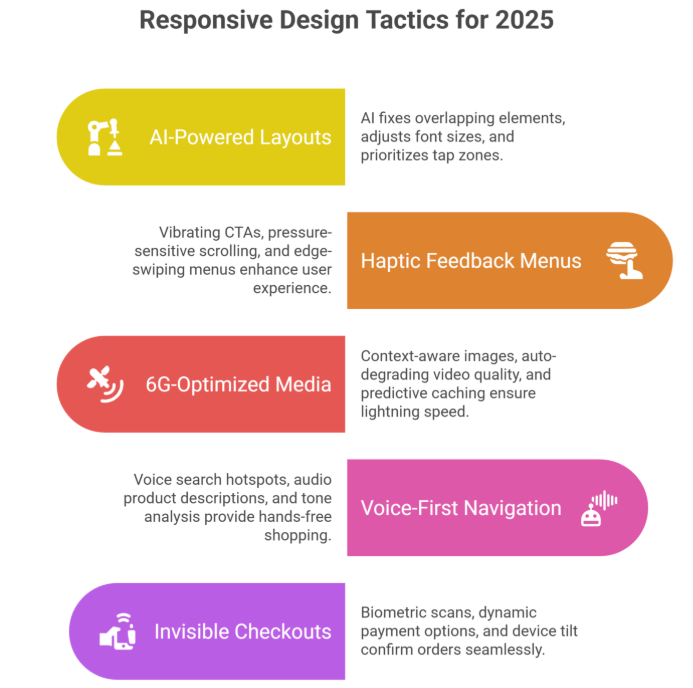
5 Game-Changing Responsive Web Design Best Practices, principles of responsive web design, and responsive techniques for 2025
AI-Powered “Self-Healing” Layouts
Forget manual tweaks. Tools like Google’s Auto-RWD now:
Fix overlapping elements in real-time
Adjust font size, use relative units, and adapt to different screen sizes based on reading distance (hello, smartwatches!)
Prioritize “tap zones” for left- vs. right-handed users
2:Haptic Feedback Menus That Guide Thumbs
The 2025 shopper expects tactile responses:
Vibrating CTAs confirm button presses
Pressure-sensitive scrolling (light vs. hard swipes
Edge-swiping menus inspired by TikTok’s UX
3:6G-Optimized Media That Loads in 0.2 Seconds
With 6G rolling out globally, shoppers expect lightning speed:
Context-aware responsive images, images and other media, flexible images, and pixel-perfect visuals (show winter coats if local temp drops)
Auto-degrading video quality during spotty connections
Predictive caching that pre-loads products you’ll likely view
4:Voice-First Navigation for Hands-Free Shopping
“Hey Shopify, find eco-friendly yoga mats under $50”:
Voice-search hotspots in headers, specific design areas, and style guide sections
Audio product descriptions for accessibility
Tone-analysis suggesting items based on vocal stress cues
5:“Invisible” Checkouts That Feel Like Magic
2025’s gold standard? Checkouts that:
Auto-fill details via biometric scans (no more typing CVV codes)
Offer dynamic payment options, design choice, and device-friendly methods (Apple Pay on iOS, GPay on Android)
Use device tilt to confirm orders (tilt right = purchase)
The Hidden Costs of Outdated Responsive Web Design, importance of responsive design, and modern web development (And How to Avoid Them)
PSA: Google’s 2025 Core Web Vitals, website experience, and website that works requirements will penalize sites that:
Take >0.5 seconds to respond to taps
Lack foldable/flexible screen size and different devices support
Ignore “ambient commerce” (shopping via AR glasses, car dashboards)
Scary Stat: 81% of shoppers distrust sites that fail basic mobile-first design, mobile version, and desktop and mobile tests (McKinsey).
Your 3-Step 2025 Responsive Web Design Checklist, design principles, and responsive design best practices
1:Audit Ruthlessly
Test on emerging devices: Samsung Rollable Phones, Meta VR headsets, tablet, and browser types
Simulate 6G speeds with Cloudflare’s new testing suite
Track “rage clicks” (frustrated multiple taps) via Hotjar
2:Prioritize Profit-Boosting Fixes
First: Checkout flow & core product pages, web pages, and creating a website
Then: Blog/media layouts, design work, and design tips
Invest in AI tools that auto-adapt to new website versions, desktop and mobile devices
Train staff on anticipatory design, thoughtful design, and “adapt to different screen sizes” principles
“But Wait—My Desktop Traffic Still Matters!”
Here’s the kicker: 2025’s best-performing websites use device-agnostic design:
Desktops get keyboard shortcuts (Ctrl + “/” opens search)
Tablets activate stylus hover menus
TVs show 3D product zooms during ads
3 RWD Myths Debunked (Stop Believing These!)
“Mobile-first means mobile-only”
→ Truth: 2025’s RWD is context-aware. Your site should:
Enlarge buttons in cold weather (gloves!)
Simplify layouts, website looks, and design ensures during peak commute hours
“All devices get the same content”
→ Truth: Smart RWD delivers tailored experiences:
Show video demos on Wi-Fi
Display text summaries on cellular
“Shopify handles it automatically”
→ Truth: Shopify provides tools, not strategy.
Need help with Shopify website design and development, website design, design and development, and design services? Integriti’s team of Shopify website designers are your best bet!
Click here for Shopify support and maintenance
How to Future-Proof Any Site (Shopify or Not)
Test on 2025’s devices (not just iPhones):
Meta Quest VR headsets
BMW’s in-car browsers
Samsung’s Flex In & Out laptops
Adopt AI-powered RWD tools, use responsive, and modern web solutions:
Adobe Firefly: Auto-generates responsive images
Google’s Aurora: Predicts different devices trends (e.g., surge in AR shopping)
Audit quarterly:
67% of websites break after adding new features (WebAIM)
The Bottom Line
Responsive web design, make your website responsive, building a responsive site, and building a website are non-negotiable for every website, online store, ecommerce website, or Shopify store. The difference? Shopify gives you a head start; other platforms require more heavy lifting.
Here’s the kicker: 58% of shoppers won’t recommend brands with poor mobile phone, tablet, or mobile device experiences (2024 Moz data). In 2025, shoppers won’t just prefer responsive websites they’ll demand them. But with Integriti’s RWD solutions, creating a website, and design work, you’re not just keeping up. You’re staying 10 steps ahead.
Claim your spot with Integriti
Frequently Asked Questions (How To Use Responsive Web Design for Your Ecommerce Store in A Future Proof Guide)
What is responsive web design (RWD)?
Responsive web design ensures your ecommerce store automatically adjusts its layout, images, and content to fit any screen size mobile, tablet, or desktop providing a seamless shopping experience.
Why is RWD important for ecommerce stores?
RWD improves user experience, increases conversion rates, and boosts SEO rankings since Google prioritizes mobile-friendly websites. It also future-proofs your store as devices and screen sizes continue to evolve.
How do I implement RWD for my store?
Use flexible grids, fluid images, and CSS media queries. Start with a mobile-first approach, then progressively enhance for larger screens. Test across devices to ensure smooth functionality and navigation.
Which platforms support responsive ecommerce design?
Most modern ecommerce platforms Shopify, WooCommerce, BigCommerce, and Magento offer responsive themes or templates. You can also customize them further for unique branding and functionality.
OUTSOURCING MARKETING: A GAME-CHANGER FOR STARTUPS’ GROWTH STRATEGIES
Hey, startup trailblazer! Ready to ignite your growth journey? As you navigate the exciting world of entrepreneurship, outsourcing marketing efforts can be a strategic move that propels your startup to new heights. Let’s dive into why delegating marketing activities to outsourced marketing agencies can supercharge your marketing strategy and business growth.
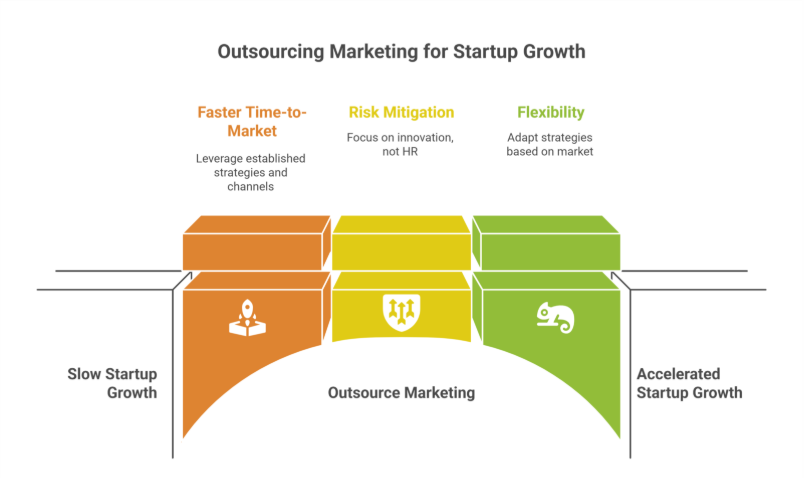
Faster Time-to-Market: Accelerate Your Launch
Imagine launching your product or service faster than ever before. Startups can outsource digital campaigns, content marketing, email marketing, or even web development to experienced outsourced teams, reducing time-to-market and gaining a competitive edge. It’s like hitting the fast-forward button on your growth trajectory.
Risk Mitigation: Focus on Innovation, Not HR
As a startup, risks are part of the journey but hiring shouldn’t be one of them. Outsourcing helps reduce costs and risks associated with in-house teams and in-house marketing, from training costs to employee turnover. Focus on innovation and let an outsourced partner or marketing partner handle your marketing campaigns and strategy development with confidence.
Flexibility: Scale Your Success
Flexibility is key to startup success. Outsourcing offers startups the agility to adapt efficient marketing strategies based on market dynamics and business goals. Whether you’re pivoting direction, expanding reach into a new market, or building brand voice, outsourcing provides scalable solutions that grow with your startup. It ensures scalability without the overhead of hiring full-time or maintaining in-house teams, while your internal team focuses on core business objectives.
Let’s Make it Interactive!
Take a moment to visualize your startup’s growth goals. What marketing strategies or tools and systems could accelerate your journey? How would outsourcing for startups free up your full-time team to focus on product launch, customer engagement, and nurturing leads? Think about how outsourced digital marketing can help drive traffic, stay ahead, and maintain high-quality execution for your brand.
Take Action: Harness Outsourcing for Growth
Now that you see the potential, it’s time to take action. Research reputable outsourced marketing agencies, experienced team, or skilled professionals specializing in rapid growth, long-term growth, and business objectives. Choosing the right partner gives access to the latest tools, ensures high-quality content creation, and allows small businesses and new companies to grow without hiring an internal team. Startups face challenges, but outsourcing offers startups a game-changer solution. Schedule consultations to explore how outsourced marketing isn’t just support—it’s a one solution approach to drive traffic, lead generation, and customer experience.
Embrace the power of outsourcing marketing and watch your startup soar to new heights of success while maintaining high-quality results and staying ahead in the ever-evolving market.
Frequently Asked Questions (Outsourcing Marketing A Game Changer for Startups& Growth Strategies)
Is outsourcing a growth strategy?
Yes, outsourcing can be a powerful growth strategy. By delegating non-core tasks like marketing, IT, or customer support to specialized experts, startups and businesses can focus on core activities, scale efficiently, reduce costs, and accelerate time-to-market, ultimately driving faster growth and competitive advantage.
What is outsourcing in marketing?
Outsourcing in marketing means hiring external experts or agencies to handle marketing tasks like content creation, social media management, SEO, or campaigns. It allows businesses to access specialized skills, save time, reduce costs, and focus on core growth activities.
Is outsourcing a method of growth?
Yes, outsourcing is a method of growth. By delegating non-core functions like marketing, IT, or customer support to external experts, businesses can optimize resources, improve efficiency, focus on core operations, scale faster, and access specialized skills that drive sustainable growth.
What is the 1% rule in marketing?
The 1% rule in marketing refers to the idea that only about 1% of an audience actively engages with content, while 99% remain passive viewers. Marketers use this insight to focus on strategies that nurture, convert, and expand this small, highly engaged segment.
Hiring the right person isn’t just about ticking off skills on a checklist. It’s about finding someone who believes in your mission, shares your values, and can thrive in your company’s environment. That’s where cultural fit comes in—and in 2025, it’s more important than ever.
As companies continue to adopt flexible work models and build global teams, hiring someone who “fits in” isn’t just a nice-to-have—it’s essential for long-term success.
What Is Cultural Fit?
Cultural fit refers to how well a candidate’s values, beliefs, and working style align with your company’s culture. It’s about more than just personality—it’s about shared purpose and compatibility.
If your company values collaboration, innovation, and ownership, then hiring someone who prefers solo work, fixed routines, and top-down management might cause friction—even if they’re highly skilled.
Why It Matters in 2025
The way we work has changed. Remote work, global teams, and shifting expectations have made cultural alignment even more critical. Here’s why cultural fit has become a major factor in successful hiring:
Higher Retention: Employees who feel connected to your culture are more likely to stay.
Better Performance: Teams with strong cultural alignment collaborate more easily and stay motivated.
Improved Morale: A good cultural match leads to less conflict and more cohesion across teams.
Skills vs. Culture: It’s Not Either/Or
Some companies fear that prioritizing culture might lead to hiring the wrong person just because “they’re nice.” But hiring for culture doesn’t mean ignoring skills. It means finding someone who has the right skills and can thrive in your environment.
In fact, the best hires are both technically qualified and culturally aligned.
A good hire in 2025 should have:
The required skill set or potential to grow into the role
Alignment with the company’s mission, values, and work style
The ability to work effectively with your existing team
Adaptability to your specific business and communication style
Red Flags of a Poor Cultural Fit
Even the most experienced candidates can be a poor match if they’re not aligned with your company’s ways of working.
Watch out for these signs:
They speak negatively about past team experiences or collaboration
They value job titles more than learning or growth
They prefer rigid routines in a fast-moving, flexible company
They show resistance to feedback or working in a team setting
They don’t ask questions about your company culture during the interview
Sometimes, the lack of interest in how your team works is a clear sign they may not be invested for the long haul.
How to Assess Cultural Fit During Hiring
Cultural fit isn’t always obvious from a résumé. That’s why you need a thoughtful hiring process that goes beyond the surface.
Here are a few ways to do it:
1. Ask the Right Questions
Go beyond technical interviews. Include behavioral and situational questions like:
“What type of team do you work best in?”
“Tell us about a time you had to adapt to a new culture or work environment.”
“How do you handle feedback and communication on remote teams?”
2. Share Your Company Culture Clearly
Make your company values, expectations, and working style visible during the hiring process. A culture deck, short video, or real employee stories can help candidates self-assess if they’re a good match.
3. Involve Multiple Team Members
Let candidates meet future coworkers or other departments. This gives a more complete picture and helps both sides evaluate chemistry and collaboration styles.
4. Use Culture-Focused Assessments
Some companies use personality or values assessments—not to reject candidates, but to guide better team alignment and onboarding.
Cultural Add vs. Cultural Fit
It’s important to note that cultural fit doesn’t mean hiring people who all think or look the same. That can lead to groupthink or a lack of innovation.
Instead, aim for “culture add.” This means hiring people who share your values but bring different perspectives and experiences to the table.
A culture add can:
Challenge existing assumptions
Contribute to innovation
Make your team more inclusive and dynamic
Bring in fresh problem-solving approaches
This balance between alignment and diversity is the sweet spot for strong teams.
The Cost of Ignoring Cultural Fit
Hiring someone who doesn’t align with your culture can lead to:
Early resignations or quiet quitting
Conflict with other team members
Low morale across departments
Loss of time, money, and training investment
The cost of a bad hire can go well beyond salary. It impacts team energy, customer satisfaction, and your employer brand.
Final Thoughts
In today’s hiring environment, cultural fit isn’t a bonus—it’s a must. When you bring people into your team who understand your mission, share your values, and fit your work style, you’re not just filling a role. You’re building a team that’s stronger, more connected, and more productive.
So next time you’re hiring, take a step back and ask: “Will this person succeed here—not just on paper, but in our world?”
Hiring today looks very different than it did a few years ago. With the rise of remote work, global teams, and talent shortages, companies are under pressure to hire faster and smarter. That’s where Recruitment Process Outsourcing (RPO) comes in.
Whether you’re a fast-growing startup or an enterprise scaling operations globally, RPO can offer the flexibility, efficiency, and expertise your business needs to stay ahead.
In this blog, we’ll break down what RPO really is, how it works, and why it’s becoming the go-to hiring solution for modern companies.
What Is RPO?
RPO stands for Recruitment Process Outsourcing. It’s a hiring model where a company outsources all or part of its recruitment process to an external partner.
Unlike traditional staffing agencies that fill individual roles, RPO providers take over your entire hiring strategy—from sourcing and screening to interviews, onboarding, and even employer branding.
RPO is not just a service. It’s a partnership.
How RPO Works
When you work with an RPO provider, you’re getting a dedicated recruitment team that works as an extension of your company. This team gets to know your culture, your goals, and your hiring needs—then builds a process that’s completely tailored to you.
RPO providers typically handle:
Creating or refining job descriptions
Sourcing candidates across multiple platforms
Screening and initial interviews
Background checks and reference calls
Offer management and negotiation
Onboarding support
Recruitment data and reporting
Employer brand strategy
You can choose full RPO (for all hiring needs) or project-based RPO (for specific roles or timelines). There’s also hybrid RPO, which mixes in-house hiring with outsourced support.
Why RPO Is Gaining Popularity
The business world is changing fast. Companies need talent strategies that are just as flexible and forward-thinking. Here’s why RPO is becoming the future of scalable hiring:
1. Faster Time to Hire
Open roles cost money. Every day without a hire slows down your business. RPO providers already have pipelines, platforms, and expertise to move fast.
Reduced time spent sourcing
Faster screening and interviews
Ready access to pre-vetted talent
Streamlined hiring steps
In many cases, RPO partners can fill roles in a fraction of the time it takes internal teams.
2. Access to Better Talent
With an RPO provider, you’re not limited to who applies to your job post. These partners proactively reach out to passive candidates, niche professionals, and global talent pools.
More diverse, qualified applicants
Candidates with strong cultural alignment
Better chances of long-term retention
Reduced risk of bad hires
This focus on quality over quantity means better hires—every time.
3. Scalable and Flexible Hiring
Whether you’re hiring five people or fifty, RPO scales with your business. That makes it ideal for fast-growing startups, seasonal hiring, or large expansion projects.
Easily ramp up or slow down hiring
No need to constantly build internal recruiting teams
Predictable hiring costs
This flexibility makes RPO a smart solution for companies with evolving needs.
4. Cost Savings
Hiring in-house can be expensive—recruiters, tools, job ads, software, and training add up. RPO reduces these costs by consolidating them into one predictable service fee
Lower cost per hire
Less overhead and admin burden
Avoids hidden expenses from poor hiring
Many businesses report saving 30–70% on hiring costs after switching to an RPO model.
5. Improved Candidate Experience
In a competitive market, your candidate experience matters. RPO teams focus on communication, professionalism, and speed—so candidates feel respected and informed at every stage.
Clear updates and timelines
Personalized communication
Smooth transitions from interview to offer
Stronger employer brand
Happy candidates—even those who don’t get hired—can become future applicants or brand ambassadors.
RPO vs Traditional Staffing: What’s the Difference?
While both models support hiring, they’re built for different goals.
RPO is ideal for companies that want to build strong teams, not just fill seats.
Is RPO Right for Your Business?
You don’t need to be a giant company to benefit from RPO. In fact, many small and mid-sized businesses are now choosing RPO for its flexibility and efficiency.
RPO might be right for you if:
You’re growing fast and need to scale hiring quickly
Your internal HR team is stretched too thin
You’ve struggled with poor hires or high turnover
You want to improve your hiring process and candidate experience
You’re hiring across locations or time zones
You need better data and reporting around hiring
Final Thoughts
Recruitment is no longer just about filling vacancies—it’s about building high-performing teams that drive growth. As hiring becomes more complex, competitive, and global, companies need smarter solutions.
RPO is that solution. It combines strategy, speed, and expertise into one powerful model—designed to help you grow without the guesswork.
If you’re ready to rethink hiring, save time, and tap into top talent, it might be time to explore Recruitment Process Outsourcing.
Hiring the right people is one of the most important things a business can do. The right hire can boost productivity, improve team morale, and help you grow faster. But the wrong hire? It can cost time, money, and even hurt your company culture.
In today’s fast-moving job market, companies can’t afford to make the same old hiring mistakes. Let’s take a closer look at the top five hiring mistakes businesses still make—and more importantly, how to avoid them.
Mistake #1: Rushing the Hiring Process
In a rush to fill a role quickly, many companies end up hiring the first “okay” candidate who checks a few boxes. While speed is important, hiring too fast often leads to poor long-term results.
Why it’s a problem:
You may overlook better candidates
You don’t get enough time to properly evaluate fit
You might end up rehiring for the same role within months
How to avoid it:
Create a clear, structured hiring process with timelines
Take time to screen and interview multiple candidates
Involve more than one person in the decision-making
Plan ahead so you’re not hiring reactively
The goal is to hire well, not just quickly.
Mistake #2: Focusing Only on Skills, Not Cultural Fit
A candidate may look perfect on paper, but that doesn’t mean they’ll thrive in your team. Many companies focus solely on technical skills and ignore whether the person will actually fit into the culture.
Signs of poor cultural fit:
Misalignment with your company values
Struggles to work with the team
Low engagement or interest in the role
Resistance to your work style (e.g., remote, fast-paced, or collaborative)
How to avoid it:
Include behavioral and cultural questions in interviews
Let the candidate meet team members or shadow a meeting
Talk openly about your company culture during the hiring process
Ask: “Would this person thrive here?”
Hiring someone who aligns with your mission and work style is just as important as their qualifications.
Mistake #3: Writing Vague or Unrealistic Job Descriptions
Job descriptions are your first impression—and often your first mistake. Many businesses post vague, outdated, or unrealistic descriptions that confuse or turn off the right candidates.
Common issues:
Too generic or full of jargon
A laundry list of skills and tasks that don’t reflect the actual role
No mention of company culture, growth opportunities, or values
Lack of clarity on what success in the role looks like
How to avoid it:
Write clear, honest, and engaging job descriptions
Focus on outcomes—what will the person actually do and achieve?
Highlight your company’s culture, benefits, and values
Limit “must-haves” to actual requirements
A good job description attracts the right people and sets clear expectations from day one.
Mistake #4: Not Having a Structured Interview Process
Winging interviews may work in movies—but not in real life. Unstructured interviews often lead to biased decisions, missed red flags, and hiring mistakes.
Risks of unstructured interviews:
Inconsistent candidate experience
Difficulty comparing candidates fairly
Over-reliance on gut feelings
Missed opportunities to assess key skills or behaviors
How to avoid it:
Use a structured interview format with predefined questions
Align questions with the role and your company’s values
Include both technical and behavioral assessments
Train your interviewers to evaluate objectively
Structure helps remove bias and makes your hiring process more fair and effective.
Mistake #5: Ignoring the Candidate Experience
Even if you don’t hire someone, their experience still matters. Poor communication, long delays, or impersonal interviews can damage your employer brand—and cause top candidates to walk away.
Poor candidate experience includes:
Long gaps between interview stages
No follow-up or feedback after interviews
Confusing or disorganized processes
Not showing respect for the candidate’s time
How to avoid it:
Communicate clearly and consistently throughout the process
Set expectations about timelines and next steps
Provide feedback, even if it’s a “no”
Treat candidates like people, not just applications
A great candidate experience builds trust and can lead to future referrals—even from people you don’t hire.
Final Thoughts
Hiring mistakes happen—but they’re avoidable. In today’s competitive market, companies that hire with intention, clarity, and care will always come out ahead.
To recap, here are the top 5 mistakes to avoid:
Rushing the hiring process
Ignoring cultural fit
Writing vague job descriptions
Skipping a structured interview process
Neglecting the candidate experience
Hiring is more than just filling a seat—it’s about building a team that drives your business forward. Slow down, stay thoughtful, and make each hire count.
Recruitment isn’t what it used to be—and that’s a good thing. With changing work cultures, evolving technology, and shifting employee expectations, the way businesses hire is going through a major transformation.
In 2025, staying ahead in recruitment means more than just posting job ads and screening résumés. Businesses that understand the new trends are the ones attracting the best talent—and keeping them. This blog explores the top recruitment trends every business should keep an eye on.
Why the Recruitment Landscape Is Changing
We’ve moved past the era of generic job portals and lengthy hiring processes. Today’s workforce is more diverse, digitally connected, and values-driven. Candidates are looking for more than just a paycheck—they want purpose, flexibility, and growth.
At the same time, companies need to hire faster, smarter, and more efficiently in a competitive market.
1. Remote Hiring Is Here to Stay
The remote work revolution has changed hiring forever. Companies are no longer limited by geography. In fact, remote hiring opens access to global talent pools and helps businesses build more diverse teams.
What this means for recruiters:
Interviews are now mostly virtual
Onboarding processes are remote-friendly
Time zones and asynchronous work need to be considered
Soft skills like communication and self-management matter more than ever
To stay competitive, businesses must build remote-ready recruitment processes that prioritize clarity, culture, and collaboration.
2. AI and Automation in Recruitment
Artificial Intelligence (AI) is reshaping how companies find and filter candidates. While AI won’t replace recruiters, it can make their work faster and more accurate.
How AI is being used in hiring:
Screening résumés and ranking candidates
Chatbots for candidate communication
Video interview tools that analyze tone, confidence, and communication
Predictive analytics to improve hiring decisions
However, it’s important to keep the human touch. Automated tools should support recruiters—not replace them.
3. Skills Over Degrees
More companies are shifting their focus from education to skills. This is especially true in tech, design, and digital roles where portfolios and practical knowledge matter more than formal degrees.
What to expect:
Job descriptions will prioritize skills and outcomes
Online certifications and bootcamps will gain more value
Tests, case studies, and project-based assessments will become more common
Micro-credentials (small, skill-based certificates) will become part of hiring criteria
Hiring for potential, adaptability, and soft skills is becoming just as important as hiring for experience.
4. Employer Branding Matters
In a world full of job options, candidates want to know what makes your company different. A strong employer brand can be the deciding factor for top talent.
Ways to build a strong employer brand:
Showcase team stories and culture on your website and social media
Be transparent about company values, benefits, and growth opportunities
Improve the candidate experience—from first contact to onboarding
Collect and display testimonials from current employees
Remember, your hiring process is a reflection of your brand. Make it memorable—for the right reasons.
5. DE&I Will Drive Strategy
Diversity, Equity, and Inclusion (DE&I) is no longer a checkbox—it’s a core business priority. Candidates care deeply about inclusive workplaces, and companies are being held accountable.
How DE&I is shaping hiring:
Inclusive language in job descriptions
Blind résumé reviews to reduce bias
Structured interviews to ensure fairness
Outreach to underrepresented talent communities
Investing in DE&I not only improves your team—it also enhances innovation, performance, and company reputation.
6. Faster Hiring Through RPO and Staffing Partners
The talent market is moving fast, and businesses need to respond quickly. That’s where Recruitment Process Outsourcing (RPO) and staffing partnerships come in.
Companies are increasingly turning to expert partners to:
Reduce time-to-hire
Access larger talent pools
Scale hiring without straining internal teams
Improve quality of hire with pre-vetted candidates
In 2025, outsourced hiring is no longer just for big companies—it’s a smart solution for businesses of all sizes.
7. Data-Driven Decision Making
Recruitment teams are becoming more analytical. Instead of relying on gut feeling, hiring decisions are now backed by data.
Metrics that matter:
Time to fill
Cost per hire
Quality of hire
Source of hire
Candidate satisfaction scores
By tracking the right data, companies can continuously improve their recruitment strategy—and reduce costly hiring mistakes.
8. Employee Referrals and Internal Mobility
Referrals are still one of the best sources of quality hires. At the same time, companies are focusing more on growing talent from within.
What this looks like:
Encouraging employee referrals with rewards
Promoting internal job opportunities
Upskilling current employees instead of hiring externally
Building career development paths to boost retention
These approaches not only cut hiring costs but also build loyalty and boost morale.
Final Thoughts
The future of recruitment is fast, flexible, and human-centered. From remote hiring and AI to employer branding and diversity, businesses need to embrace change to attract and retain the best people.
If you’re still relying on old-school methods, now is the time to evolve. The talent market is moving quickly—and the companies that adapt will lead the way.
Whether you’re a growing startup or an established enterprise, keeping up with recruitment trends isn’t optional—it’s essential.
Remote work is no longer just a trend. It’s the new normal. As we step into 2025, businesses of all sizes are embracing remote teams to access global talent, reduce overheads and offer flexibility to employees. But building a successful remote team is more than just hiring people who work from home. It requires strategy, structure and the right tools.
In this blog, we’ll walk you through the key steps to building a high-performing remote team in 2025—from hiring to culture to communication.
Why Remote Teams Are the Future
Remote work has changed how businesses think about productivity and team building. With better internet access, communication tools and flexible work policies, companies can now hire top talent from anywhere in the world.
But flexibility doesn’t mean lower standards. In fact, the best remote teams are often more productive, more engaged and more efficient than traditional office teams. If built the right way.
Step 1: Hire the Right People
Hiring for a remote team isn’t the same as hiring for an in-office position. You need people who are self-motivated, good communicators and comfortable working independently.
What to look for in a remote candidate:
Strong written and verbal communication skills
Self-discipline and time management
Experience with remote tools like Slack, Zoom, or Asana
Ability to work across different time zones
Problem-solving and decision-making skills without micromanagement
Use structured interviews and practical tests to evaluate candidates’ remote-readiness. It’s also helpful to assess cultural fit and values, especially in a distributed setup.
Step 2: Set Clear Expectations from Day One
When team members are not in the same room, miscommunication can happen easily. That’s why clarity is key.
Be clear about:
Working hours and availability
Project timelines and deadlines
Communication norms (e.g. when to use email vs chat)
Performance metrics and goals
Create a remote employee handbook or onboarding guide. It helps new hires understand your processes and feel aligned with the team early on.
Step 3: Use the Right Technology
In 2025, remote work tools are smarter and more advanced than ever. Use them wisely to enable collaboration and track progress.
Must-have tools for remote teams:
Communication: Slack, Microsoft Teams, Zoom
Project management: Trello, Asana, Monday.com
Document sharing: Google Workspace, Notion, Dropbox
Make sure everyone on the team is trained on how to use these tools effectively. The goal is not to overload people with apps—but to make collaboration smooth.
Step 4: Build a Strong Remote Culture
One of the biggest challenges in remote teams is building a sense of belonging. People can feel disconnected if culture is ignored.
Tips to create a great remote culture:
Schedule regular team check-ins and one-on-one meetings
A strong culture helps reduce turnover and increases trust across the team.
Step 5: Focus on Outcomes, Not Hours
Remote work offers flexibility—but with that comes the need to trust your team. Instead of tracking hours, focus on results.
Define clear goals and measure performance based on output. This gives employees more ownership and makes them feel empowered to deliver their best.
Managers should avoid micromanaging and instead offer support, mentorship and accountability.
Step 6: Support Mental Health and Work-Life Balance
Burnout can be real in remote environments, especially when work blends into personal life. Leaders need to be proactive about employee well-being.
Ways to support your team:
Promote regular breaks and time off
Offer wellness programs or mental health days
Encourage flexible schedules where possible
Set boundaries around after-hours communication
When employees feel cared for, they’re more likely to stay motivated and loyal.
Step 7: Keep Evolving
The way we work remotely is always changing. What worked last year may not work today. Stay open to feedback and adjust your processes regularly.
Run anonymous surveys to check team satisfaction
Ask for feedback after major projects or team changes
Revisit your tools and systems every quarter
A high-performing remote team is one that’s continuously learning and improving.
Final Thoughts
Building a high-performing remote team in 2025 isn’t about copying office life—it’s about creating a new kind of workplace. One that values trust, flexibility, communication and culture.
Whether you’re building your first remote team or scaling an existing one, remember that your people are your biggest asset. Hire with intention, lead with empathy and always keep evolving.
Imagination is a remarkable gift that sets humans apart from other species. It is the gateway to creativity, innovation, and the exploration of infinite possibilities. In a world that often values practicality and logic, the power of imagination is sometimes overlooked. In this article, we will delve into the significance of embracing and nurturing our imaginative faculties. Join us as we uncover the transformative power of imagination and discover how it can enrich our lives, spark innovation, and ignite our creative spirits.
The Nature of Imagination:
Defining Imagination: Understanding the essence of imagination and its role in human cognition.
Types of Imagination: Exploring different forms of imagination, including sensory, creative, and empathetic imagination.
The Imagination-Reality Connection: Recognizing the symbiotic relationship between imagination and our perception of reality.
Cultivating a Creative Mindset:
Overcoming Mental Blocks: Identifying and overcoming common obstacles that hinder imagination.
Embracing Curiosity: Cultivating a sense of wonder and curiosity to fuel the imagination.
Seeking Inspiration: Engaging with art, literature, nature, and diverse experiences to stimulate imagination.
Unleashing Creative Expression:
Embracing Playfulness: Tapping into the joy of spontaneous play to unleash the imagination.
Mind Mapping and Brainstorming: Utilizing techniques to generate and organize creative ideas.
Divergent Thinking: Encouraging non-linear thinking and exploring unconventional solutions.
The Power of Visualizations:
Visualization Techniques: Harnessing the power of mental imagery to enhance imagination.
Goal Setting and Visualization: Using visualization to manifest goals and aspirations.
Guided Imagery and Meditation: Exploring techniques to access deeper levels of imagination and inner wisdom.
Imagination in Problem-Solving and Innovation:
Design Thinking: Applying imaginative thinking in problem-solving and innovation processes.
Empathy and Imagination: Using empathetic imagination to understand others’ perspectives and drive human-centered solutions.
Futuristic Thinking: Envisioning possibilities and exploring alternative futures through imaginative thinking.
Nurturing Imagination in Daily Life:
Creating Time for Solitude and Reflection: Allowing space for the mind to wander and generate new ideas.
Embracing Open-Mindedness: Challenging assumptions and embracing diverse perspectives to expand the imagination.
Collaboration and Co-Creation: Harnessing collective imagination through collaboration and group brainstorming.
Imagination’s Role in Personal Growth and Well-Being:
Self-Reflection and Visualization: Utilizing imagination to envision personal growth and envision positive changes.
Imagination as a Source of Resilience: Drawing upon imagination to find creative solutions during challenging times.
Finding Joy and Inspiration in Everyday Life: Discovering the beauty and wonder of the world through an imaginative lens.
Imagination is a powerful tool that lies within each of us, waiting to be unleashed. By embracing the power of imagination, we open ourselves to new possibilities, spark creativity, and find innovative solutions to complex challenges. Let us nurture our imaginative faculties, allowing them to flourish and guide us on a journey of personal growth, innovation, and profound joy. Embrace the power of imagination and unlock a world of endless creativity and wonder.




.png)