Blog

  • What Will Separate Average Webflow Sites From Great Ones In 2026

    What Will Separate Average Webflow Sites From Great Ones In 2026

    What Will Separate Average Webflow Sites From Great Ones In 2026

    Why do some Webflow sites feel seamless and intuitive, while others leave visitors frustrated and disengaged? The difference often isn’t in the platform itself it’s in the choices behind design, development, and ongoing maintenance. By 2026, the standards for high-performing Webflow websites will rise dramatically, driven by factors like page speed, SEO optimization, accessible layouts, UX-focused interfaces, and the intelligent use of AI in workflows.

    By 2026, great Webflow sites will stand out through faster performance, SEO-friendly structure, intuitive UX, accessible layouts, and polished animations. Strategic AI use, professional development, and ongoing optimization will boost conversion and brand credibility, while average sites lag due to poor design, slow workflows, and lack of maintenance.

    Professional development and expert support are no longer optional. Investing in well-structured semantic code, smooth animations, and thoughtful interaction design ensures your brand communicates credibility while boosting conversion rates. Even small improvements like optimizing layouts for accessibility or refining micro-interactions can impact performance and user satisfaction. Typical professional development packages start from a few thousand dollars but deliver measurable ROI through higher engagement, faster loading times, and stronger brand presence.

    This blog will explore what separates average Webflow sites from truly great ones in 2026. You’ll learn which web design decisions matter most, how to leverage AI and modern workflows, and why ongoing optimization, support, and UX enhancements are critical to keeping your website competitive in the evolving digital landscape.

    AI and UX Trends Shaping Webflow Sites in 2026
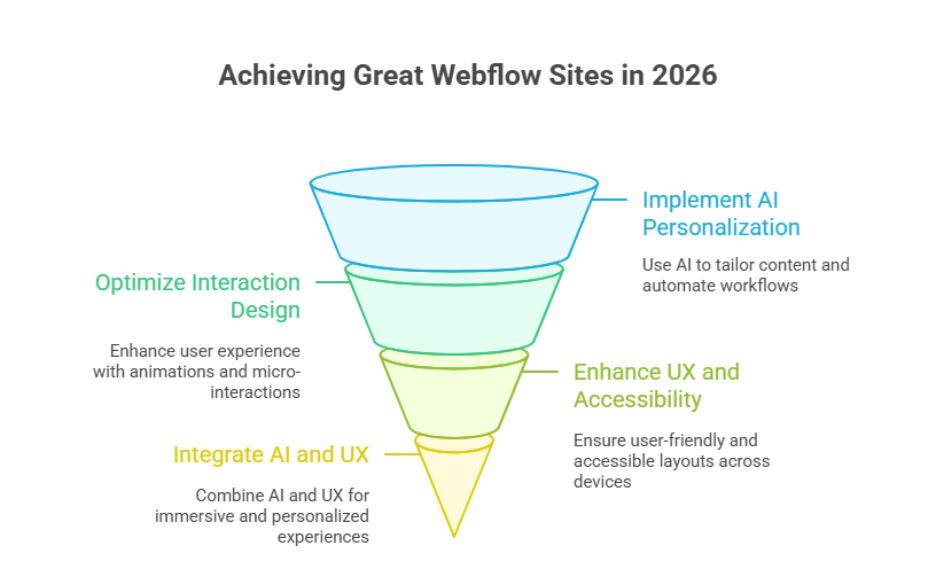
    AI and UX Trends Shaping Webflow Sites in 2026

    By 2026, high-performing Webflow websites will rely on the seamless integration of AI and UX. These trends will shape how users interact with modern websites, improve conversion rates, and create immersive digital experiences that build trust. Whether your website is built for SaaS, ecommerce, or a portfolio, following structured steps ensures measurable results.

    Step 1: Implement AI-Driven Personalization and Automation

    • Use AI tools to tailor content dynamically based on user behavior.
    • Automate workflows in Webflow CMS items, like updating content or managing SEO for search engines.
    • Track analytics to measure engagement, scroll behavior, and conversion rates.

    Step 2: Optimize Interaction and Motion Design

    • Add scroll-triggered animations, micro-interactions, and motion design to guide users seamlessly.
    • Align UI elements with your brand and design systems for a cohesive experience.
    • Ensure minimalism and typography choices enhance readability and accessibility.

    Step 3: Enhance UX and Accessibility

    • Test navigation and layouts for accessibility compliance.
    • Focus on user experience that keeps visitors engaged across all devices.
    • Combine immersive visuals with Webflow SEO best practices for discoverability.

    Step 4: Integrate AI and UX for Next-Generation Websites

    • Build AI-ready frameworks to deliver personalized digital experiences.
    • Collaborate with Webflow agencies or internal teams to align design and development.
    • Use automation and analytics to continuously improve performance, creating high-performing websites that convert and scale.

    Key Webflow Features That Drive Great Web Design

    CMS Items and Dynamic Content

    Webflow’s CMS allows digital teams to manage content efficiently through CMS items. Dynamic templates ensure consistency across pages, while supporting good design and technical SEO best practices, including answer engine optimization (AEO). This enables scalable websites that deliver measurable business impact.

    Drag-and-Drop Design and Aesthetics

    The drag and drop interface empowers teams to create visually compelling layouts without coding. By combining flexibility with design aesthetics, designers can implement grids, motion, and typography that enhance user engagement, all without sacrificing performance.

    Technical Capabilities for SEO and Performance

    Webflow’s platform offers robust technical SEO tools, semantic code, and fast hosting. Features like optimized headings, images, and integrations with large language models support enterprise-level speed and search visibility, helping sites achieve measurable business impact.

    Integrating Design and Business Goals

    By leveraging CMS, drag-and-drop design, and technical capabilities together, Webflow enables web solutions that balance creativity with performance. This approach turns websites from novelty to necessity, ensuring brands stay ahead of the curve heading into 2026.

    Conclusion

    As we’ve explored, the gap between average and great Webflow sites in 2026 will be defined by deliberate choices in design, development, and ongoing optimization. High-performing websites seamlessly combine AI-driven personalization, thoughtful UX, accessible layouts, and technical SEO practices all supported by professional development and well-structured workflows. Features like CMS items, drag-and-drop design, and advanced motion and interaction elements allow digital teams to create web solutions that are visually compelling, scalable, and measurable.

    Investing in these capabilities ensures that your website not only engages users but also drives conversion, strengthens brand credibility, and remains competitive in a rapidly evolving digital landscape. Small improvements optimizing accessibility, refining micro-interactions, or integrating AI frameworks can deliver a measurable business impact that far outweighs the initial investment.

    if you want a website built to these standards, why not contact Integriti Studio and see how they can transform your Webflow site into a high-performing, future-ready platform?

    Frequently Asked Questions (What Will Separate Average Webflow Sites From Great Ones In 2026)

    What is the future of Webflow?

    The future of Webflow looks strong, focusing on AI-driven design, seamless UX, and scalable CMS capabilities. By 2026, it will empower businesses to build high-performing, visually compelling websites without heavy coding, integrating advanced SEO, automation, and interactive features that keep brands competitive in the evolving digital landscape.

    What are the web design trends in 2026?

    Web design trends in 2026 will emphasize AI-driven personalization, immersive UX, and seamless interaction design. Minimalism, accessible layouts, dynamic motion, and bold typography will dominate, while integration with analytics and automation ensures high-performing, conversion-focused websites that deliver measurable business impact across devices and platforms.

    Is Webflow still relevant in 2025?

    Yes, Webflow remains highly relevant in 2025. Its no-code platform enables designers and digital teams to create high-performing, visually compelling websites with CMS flexibility, advanced interaction design, and SEO optimization. Webflow continues to attract businesses seeking scalable, modern website solutions without heavy coding.

    What are the statistics for Webflow in 2025?

    Yes Webflow has significant usage and continued growth in 2025. It powers around 493,000+ active websites and holds about 1.2% of the CMS market share (0.8% of all sites globally). Its adoption has increased year‑over‑year, showing steady expansion as designers, enterprises, and companies leverage the platform for modern web design.

  • How To Prepare Your Shopify Store For 2026 Growth

    How To Prepare Your Shopify Store For 2026 Growth

    How To Prepare Your Shopify Store For 2026 Growth

    Why do some businesses see consistent growth on Shopify, while others struggle to scale despite having similar products and budgets? The difference often lies in how a Shopify store is built, optimized, and maintained over time especially as expectations rise heading into 2026.

    Preparing your Shopify store for 2026 growth means optimizing performance, improving product pages, using professional design, and planning scalable marketing strategies. Focus on speed, mobile experience, automation, and data-driven decisions to build trust, retain customers, and support long-term ecommerce growth.

    Website performance is influenced by multiple factors, including design structure, page speed, checkout flow, mobile optimization for mobile devices, and how well product pages guide a shopper toward confidence. A professionally developed Shopify store focuses on usability, clear meta structure, strong keyword targeting, and a smooth shopping experience that helps build trust and reduce abandoned cart issues. Strategic use of shopify apps, email marketing, smart bundle offers, and limited-time discount campaigns also play a role in growing a loyal customer base.

    From a practical perspective, many businesses invest anywhere from a few hundred dollars for basic setup to several thousand for a fully optimized, professional Shopify store with ongoing support an investment that directly impacts long-term ecommerce performance.

    This guide explains how to prepare your Shopify store in 2026, covering development decisions, performance improvements, marketing alignment, and scalability strategies to help your online store grow sustainably.

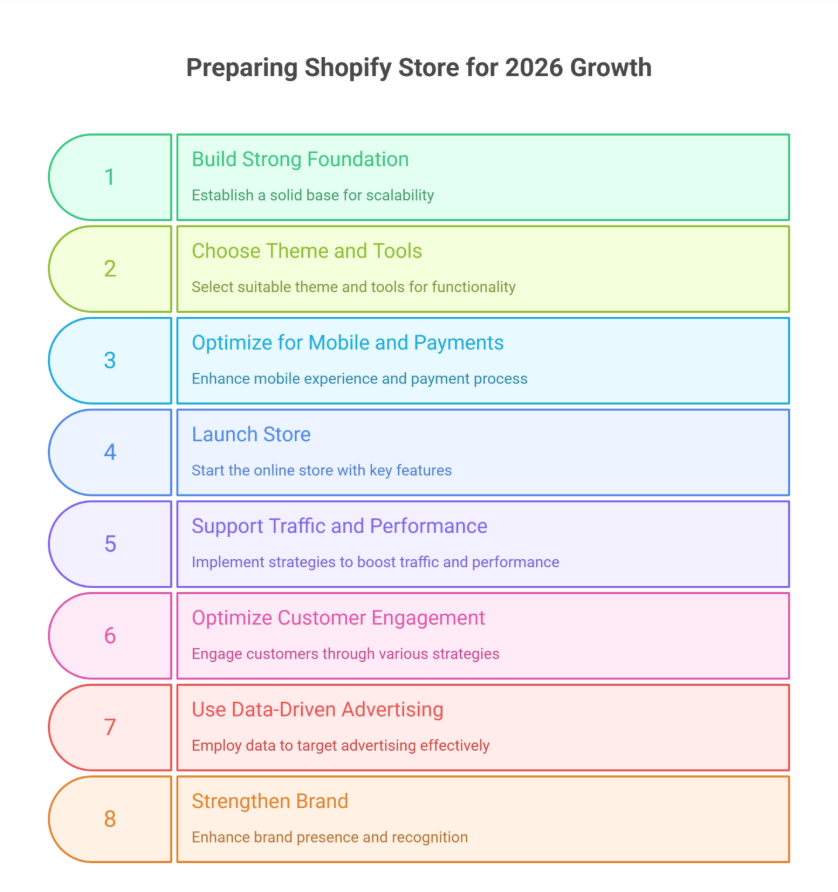
    Build a Professional Shopify Store Foundation for 2026 Growth

    Build a Professional Shopify Store Foundation for 2026 Growth

    Before trying to grow your Shopify store, focus on building a strong foundation. Early decisions in store setup, store design, and platform configuration determine long-term scalability, performance, and shopify growth potential. A solid base prevents costly redesigns and technical issues later.

    Choosing the Right Structure, Theme, and Tools

    Selecting a suitable shopify theme and store builder is essential. Your theme should be fast, flexible, and optimized for conversions. Integrating the right tools ensures your professional Shopify store can handle traffic, sales, and evolving online business needs without compromising speed or user experience.

    Optimizing for Mobile and Payments

    Most shoppers now use mobile devices. Optimizing your store for mobile and streamlining Shopify payments enhances the shopping experience, reduces cart abandonment, and increases order value. Mobile-first design is crucial for higher conversion in 2026.

    From Launch to First Sales

    Whether you’re starting an online store or planning to launch your Shopify store, clear pricing, free shipping, and trust signals are key. Using Shopify’s free trial allows you to refine your store setup, create your store, and test early marketing strategies before going live.

    Supporting Traffic and Long-Term Performance

    A professional setup enables better traffic to your store and supports growth strategies. Features like loyalty programs, early access offers, and bundle promotions help create urgency, increase Shopify sales, and ensure sustainable growth over time.

    Smart Marketing Strategies to Grow Your Shopify Store Long Term

    Growing a Shopify store sustainably requires more than a great product or polished design. To achieve long-term growth, you need a strategic approach that drives online sales, encourages repeat visits, and strengthens customer loyalty. Implementing Shopify solutions and targeted marketing campaigns can transform your ecommerce store from a temporary setup into an essential store for your audience.

    Optimize Customer Engagement to Keep Shoppers Coming Back

    Engaged customers are more likely to return, increasing online sales and building lifetime value. Focus on:

    • Email marketing campaigns: Send personalized recommendations, promotions, and back to your store reminders to keep your audience engaged.
    • Abandoned cart recovery: Automate messages for making your store irresistible and recovering lost sales.
    • Loyalty programs: Reward repeat buyers to strengthen retention and promote long-term Shopify growth.

    Use Data-Driven Advertising for Targeted Reach

    Smart Shopify solutions allow you to track user behavior and optimize ad spend. Key strategies include:

    • Paid social campaigns: Platforms like Facebook, Instagram, or TikTok help you reach new audiences efficiently.
    • Retargeting ads: Bring visitors back to your store who didn’t convert the first time.
    • A/B testing campaigns: Experiment with messaging, creatives, and offers to maximize ROI.

    Strengthen Your Brand and Online Presence

    A strong brand creates trust, drives recognition, and increases online sales. Focus on:

    • Consistent messaging and visuals across your ecommerce store.
    • SEO optimization for product pages to capture organic traffic.
    • Content marketing like blogs, guides, or videos to educate your audience.

    Conclusion

    Preparing your Shopify store for 2026 growth requires a combination of strategic planning, professional design, and data-driven marketing. By building a strong foundation, choosing the right shopify theme and tools, optimizing for mobile and payments, and implementing smart Shopify solutions, you can improve your Shopify performance, increase online sales, and achieve long-term growth. Engaging customers through email marketing, loyalty programs, and personalized campaigns ensures repeat visits, while data-driven advertising and strong branding make your store an essential store for your audience.

    Investing in professional setup and scalable strategies from store setup to marketing turns your ecommerce store into a trusted, high-converting destination. Small choices like bundle offers, free shipping, or early access campaigns can have a significant impact on Shopify sales and shopify growth, making your store competitive in 2026 and beyond.

    So, as you plan your next steps to grow your Shopify store, consider this: are you ready to start a successful Shopify journey, or will you leave your growth to chance?

    why not contact Integriti Studio today and see how they can help your store scale smartly in 2026?

    Frequently Asked Questions (How To Prepare Your Shopify Store For 2026 Growth)

    How do I grow my Shopify store?

    To grow your Shopify store, focus on optimizing product listings, improving site speed, and enhancing UX. Use email marketing, abandoned cart recovery, and social media campaigns to drive traffic. Leverage analytics to track performance, implement SEO strategies, and consider AI-powered personalization to boost conversions and customer loyalty.

    Is Shopify really 1 dollar a month?

    No, Shopify’s standard plans are not $1 per month. While Shopify occasionally offers limited-time promotions or trial periods for around $1, the regular pricing starts higher, depending on the plan. Businesses should review current plan details to understand actual costs, features, and transaction fees.

    Where will Shopify be in 5 years?

    In five years, Shopify is likely to evolve as a leading global ecommerce platform, emphasizing AI-driven personalization, automation, and seamless omnichannel experiences. It will focus on faster, high-performing stores, advanced analytics, and integrations with emerging technologies, helping businesses scale efficiently and stay competitive in digital commerce.

    How much does Shopify take from a $100 sale?

    Shopify’s fees on a $100 sale depend on your plan and payment method. Using Shopify Payments, the platform charges 2.9% + 30¢ on the Basic plan, meaning about $3.20. Third-party payment gateways add extra transaction fees, increasing the total deduction from each sale.

  • What WordPress Website Mistakes Will Hurt Rankings In 2026

    What WordPress Website Mistakes Will Hurt Rankings In 2026

    What WordPress Website Mistakes Will Hurt Rankings In 2026

    Why do some businesses invest in a wordpress build yet still see declining ranking as competition tightens toward 2026? The gap is rarely about effort. It is usually caused by unseen technical and strategic choices that weaken seo, slow loading, and reduce trust signals across a wordpress website.

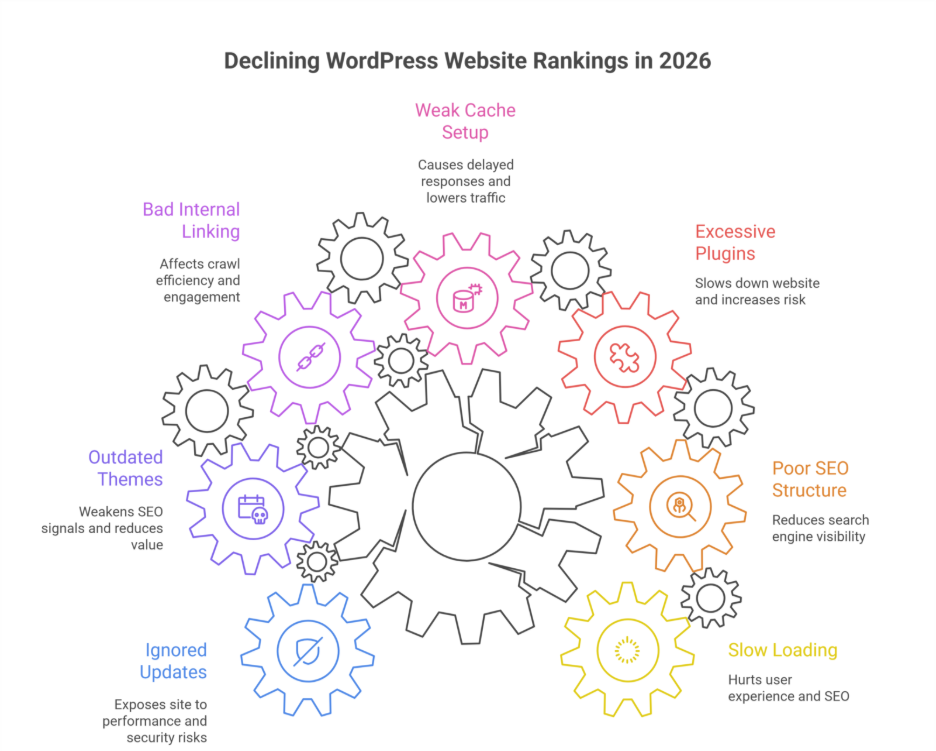
    WordPress website rankings in 2026 suffer due to slow loading, poor SEO structure, excessive plugins, weak cache setup, bad internal linking, outdated themes, and ignored updates. These common WordPress mistakes hurt user experience, reduce search engine visibility, and prevent proper optimization for long-term ranking growth.

    Website performance is influenced by multiple factors working together code quality, user experience, infrastructure, content structure, and long-term maintenance. When wordpress development is handled without professional oversight, even small missteps can turn into a costly wordpress mistake that impacts visibility and ranking. Poor cache handling, rushed updates, or design decisions that ignore user experience often send negative signals to search platforms, directly affecting seo performance.

    Professional development goes beyond visuals. Thoughtful design, reliable support, and consistent maintenance protect your investment. For example a properly planned wordpress project may range from $2,500 to $6,000, while ongoing care can cost far less than fixing lost traffic later. That difference often determines whether your site grows or stalls in 2026.

    This blog breaks down the most critical mistakes to avoid explains how they impact seo and shows how smarter development decisions help your site meet modern standards and stay competitive.

    Critical WordPress SEO Mistakes That Hurt Rankings In 2026

    Critical WordPress SEO Mistakes That Hurt Rankings In 2026

    As competition intensifies, many brands unknowingly repeat mistakes in 2026 that directly limit growth. These issues are rarely obvious at first glance, yet they compound over time and damage search engine rankings. Below are the most critical areas where a seo mistake can quietly undo your efforts.

    Ignoring Core Updates and Technical Foundations

    One common wordpress mistake is delaying maintenance. Failing at updating your wordpress core or managing wordpress core files correctly exposes your wordpress site to performance and security risks. Outdated systems weaken wordpress seo signals and reduce long-term seo value, especially for a new website competing in crowded markets.

    Overlooking Structure Design and Content Logic

    Poor website design choices remain among the top web design mistakes to avoid. Weak navigation, cluttered layouts, and misuse of wordpress categories create seo errors that affect crawl efficiency. These are classic wordpress seo mistakes that hurt relevance and engagement.

    Mismanaging Plugins Hosting and Data

    Heavy or unvetted wordpress plugins, weak wordpress hosting, and an unoptimized wordpress database slow performance. These are mistakes that hurt both trust and usability. Combined with gaps in wordpress security and website security, they increase risk and frustrate website visitors.

    Strategic Oversights That Limit Growth

    From ignoring local seo to poor execution in custom wordpress builds, agencies consistently find wordpress mistakes we see across industries. Many are mistakes you can make inside the wordpress dashboard without realizing the impact.

    How to Move Forward

    To fix these mistakes, brands must reassess their version of your website, review common seo, and align wordpress development with modern standards. These are the real mistakes to avoid in 2026 if you want to help optimize your website, optimize your website for search, and truly avoid these mistakes moving forward.

    Common WordPress Plugin And Cache Mistakes To Avoid SEO

    Search performance issues often originate from plugin misuse and poor cache configuration.

    Step 1: Installing Too Many Or Poor-Quality Plugins

    One common wordpress mistake is relying on excessive or free or cheap wordpress tools without reviewing impact. Bloated wordpress plugins create a clear seo mistake by adding scripts that slows down your website and increases risk of website crashes. These are classic wordpress seo mistakes that reduce trust and engagement.

    Step 2: Cache Misconfiguration And Hosting Gaps

    Improper cache rules, combined with weak wordpress hosting or an unreliable wordpress hosting provider, cause delayed responses. This directly affects user experience and search rankings and lowers website traffic. Many wordpress mistakes we see originate from a mismatch between cache layers and the website hosting provider setup.

    Step 3: Ignoring Core Compatibility And Updates

    Failing at updating your wordpress core or maintaining wordpress core files can break cache logic and plugins. This creates seo errors, exposes wordpress security gaps, and impacts website security all mistakes that hurt long-term growth on any wordpress site, including a new website or custom wordpress build.

    Step 4: No Testing Or Ongoing Review

    Many mistakes you can make happen inside the wordpress admin dashboard or wordpress dashboard when changes go untested. Agencies recommend to test your website, review the version of your website, and audit the wordpress database regularly to protect search engine rankings and seo value.

    Step 5: Fixing The Right Way

    To fix these mistakes, align wordpress development with smart website development, clean website design, proper cache rules, and structured wordpress categories. These are seo mistakes to avoid if you want to optimize your website, optimize your website for search, help optimize your website, and ultimately avoid these mistakes that can hurt your site and limit website visitors.

    Conclusion

    WordPress performance in 2026 is no longer about isolated fixes—it is about consistency structure, and accountability. As outlined above, slow loading unmanaged plugins, poor cache handling delayed updates, and weak development decisions are not minor oversights they are strategic gaps that directly impact SEO trust and long-term rankings. These mistakes often accumulate quietly until traffic drops visibility declines and recovery becomes expensive.

    A well-maintained WordPress website requires proactive audits, disciplined plugin usage secure hosting, and development choices aligned with modern search standards. Businesses that treat SEO, performance, and maintenance as ongoing priorities—not one-time tasks are the ones that stay competitive as algorithms and user expectations evolve.

    If your site is already live, the real question is simple but important:
    Are these issues already affecting your rankings and is it time to speak with Integriti Studio before they cost you more?

    Frequently Asked Questions (What WordPress Website Mistakes Will Hurt Rankings In 2026)

    Is WordPress still in demand in 2025?

    Yes, WordPress remains in demand in 2025 due to its flexibility, large plugin ecosystem, and ease of use for both businesses and developers. It continues to power blogs, ecommerce sites, and enterprise platforms, especially when combined with modern themes, SEO optimization, and security enhancements.

    Is WordPress being phased out?

    No, WordPress is not being phased out. While new platforms like Webflow and headless CMS options are growing, WordPress remains widely used due to its flexibility, extensive plugin ecosystem, and strong community support. Businesses continue relying on it for blogs, ecommerce, and enterprise websites in 2025.

    What are common WordPress issues?

    Common WordPress issues include slow site speed, outdated plugins or themes, security vulnerabilities, broken links, and poor mobile optimization. Duplicate content, inefficient SEO practices, and plugin conflicts can also affect performance. Regular updates, proper maintenance, and optimization are essential to keep a WordPress site secure and high-performing.

    What are the disadvantages of WordPress?

    The main disadvantages of WordPress include security risks from outdated plugins or themes, slower performance on complex sites, frequent maintenance requirements, and potential plugin conflicts. Customization beyond standard themes often requires coding skills, and poorly optimized sites can suffer from SEO and usability issues.

  • Shopify Trends To Start Adapting Before 2026 Begins 

    Shopify Trends To Start Adapting Before 2026 Begins 

    Shopify Trends To Start Adapting Before 2026 Begins 

    Why do some brands grow faster on Shopify while others struggle to scale profitably? The difference rarely lies in the platform itself. It comes down to how performance, structure and long-term decisions are handled as competition increases toward 2026. From page speed and optimization to data flow and scalability multiple factors directly influence results across modern ecommerce environments. 

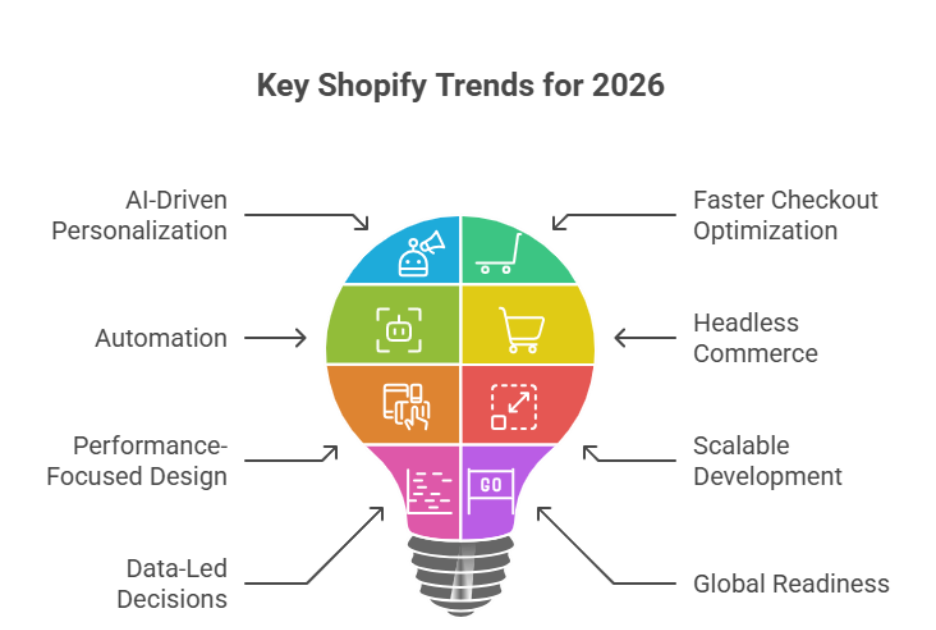
    Shopify trends to start adapting before 2026 include AI-driven personalization, faster checkout optimization automation headless commerce and performance-focused design. Brands investing in scalable Shopify development smarter shopper experiences and data-led ecommerce decisions will stay competitive and future-ready as 2026 approaches. 

    A professionally built Shopify store is no longer just a digital catalog. Strategic development thoughtful design systems, and consistent maintenance create real business value especially as shopper expectations rise in 2026. Smart personalization supported by ai helps brands adapt faster while poor execution increases costs over time. In practice, businesses often invest between $2,000–$5,000 for professional builds to avoid expensive fixes later. Shopify solutions planned correctly protect margins and reduce technical debt as 2026 approaches. 

    This blog breaks down key Shopify trends shaping 2026 explains what matters beyond features and shows how informed decisions help Shopify brands stay competitive resilient and ready for what’s next in 2026. 

    Shopify 2026 FAQ trends to watch shaping ecommerce future 

    Shopify 2026 FAQ trends to watch shaping ecommerce future 

    As 2026 approaches, many Shopify brands ask similar questions about scalability performance, and long-term growth. This faq section highlights the most important trends to watch not as predictions, but as trends shaping how modern ecommerce operates and competes globally. 

    Understanding What’s Driving Shopify in 2026 

    The ecommerce industry is evolving due to changing consumer behavior, rising competition and platform maturity. Insights from google trends show increasing demand for faster experiences, flexible architecture and global selling. These trends for 2026 reflect a clear shift toward smarter systems that support growth efficiency and adaptability. 

    Headless Commerce Becomes Strategic 

    One of the most impactful shifts is headless commerce, allowing brands to separate frontend experiences from backend systems. This approach helps Shopify brands deliver faster interfaces integrate a mobile app and align with unified commerce strategies. For larger operations, solutions like shopify plus make this transition more manageable. 

    Payments, Markets, and Global Readiness 

    Modern shoppers expect diverse payment methods, localized pricing, and seamless international access. Tools such as shopify payments and shopify markets support expansion while reducing operational friction. This enables business owners to respond to market demand and sell in 2026 with confidence. 

    What This Means for Store Owners 

    For every store owner planning a serious business plan, these top shopify development trends are no longer optional. Whether launching a new business, refining a product idea, or scaling an ecommerce store understanding the future of Shopify helps brands stay competitive improve customer experience and drive sustainable sales growth in 2026 Shopify ecosystems. 

    Personalization AI optimization for Shopify store shoppers in 2026 

    Personalization is no longer an advanced feature it is a core expectation. As shopper behavior evolves, AI-led personalization is shaping 2026 by redefining how brands build relevance loyalty and measurable growth across every ecommerce touchpoint. 

    Step 1: Understand Why Personalization Matters 

    In a competitive landscape a generic experience limits performance. AI-driven personalization allows an ecommerce store to respond to browsing behavior purchase history and intent in real time. This creates meaningful interactions that increase engagement and long-term value especially for a new business entering the market. 

    Step 2: Use Data to Guide Smarter Decisions 

    AI analyzes patterns faster than manual review ever could. Using insights from customer actions brands can recommend relevant products, optimize content placement and improve conversion paths. This step is essential to align personalization with real demand rather than assumptions. 

    Step 3: Apply AI Where It Impacts the Shopper Most 

    Focus personalization efforts on product discovery, homepage content and on-site messaging. These areas influence decision-making early and directly support stronger performance without overcomplicating the user journey. 

    Step 4: Operationalize Through Shopify Systems 

    Centralized data and workflows within the shopify admin help manage personalization efficiently at scale. When aligned with collaboration tools such as shopify collective, brands can extend personalization across partners while maintaining consistency. 

    Step 5: Build for Long-Term Growth 

    AI personalization is not a one-time setup it evolves as your business journey grows. When implemented strategically it helps brands adapt to ecommerce trends, respond to global ecommerce sales patterns, and deliver experiences that keep shoppers returning well beyond 2026. 

    Conclusion 

    Adapting to Shopify trends before 2026 is no longer optional it’s essential for brands aiming to stay competitive, scalable and profitable. From AI-driven personalization and headless commerce to optimized checkout experiences and smart use of shopify payments, every decision impacts shopper engagement sales growth and long-term sustainability. Investing in professional development thoughtful design, and robust maintenance ensures your ecommerce store performs at its peak while reducing costly fixes later. By leveraging data, automation, and modern shopify admin tools, brands can respond to evolving customer needs, global market demand, and emerging ecommerce trends, positioning themselves as leaders in 2026 Shopify ecosystems. 

    Now the tricky part are you ready to stay ahead of competitors and grow your Shopify store faster with expert guidance? Maybe it’s time to contact Integriti Studio and see how we can help your business adapt smarter before 2026. 

    Frequently Asked Questions (Shopify Trends To Start Adapting Before 2026 Begins)

    Is Shopify still worth it in 2026?

    Yes Shopify is still worth it in 2026 for many online sellers because it’s easy to set up, scales from small shops to big brands, and offers strong e-commerce tools, AI features, and multi-channel selling support. It has widespread use but costs and limitations should be considered.

    Is Shopify profitable in 2026?

    Yes Shopify is profitable in 2026 with strong revenue and free-cash-flow margins, continuing double-digit profitability even as it grows and invests in AI and expansion.

    What is the future for Shopify?

    The future of Shopify looks strong and evolving: it will keep expanding AI tools for automation, personalization, and store setup, improve omnichannel commerce, support headless and immersive shopping experiences, and grow internationally. It will remain a major e-commerce platform adapting to trends through 2026 and beyond.

    What are the small business trends in 2026?

    Small business trends in 2026 include AI-integration, e-commerce and omnichannel growth, remote/hybrid work, stronger cybersecurity, hyper-personalized customer experiences, and sustainability practices driving growth.

  • What needs To Change In Your wordpress Website Before 2026 

    What needs To Change In Your wordpress Website Before 2026 

    What needs To Change In Your wordpress Website Before 2026

    Why do some WordPress websites struggle with performance while others drive traffic and conversions effortlessly? The answer often lies in a combination of technical structure, design choices, and ongoing maintenance practices. As 2026 approaches, factors influencing website performance such as page speed, responsive design, plugin management, and SEO optimization are more critical than ever for your brand’s digital presence. 

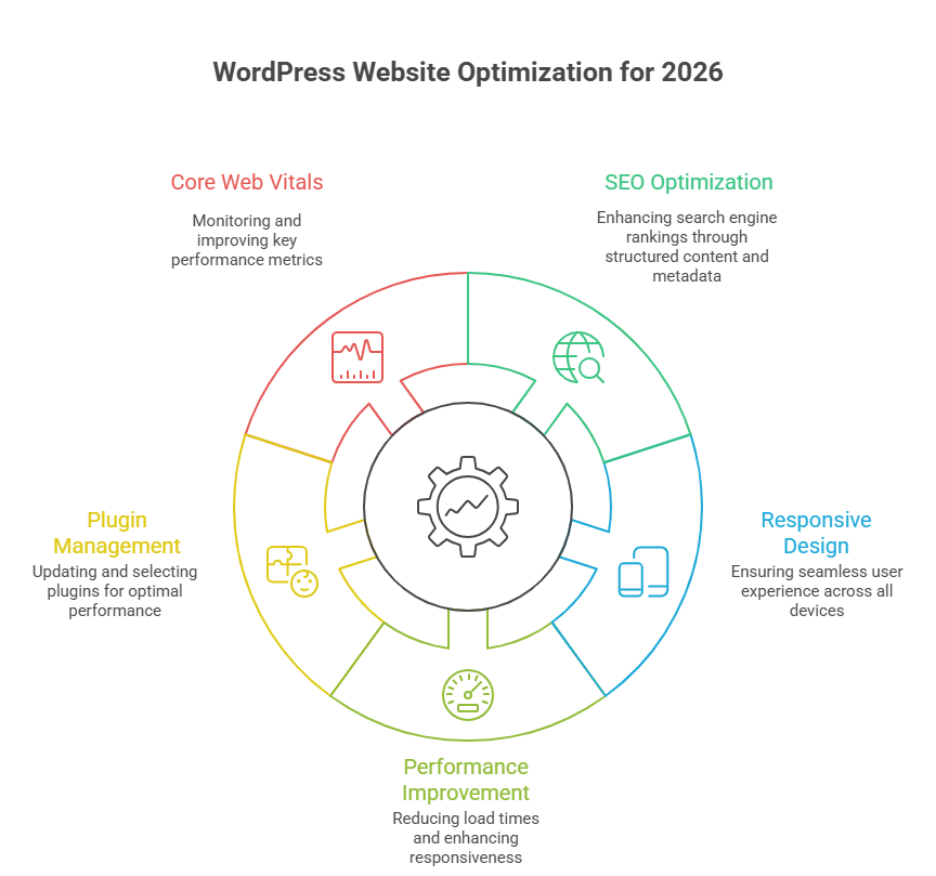
    Before 2026, your WordPress website must prioritize SEO optimization, responsive design, fast WordPress performance, and updated plugins. Focus on user experience, maintain core web vitals, manage cache effectively, and follow best practices in WordPress development to ensure your site stays competitive, secure, and future-ready. 

    Investing in professional WordPress development ensures your site is not only visually appealing but also functionally robust. A well-maintained WordPress site improves user experience strengthens SEO and supports scalable growth. Regular updates thoughtful plugin selection and performance-focused cache strategies protect your investment while reducing long-term technical debt. In practice businesses often allocate $1,500–$4,000 for professional development and ongoing maintenance to avoid costly fixes later. 

    This blog will explore key areas that require change in your WordPress website before 2026 including optimization for SEO improving user experience ensuring responsive design, managing plugins effectively and maintaining core web vitals. By addressing these areas you can future-proof your WordPress website maximize performance and stay ahead of evolving web standards. 

    Optimize WordPress website performance and SEO before 2026 

    Optimize WordPress website performance and SEO before 2026 

    Ensuring your WordPress website is fast, secure, and SEO-friendly is essential for businesses in 2026. Performance directly impacts user experience search engine rankings, and conversion rates. Proper optimization combines technical improvements, design considerations, and ongoing website maintenance. 

    Speed and Performance Optimization 

    Improve Load Times and Responsiveness 

    Load times and responsiveness are critical for both desktop and mobile devices. Adopting mobile-first design optimizing images, leveraging Cloudflare and enabling browser caching can dramatically improve website performance. Choosing managed WordPress hosting or reliable WordPress hosting ensures server-side speed and uptime. 

    Optimize PHP, Themes, and Plugins 

    Using lightweight WordPress themes and limiting unnecessary WordPress plugins reduces server load. Regularly updating PHP the latest WordPress, and plugin versions prevents security risks while improving site performance. Implementing performance optimization best practices enhances both search engine optimization and user satisfaction. 

    SEO and Search Engine Optimization 

    Structure Content and Metadata 

    Organizing your site with clear categories and tags, proper headings and structured metadata improves search engine rankings. Optimized content and a well-maintained block editor workflow ensure that every WordPress site can compete for organic traffic in 2026. 

    Monitor Core Web Vitals 

    Metrics like Largest Contentful Paint (LCP) interactivity, and stability affect both SEO and user experience. Regularly auditing your WordPress development and following best practices ensures your site meets Google’s performance standards and ranks higher. 

    Ongoing Maintenance and Security 

    Consistent website maintenance updates to plugins for WordPress and implementing free SSL certificates protect your site from hackers and maintain optimal performance. Partnering with a professional development agency or experienced WordPress development team ensures your custom WordPress site remains competitive and secure. 

    Improve user experience with responsive WordPress development 

    responsive WordPress development approach ensures your site adapts seamlessly to all devices, improves engagement and strengthens SEO. A site that performs well for users and search engines builds trust increases conversions, and supports long-term growth. Below is a structured value-driven guide to improving user experience on your WordPress site. 

    Core Strategies for Responsive Design 

    • Mobile-first approach: Design layouts starting with mobile devices to ensure accessibility and readability on smaller screens. 
    • Flexible grids and media: Use flexible grids fluid images, and scalable typography for consistency across devices. 
    • CSS and JavaScript optimization: Minify and defer scripts to reduce page load times and improve performance. 
    • Use lightweight themes: Choosing a well-coded WordPress theme reduces server load and improves overall responsiveness. 

    Performance and Optimization Tools 

    • Caching solutions: Tools like WP Rocket enhance speed and reduce server strain. 
    • Staging site testing: Test changes on a staging site before going live to avoid user experience disruptions. 
    • Free SSL certificates: Ensure secure browsing with free SSL improving trust and search rankings. 
    • Regular audits: Continuously identify and fix broken links slow-loading pages or plugin conflicts. 

    Best Practices for Users and SEO 

    • Accessible navigation: Ensure menus and buttons are easily tappable on mobile devices. 
    • Readable content structure: Use headings bullet points and whitespace to make content digestible. 
    • Frequently updated content: Answer frequently asked questions and provide useful resources. 
    • Monitor performance metrics: Track Core Web Vitals and page speed to maintain optimal user experience. 

    Conclusion 

    Preparing your WordPress website for 2026 is about more than aesthetics it’s about performance, SEO and a seamless user experience across all devices. By optimizing load times, maintaining core web vitals, updating plugins, and following best practices in WordPress development, you ensure your site remains competitive, secure, and future-ready. Implementing responsive design, leveraging WP Rocket or other caching solutions, and conducting regular audits on a staging site strengthens both search engine rankings and customer trust. A well-maintained site with free SSL and optimized CSS and JavaScript reduces server load while enhancing engagement and conversion rates. 

    Adapting these strategies transforms your WordPress site into a scalable, efficient, and user-friendly platform, ready to meet the demands of businesses in 2026. 

    So here’s a tricky question for you are you ready to stay ahead of competitors and boost your WordPress performance? Maybe it’s time to contact Integriti Studio and see how expert guidance can future-proof your website. 

    Frequently Asked Questions (What needs To Change In Your wordpress Website Before 2026)

    How do you make changes to your WordPress website?

    You make changes to a WordPress website by logging into the admin dashboard, editing pages or posts with the block editor, updating themes or plugins, and adjusting settings. For design or functionality updates, you can use themes, plugins, or custom code safely via a staging environment.

    How to build a WordPress website in 2026?

    In 2026, build a WordPress website by choosing fast managed hosting, installing WordPress, using a lightweight block-based theme, and creating pages with the Gutenberg editor. Focus on performance, SEO, accessibility, and security by using essential plugins, clean design, and regular updates.

    Do people still use WordPress in 2026?

    Yes people still use WordPress in 2026. It powers around 43% of all websites worldwide and dominates the CMS market with over 60% share, so it remains very popular for blogs, business sites, and e-commerce.

    What to do before updating WordPress?

    Before updating WordPress, back up your website files and database, check plugin and theme compatibility, and review the update details. Test updates on a staging site if possible, disable caching temporarily, and ensure you can roll back easily in case of errors or conflicts.

  • Building Loyalty Programs With Shopify Apps 

    Summary

    A well-structured Shopify loyalty program or loyalty system can turn first-time customers into lifelong brand advocates. With Shopify’s ecosystem, you can easily launch points-based rewards, referral programs, and VIP tiers using third-party loyalty apps, loyalty and reward apps, or app for Shopify—no complex development required.

    Why loyalty matters in eCommerce

    • Customer retention and customer loyalty are cheaper than acquiring new customers. Loyalty programs:
    • Increase repeat purchases, repeat business, and repeat sales
    • Improve customer lifetime value and average order value
    • Encourage word-of-mouth referrals and boost customer engagement
    • Strengthen emotional connection with your brand and improve customer experience

    Shopify merchants benefit from Shopify loyalty apps, app built for Shopify, and loyalty platform that sync seamlessly with store data, customer behavior, POS system, marketing flows, and purchase history.

    Top Shopify loyalty apps to consider

    • Smile.io – Create points, referral, and VIP programs with flexible rules, points earned, and loyalty points.
    • LoyaltyLion – Offers advanced segmentation, integration with Klaviyo, and tiered rewards for loyalty program members.
    • Yotpo Loyalty & Rewards – Combines reviews, referrals, loyalty and rewards, and positive reviews in one ecosystem.
    • Growave – Ideal for stores looking for an all-in-one solution with wishlists, referral programs, and reviews.

    These loyalty and reward apps often include email reminders, on-site widgets, and reward dashboards to create a loyalty experience that boosts customer engagement.

    Tips for successful implementation

    • Start simple: Launch a loyalty program or robust loyalty program with one program—like points for purchases—before layering more.
    • Brand it: Customize the loyalty interface, custom loyalty, or membership program to match your brand’s design and tone.
    • Promote it: Highlight your program during checkout, on product pages or Shopify store, and via email.
    • Reward strategically: Offer rewards, perk, or free products that motivate behavior—free shipping, discounts, early access, or points-based rewards.

    Track performance regularly to see what’s driving engagement, boosting customer loyalty, and refine accordingly.

    Final outcome

    By using a loyalty app tailored to your Shopify store’s goals, program for your Shopify store, or program for your store, you can create a scalable, branded customer retention system that grows with you. Loyalty isn’t just a feature—it’s a growth strategy, loyalty that pays, and loyalty programs are designed to build customer loyalty, increase customer retention, and improve customer engagement online and in-store.

    Need help choosing or setting up a Shopify loyalty app, Shopify loyalty program, or loyalty program app?
    Integriti Studio can help you design a reward program, loyalty rewards program, or loyalty platform that keeps customers coming back.

    📩Talk loyalty with us

  • How To Integrate Third-Party CRMs With Shopify 

    Summary

    Integrating a CRM or crm system, customer relationship management platform, or integrated crm with your Shopify store allows Shopify store owners and Shopify merchants to centralize customer data, personalize communication, and automate sales workflows. Whether you’re using HubSpot, Zoho CRM, Salesforce, or another popular crm platform, Shopify supports seamless third-party integrations and Shopify third-party integration through apps, third-party apps, and APIs.

    Choose the right CRM for your business

    Before integrating, assess your Shopify store needs:

    • HubSpot is great for email automation, marketing tools, and inbound marketing.
    • Zoho CRM and crms like Zoho are ideal for small-to-medium businesses seeking affordability.
    • Salesforce or crms like Salesforce works well for enterprise-level automation, reporting, and analytics tools.

    Ensure the crm integration supports eCommerce workflows like abandoned cart follow-ups, segmentation, and lifecycle tracking for your online store or Shopify plus store.

    Integration methods: apps, APIs, and middleware

    You can connect CRMs using:

    • Shopify apps like HubSpot Integration by ShopSync, MESA, or Zapier for no-code syncing, allowing Shopify CRM integration and custom integration.
    • Native integrations available in the Shopify App Store or offered by crm platforms allow connect your crm directly from the Shopify app.
    • Custom API solutions for businesses with specific workflows or larger teams ensure crm system integration works seamlessly.

    Apps and integrations typically sync data from Shopify including contacts, orders, and customer behavior in real-time, enabling integration with Shopify, Shopify to QuickBooks, and other systems with Shopify.

    Map data and test workflows

    Once connected:

    • Map fields between Shopify and your crm (e.g., email, name, purchase history) to maximize your Shopify data flows.
    • Automate workflows like follow-up emails, sales rep notifications, lead scoring, and automated tasks using crm tools or crm software.
    • Test thoroughly before going live—ensure tags, lists, segments, and built-in crm options populate correctly.

    Final outcome

    With a properly integrated crm, you can engage Shopify customers more intelligently, reduce manual tasks, and nurture leads into loyal buyers. The right setup ensures you never miss a sales opportunity while maintaining a 360° view of each customer and running a successful Shopify store.

    Need help connecting your CRM to Shopify, integrating third-party apps, or planning integrations for your business?
    Integriti Studio can help you choose a crm, plan a custom integration, and integrate with Shopify for growth.

    📩Lets talk integrations

  • Setting  Up Automated Abandoned Cart Recovery Emails 

    Summary

    Abandoned carts or abandoned a cart are one of the biggest missed opportunities in eCommerce but they’re also one of the easiest to recover. With the right tools, abandoned cart recovery system, and strategy, Shopify store owners or Shopify merchants can automatically remind customers of abandoned items, forgotten items, or customer abandoned carts and bring them back to complete their purchase.

    Why cart recovery emails matter

    Up to 70% of online shopping carts are abandoned. Reasons range from high shipping costs to distractions, indecision, or a customer leaving in the cart. Abandoned cart recovery emails or abandoned cart email campaigns give you a second chance to close the sale and often deliver higher ROI than regular marketing emails.

    Tools to automate your recovery emails

    Shopify offers native abandoned cart features, but third-party tools allow for deeper customization, automated email flows, and performance tracking. Top options include:

    • Shopify Email – Simple and free option to send basic abandoned cart emails and automated abandoned cart.
    • Klaviyo – Advanced segmentation, abandoned cart flow, multi-step abandoned cart email sequence, and A/B testing.
    • Omnisend – Includes SMS, push notifications, and email in a single automation or email flow.
    • Privy – Combines cart recovery emails with popups and on-site conversion tools.

    These tools let you personalize messages based on cart contents, abandoned items, timing, and customer behavior, improving recovery efforts and abandoned cart recovery strategy.

    Best practices for recovery emails

    • Send 2–3 follow-ups: Space them out (e.g., 1 hour, 12 hours, 24 hours) for effective abandoned cart emails and cart recovery strategy.
    • Use personalization: Mention the product to their cart, product image, total value, or specific abandoned items.
    • Offer incentives: Include a discount or free shipping offer or free shipping thresholds if appropriate.
    • Create urgency: Use phrases like “Items in your cart are selling fast” to inspire immediate action.
    • Optimize subject lines: Keep email subject line short, clear, and curiosity-driven to increase recovery rates.

    Include a clear CTA or call-to-action that brings users directly back to their cart for checkout recovery.

    Final outcome

    Automated abandoned cart emails are a low-effort, high-impact addition to your Shopify store’s email marketing, email automation, and conversion strategy. They help you recover revenue you’ve already worked to earn—without lifting a finger after setup, sending abandoned cart emails manually, or monitoring every abandoned checkout.

    Want to maximize your email automations, abandoned cart campaigns, and abandoned cart recovery strategy?
    Integriti Studio can help you design automated abandoned cart email flows, abandoned cart email best practices, and email strategy that actually convert.

    📩Lets get your sales back

  • Creating High-Converting Shopify Landing Pages Without Code 

    Summary

    Shopify store owners or Shopify merchants can now design visually engaging, conversion-focused, high-converting Shopify landing pages without touching a single line of code. With intuitive drag-and-drop page builder apps, Shopify page builder, and strategic page design and content placement, it’s easier than ever to build high-performance landing pages, product page templates, or dedicated landing pages that drive sales, convert visitors, promote products, or capture leads—no developer or coding needed.

    Use drag-and-drop builders like PageFly or Shogun

    Apps like PageFly, Shogun, and GemPages allow you to:

    • Build fully responsive layouts with pre-made landing page templates.
    • Add custom elements like countdown timers, trust badges, video blocks, or optimized page sections for high-converting pages.
    • Optimize your Shopify landing page for mobile and desktop without separate editing, using Shopify’s built-in page editor.

    These tools integrate seamlessly with your Shopify theme and Shopify admin.

    Follow landing page best practices

    To boost conversion rates and high conversion rates, focus on:

    • A compelling headline that communicates value and aligns with high-converting Shopify landing page best practices.
    • One clear call-to-action (CTA)—no distractions.
    • Social proof, such as reviews, ratings, or logos of featured partners.
    • Limited-time offers or urgency-based visuals to convert visitors.
    • Product visuals that are high-resolution and relevant to your Shopify store or product page.

    Remember: less is more. Avoid clutter and focus on guiding the user to take action on the landing page for Shopify.

    Optimize with built-in analytics

    • Many page builder apps offer A/B testing, Shopify landing page performance tracking, and conversion tracking. Use these to:
    • Test headline variations, page design adjustments, or CTA button placements on Shopify landing pages.
    • Monitor bounce rate, clicks, scroll depth, and page performance metrics.
    • Make data-driven updates that increase engagement, page conversions, and results over time.

    Final outcome

    With the right page builder and conversion-focused design, you can launch high-performing Shopify landing pages without hiring a developer. These standalone web pages can be reused across campaigns, pages without coding, and updated quickly—saving time and driving results.

    Need help building optimized Shopify landing pages?
    Integriti Studio can help you set up, design, and launch high-converting Shopify landing pages, create a high-converting Shopify landing page, and optimize their landing pages to convert visitors.

    📩Lets build your next high-impact page

  • Blog Post Structure For Readability and SEO 

    Summary

    A well-structured blog post or well-structured blog not only keeps readers engaged but also signals relevance, structure, and clarity to search engines. Structuring your content for both readability and SEO increases dwell time, reduces bounce rate, and improves your chances of ranking well on Google search results.

    Use clear, keyword-optimized headings

    Break your blog into sections using H2s and H3s that include relevant keywords naturally. This helps:

    • Search engines understand your content hierarchy and enhances SEO performance.
    • Readers skim and navigate with ease, improving readability and reader engagement.
    • Enhance relevance in featured snippets, search previews, and meta description for better SEO optimization.

    Write short paragraphs and scannable content

    Avoid long blocks of text. Instead:

    • Keep paragraphs to 2–4 lines max to improve readability score.
    • Use bullet points or numbered lists for steps, tips, takeaways, or main points.
    • Highlight important words or phrases in bold for emphasis and to guide readers.

    This format boosts mobile readability, content quality, and user engagement throughout your blog.

    Don’t forget the intro and conclusion

    Your introduction should:

    • Hook the reader within the first 2–3 sentences and clearly state what the post will cover.
    • Include a variation of your primary keyword and structure your blog content for SEO best practices.

    Your conclusion should:

    • Summarize key takeaways and maintain reader attention.
    • End with a call-to-action—subscribe, share, or contact—to improve conversion and provide structured blog post guidance.

    Final outcome

    A blog post with strong structure and blog post structure ranks better, reads easier, and drives action. By combining SEO-friendly elements, internal linking, clear structure, subheadings, concise paragraphs, and clean formatting, you create content that performs across both human and algorithmic audiences.

    Need help structuring blog content that ranks and converts?
    Integriti Studio offers strategy-backed content services to structure your blog, improve readability, enhance SEO optimization, and create posts with quality content and content depth.

    📩Lets plan your next high performing blog post