
Why do some webflow sites outperform others in both user experience and conversion? The answer often lies in factors influencing website performance load times, semantic structure, seamless integration, and robust workflow management all play critical roles. As businesses look toward 2026, optimizing your webflow site is no longer optional; it’s essential for measurable results in SEO, UX, and conversion.
To succeed with Webflow projects in 2026, focus on optimizing user experience, SEO, and conversion through efficient workflows, semantic layouts, and seamless integrations. Regular audits, performance monitoring, and professional support ensure measurable results, while scalable design and maintenance keep your Webflow site fast, accessible, and future-ready.
Professional development remains a cornerstone of success. Investing in skilled webflow designers ensures layouts are both visually compelling and technically sound. Beyond initial design, ongoing support, maintenance, and performance audits drive long-term value, helping you optimize your website efficiently. Even a small investment in these services—typically starting around a few thousand dollars can dramatically improve speed, accessibility, and scalability, delivering a tangible ROI.
This blog will explore strategic considerations for webflow projects heading into 2026, covering workflow optimization, SEO best practices, layout and UX improvements, integration strategies, and practical audit techniques. By the end, you’ll understand how to leverage webflow for a powerful, measurable online presence that performs today and scales tomorrow.
Key Webflow SEO Strategies For Scalable 2026 Projects
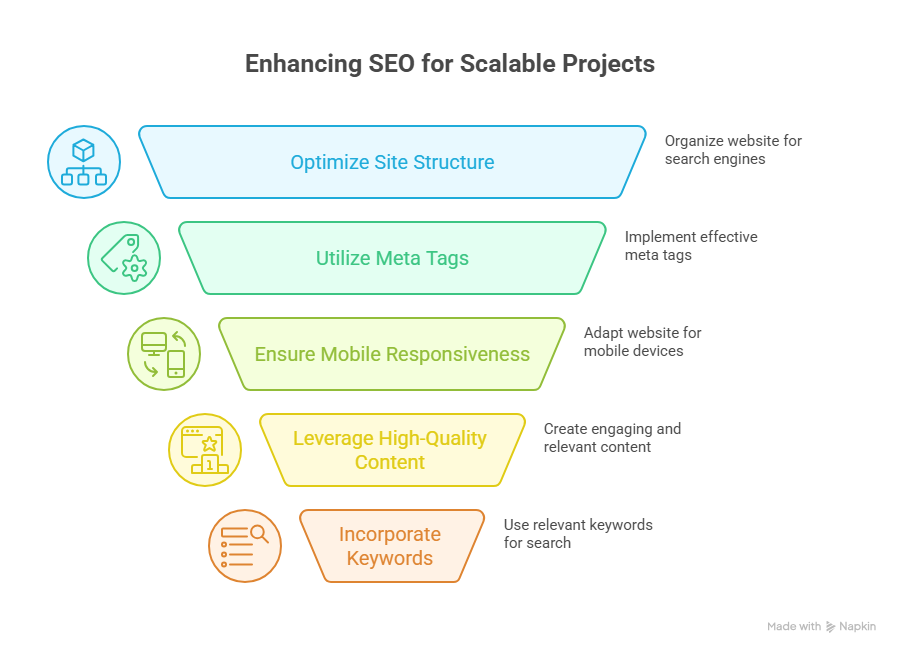
Conduct a Comprehensive Migration or Redesign Audit
Before migrating to Webflow or planning a webflow redesign, it’s essential to evaluate your current website. Identify common mistakes, technical debt, and usability issues that could impact SEO and user experience. A thorough migration checklist ensures your Webflow project aligns with business goals, improves online presence, and sets the stage for scalable growth.
Evaluate Core Web Vitals and Load Times
Improving core web vitals is critical for SEO and visitor retention. Focus on metrics like largest contentful paint, cumulative layout shift, and seconds to load. Use lazy loading, optimized CSS, and streamlined site structure to enhance performance and ensure your Webflow site delivers measurable results in search engines.
Optimize On-Page SEO and Content Readability
Webflow SEO best practices include semantic HTML, structured headings, alt text for images, and internal linking. Prioritize readability and accessibility to meet customer expectations and improve user experience. AI-driven tools and plugins can help optimize your content for search engines while maintaining a scalable design system.
Build a Scalable Framework With Best Practices
A scalable Webflow project requires a structured workflow and a consistent design framework. Use Figma or design system guidelines to standardize layouts and responsive design. Focus on accessibility, responsive design, and avoiding overuse of plugins to maintain long-term performance and SEO capabilities.
Focus on Conversion and User Experience
Turning visitors into customers requires more than technical optimization. Align your webflow development with usability principles, business goals, and design trends. Ensure intuitive navigation, clear calls-to-action, and seamless UX to maximize conversion while maintaining performance and accessibility.
Track Analytics and Continuously Optimize
Monitoring analytics allows you to refine your Webflow site over time. Track SEO metrics, user engagement, and load times to optimize your website continually. Regular audits and AI-driven performance optimization ensure your online presence remains powerful, measurable, and ready for 2026 trends.
Avoid Common Mistakes When Migrating To Webflow Sites
Migrating to Webflow can unlock a powerful Webflow project with better scalability, improved SEO capabilities, and enhanced user experience, but it requires careful planning. Avoiding common mistakes ensures your site meets business goals, improves online presence, and converts visitors into customers. Below is a step-by-step guide for a successful migration.
Step 1: Conduct a Migration Checklist and Audit
Before migrating to Webflow, start with a migration checklist to evaluate your current website. Identify technical debt, broken links, and usability issues. Analyze core web vitals like largest contentful paint and seconds to load to ensure optimal performance. Review webflow SEO, on-page SEO, and accessibility compliance to prevent future issues.
Step 2: Plan a Scalable Webflow Framework
A scalable Webflow project requires a clear design system and structured framework. Use Figma to standardize layouts, CSS, and responsive design. Prioritize accessibility and readability to improve UX and meet customer expectations. Avoid overloading your site with unnecessary plugins or inconsistent design patterns.
Step 3: Optimize Performance and SEO
Improving core web vitals, performance and SEO, and on-page SEO ensures your Webflow site ranks well in search engines. Implement lazy loading, clean site structure, and semantic HTML. Use AI-driven tools to optimize content, metadata, and readability. Proper optimization converts more visitors into customers.
Step 4: Align With Business Goals and Design Trends
Your webflow redesign should align with business goals and current design trends. Maintain usability, intuitive navigation, and clear CTAs. A scalable Webflow project allows you to add new pages and content while maintaining accessibility and SEO best practices.
Step 5: Monitor, Audit, and Continuously Improve
After migrating to Webflow, continually audit your site structure, core web vitals, and SEO performance. Track analytics to optimize user experience and refine the workflow. Continuous improvement ensures your Webflow site remains fast, accessible, and scalable, delivering measurable business results.
Conclusion
Successfully executing a Webflow project in 2026 requires more than just moving your website it demands strategic planning, scalable design frameworks, and a focus on SEO, accessibility, and user experience. From conducting thorough migration audits to optimizing core web vitals, implementing webflow SEO best practices, and maintaining a consistent design system, every step contributes to measurable results in conversion, performance, and long-term scalability.
By aligning your webflow redesign with business goals, design trends, and accessibility standards, and continuously monitoring analytics, your site can remain fast, responsive, and fully optimized for both visitors and search engines. Leveraging professional development and AI-driven tools ensures that your Webflow site not only meets today’s standards but is also prepared to adapt to the evolving demands of 2026.
Frequently Asked Questions (Strategic Considerations For Webflow Projects Heading into 2026)
What are the 7 major steps to designing a webpage?
The 7 major steps to designing a webpage are: 1) Define goals and target audience, 2) Plan site structure and layout, 3) Create wireframes and mockups, 4) Design visuals and branding, 5) Develop the website with coding or CMS, 6) Test functionality and responsiveness, 7) Launch and maintain.
What are the 5 major components of a web page?
The 5 major components of a web page are: 1) Header – contains navigation and branding, 2) Content main text, images, or videos, 3) Sidebar optional navigation or additional info, 4) Footer – contact info and links, 5) Call-to-Action (CTA) buttons or forms driving user interaction.
What makes Webflow a strategic choice in 2026?
Webflow allows rapid, no-code development, highly customizable designs, and scalable CMS options, making it ideal for startups and agencies seeking efficiency and innovation.
What are the 7 C’s of a website?
The 7 C’s of a website are: Content relevant information, Context design and layout, Community user interaction, Customization personalized experience, Communication two-way engagement, Connection links to other sites, and Commerce – online transactions. Together, they ensure an effective website.
Leave a Reply