
Common Wordpress Website Issues That May Impact Visibility In 2026
Why do some businesses struggle to gain visibility on WordPress while others consistently perform better in search results? The difference often lies in how a wordpress website is built, managed, and maintained over time. As 2026 approaches, even a well-designed wordpress site can lose traction due to overlooked technical factors, bloated plugins, weak seo, or poor decisions made inside the admin panel.
Common WordPress website issues impacting visibility in 2026 include outdated plugins, poor SEO setup, slow performance, security weaknesses, and accessibility gaps. Without regular updates, professional maintenance, and technical audits, even a well-built WordPress site can lose search engine rankings and user trust.
Website performance is influenced by multiple elements working together, including code quality, design structure, hosting environment, and ongoing maintenance. Professional development ensures these components remain aligned, helping you fix issues before they impact rankings or credibility. Smart design choices, reliable support, and routine maintenance directly improve user experience and long-term growth. For example, businesses often invest a few hundred dollars monthly for maintenance and updates, compared to the much higher cost of repairing damage later.
Common WordPress site SEO issues affecting visibility in 2026
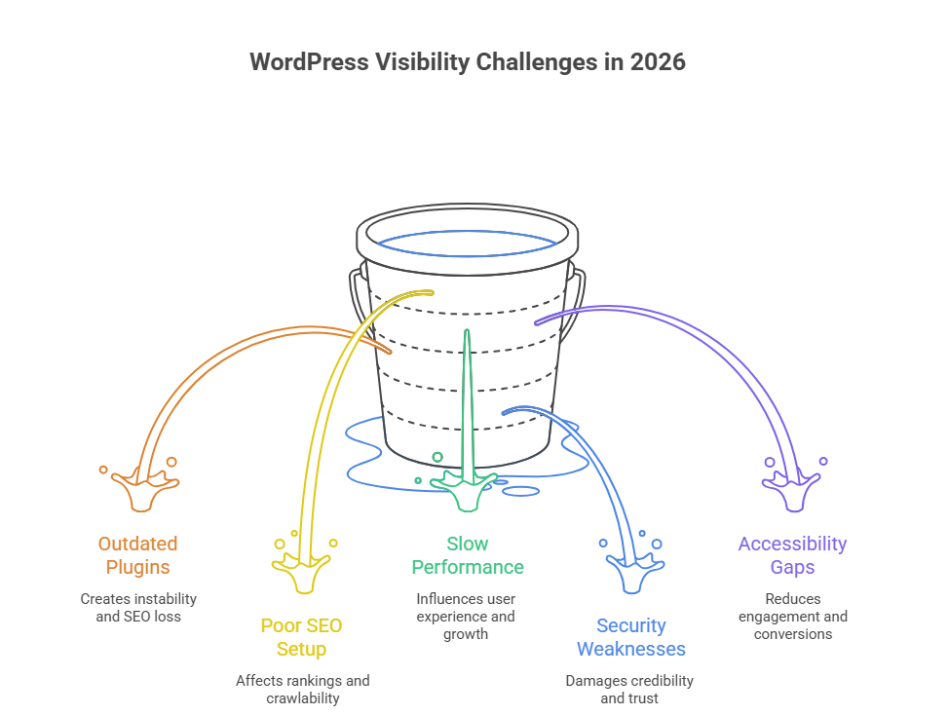
Understanding common WordPress SEO challenges
Many visibility problems stem from common WordPress configuration gaps that site owners overlook as their platform grows. These common WordPress issues are not always obvious but can significantly affect rankings, crawlability, and trust signals. For wordpress sites in 2026, search engines are far less forgiving of technical weaknesses, especially when common WordPress practices are not followed correctly.
Technical errors that weaken search performance
One major issue is broken URLs leading to 404 errors, which interrupt crawl paths and frustrate users. Another frequent concern is outdated plugins, often caused by delayed regular updates, creating instability and SEO loss. Poorly managed plugin or theme choices can also introduce compatibility issues, reducing site efficiency and visibility.
Security and accessibility impact on SEO
Search engines increasingly evaluate wordpress security as part of ranking signals. Unaddressed security vulnerabilities create a security risk that can damage credibility. At the same time, website accessibility and unresolved accessibility issues affect usability, especially on mobile devices, reducing engagement and conversions.
Strategic approach for long-term visibility
A structured review of the wordpress core, supported by a skilled wordpress developer, ensures your business website remains stable, compliant, and competitive. Addressing common WordPress mistakes through proactive audits helps protect SEO performance and supports sustainable growth beyond 2026.
Plugins admin errors 404 problems and fixes for WordPress
Step 1: Review plugin and admin configuration
Begin by checking settings inside the wordpress admin area. Many issues start from common mistakes such as activating a plugin or theme that conflicts with the wordpress core. Ensure the configuration supports website accessibility and does not introduce early technical gaps.
Step 2: Identify causes of 404 errors
Next, audit pages and links producing 404 errors. These often occur after plugin removals, URL structure changes, or failed updates. Persistent 404 issues reduce trust and impact user flow, especially on mobile devices.
Step 3: Update or replace outdated plugins
Running outdated plugins increases maintenance complexity and creates a serious security risk. Apply regular updates carefully, confirming compatibility before activation. If plugins are no longer supported, replace them with stable alternatives.
Step 4: Resolve compatibility and accessibility issues
Multiple tools can create compatibility issues that affect layouts, forms, and navigation. Addressing accessibility issues ensures your business website remains usable for all audiences and compliant with evolving standards.
Step 5: Apply long-term fixes with professional support
Consistent regular updates and expert oversight from a wordpress developer ensure stability. This structured approach prevents admin errors, protects performance, and supports sustainable growth as WordPress environments become more complex.
Conclusion
As WordPress continues to evolve, visibility challenges in 2026 will be less about the platform itself and more about how strategically it is managed. From outdated plugins and unresolved 404 errors to security gaps and accessibility limitations, small technical oversights can quietly erode search performance and user trust. A successful WordPress strategy requires more than basic setup it demands consistent updates, informed decision-making, and a proactive approach to SEO, security, and performance.
When plugin management, admin configurations, and core updates are handled professionally, your website remains stable, accessible, and competitive. Investing in expert support today not only prevents costly fixes tomorrow but also protects long-term growth, credibility, and conversion potential for your business.
if these issues are already impacting visibility for many sites, isn’t it time to ask whether partnering with Integriti Studio could be the smarter move for your WordPress success?
Frequently Asked Questions (Common Wordpress Website Issues That May Impact Visibility In 2026)
What are common WordPress issues?
Common WordPress issues include slow website speed, plugin or theme conflicts, outdated core, plugins, or themes, broken links, security vulnerabilities, white screen of death, database connection errors, poor SEO optimization, and incompatible updates. Regular maintenance, updates, and backups help prevent these problems.
Is WordPress still in demand in 2025?
Yes WordPress is still in demand in 2025. It powers about 43 % of all websites worldwide and holds over 60 % of the CMS market, making it the most widely used platform for blogs, business sites, and e‑commerce with WooCommerce.
Is there a problem with WordPress right now?
No WordPress itself isn’t having a major global outage right now; status checks show WordPress.com services are up and user reports don’t indicate widespread downtime. However, many individual WordPress sites still face issues like update‑related errors, plugin conflicts, or admin access problems.
What is the most vulnerable part of a WordPress website?
The most vulnerable part of a WordPress website is third-party plugins and themes. Poorly coded or outdated plugins often contain security flaws that attackers exploit. Weak login credentials, outdated WordPress core files, and improper permissions also increase the risk of hacking and data breaches.