
How To Recover Your Traffic After a Web Migration (2025)
Introduction
Migrating a website to a completely new platform or domain can be a highly daunting task. If its not handled very properly, it could result in quite a significant drop in organic traffic. Many businesses and store owners experience this quite often after moving to Shopify or any other platform. However, with a well-planned strategy, you can quickly recover your traffic after a web migration and even highly improve your search rankings.
This blog will walk you through the key steps to regain and highly sustain your lost traffic. It will also ensure a pretty seamless transition to your new website, improving your search visibility and rankings and traffic.
Understanding Web Migration and Its Impact
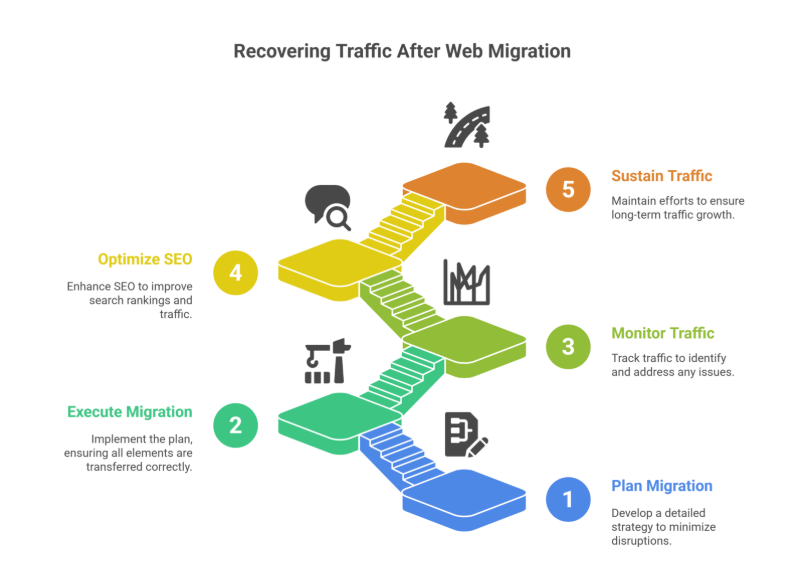
A web migration involves major changes to a website, such as:
- Moving to a new domain
- Switching to a new CMS (e.g., moving to Shopify)
- Redesigning site structure and URLs
- Implementing HTTPS
Search engines take time to re-index your pages, and if migration is not done correctly, it can lead to broken links, missing pages, and SEO issues—ultimately reducing organic search traffic and causing a drop in organic traffic.
Steps to Recover Traffic After Migration
1. Conduct a Pre-Migration Audit
Before making any major changes, you have to assess your current site’s total performance. Tools like Google Analytics, Google Search Console, and SEMrush help a lot in analyzing traffic sources, top-ranking pages, and backlinks.
Checklist for pre-migration audit:
- Identify top-performing pages
- Analyze traffic patterns
- Export metadata (title tags, meta descriptions, URLs)
- Check backlinks and referring domains
This data will serve as a benchmark after the migration to measure progress and help you recover your organic traffic.
2. Set Up Proper Redirects
One of the biggest reasons for traffic loss after migration is broken links. Ensure that every old URL correctly redirects to its new counterpart using 301 redirects, avoiding redirect chains.
Steps to implement proper redirects:
- Map old URLs to new URLs
- Use 301 redirects to maintain SEO value
- Test redirects using tools like Redirect Checker
Avoid 404 errors, as they can very badly impact user experience, SEO rankings, and cause a drop in traffic due to web migration.
3. Submit Updated Sitemaps to Google
After migrating, tell search engines about your new website structure. Generate and submit an updated XML sitemap in Google Search Console, including all important pages and new URLs.
How to do it:
- Generate some new sitemap using highly effective tools like Yoast SEO (for WordPress) or Shopify’s built-in sitemap feature.
- Submit completely updated sitemap to Google Search Console.
- Monitor indexing progress in Google Search Console’s Coverage Report.
4. Monitor Google Search Console for Errors
Google Search Console is your best friend after a migration. Regularly check for issues like:
- Indexing errors
- Crawl issues
- 404 errors
- Mobile usability issues
Fixing these errors quickly ensures faster recovery of your lost traffic and improved rankings.
5. Retain and Reclaim Backlinks
Backlinks are quite crucial for SEO. However, a migration can cause many possible backlinks to break. Losing backlinks can result in a high drop in domain authority, SEO value, and organic traffic.
Steps to retain backlinks:
- Identify top-linked pages using tools like Ahrefs or Moz.
- Reach out to site owners and request them to update links.
- Set up the proper 301 redirects to always maintain link equity.
6. Optimize Your Content for SEO
Ensure your content is highly optimized for search engines by:
- Keeping meta titles and descriptions intact
- Using SEO-friendly URLs
- Maintaining keyword density and placement
- Improving page speed and mobile responsiveness
For Shopify migration, leverage Shopify’s SEO features like highly customizable meta tags, alt text, and completely automatic sitemaps to help recover lost traffic.
7. Improve Internal Linking Structure
Internal links help search engines crawl and understand your website efficiently. Post-migration, update all internal links to reflect the new URL structure.
Best practices:
- Link from high-authority pages to new pages
- Use descriptive anchor text
- Fix broken internal links
8. Leverage Paid Ads and Social Media
While waiting for your complete organic traffic to recover, consider using Google Ads, Facebook Ads, or Instagram Ads to drive traffic due to migration. Actively promote the new site on social media platforms to inform your followers and customers about the migration.
9. Monitor Performance and Make Adjustments
Track your website’s performance post-migration using Google Analytics, Google Search Console, and other SEO tools.
Key metrics to monitor:
- Organic traffic trends
- Bounce rate and session duration
- Indexed pages in Google Search Console
- Keyword rankings
If traffic is not recovering as expected, identify problem areas and adjust your strategy accordingly.
10. Seek Professional Help if Necessary
If you’re struggling to recover traffic after migration, consult with SEO consultants or Shopify migration specialists. It can help identify and resolve technical SEO and optimization issues quite effectively.
Conclusion
Web migrations can be tricky, but with careful planning and execution, you can recover your traffic after a Shopify migration, website migration, or any other platform transition. By implementing proper redirects, optimizing content, reclaiming backlinks, and monitoring performance post-migration, you can minimize traffic loss and even improve your site’s overall visibility, rankings and traffic.
With patience and a structured recovery plan, your website can regain its rankings, recover lost traffic, and thrive post-migration.
Frequently Asked Questions (How To Recover Your Traffic After a Web Migration (2025)
How to fix website traffic?
To fix website traffic, first analyze analytics to identify drop points. Improve SEO with relevant keywords, optimize site speed, and enhance mobile experience. Publish high-quality content consistently, use social media and email marketing, and build backlinks. Regularly monitor performance and adjust strategies for better traffic results.
Why 96.55% of content gets no traffic from Google?
96.55% of content gets no traffic from Google because it lacks proper SEO, targets low-demand or highly competitive keywords, has poor quality or outdated content, and fails to meet user intent. Without optimization, promotion, and backlinks, even published content remains invisible in search results.
Which is the easiest way to get traffic to a brand new site?
The easiest way to get traffic to a brand-new site is through social media promotion, sharing content in relevant communities, and leveraging paid ads like Google or Facebook Ads. Guest posting, email outreach, and influencer collaborations can also drive initial visitors quickly while building credibility.
How to transfer SEO from one website to another?
To transfer SEO to a new website, set up 301 redirects from old URLs to corresponding new URLs, migrate all high-quality content, update internal links, and submit a new sitemap to search engines. Maintain metadata, backlinks, and structured data to preserve rankings and traffic during the transition.