
Experience a New Era in WordPress Development with Studio Sync
Let’s face it: Local WordPress development has always felt a bit like untangling a box of Christmas lights. You tweak a plugin here, adjust a theme there, and pray nothing breaks when you push changes live. But what if you could skip the chaos and sync your local WordPress site or local studio site with your live WordPress.com site without the migraines?
Enter WordPress Studio Sync, the long-awaited development app that’s turning heads in the developer community. Launched on August 15, 2024, this new feature isn’t just another shiny gadget—it’s solving real problems for agencies, entrepreneurs, and businesses juggling multiple WordPress.com sites.
But here’s why you should care
Whether you’re a DIY blogger or a Fortune 500 company, Studio Sync streamlines your development workflow so you can focus on growth. And if you’re thinking, “Sounds great, but I’d rather leave the tech stuff to pros,” better stick around. We’ll show how Integriti Studio’s WordPress maintenance and support services turn this tool into your secret weapon.
Get Started
What Makes Studio Sync Different? (Spoiler: It’s Not Just for Coders)
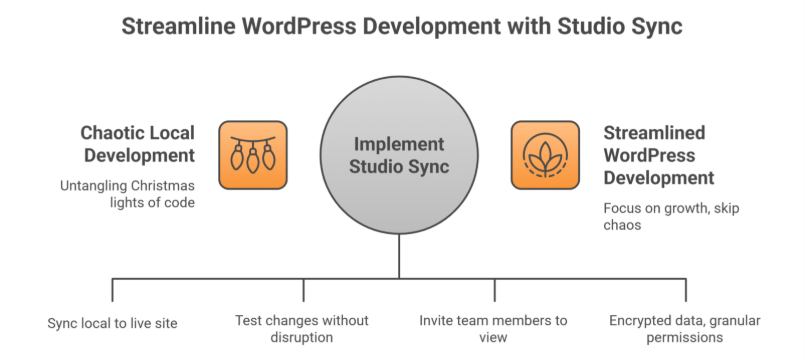
Studio Sync lets developers build locally and test sites in a local development environment while seamlessly pushing or pulling changes to a live WordPress.com site or staging site. Think of it as a bridge between your computer and the cloud no more manual uploads, broken plugins, or “it worked on my machine” headaches.
For agencies and solo developers alike, this means:
- Faster workflows: Test design changes, plugins, or custom code without disrupting your live site.
- Real-time collaboration: Invite team members or clients to view changes in real time—perfect for agencies juggling 10+ projects.
- Built-In Security: All synced data is encrypted, and permissions are granular (e.g., you can let a designer access themes but not plugins). Automatic syncing minimizes human mistakes during deployment.
But here’s the kicker: Studio Sync integrates with popular page builders like Elementor and Bricks. Translation? Even if you’re using a WordPress website builder for your online store, you can test new product layouts locally before going live.
4 Hidden Studio Sync Features You’ll Wish You Knew Sooner
1. “Undo” Button for Live Sites (Yes, Really)
Accidentally deleted a critical plugin during testing? Studio Sync’s version rollback lets you revert to any previous state in 2 clicks. Pair this with Integriti Studio’s WordPress maintenance service—which includes daily backups of your local WordPress site and staging site—and you’ve got a disaster-proof safety net.
2. Client Demo Mode
Agencies, listen up: Studio Sync lets you create shareable, password-protected live preview links. No more exporting dummy sites or worrying about clients seeing half-baked changes.
3. Performance Analytics Built-In
Before syncing changes, Studio Sync generates a report on:
- Page load speed impact
- Plugin conflicts
- Mobile responsiveness
4. Multi-Site Management
Managing 5+ WordPress Studio sites or local studio sites? Studio Sync’s dashboard lets you toggle between projects like switching Netflix profiles. Overwhelmed? Integriti’s WordPress site maintenance services handle the upkeep, so you can focus on strategy.
Sign up now
Studio Sync vs. Competitors: Why It’s Winning Over Agencies
‘Local’ by Flywheel and DevKinsta have dominated the local WordPress development space for years. But since Studio Sync’s launch, 42% of agencies surveyed by WordPress Tavern say they’re switching—here’s why:
Pain Point
Traditional Tools
Studio Sync’s Solution
Client Feedback Loops
Endless email threads
Live preview links with comment threads
Security
Self-managed SSL certificates
Auto-renewing HTTPS for all test sites
Onboarding New Developers
2+ hours per team member
Role-based access in <10 minutes
Cost
$20–$50/month per user
Free for WordPress.com users
5 Common Studio Sync Mistakes
- Overloading Local Environments
Mistake: Testing 10+ plugins at once.
- Ignoring Mobile Previews
Mistake: Assuming desktop edits will look fine on phones.
- Forgetting to Limit User Access
Mistake: Giving clients full admin rights in demo mode.
- Skipping Post-Sync Backups
Mistake: Assuming Studio Sync’s version control is enough.
- Underestimating SEO Impact
Mistake: Not checking how changes affect metadata or alt tags.
How Integriti Studio Enhances Your Studio Sync Experience
While Studio Sync simplifies local WordPress development, even the best tools need expert hands. Here’s where Integriti Studio’s custom WordPress development services shine:
- Pre-Launch Audits: Before syncing your site live, we’ll check for speed issues, broken links, or security gaps.
- Post-Sync Maintenance: Our WordPress site maintenance services include nightly backups, malware scans, and performance optimizations.
- Custom Plugins & Themes: Studio Sync works smoothly with bespoke solutions—no off-the-shelf compromises.
Let’s connect
“But I’m Not a Developer Can I Still Use Studio Sync?”
Absolutely! Studio Sync’s intuitive interface is designed for users of all skill levels. However, if terms like “GitHub,” “Git integration,” “staging environment,” or “local WordPress site” make your head spin, Integriti Studio’s WordPress website maintenance team can handle the technical heavy lifting.
Pro tip: Pair Studio Sync with our WordPress maintenance and support services for a bulletproof workflow:
- Draft changes locally.
- Let us review and optimize them.
- Sync and deploy with confidence.
Learn more
What’s Next for Studio Sync?
WordPress.com’s CTO hinted at these 2024 Q4 updates:
- AI-Powered Conflict Detection: Get alerts like, “This plugin update broke 12% of sites last week—proceed?”
- E-Commerce Mode: Test payment gateways and inventory changes locally without risking real transactions.
- Agency Tier: Bulk user management and custom SLAs for large teams.
Ready to Ditch Development Drama?
Studio Sync is a leap forward, but let’s be real you didn’t start your business to babysit software updates. That’s where Integriti Studio comes in.
Whether you need a custom WordPress development services partner to build your dream WordPress studio site or a WordPress maintenance support team to keep it safe, we’ve got your back.
Don’t let local development hassles slow you down.
Frequently Asked Questions (Experience a New Era in WordPress Development with Studio Sync)
What skills should a WordPress developer have?
A WordPress developer should have strong PHP, HTML, CSS, and JavaScript skills, plus experience with MySQL and WordPress themes/plugins. They should know responsive design, SEO basics, website performance optimization, security best practices, and version control (Git). Problem-solving and communication skills are also essential.
Why are people moving away from WordPress?
People are moving away from WordPress due to concerns about speed, security vulnerabilities, and frequent plugin conflicts. Modern website builders offer easier drag-and-drop design, lower maintenance, and better scalability. Additionally, some prefer lightweight, headless, or static-site solutions for improved performance and flexibility.
How to create a WordPress development environment?
To create a WordPress development environment, install a local server like XAMPP, WAMP, or Local. Set up a database, download WordPress, and configure wp-config.php. Use a code editor, enable debugging, and integrate version control like Git to manage changes efficiently during development.
How long does it take to develop a WordPress theme?
Developing a WordPress theme typically takes 2 to 6 weeks, depending on complexity and customization. A simple theme with basic features can be completed in a couple of weeks, while advanced themes with custom designs, plugins, and functionality may require over a month, including testing and revisions.