Is Your WordPress Site Ready For 2026? A Simple Readiness Checklist
Why do some WordPress websites perform flawlessly while others struggle with speed, security, and conversions? The difference is rarely the platform itself. It lies in how well your WordPress site is built, managed, and maintained as expectations rise in 2026. For business growth, relying on an outdated setup is no longer sustainable in 2026.
A WordPress site ready for 2026 follows a clear checklist covering performance, SEO, security, hosting, mobile experience, backups, and AI-driven optimization. Regular updates, reliable support, and professional maintenance ensure faster loading, better rankings, higher conversions, and long-term stability for growing businesses.
Website performance is influenced by multiple factors, including hosting quality, code standards, design decisions, and ongoing support. A professionally developed WordPress site integrates SEO, reliable host infrastructure, regular backup systems, and smart use of AI to maintain efficiency and scalability in 2026. Without a clear checklist, even strong brands risk slow performance, weak trust, and missed opportunities.
Many business owners underestimate the real value of professional design, proactive maintenance, and technical support. While basic development may cost a few hundred dollars, long-term stability, security, and performance require a strategic investment backed by expertise and planning.
This blog presents a practical checklist to assess whether your WordPress website is truly ready for 2026, outlining key areas to review, risks to address, and improvements that support sustainable business success.
2026 WordPress SEO Checklist For Business Owners Platform
Step 1: Evaluate Technical SEO Foundations
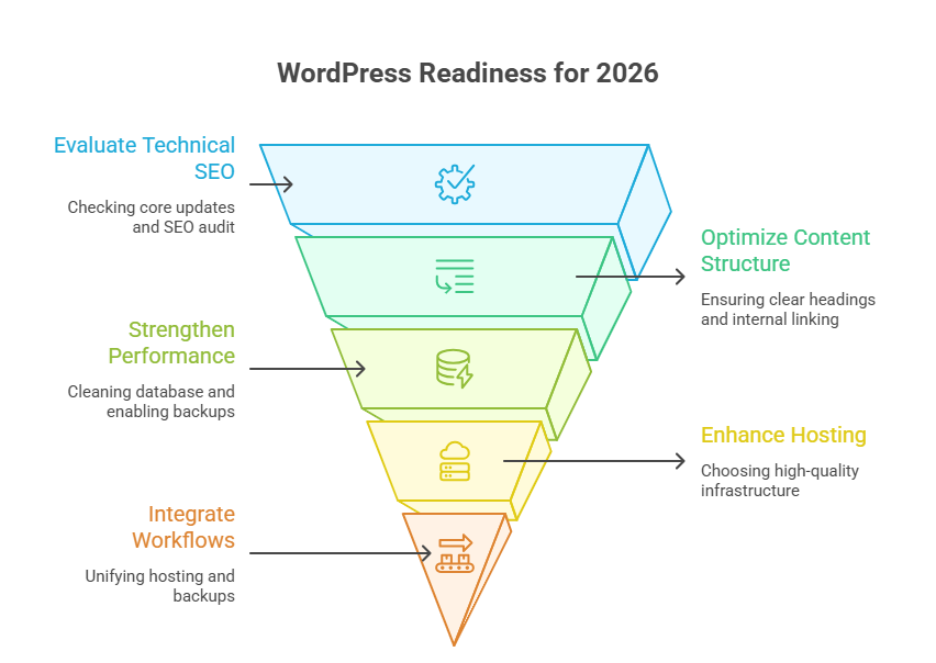
A website ready for search growth in 2026 and beyond starts with strong technical foundations. Begin by reviewing wordpress core updates to ensure no outdated software is exposing security vulnerabilities. Perform a full SEO audit covering ssl configuration, core web vitals, and proper cdn integration to reduce downtime. This step protects your site from hacker risks while improving visibility and crawl efficiency for search engines.
Why it matters
For business owners, technical gaps directly affect trust, rankings, and long-term stability. Ignoring these basics often leads to performance drops and hidden risks.
Step 2: Optimize Content Structure And User Flow
Search engines reward clarity and relevance. Review your service pages, blog posts, and faqs to ensure consistent format, clear headings, and strong internal linking. Strategic calls to action should guide users toward booking or inquiries without disrupting the user experience. Clean css, readable font, and logical page hierarchy strengthen accessibility and engagement.
Step 3: Strengthen Performance, Data, And Reliability
Effective performance optimization includes database cleanup, malware scanning, and enabling daily backups. Properly configure your hosting plan to support peak traffic and smooth mobile experience. A reliable workflow for updates and monitoring ensures stable functionality and protects revenue during traffic surges.
2026 WordPress Host Backup Advantage Reducing Downtime Workflow
A strong hosting setup is the first advantage in reducing website downtime and protecting business continuity. In 2026, hosting is no longer just about server space; it is about performance, security, and seamless integration across your WordPress workflow.
Key hosting advantages
- Use a latest stable server environment to prevent unexpected crashes
- Choose high-quality infrastructure that supports traffic spikes during any marketing campaign
- Enable automated monitoring to protect real user experience
- Maintain secure admin accounts to limit unauthorized access
- Build user trust through consistent uptime and fast response times
Backup Systems That Minimize Risk And Recovery Time
Backups are your safety net when technical failures occur. A structured backup strategy ensures fast recovery without data loss or reputational damage.
Backup workflow best practices
- Store backups in secure cloud storage for off-server protection
- Schedule backups using automation to eliminate manual errors
- Ensure compatibility with third-party tools and services
- Regularly test restore points to avoid failed recovery scenarios
Integrated Workflow For Downtime Reduction
Hosting and backups should not operate in isolation. When you integrate them into a single workflow, recovery becomes faster and more predictable.
Why integration matters
- Simplifies technical operations through unified control
- Reduces dependency on manual fixes during failures
- Supports search visibility across platforms like Bing
- Improves long-term reliability through seamless system alignment
Conclusion
Preparing yourWordPress website for 2026 is no longer a technical luxury it is a business necessity. From SEO foundations and content structure to hosting stability and backup workflows, every element discussed above directly impacts performance, security, user trust, and long-term growth. A clear readiness checklist helps you identify gaps before they turn into downtime, ranking loss, or missed conversions.
For business owners, the real advantage lies in proactive decisions: keeping systems updated, integrating hosting and backups into a reliable workflow, and investing in professional oversight rather than reactive fixes. When these elements work together, your WordPress platform becomes scalable, resilient, and aligned with future expectations instead of struggling to catch up.
Isn’t it time to see how Integriti Studio can strengthen your WordPress site for 2026?
Frequently Asked Questions (Is Your WordPress Site Ready For 2026? A Simple Readiness Checklist)
How to build a website checklist?
To build a website, start with a clear purpose and target audience. Choose a domain and reliable hosting, plan your site structure, and design a responsive layout. Add quality content, optimize for SEO, ensure fast loading, implement security, and test across devices before launch.
What are the 7 steps to building a good website?
The 7 steps to building a good website are: 1) Define purpose and audience, 2) Choose domain and hosting, 3) Plan site structure, 4) Design responsive layout, 5) Create quality content, 6) Optimize for SEO and speed, 7) Test, secure, and launch.
What is the basic information of WordPress?
WordPress is a popular open-source content management system (CMS) used to create websites and blogs. It offers customizable themes, plugins for added functionality, and a user-friendly interface. WordPress supports SEO, responsive design, and content management, making it suitable for beginners and professionals alike.
What are the requirements for a website?
The requirements for a website include a clear purpose, target audience, and domain name. You need reliable web hosting, a responsive design, quality content, and user-friendly navigation. Additionally, SEO optimization, fast loading speed, security measures, and regular updates are essential for a successful website.